


The two words are used as though they mean the same thing, and the difference is the reason most teams do not trust their own numbers. A timesheet is a document somebody fills in. Time tracking is a record of what happened while it was happening. One is a claim, the other is evidence.
Almost every argument about hours — with a client, with an employee, at month end — comes from treating the first as though it were the second.
What a timesheet actually is
A timesheet is a form with days across the top and hours written in. Somebody fills it in — usually on the last day of the month, sometimes weekly if the company is disciplined — and a manager signs it.
It has one genuine advantage: it needs no software, no setup and no agreement from anybody. A spreadsheet works. That is why almost every company starts here.
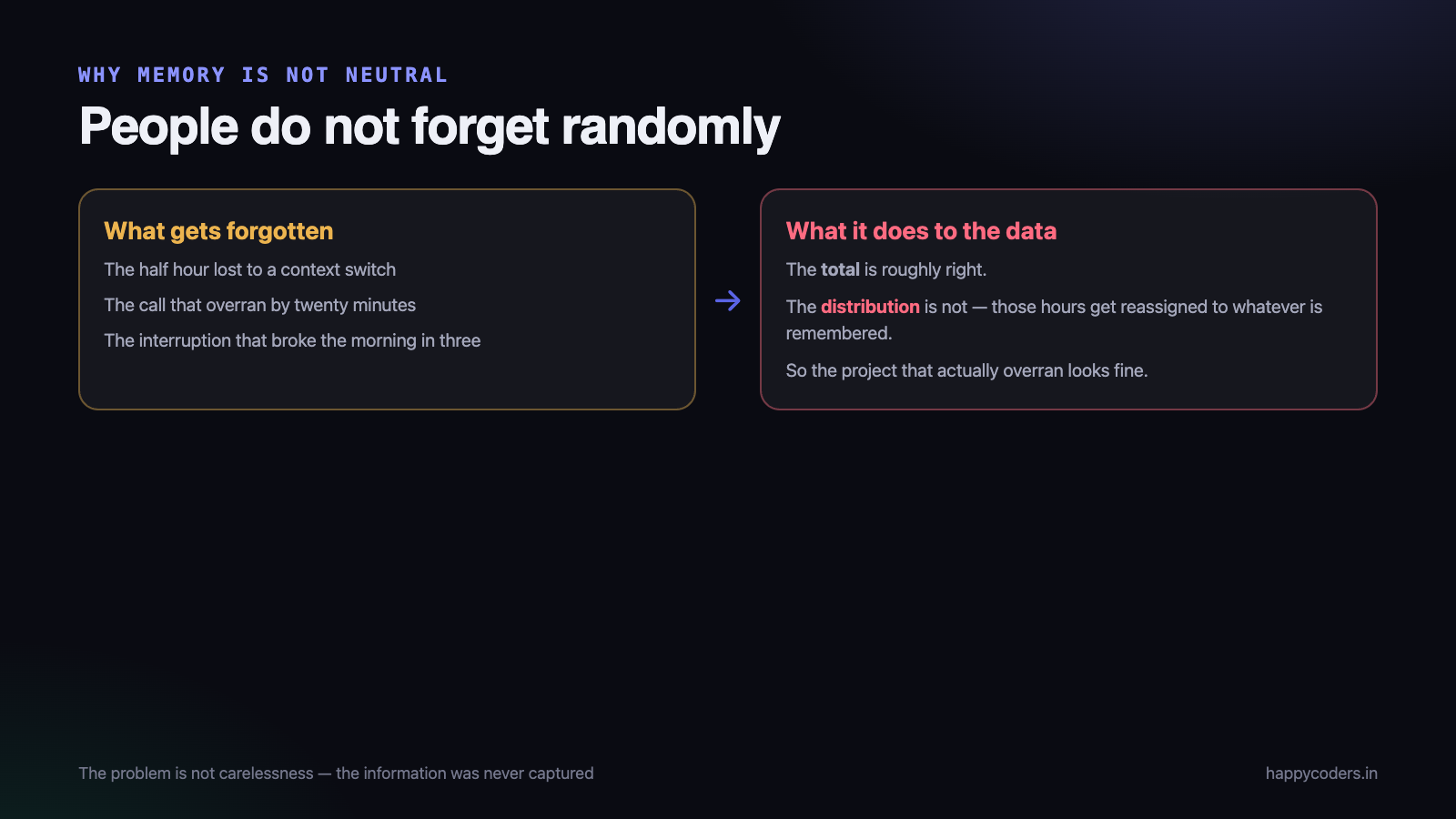
It has one serious weakness, and it is not dishonesty. A working day is not stored in memory as a set of durations. You remember that Tuesday was “mostly the checkout bug”. You do not remember that the checkout bug took two hours forty, because a fifty-minute deployment conversation happened in the middle of it. Asked to reconstruct that a fortnight later, an honest person invents — and the total almost always lands near the number of hours they were contracted to work, because that is the number the brain reaches for when memory runs out.
A timesheet filled in from memory is not a record of work. It is a reconstruction of an expectation. On paper the two look identical.
What time tracking is
Time tracking records events as they happen. Somebody starts work on a project, the clock runs, they switch to something else, the clock follows. Nobody writes a number down. At the end of the month the timesheet already exists, because it was assembled from the events.
That inversion is the whole difference. With a timesheet, the document is created and the hours are remembered. With tracking, the hours are recorded and the document is derived — and every number in it can be opened up to see the sessions it came from.
The differences that matter in practice
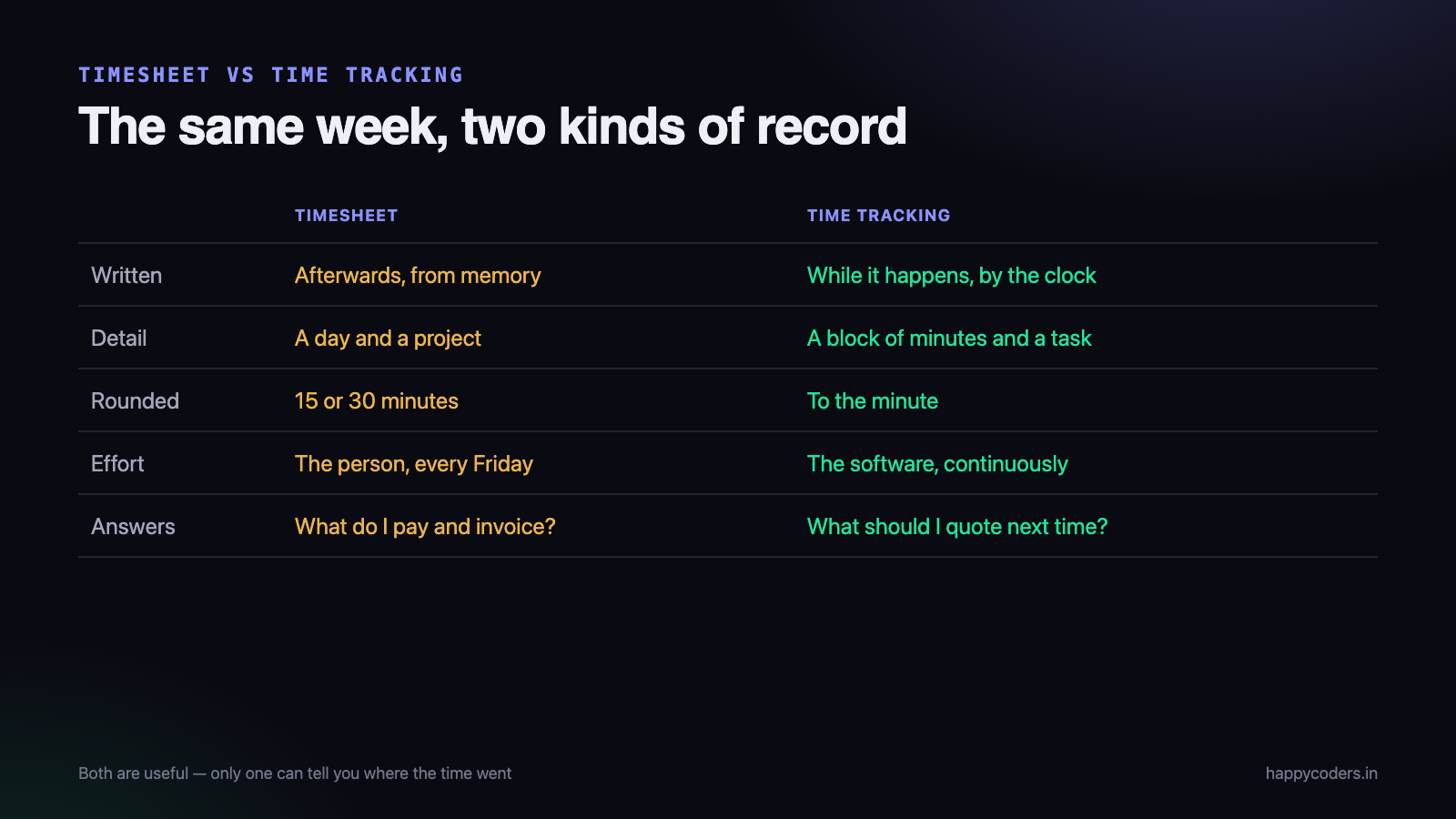
- When it is written. Timesheet: at the end, from memory. Tracking: during the work, from what happened.
- What it can prove. Timesheet: nothing beyond “somebody typed this”. Tracking: a list of sessions with start and end times.
- Rounding. Timesheets are full of round numbers — eight, four, two — because memory rounds. Real work does not.
- Missing work. Timesheets lose the small pieces: the call that ran long, the fix after review, the twenty minutes of messages. Those are exactly the hours that decide a project’s margin.
- What a dispute looks like. Timesheet: a discussion. Tracking: a list you send, and it ends.
- Effort. Timesheet: half an hour at month end, plus the chasing. Tracking: a few seconds a day, and no chasing at all.
But a tracker still produces a timesheet
This is where the vocabulary confuses people. Tracking does not replace the timesheet — it replaces the filling in of the timesheet. Payroll still wants a weekly grid. A client still wants hours by project. Those documents still exist; they are just generated rather than typed.
So the practical question is not “timesheet or tracking”. It is where do the numbers in the timesheet come from: somebody’s memory, or a record.
When a manual timesheet is genuinely fine
It would be dishonest to say tracking is always the right answer. Manual timesheets work when:
- Everybody bills the same fixed hours and the timesheet is a compliance record, not a management tool.
- The team is two or three people on one project, where nobody is reconciling anything.
- Work is priced per deliverable and nobody is paid or billed by the hour.
What those have in common is that no decision depends on the accuracy of the number. The moment a decision does — what to charge, whether a project is profitable, whether to hire — a remembered number stops being good enough.
The middle ground people try, and why it slips
Most teams first try “fill it in daily”. It is the right instinct and it survives about three weeks. The failure is not laziness; it is that filling in a form is a separate task from doing the work, and separate tasks get dropped when the work gets busy — which is exactly when the hours matter most.
The second attempt is usually a stopwatch app where people start and stop a timer for every task. That fails the other way: it is accurate and it demands attention every few minutes, so it gets abandoned or, worse, gets filled in retrospectively — which is a timesheet again, with extra steps.
What survives is tracking at the level people actually switch: start when you sit down for a client, switch when you switch client or project, stop when you stop. Anything finer costs more attention than it returns.
What tracking gives you that a timesheet never can
- Estimate against actual. A task estimated at four hours and tracked at eleven is a conversation on day three, not a surprise on day ten.
- Billable against absorbed. The hours you chose not to charge for are visible, and their cost is a number rather than a feeling.
- Effective rate per hour. What a client actually paid for an hour of your team’s time, which is the fastest way to spot a client who is not worth keeping.
- An answer for a client mid-project. Not a guess assembled during the call.
- A defensible invoice. Hours attached to tasks, with dates.
The objection: does tracking mean monitoring?
This is the real reason many teams stay on timesheets, and it deserves a straight answer: no, unless you choose it.
Recording that two hours were spent on a project is time tracking. Screenshots, activity levels and application names are a separate feature with a separate switch, and a team can run tracking with all of that switched off. Plenty do.
If your aim is to know what work costs, you need the hours and nothing else. The rest is a different decision, and one that should be made deliberately rather than arriving with the tool.
How to move from one to the other
- Start with one project. Not the whole company. A live project with a deadline, so the numbers mean something immediately.
- Agree what a project is before anybody starts — usually one per client engagement, so the hours group the way you will want to read them.
- Decide what counts as billable up front, not at invoice time.
- Keep manual entries. People forget; a tracker with no way to add a missed entry pushes everyone back to spreadsheets.
- Look at it weekly, not monthly. A week is short enough that people still remember what an odd entry was.
- Compare the first month with what the timesheet would have said. The gap is the argument for continuing, and it is usually larger than anybody expects.
Frequently asked questions
Is a timesheet still needed if we track time?
Yes — as an output. Payroll, clients and auditors want the grid. The difference is that nobody spends the last day of the month producing it.
Does time tracking need approval workflows?
For payroll and client billing, yes. Approval matters mainly because it freezes the week: once approved, entries cannot be edited, so the invoice built from them cannot drift afterwards.
Will my team accept it?
Acceptance depends almost entirely on what else is switched on and on how it is introduced. “We need to know what projects cost so we can quote properly” is a reason people accept. “We want to see what you are doing” is not.
What about work away from the computer?
Meetings, site visits and phone calls are real hours and belong in the record. Add them as entries — this is exactly what manual entry is for, and it is why removing manual entry is a mistake.
Where to start
Happy Tracker records time against projects and tasks, splits billable from non-billable, keeps estimates next to actual hours, and produces the weekly grid and the client report from the same record. It is free for up to five users with no time limit and no card, which is enough to run one project through it and compare.
If you want to work out what that project actually cost, we have a free profitability template that takes the hours and does the arithmetic.
What a timesheet is actually for
Before comparing the two, it helps to be honest about what a timesheet was invented to do. It is an accounting record. It exists so somebody can be paid, so a client can be invoiced, and so a finished month can be closed and never reopened. It is a summary, written by a person, about time that has already passed.
That is why a timesheet has the shape it has. It is filled in at the end of a day or a week. It is rounded, usually to fifteen or thirty minutes. It is approved by a manager. And once approved, it is treated as final — the number in the timesheet becomes the truth, whatever really happened.
None of that is a flaw. If you only need to run payroll and raise invoices, a timesheet is sufficient and has been for a century. The problem is that most teams now want it to answer questions it was never designed for.
What time tracking is actually for
Time tracking is a measurement rather than a record. Somebody starts a timer against a project or a task, works, and stops. The software writes down when each block of work started and ended, while it was happening.
The consequence is that the data has a different shape. Instead of “Tuesday: 8 hours, Website Redesign”, you have twenty-three entries with start times, end times and task names attached. You can still add them up into a timesheet — and any decent tool does exactly that — but you can also ask questions the summary cannot answer.
- How long does this kind of work really take? Not the estimate, the measured average across the last twenty times you did it.
- Where did last week actually go? Not the eight hours you remember, but the pattern of blocks that produced them.
- Is this project consuming more hours than it earns? A question you cannot answer at all from rounded weekly totals.
The differences that actually matter
1. When the data is written
This single difference produces most of the others. A timesheet is written afterwards, from memory. Time tracking is written during, by the clock.
Memory is not neutral. People do not forget randomly — they forget in a pattern. The half hour lost to a context switch, the twenty minutes of a call that overran, the interruption that broke a morning into three pieces: these vanish, and the hours get reassigned to whatever the person remembers doing. The total is usually about right. The distribution rarely is.
2. The granularity
A timesheet entry is typically a day and a project. A tracked entry is a block of minutes and a task. That difference decides which questions are answerable.
With daily totals you can say the redesign took 96 hours. With tracked blocks you can say 41 of those hours were revisions after the second review — which is the sentence that changes how you write the next proposal.
3. Who does the work of recording
Somebody has to produce the data. In a timesheet system, it is the person, at the end of the week, reconstructing five days. In a tracking system, it is the software, continuously, while they get on with the job.
This is not only about accuracy. Friday-afternoon timesheet filling is genuinely disliked, and the dislike shows in the quality of what gets entered. Removing the chore usually improves both the data and the mood.
4. What the data can be used for
A timesheet supports payroll and invoicing. Tracked time supports those too, plus estimation, capacity planning, project profitability and the ability to settle a dispute about scope with a record rather than an argument.
The honest case for keeping timesheets
Tracking is not automatically better for everybody, and it is worth saying where a timesheet is still the right answer.
- Work that is not done at a computer. A site engineer or an installer cannot run a desktop timer. A simple daily entry, or a mobile clock-in, fits reality better.
- Fixed-price work where hours genuinely do not matter. If you sell an outcome for a fixed fee and have no interest in what it costs you, a timesheet for payroll is enough. Most firms think they are in this category and are not, but some genuinely are.
- Very small teams with very few projects. Three people on one project do not need a measurement system to know where the time went.
- Where a contract or regulator specifies the format. Some clients require an approved weekly timesheet. Track underneath, and produce the timesheet from it.
That last point is the useful pattern generally: tracking and timesheets are not rivals. Track continuously, and generate the timesheet as a report. You get the accounting record the process demands, without asking anybody to reconstruct their week from memory.
Moving from one to the other without a fight
Introducing tracking badly is the fastest way to make a team hate it, and the mistakes are predictable.
- Say what it is for, in one sentence, before anybody installs anything. “So we can quote properly and stop losing money on revisions” is a reason people accept. Silence gets filled with a worse explanation.
- Start with projects, not people. The first report anybody sees should be about a project’s hours, not an individual’s. This sets the tone permanently.
- Run it for a month before changing anything. Reacting to the first week’s data — which is always odd, because people are still learning the tool — destroys trust immediately.
- Let people edit their own entries. Timers get left running over lunch. If a wrong entry cannot be corrected, people stop trusting the whole system.
- Never use it for attendance policing first. If the first thing tracking produces is a conversation about somebody’s short day, it becomes surveillance in the team’s mind and the data quality collapses within a fortnight.
The teams where this works treat the data as being about work, not about workers. That is a choice made by managers, not by software, and it is the single biggest factor in whether tracking survives its first quarter.
Which one answers your question?
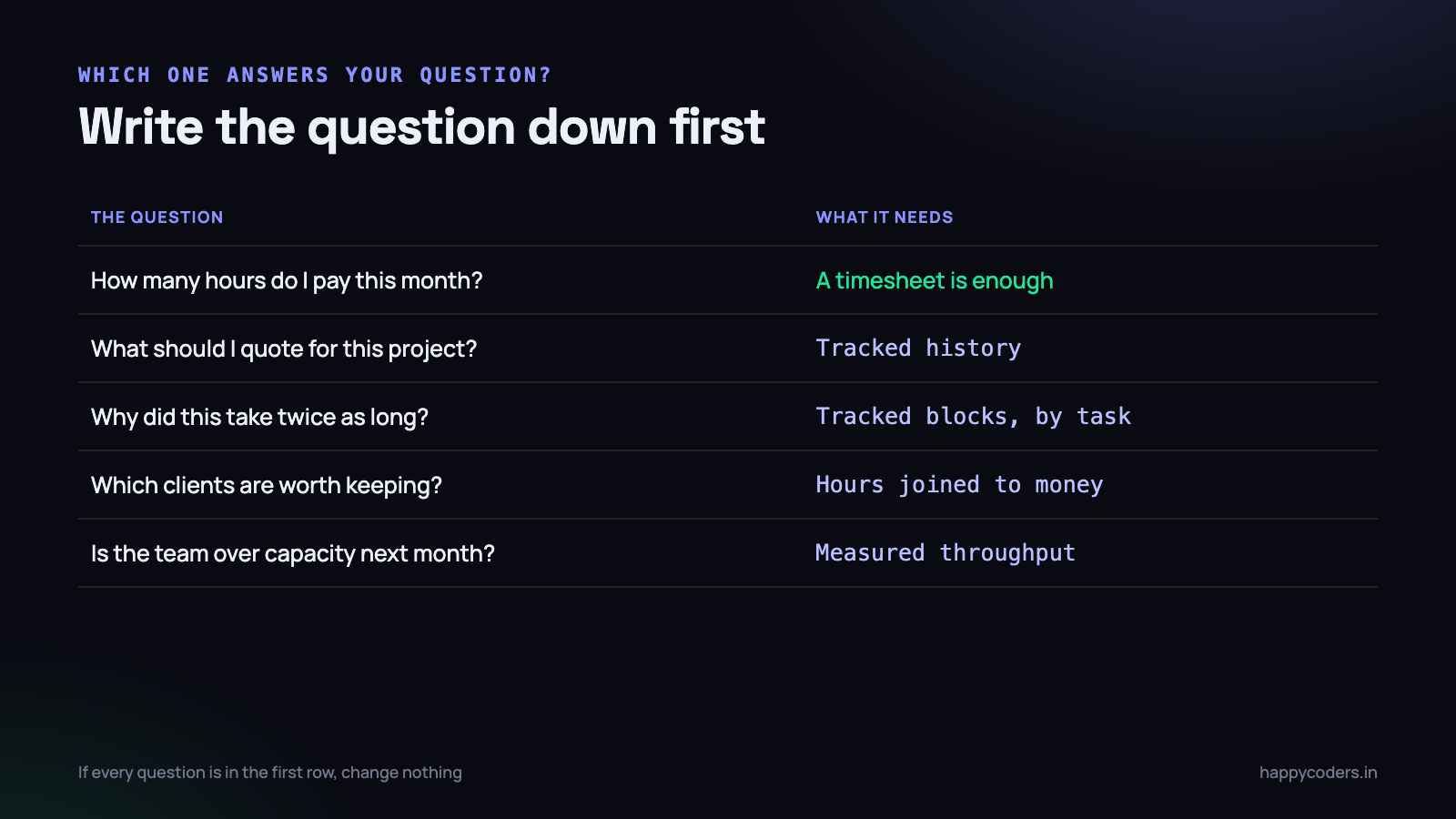
A practical way to decide is to write down the question you actually want answered, and see which system can answer it.
- “How many hours do I pay for this month?” — a timesheet is enough.
- “What should I quote for this kind of project?” — you need tracked history.
- “Why did this project take twice as long as planned?” — you need tracked blocks by task.
- “Which clients are worth keeping?” — you need hours joined to money.
- “Is my team over capacity next month?” — you need measured throughput, not estimates.
If every question on your list is in the first category, you do not need to change anything. If any of the others matter to you, summaries written from memory will never get you there — not because people are careless, but because the information was never captured in the first place.
Happy Tracker records time as blocks with start and end times against projects and tasks, and produces conventional timesheets as a report from them — so the accounting record still exists, without anybody reconstructing their week on a Friday afternoon.




