Where did the hours go?
A project runs three weeks past its estimate and nobody can say which weeks. Hours recorded against the project, the client and the task answer that while the work is still running — not after the invoice has gone out.

Time tracking and team productivity for service businesses. The hours a person logs are the hours that land on the client's invoice — from one place, on the web or the desktop.
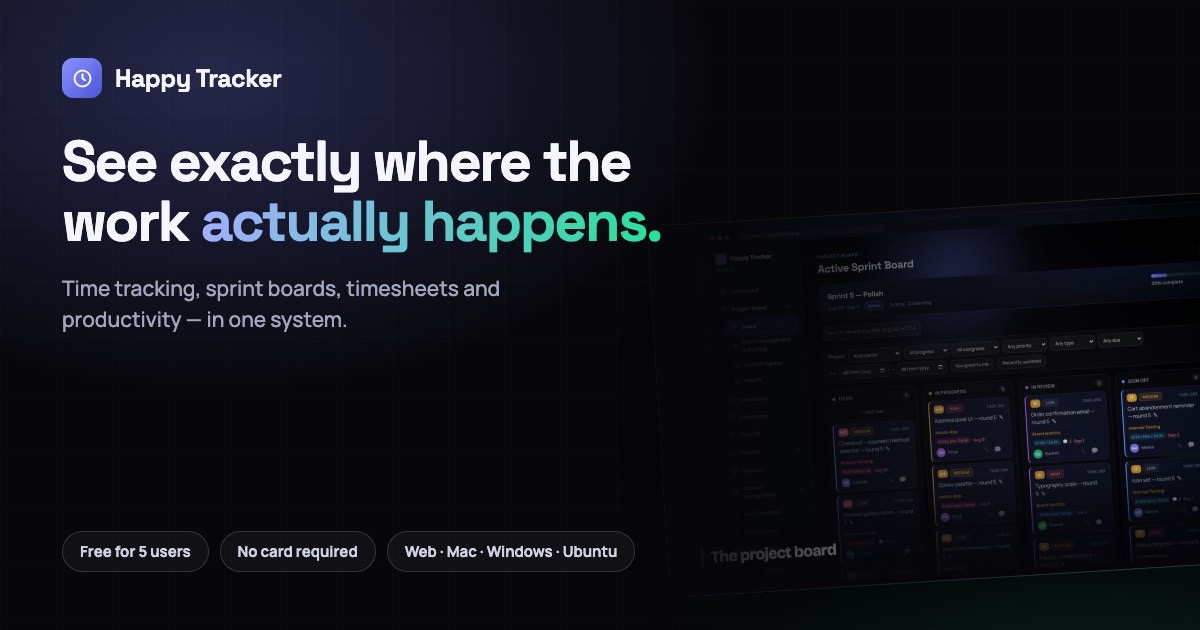
Not “is everyone working”. These three — and until the hours, the work and the rates live in one place, none of them has an honest answer.
A project runs three weeks past its estimate and nobody can say which weeks. Hours recorded against the project, the client and the task answer that while the work is still running — not after the invoice has gone out.
When a client asks how it is going, the reply should not be assembled in the meeting. Tasks done, tasks left, hours spent against hours estimated — all from the same record.
Estimated at forty hours, tracked at seventy-one. The useful question is where the extra thirty-one went — a bad estimate, a scope change, or work that was never on the board. Each has a different fix.
Hours, tasks and invoices in one chain — so nobody adds it up by hand at month end.
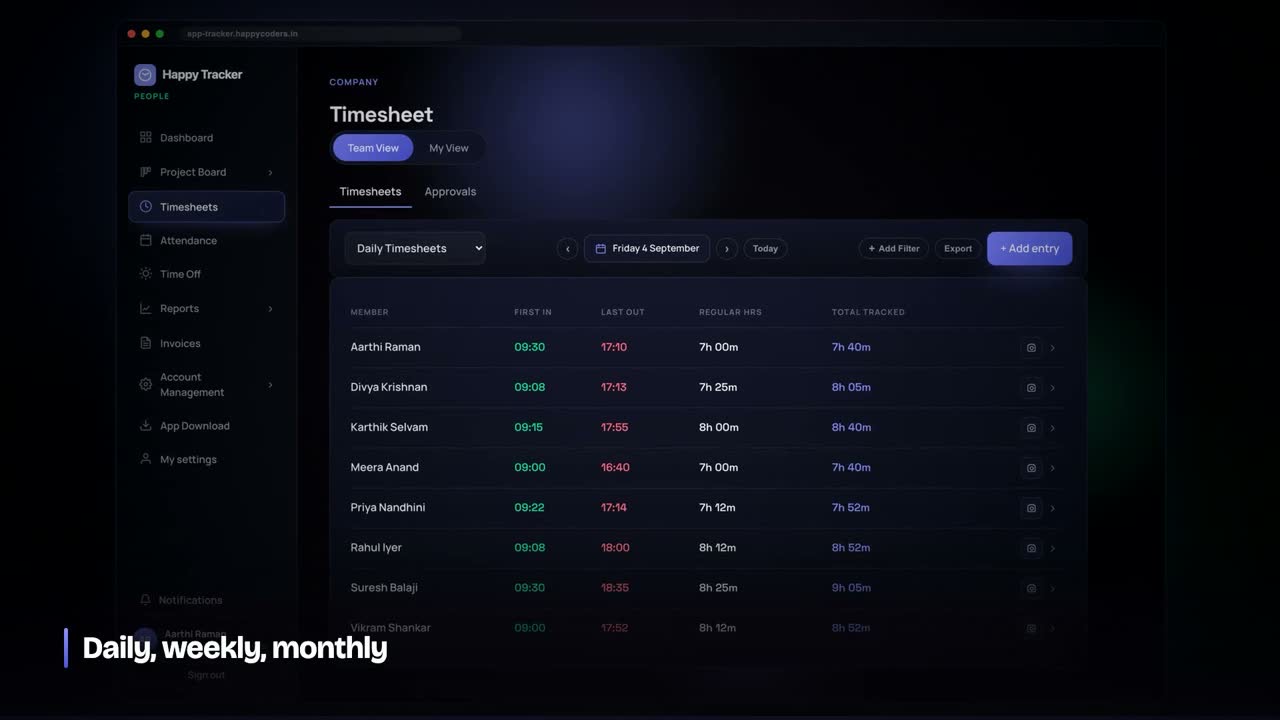
Clock in and out. Daily, weekly and monthly team timesheets with manager approval, week locking and CSV export.
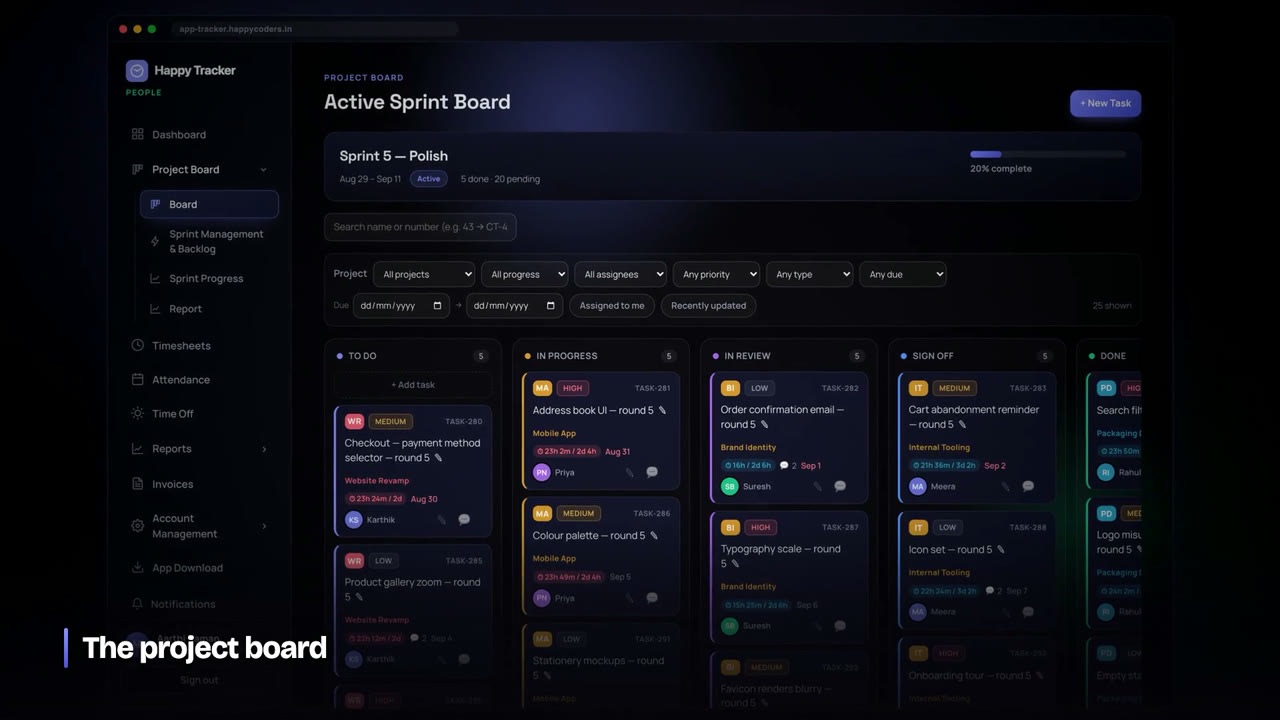
A five-stage board with sprints, backlog, points, priorities and labels. Every task carries the time logged against it.
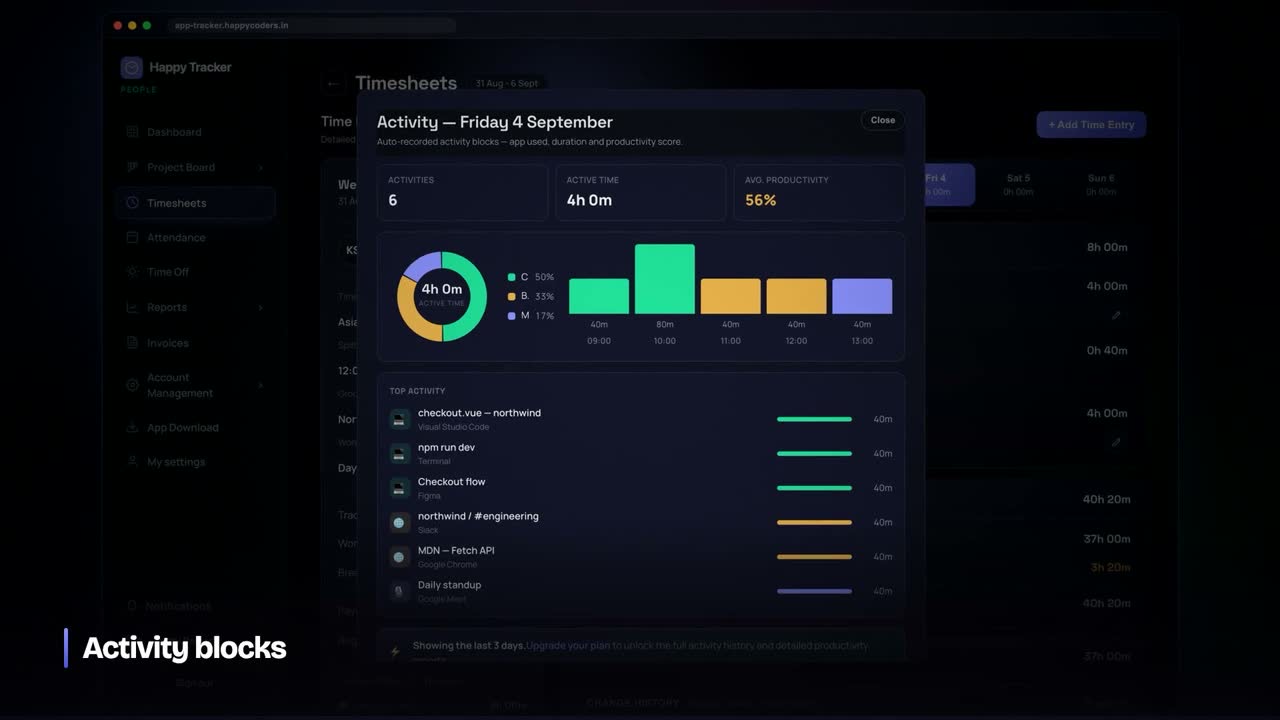
A productivity score per activity block, rolled up to task, project and person. Counts movement density — never what is typed.
Every 10, 5 or 1 minute, or off. Blurred on the device before upload (Starter and up) and deleted when retention ends.
Attendance, time and productive-time reports, and branded invoices generated from billable time, with tax and PDF export.
Four roles, per-member billable rates, leave requests with approvals and balances, and a shared holiday calendar.
Activity Mode scores blocks of time, not people. Anyone can reclassify a block as a meeting, a break or learning, and it stops counting against them.
Managers approve the week and lock it, so the record stops changing underneath you. The invoice is generated from the approved billable time.
Set up in about twenty minutes for a small team. Nothing to configure on a server.
Run everything in the browser; give the team a lightweight desktop tracker for background capture. Screenshots and app activity come only from the desktop app.
| Platform | What you get | Notes |
|---|---|---|
| Web app | Dashboards, board, timesheets, reports, invoices, leave | Any modern browser. Works in a phone browser for clocking in and checking your timesheet |
| macOS | Menu-bar app with a floating mini-timer, background screenshots and Activity Mode | Apple Silicon and Intel |
| Windows | The same desktop tracking, screenshots and activity capture | Windows 10 and 11 |
| Ubuntu / Debian | Native desktop capture with the same background tracking | Screen capture through the desktop portal |
| Mobile app | — | There is no iPhone or Android app today |
Track time against client projects, prove the work with screenshots and reports, then invoice the exact billable hours — no leakage.
See who's working, on break or off across time zones. Activity scores give managers signal; blur and counts-only keep it fair.
Plan sprints, run the five-stage board, and roll productive time up per task — delivery and effort visible together.
Approve timesheets, manage leave and holidays, and export payroll-ready hours — with an audit trail of every change.
Nothing is captured when someone is clocked out or on a break. Clocking out stops it immediately.
Activity records how much keyboard and mouse activity there was and which app was in use — never the content of what is typed.
There is no GPS, no map and no geofencing anywhere in the product.
Everyone can open their own screenshots, activity and timesheet, and ask for a screenshot to be deleted.
When the desktop app is recording, the person can see it. There is no invisible mode and we will not build one.
Data moves over HTTPS, each company is separated by workspace, screenshots sit in Amazon S3 and are deleted when retention ends.
Nobody fills in a timesheet. It is built from clock events as they happen.
This is the part people ask about most. Here is exactly what is recorded, and how idle time is decided.
A short block noting the app in front, the window title, how long it lasted, and how many seconds passed with no keyboard or mouse input.
No keystrokes, no clipboard, no camera or microphone, no browsing history — and nothing at all while clocked out.
Reading, meetings and thinking all register as idle — and all of them are work. Read the ratio over time, not any single day.
Apps map to coding, communication, design, documents or browsing, so reports read as work. A wrong category can be fixed by the person themselves.
Each closure is recorded with its reason, so nobody loses time silently — and nobody is credited with hours they didn't work.
No input for the stretch your company configured. Closed at the moment the idle period began, not when it was noticed.
No single entry may exceed your configured maximum — with a ten-hour backstop even if the policy is off.
The tracker stopped reporting entirely (the machine was shut down). Closed at the last activity it did report.
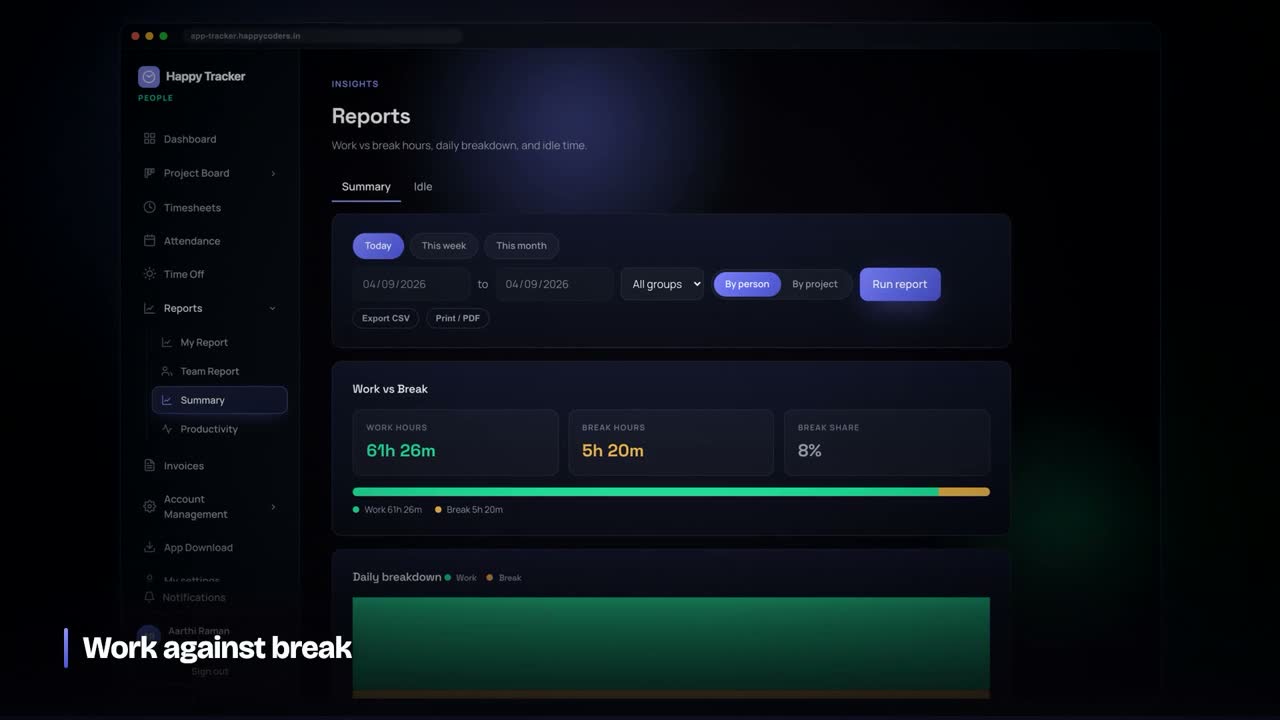
All of them export to CSV and print to PDF, and all of them honour your role.
Total hours for a period, by person or project, split into work and break, with billable time separated. The one for an invoice or a client update.
Per person per day: first in, last out, hours worked and the state of the day. Rows expand into sessions. This is the payroll report.
Tracked, active and idle time per person, with the idle percentage, expandable into each stretch with its time and app.
Every employee sees their own hours, activity and productivity. Nobody is measured by numbers they cannot see.
Not levels of trust — jobs.
| Role | Can | Cannot |
|---|---|---|
| Employee | Own timesheet, leave, reports and assigned projects | See a colleague's hours |
| Manager | Team work, timesheet and leave approvals, team reports | Change company settings or see billing |
| Admin | People, projects, clients, policies, privacy settings, audit log | Manage the subscription |
| Owner | Everything an admin has, plus subscription, plan and seats | — |
When somebody leaves, deactivate rather than delete: access ends immediately, and their hours stay in past reports and invoices.
Balances are calculated, never stored — so they always agree with the requests behind them.
Pick a type, dates and an optional half day. Your remaining balance is shown before you submit.
If a request breaks a notice rule, the message tells you the rule — not just that it was rejected.
Joiners get a share of the annual allowance; leave can be granted yearly or earned monthly; unused days expire or carry forward.
Admins keep the company holiday calendar; a holiday inside a leave request does not use your allowance.
The three messages people actually see, and what they mean.
Asked often enough that leaving it out would be the dishonest choice.
No. The admin sets the interval and one of the options is off. Plenty of teams use Happy Tracker only for timesheets, leave, reports and invoicing.
No. Activity is measured as movement density. There is no keystroke logging in any build, on any platform.
Five users, three projects, time tracking, timesheets, approvals, attendance, leave and invoicing. It is a plan, not a trial, and it does not expire.
No. Pricing is one payment per user for the year, and nothing renews itself without you deciding to.
Yes. Timesheets export to CSV; invoices and reports export to PDF.
The web app runs in any modern browser. There are native desktop apps for macOS, Windows and Ubuntu or Debian Linux. Screenshots and application activity are captured only by the desktop app.
No. The web app works in a phone browser for clocking in and out and checking your own timesheet, but there is nothing to install from an app store.
Yes, unless the company turns it off. An administrator can require the desktop app and still allow specific people to use the browser. The timesheet records which one was used.
The session is closed at the hours limit the company sets and marked as closed automatically. An administrator can then correct it.
The desktop app keeps tracking. Time and screenshots are queued on the machine and uploaded when the connection returns.
3 days on Free, 7 on Starter and 15 on Pro and Business. Older ones are deleted automatically.
Yes, on Starter and above. The image is blurred on the employee's own machine before upload, so an unblurred copy never leaves their computer.
Yes. Any payment can be refunded in full within seven days, for any reason.
Buy extra seats on your current plan or move up a plan. Both are prorated.
No. There is no GPS, no map and no geofencing in the product.
Write to the people who built it. We answer from Thoothukudi, usually the same day.