

WordPress plugins · free on wordpress.org

Four plugins that exist because a client needed them.

Published free on the WordPress plugin directory and tested against the current WordPress release — all four are tested to WordPress 7.0.

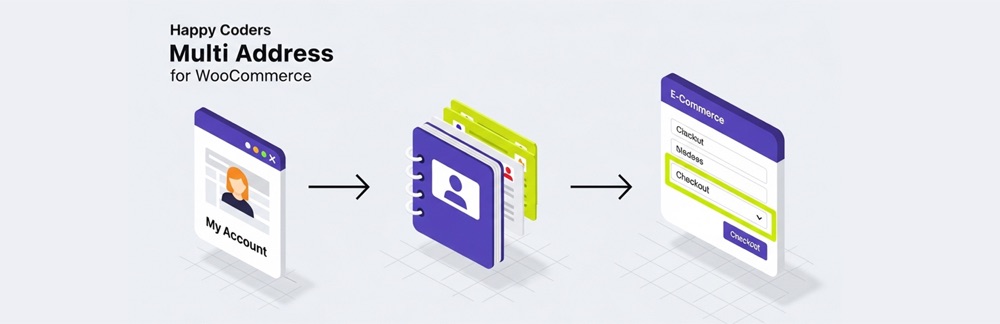
Multi Address for WooCommerce

WooCommerce · 80+ active installs · v1.0.15

An address book for your customers: several billing and shipping addresses with nicknames, picked at checkout instead of typed again.

Who it is for: Stores whose customers order to more than one place — home, office, family — and are tired of typing the same addresses at every checkout.

  • Existing default addresses imported automatically
  • New addresses at checkout saved by themselves
  • Classic and Block checkout, plus a selector block
  • Dropdown or radio list, per-user limits
Setting it up
  1. Install and activate from Plugins → Add New, or upload the ZIP.
  2. Check that “Multi Address Book” appears in My Account for a logged-in customer.
  3. Open WooCommerce → Settings → HC Multiple Addresses and choose the selector style and any limits.
  4. If the address book shows “Not Found”, go to Settings → Permalinks and press Save.
What you can change
Selector style
Dropdown or radio buttons
Allow new address entry
Yes, or force saved addresses
Address limits
Separate max for billing and shipping; 0 = unlimited
Menu text
Your own wording
Display style
Carousel or list
Requirements
Version
1.0.15
Requires WordPress
5.6+
Checkout
Classic and Block
Multisite
Yes
Price
Free

OTP Login for WooCommerce

WooCommerce · 30+ active installs · MSG91

Log in with a mobile number and a one-time password — by SMS or WhatsApp through MSG91, or by email.

Who it is for: Indian stores whose customers remember their mobile number but not the password they set six months ago.

  • Full-screen form or popup on any button
  • Order, shipping and abandoned-cart messages
  • 4- or 6-digit OTP, resend timer, daily cap
  • Needs an MSG91 account with DLT-approved templates
Setting it up
  1. Create an MSG91 account and get your Auth Key, Sender ID and DLT-approved template IDs.
  2. Install and activate the plugin.
  3. Open MSG91 OTP & SMS in the admin menu and enter your credentials.
  4. Set OTP length, resend timer, daily limit, colours and post-login redirect, then add the shortcode or the otp-popup-trigger class.
What you can change
Delivery
SMS or WhatsApp via MSG91, or email OTP
OTP length
4 or 6 digits
Limits
Resend timer and a daily cap per user
Alerts
Registration, order placed, shipped, completed, abandoned cart — each on/off
Templates
Variables like customer name and order ID
Requirements
Needs
An MSG91 account with DLT-approved templates
Works with
WooCommerce
Display
Full-screen form or popup
Price
Free

Store Hours for WooCommerce

WooCommerce · v1.0.4 · no database tables

Take orders only when you are open. Customers still browse everything and are told exactly when ordering resumes.

Who it is for: Restaurants, bakeries and cloud kitchens that cook to order, grocery and fresh-produce stores — any shop where an order placed while you're closed is a problem, not a sale.

  • Fixed daily hours or a weekly schedule
  • One-click close for the unexpected day
  • Blocks every route — even the direct checkout URL
  • No external libraries, tracking or API calls
Setting it up
  1. Install and activate the plugin.
  2. Go to WooCommerce → Store Hours.
  3. Choose Fixed Daily Hours or Weekly Schedule and fill in the times.
  4. Save — then test by setting closing time a minute from now and adding something to the cart.
What you can change
Browsing products
Still works
Prices and catalogue
Still visible
Items already in cart
Stay there
Add to cart / AJAX add
Blocked
Checkout, place order, direct checkout URL
Blocked
Requirements
Version
1.0.4
Requires WordPress
6.0+
Requires PHP
7.4+
Tested up to
WordPress 7.0
Database tables
None — Options API

Smart Image Alt Text

Any WordPress site · v1.0.1

Find and fill missing ALT text across the whole Media Library in bulk — or automatically as images are uploaded.

Who it is for: Sites that have been running for years, with thousands of Media Library images and no ALT text on most of them.

  • Skip if exists: never overwrites your own ALT text
  • Prefix, suffix and maximum length
  • Duplicate detection, and blocking
  • Optional frontend fallback for empty ALT
Setting it up
  1. Install and activate the plugin.
  2. Go to Tools → HappyCoders Smart Image Alt Text.
  3. Turn on “skip if exists”, set prefix, suffix and maximum length, then run bulk generation on a selection first.
  4. Large library? Run it on a staging copy first — it writes to every image it touches.
What you can change
Skip if exists
Leaves images with ALT text alone
Auto-generate on upload
Fills ALT on every new image
Live display mode
Frontend fallback for empty ALT
Prefix / suffix / max length
Your own wording, capped
Duplicate detection
Finds duplicates and can block saves that create more
Requirements
Version
1.0.1
Requires WordPress
6.0+
Requires PHP
7.4+
Tested up to
WordPress 7.0
Works on
Any Media Library

Need it to do one more thing?

Customising one of these usually becomes client work — and we will tell you plainly if what you want is better built separately.