


Every small development team eventually has the same two arguments. One is about merge versus rebase. The other starts with somebody saying “who broke main?” Both are avoidable, and neither is really about Git. They are about a branching model that was never written down, so everybody is following a slightly different one.
This is the model we use with teams of two to six, why the popular alternative is wrong at that size, and the short set of rules that removes both arguments permanently. It takes about forty-five minutes to put in place.
Why GitFlow is too much for a small team
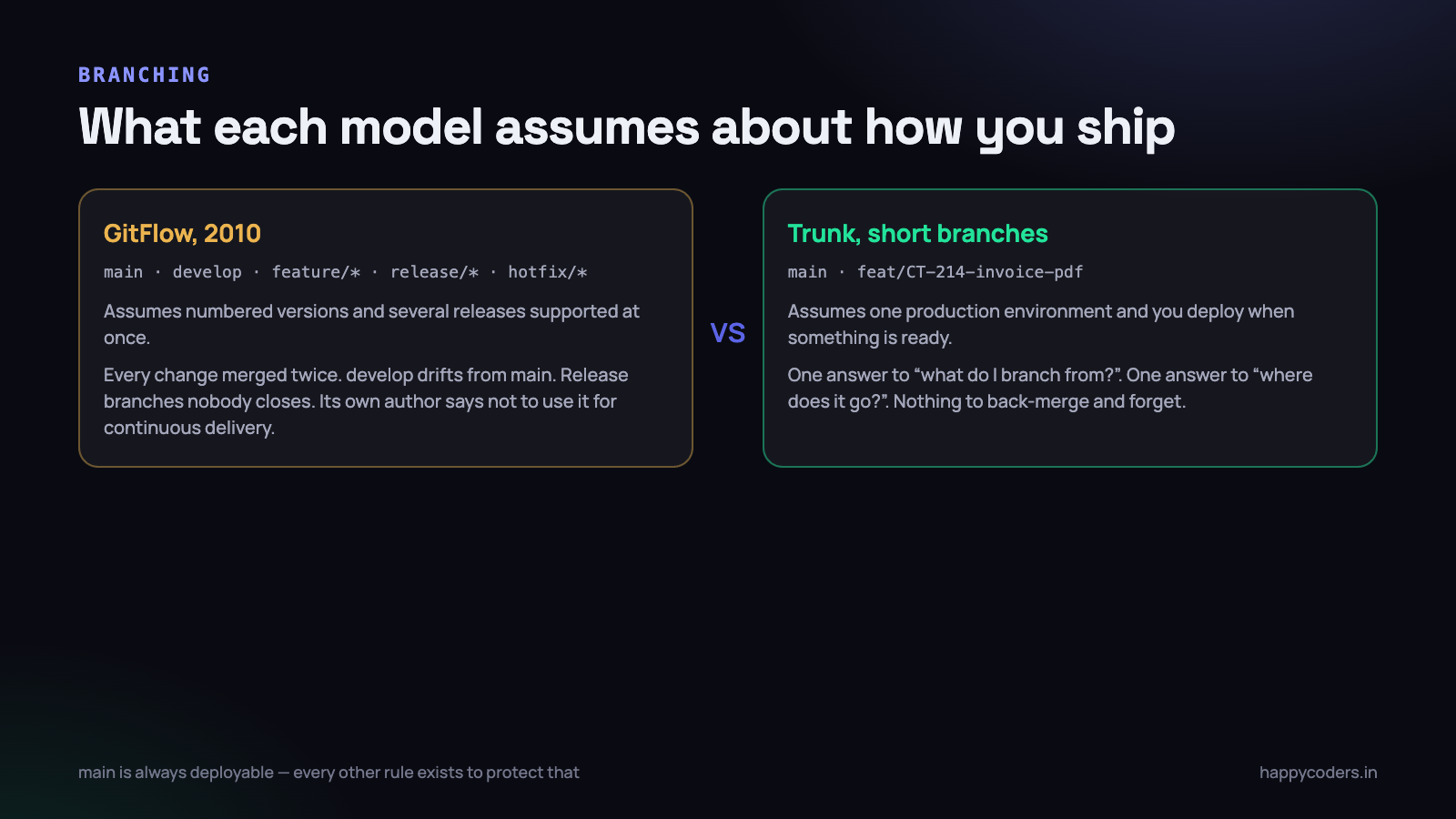
GitFlow was described in 2010, and it is a good design for what it was designed for: software that ships as numbered versions, where several releases are supported at once, and where a fix might need to go into 2.3, 2.4 and the next release simultaneously. Desktop applications, installed software, anything with a download page.
It gives you five kinds of branch — master, develop, feature/*, release/* and hotfix/* — and a set of rules about which one merges into which. Its own author later added a note to the original article saying that if you deliver continuously to a single production environment, you should probably not use it.
That note describes almost every small team in India building web applications. You have one production environment. You deploy when something is ready, not on a release calendar. There is no version 2.3 running at a customer site that needs a separate patch. So what does the extra structure actually cost you?
- Every change is merged twice — into
develop, then intomainat release time. Twice the conflicts, twice the chance of something being lost. developandmaindrift. Somebody hotfixes production, forgets to merge it back, and the fix is silently reverted by the next release. This happens to everyone at least once.- Release branches stay open. A branch called
release/1.4is created, three more things get added to it, and now it is a second trunk nobody named. - Nobody remembers the rules. With three developers, the flowchart lives on one person’s screen and everybody else asks them. That person becomes a bottleneck for something that should be automatic.
The structure exists to solve coordination problems that four people sitting in the same room do not have. You coordinate by talking. Use the branching model to protect production, not to reproduce a conversation you are already having.
What to use instead
One long-lived branch, called main, which is always deployable. Short-lived branches off it for individual pieces of work, merged back within a day or two and deleted. Nothing else.
# start from a current main, every time
git switch main
git pull --ff-only

# one branch, one piece of work
git switch -c feat/CT-214-invoice-pdf

# ... work, commit, push ...
git push -u origin feat/CT-214-invoice-pdf

# open a PR, get it reviewed, merge it in the interface
# then clean up locally
git switch main
git pull --ff-only
git branch -d feat/CT-214-invoice-pdf
That is the whole workflow, and its most important property is that there is only one answer to “what do I branch from?” and only one answer to “where does this go when it is done?” New team members are productive on day one, because there is nothing to learn.
The rule that makes it work is that main is always in a state you could deploy right now. Not “after we test it”, not “once Ravi finishes his part”. Right now. Everything else in this article exists to protect that one property.
If you need a staging environment, make it a deployment target, not a branch. Deploy
mainto staging automatically and to production on a tag or a button. Astagingbranch is a second trunk that will drift from the first, and you will spend a Friday evening finding out how.
Naming branches so the name is useful in two years
Two components, and one of them is not optional.
feat/CT-214-invoice-pdf
fix/CT-903-login-timeout-on-slow-network
chore/CT-1012-upgrade-php-83
spike/websocket-notifications
The prefix tells a reviewer what kind of risk they are about to look at before they open anything. A fix branch on a Friday afternoon is a different conversation from a chore branch.
The ticket number is the part that pays off later. When somebody runs git log in eighteen months and asks why a particular rule exists, the ticket is the only link between the code and the discussion that produced it. Without it, the reasoning lives in a WhatsApp group that has since been cleared.
Two things to avoid. Personal branches — ravi/work, karthik-testing — tell nobody anything and tend to become permanent. And branch names that describe the implementation rather than the change: feat/refactor-service-layer is a branch that will be open for a month.
Short-lived means genuinely short
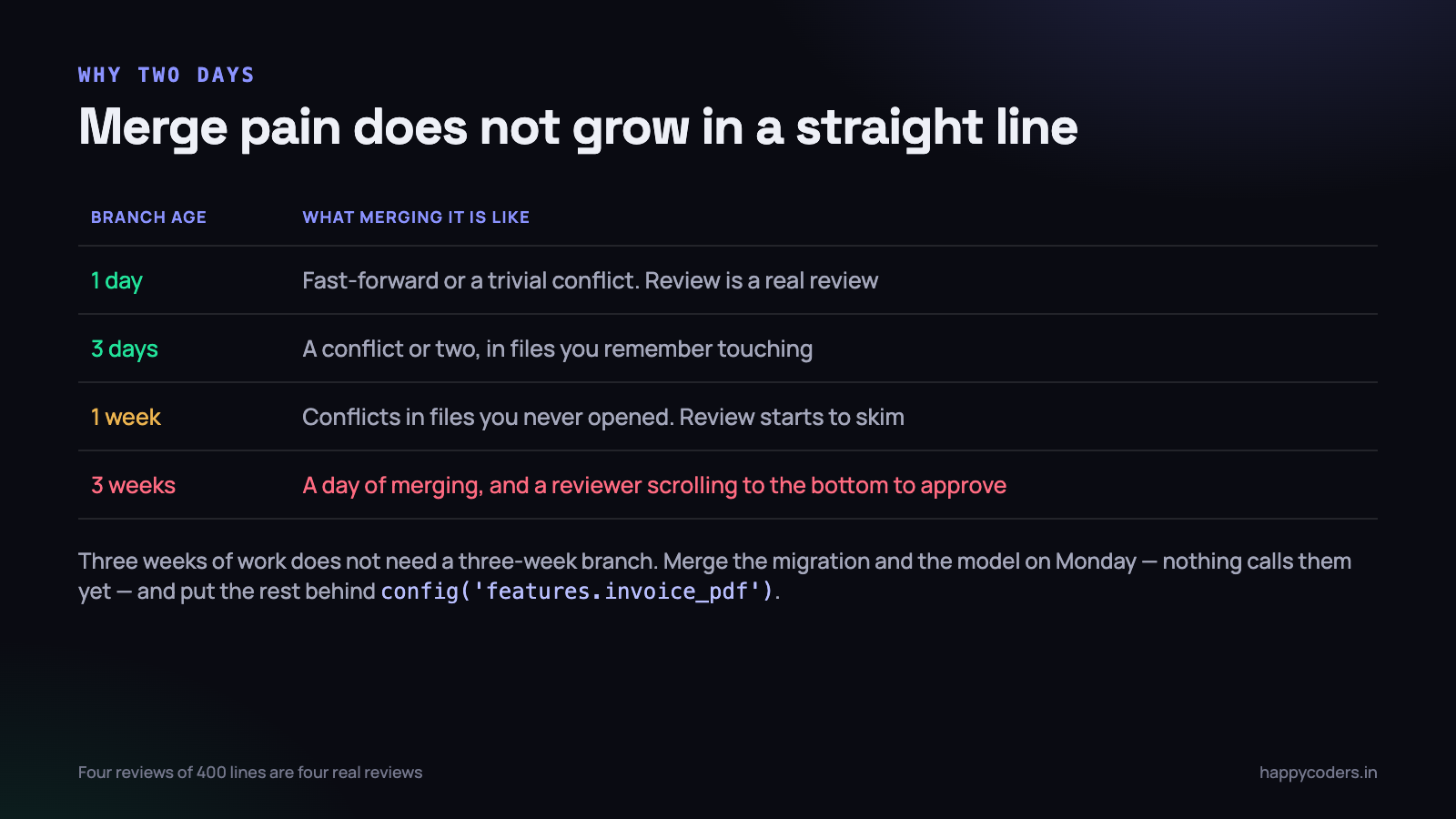
This is the rule small teams break most often, and it is the one that causes the most pain, because merge difficulty does not grow in a straight line with branch age. A branch open for a day has almost no conflicts. The same branch open for three weeks has conflicts in files you never touched, because somebody moved them.
Aim for under two days, and treat anything over a week as a problem to solve rather than a fact to accept. The practical objection is always the same: this feature takes three weeks, so how can the branch live for two days?
Two answers, and both are ordinary engineering.
- Merge it in pieces that are safe but incomplete. The migration and the model can go in on Monday and hurt nobody, because nothing calls them yet. Then the service. Then the controller. Then the route that makes it reachable.
- Put the unfinished part behind a flag. A configuration value is enough — you do not need a feature-flag service for a team of four.
// config/features.php
return [
    'invoice_pdf' => env('FEATURE_INVOICE_PDF', false),
];

// in the route or the menu
if (config('features.invoice_pdf')) {
    Route::get('/invoices/{invoice}/pdf', [InvoiceController::class, 'pdf']);
}
The code is in main, it is reviewed, it is running through CI on every build, and it is invisible to customers until one environment variable changes. That is a far better place for three weeks of work than a branch drifting on somebody’s laptop.
It also fixes the review problem. Nobody can meaningfully review a pull request with 4,000 changed lines; they scroll to the bottom and approve it. Four reviews of 400 lines each are four real reviews.
Merge or rebase: settle it once, in writing
This argument is genuinely not worth the hours teams spend on it, because both sides are right about different things. Here is a rule that gets the benefit of each, and it fits in three lines.
- Rebase your own branch onto
mainwhile it is still yours. This keeps your work on top of current code, so you find conflicts in small pieces as you go rather than all at once at the end. - Never rebase anything that somebody else has pulled. Rewriting shared history is what makes people frightened of rebase, and it is the only genuinely dangerous thing here.
- Merge into
main, never rebase onto it. Use a squash merge or a merge commit — pick one and write it down — so that the arrival of each piece of work is a single, identifiable event.
# keeping your branch current, before you ask for review
git switch feat/CT-214-invoice-pdf
git fetch origin
git rebase origin/main
# resolve, then
git push --force-with-lease
Use --force-with-lease, not --force. It refuses to overwrite the remote if somebody else has pushed to your branch since you last fetched, which is the one case where a force push destroys work that was not yours. Make it a team habit and the scariest Git command becomes a safe one.
Squash or merge commits
For a team of two to six, squash merging is usually the better default. One pull request becomes one commit on main, with the ticket number in the subject line. The history of main then reads as a list of changes that were shipped, which is what you actually want when you are trying to find when a behaviour changed. git bisect is also much more pleasant when every commit on the trunk is a working state.
The counter-argument is that you lose the individual commits. In practice, for small teams, those commits are “wip”, “fix typo” and “try again”, and losing them is a benefit. If your team writes genuinely meaningful individual commits, use merge commits with --no-ff instead. Either is fine. Having two people doing different things is what is not fine.
Protecting main
Turn this on even with two developers. It is not about trust — it is about the Thursday night when you are tired and on the wrong branch.
- No direct pushes to
main. Everything arrives through a pull request, including your own work. - At least one approval. With two people, that means you review each other. It is the single highest-value habit on this list.
- CI must pass before merging. Tests and linting, on the merged result, not just on the branch.
- Require the branch to be up to date with
mainbefore merging, so CI is testing what will actually exist afterwards. - Delete branches automatically on merge. A repository with sixty stale branches is one where nobody can find the live ones.
- No force pushes to
main, ever. There is no legitimate reason, and the illegitimate ones are catastrophic.
# GitHub, in one command, if you prefer not to click through settings
gh api -X PUT repos/:owner/:repo/branches/main/protection \
  -F required_pull_request_reviews.required_approving_review_count=1 \
  -F required_status_checks.strict=true \
  -F required_status_checks.contexts[]=build \
  -F enforce_admins=true \
  -F restrictions=null
enforce_admins=true is the one people leave off, and it is the one that matters. If the rule can be skipped by the person most likely to be in a hurry at midnight, it is not a rule.
What a useful pull request looks like
A pull request is not a formality on the way to merging. It is the only routine opportunity a small team gets to look at each other’s code, and it is also the record of why a change was made.
Small, and about one thing
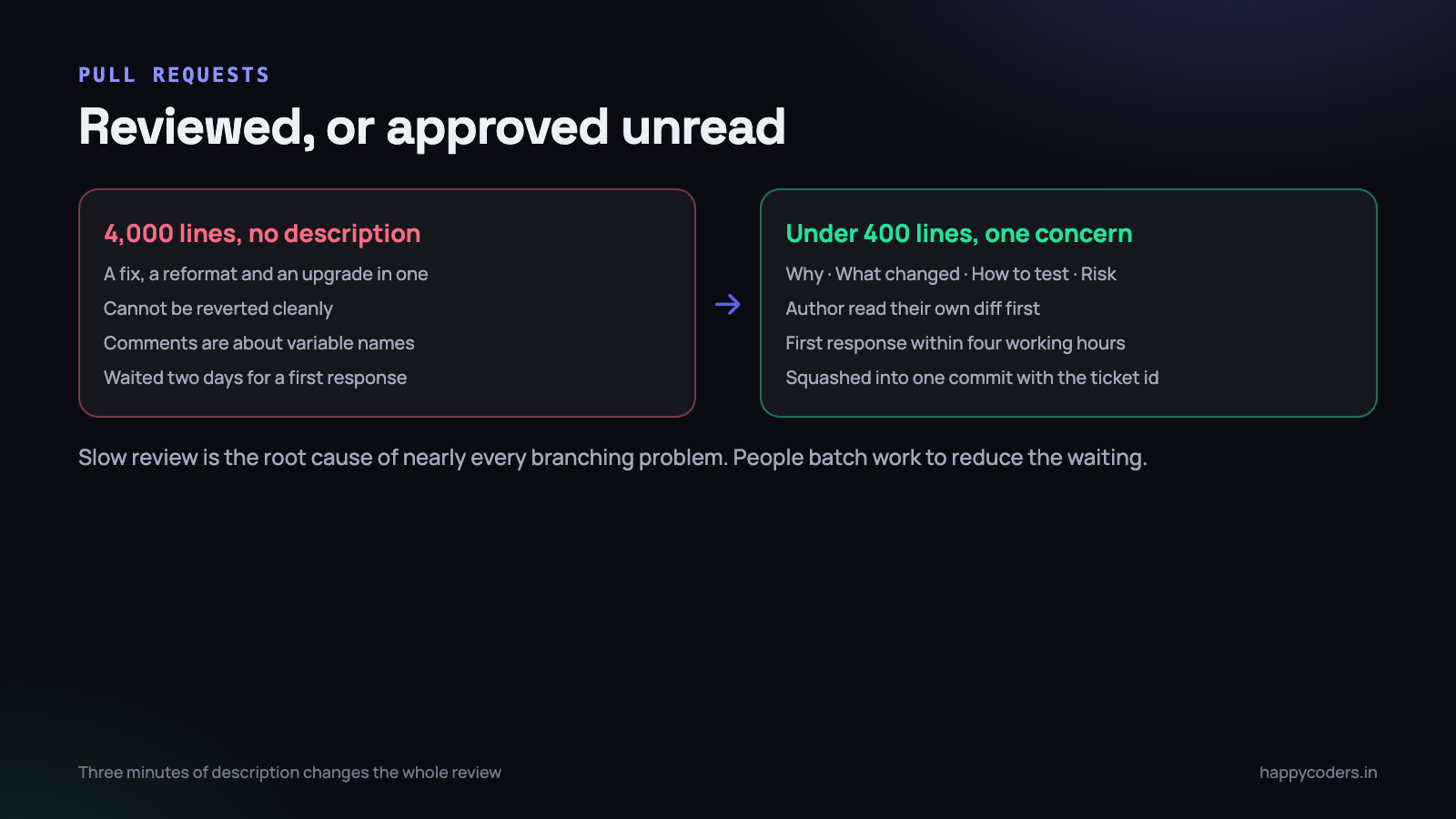
Under about 400 changed lines is the range where review quality holds up. Past that, the research and everybody’s experience agree: reviewers find fewer defects per line and start skimming. If a change is genuinely large, split it, or explain in the description which parts are mechanical and which need attention.
One concern per pull request. A PR that fixes a bug and also reformats four files and also upgrades a dependency cannot be reverted cleanly, and the reformatting hides the bug fix in the diff.
A description that answers three questions
## Why
Invoices had to be downloaded one at a time, and clients on the Starter
plan asked for a combined PDF. CT-214.

## What changed
- New InvoicePdfService, behind the FEATURE_INVOICE_PDF flag
- Route added only when the flag is on
- Storage path uses the org id, so tenants cannot read each other's files

## How to test
1. Set FEATURE_INVOICE_PDF=true in .env
2. Open /invoices, select two, click Download
3. Check the footer shows the GST number

## Risk
Low. Nothing calls the new service when the flag is off.
Three minutes to write, and it changes the review completely. Without it the reviewer has to reconstruct your intent from the diff, which is slow and is how review comments end up being about variable names instead of about whether the thing is correct.
Review your own diff first
Open the Files Changed tab and read it as though somebody else wrote it, before you ask anyone. You will find the debug statement, the commented-out block and the file you did not mean to commit. It takes two minutes and removes most of the comments a reviewer would otherwise have to write.
Review within half a day
The team rule with the biggest effect on everything else: pull requests get a first response within four working hours. Not a full review necessarily — a first response.
When review takes two days, people stop opening small pull requests, because the waiting is the expensive part. They batch work into bigger branches to reduce the number of waits, and now you have long-lived branches, painful merges and superficial reviews. Slow review is the root cause of nearly every branching problem on this list.
Hotfixes, without a hotfix branch
Production is broken at nine in the evening. The temptation is to push straight to main because the rules are slowing you down. Do not disable the protection — the process for this is thirty seconds longer than the wrong way.
git switch main
git pull --ff-only
git switch -c fix/CT-1104-invoice-total-null

# smallest possible change, one commit
git commit -am "Fix null total when a task has no rate (CT-1104)"
git push -u origin fix/CT-1104-invoice-total-null
gh pr create --fill --title "Hotfix: null invoice total (CT-1104)"
Three things make this work under pressure. Branch from main, not from whatever you happen to be on, so the fix contains nothing else. Keep it minimal — fix the symptom now, and open a second ticket for the underlying cause rather than doing both at midnight. And still open the pull request, even if somebody approves it in ninety seconds on a phone. The record of what changed during an incident is worth more than the ninety seconds.
Because there is no develop branch, there is nothing to merge back into. The fix is in main, main is what deploys, and every branch created after this moment already contains it. This is the clearest practical advantage of the model over GitFlow, where the forgotten back-merge is the classic way a fix gets silently reverted a week later.
One habit worth adding: tag each production deployment, v2026.09.16-1 or similar. When something breaks, “what changed between the last two tags” is one command, and rolling back is deploying the previous tag rather than reconstructing what was live.
The rules that stop the two arguments
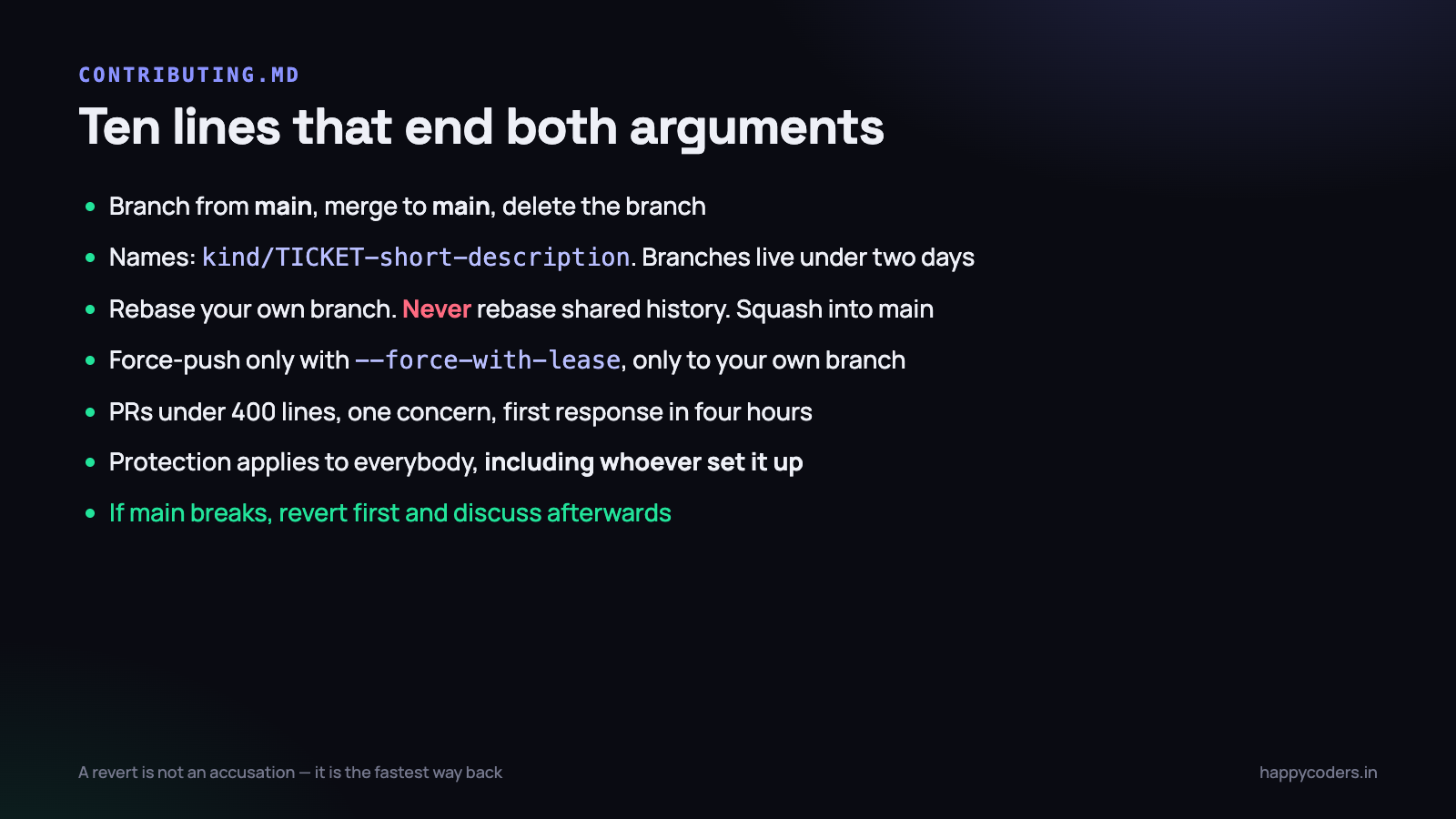
Write these in a CONTRIBUTING.md at the root of the repository. Twelve lines is enough. The point is not the document — it is that the decision has been made once, so nobody has to win it again.
mainis always deployable. Nothing merges that breaks it.- Branch from
main, merge tomain, delete the branch. - Branch names:
kind/TICKET-short-description. - Branches live under two days. Longer work goes in behind a flag.
- Rebase your own branch. Never rebase shared history. Squash into
main. - Force-push only with
--force-with-lease, and only to your own branch. - Pull requests under 400 lines, one concern, with a description.
- First review response within four working hours.
- Branch protection applies to everybody, including whoever set it up.
- If
mainbreaks, revert first and discuss afterwards.
That last one deserves a sentence of its own, because it is the rule that ends the second argument. A revert is not an accusation. When production is broken, restoring it is the only priority, and a revert is the fastest way. The fix goes in a new pull request, calmly, the next morning. Teams that treat reverts as a mark against somebody end up debating in the incident instead of fixing it, and the debate is always slower.
What to do on Monday morning
Forty-five minutes, and you will feel the difference within a fortnight.
- Turn on branch protection for
main— one approval, CI required, no force pushes, enforce for admins. Ten minutes, and it is the highest-value item here. - Write the ten rules above into
CONTRIBUTING.mdand link it from the repository description. Change the ones you disagree with; what matters is that they are written. - List every branch older than two weeks —
git branch -r --sort=committerdate— and for each one decide now: merge it this week, or delete it. There is no third option, and the ones you delete were never coming back. - Agree the squash-or-merge question in one two-minute conversation and set it as the repository default so nobody has to remember.
- Put a note in your team chat that pull requests get a first response within four hours, and then honour it for two weeks. Branch sizes shrink on their own once people trust that.
None of this is about Git being complicated. Git is fine. The difficulty in a small team is always that five reasonable people each have a slightly different model in their head, and the cost shows up as conflicts on a Friday evening. Write the model down once and the arguments stop being arguments.




