


Relationships are the reason most people choose Eloquent, and they are also the reason a page that was fast in development takes nine seconds with a real client’s data. Both facts have the same source: the method call looks free and it is not.
This is the version I wish somebody had given me — one schema you would genuinely build, every relationship type defined on it, and the performance problems shown as query counts rather than described in the abstract.
Three things trip people up, in order of how much damage they do. The method names feel arbitrary until you know the rule that picks them. The pivot table gets treated as plumbing until somebody needs to know who assigned a task and when. And the difference between $project->tasks and $project->tasks() — two characters — decides whether your filtering happens in MySQL or in PHP memory.
The schema everything below uses
Four tables and a pivot. An organisation has projects. A project has tasks. A task can have several people on it, and a person can be on several tasks.
organisations
    id, name, timezone

projects
    id, organisation_id, name, status, budget_hours

tasks
    id, project_id, title, status, estimate_hours, completed_at

users
    id, organisation_id, name, email

task_user                       -- the pivot
    task_id, user_id, role, assigned_at, assigned_by
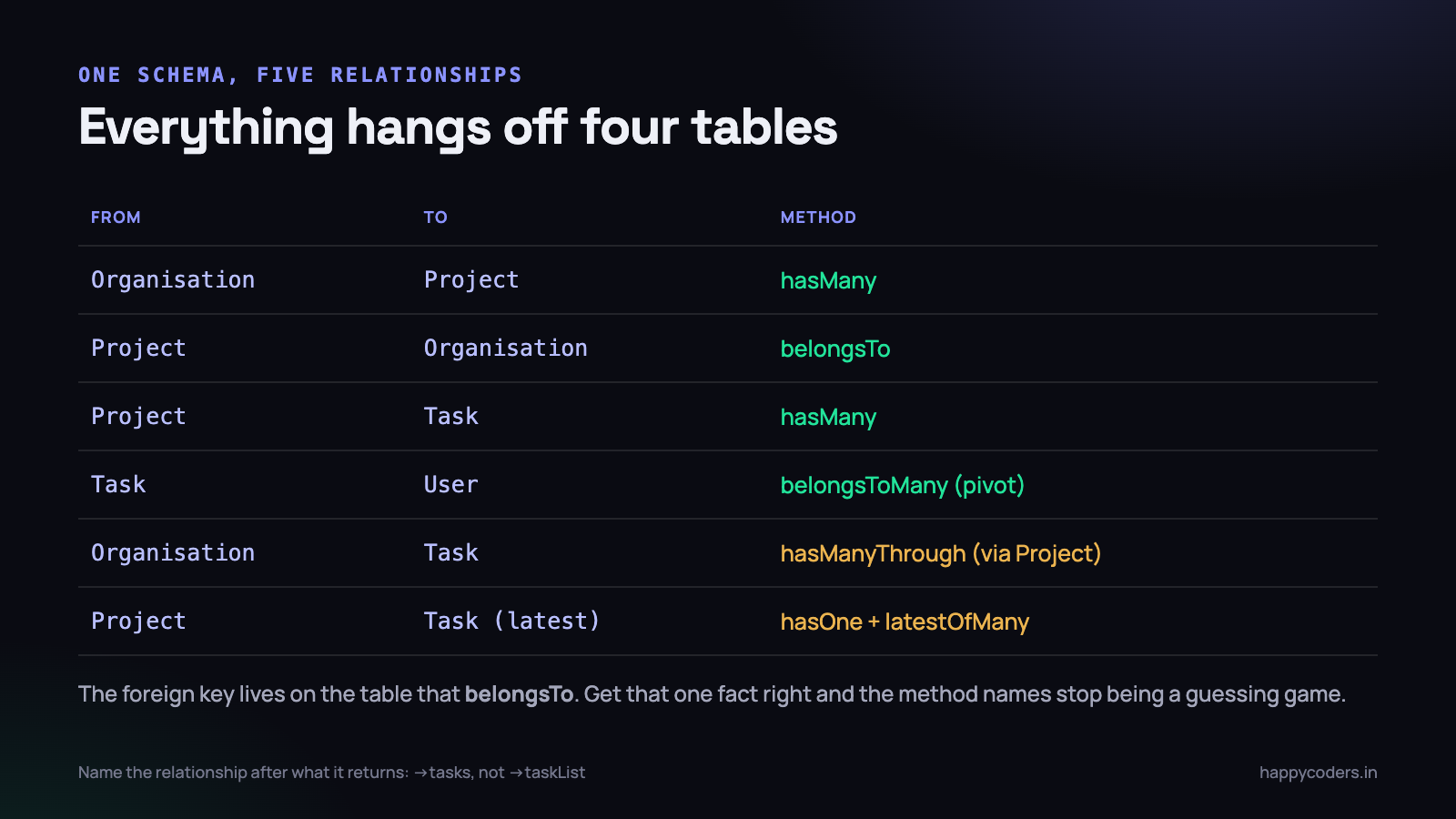
The migrations are unremarkable, but the foreign keys matter because they are what the relationships are named after:
Schema::create('tasks', function (Blueprint $table) {
    $table->id();
    $table->foreignId('project_id')->constrained()->cascadeOnDelete();
    $table->string('title');
    $table->string('status')->default('open');
    $table->decimal('estimate_hours', 6, 2)->nullable();
    $table->timestamp('completed_at')->nullable();
    $table->timestamps();

    $table->index(['project_id', 'status']);   // the query you will run most
});

Schema::create('task_user', function (Blueprint $table) {
    $table->foreignId('task_id')->constrained()->cascadeOnDelete();
    $table->foreignId('user_id')->constrained()->cascadeOnDelete();
    $table->string('role')->default('assignee');
    $table->timestamp('assigned_at')->nullable();
    $table->foreignId('assigned_by')->nullable()->constrained('users');

    $table->primary(['task_id', 'user_id']);   // no duplicate pairs, ever
});
The one fact that makes the method names obvious
People memorise hasMany and belongsTo as a pair of opposites and then guess in every new situation. There is a simpler rule.
The model whose table holds the foreign key uses belongsTo. The model on the other side uses hasOne or hasMany.
The tasks table has a project_id column, so Task belongs to a Project, and Project has many Tasks. That is the entire decision. Whether it is hasOne or hasMany is a separate question about your data, not about the schema.
hasMany and belongsTo
class Project extends Model
{
    public function tasks()
    {
        return $this->hasMany(Task::class);
    }

    public function organisation()
    {
        return $this->belongsTo(Organisation::class);
    }
}

class Task extends Model
{
    public function project()
    {
        return $this->belongsTo(Project::class);
    }
}
Laravel guesses the foreign key from the method and model names — project_id from Project, id as the owner key. When your column names follow the convention you write nothing else. When they do not, be explicit and stop the guessing:
// legacy column names, spelled out
return $this->hasMany(Task::class, 'proj_id', 'project_code');
//                                  ^ FK on tasks   ^ key on projects
Two things are worth knowing about how these behave. $project->tasks returns a Collection, which is empty rather than null when there is nothing. $task->project returns a model or null, which is where $task->project->name throws on a task whose project was deleted. Either guard it, or use a default:
public function project()
{
    return $this->belongsTo(Project::class)
        ->withDefault(['name' => 'Unassigned']);
}
Naming, and three conventions worth agreeing once
These are small, and arguing about them in code review every week is more expensive than deciding them now.
- Name the method after what it returns, plural for many and singular for one:
tasks,project,organisation. NotgetTasks, nottaskList. The property syntax reads as a noun, so give it a noun. - Keep the foreign key as
<model>_ideven on tables you inherited, if you can rename it. Every convention Laravel offers depends on it, and the exceptions are where the bugs cluster. - Decide on
cascadeOnDeleteper relationship, in the migration. Deleting a project should probably remove its tasks. Deleting a user should almost certainly not remove the tasks they worked on — that is history, and somebody will invoice against it.
That third one is worth more thought than it usually gets. A cascade written without thinking is how a routine tidy-up of old accounts takes a year of time entries with it, and the only trace is a smaller total in a report nobody checks daily.
hasOne, and the useful version of it
hasOne is the same relationship as hasMany with a different expectation. Use it when the child table holds exactly one row per parent — a settings row, a profile, an invoice for a project.
The version that earns its keep is hasOne combined with latestOfMany, which gives you one row out of many by a rule:
class Project extends Model
{
    public function latestTask()
    {
        return $this->hasOne(Task::class)->latestOfMany();
    }

    public function largestTask()
    {
        return $this->hasOne(Task::class)->ofMany('estimate_hours', 'max');
    }
}
This matters because it is eager-loadable. A project list showing “last activity” built with $project->tasks->sortByDesc(’created_at’)->first() loads every task of every project into memory to throw nearly all of them away. with(’latestTask’) asks the database for one row per project.
belongsToMany, and the pivot table nobody plans
Many-to-many needs a third table. Several people work on a task; each person works on several tasks.
class Task extends Model
{
    public function users()
    {
        return $this->belongsToMany(User::class)
            ->withPivot(['role', 'assigned_at', 'assigned_by'])
            ->withTimestamps();
    }
}

class User extends Model
{
    public function tasks()
    {
        return $this->belongsToMany(Task::class)
            ->withPivot('role');
    }
}
Laravel derives the pivot table name by putting both model names in alphabetical order, singular, separated by an underscore: task_user. Not tasks_users, and not user_task. Name it differently and you must say so as the second argument.
Extra columns on the pivot
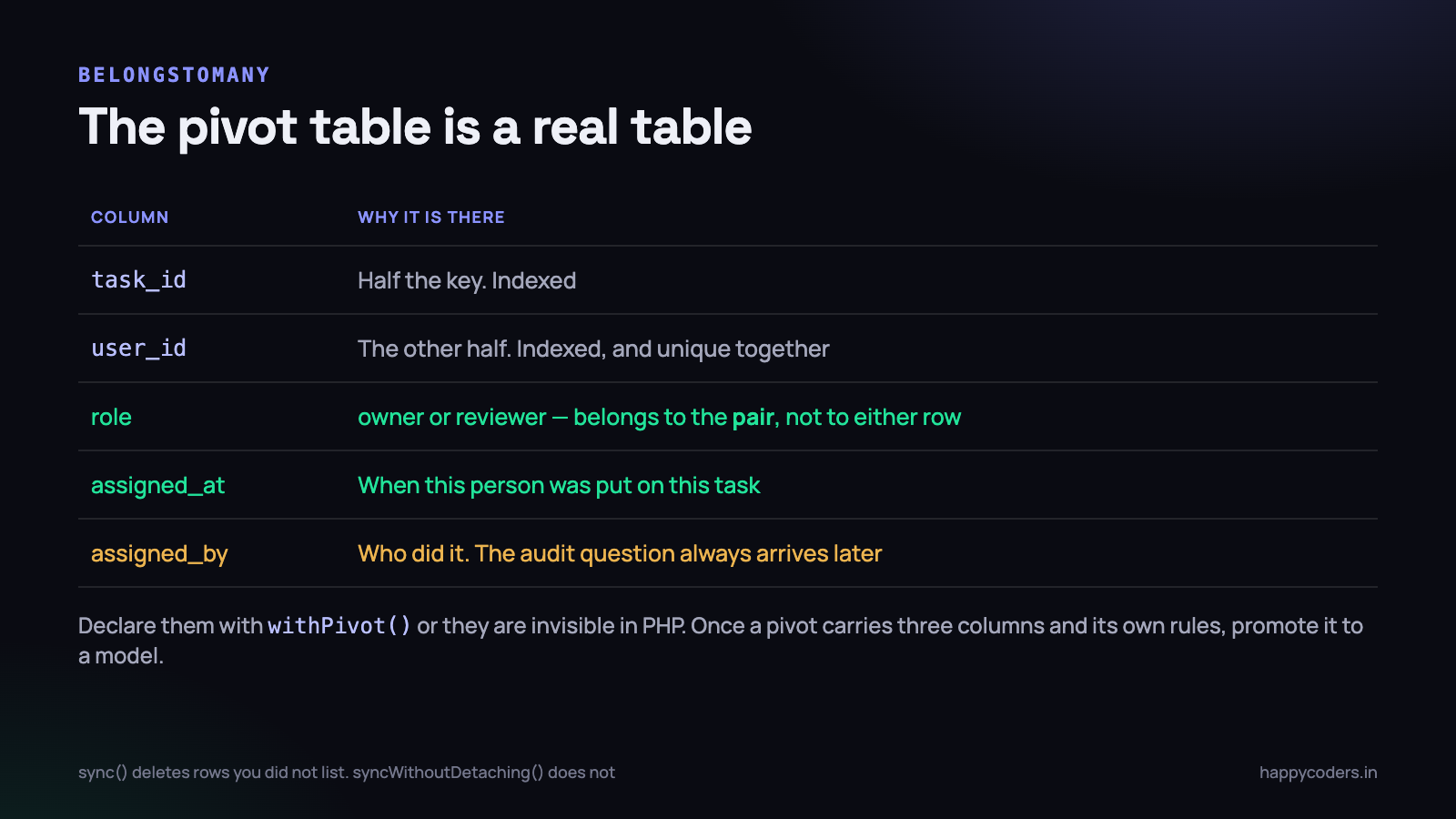
This is the part people miss. A column like role does not belong to the task or to the user — it describes the pairing. Karthik is the reviewer on this task and the owner on that one.
Pivot columns are invisible in PHP unless you declare them with withPivot(). Once declared, they arrive on a pivot attribute:
foreach ($task->users as $user) {
    echo $user->name;              // from users
    echo $user->pivot->role;       // from task_user
    echo $user->pivot->assigned_at;
}

// naming it better in the template
public function users()
{
    return $this->belongsToMany(User::class)
        ->withPivot('role')
        ->as('assignment');        // now $user->assignment->role
}
attach, detach, sync, and the one that bites
$task->users()->attach($userId, [
    'role' => 'reviewer',
    'assigned_at' => now(),
    'assigned_by' => auth()->id(),
]);

$task->users()->detach($userId);

// sync: the list becomes EXACTLY this. Everything else is deleted
$task->users()->sync([3 => ['role' => 'owner'], 7 => ['role' => 'reviewer']]);

// add without removing anyone
$task->users()->syncWithoutDetaching([9 => ['role' => 'reviewer']]);

// change a pivot column without re-attaching
$task->users()->updateExistingPivot($userId, ['role' => 'owner']);
sync()deletes every pivot row you did not list. On a form that posts only the assignees the current user can see, that silently removes everybody else — including rows the user had no permission to touch. If a form edits part of a list, usesyncWithoutDetachingand handle removals explicitly.
When to promote the pivot to a model
Once the pivot carries three or four columns, has its own validation rules, or needs to be created from more than one place, stop treating it as plumbing and give it a model:
class Assignment extends Pivot
{
    protected $casts = ['assigned_at' => 'datetime'];

    public function assignedBy()
    {
        return $this->belongsTo(User::class, 'assigned_by');
    }
}

// on the relationship
return $this->belongsToMany(User::class)
    ->using(Assignment::class)
    ->withPivot(['role', 'assigned_at', 'assigned_by']);
At that point the pivot is a real entity in the business — an assignment — and pretending otherwise just means the rules about it are scattered across three controllers.
Polymorphic relationships, and when they are worth it
Comments and attachments are the usual case: the same kind of child belongs to several different kinds of parent. Rather than task_comments and project_comments, one table stores the parent’s type alongside its id.
Schema::create('comments', function (Blueprint $table) {
    $table->id();
    $table->morphs('commentable');    // commentable_id + commentable_type
    $table->foreignId('user_id')->constrained();
    $table->text('body');
    $table->timestamps();
});

class Comment extends Model
{
    public function commentable()
    {
        return $this->morphTo();
    }
}

class Task extends Model
{
    public function comments()
    {
        return $this->morphMany(Comment::class, 'commentable');
    }
}
The cost is that you give up the foreign key. The database cannot enforce that commentable_id points at a row that exists, so deleting a task can leave orphaned comments behind unless your application cleans up. You also cannot join to it usefully in a report, because the target table changes per row.
So the test is worth applying honestly: if the child genuinely attaches to three or more parent types and will attach to more later, polymorphic is right. If it is two types and always will be, two plain foreign keys with real constraints are the better trade. Choosing polymorphic to avoid writing one extra table is a decision you pay for at every report.
Store the type as a short alias rather than a class path, using Relation::enforceMorphMap(). Otherwise the fully-qualified class name goes into thousands of rows, and renaming or moving a class becomes a data migration.
hasManyThrough: reaching across an intermediate table
An organisation has no organisation_id on tasks. It reaches them through projects.
class Organisation extends Model
{
    public function tasks()
    {
        return $this->hasManyThrough(
            Task::class,        // what you want
            Project::class,     // what you go through
            'organisation_id',  // FK on projects
            'project_id',       // FK on tasks
            'id',               // key on organisations
            'id'                // key on projects
        );
    }
}

$org->tasks()->where('status', 'open')->count();   // one query, one join
The argument order is the part everybody gets wrong, and the order above is the one to memorise: target, intermediate, then the two foreign keys in the same order, then the two local keys.
It is worth it when you need the far rows directly and often — a count of open tasks per organisation, an export, a permission check. It is not worth it when you already have the projects loaded, because $org->projects->pluck(’tasks’)->flatten() is doing the same job with data you already paid for.
The N+1 problem, in query counts
This is the single largest performance issue in Laravel applications, and it is invisible in development because the seed data has five rows.
// the controller looks innocent
$tasks = Task::where('status', 'open')->get();

// the template is where the queries actually happen
@foreach ($tasks as $task)
    {{ $task->title }} - {{ $task->project->name }}
@endforeach
Fifty tasks produce fifty-one queries: one for the tasks, then one per task for its project. Each is fast in isolation — two milliseconds — so nothing in your slow query log fires. The page just takes nine hundred milliseconds and nobody can point at a culprit.
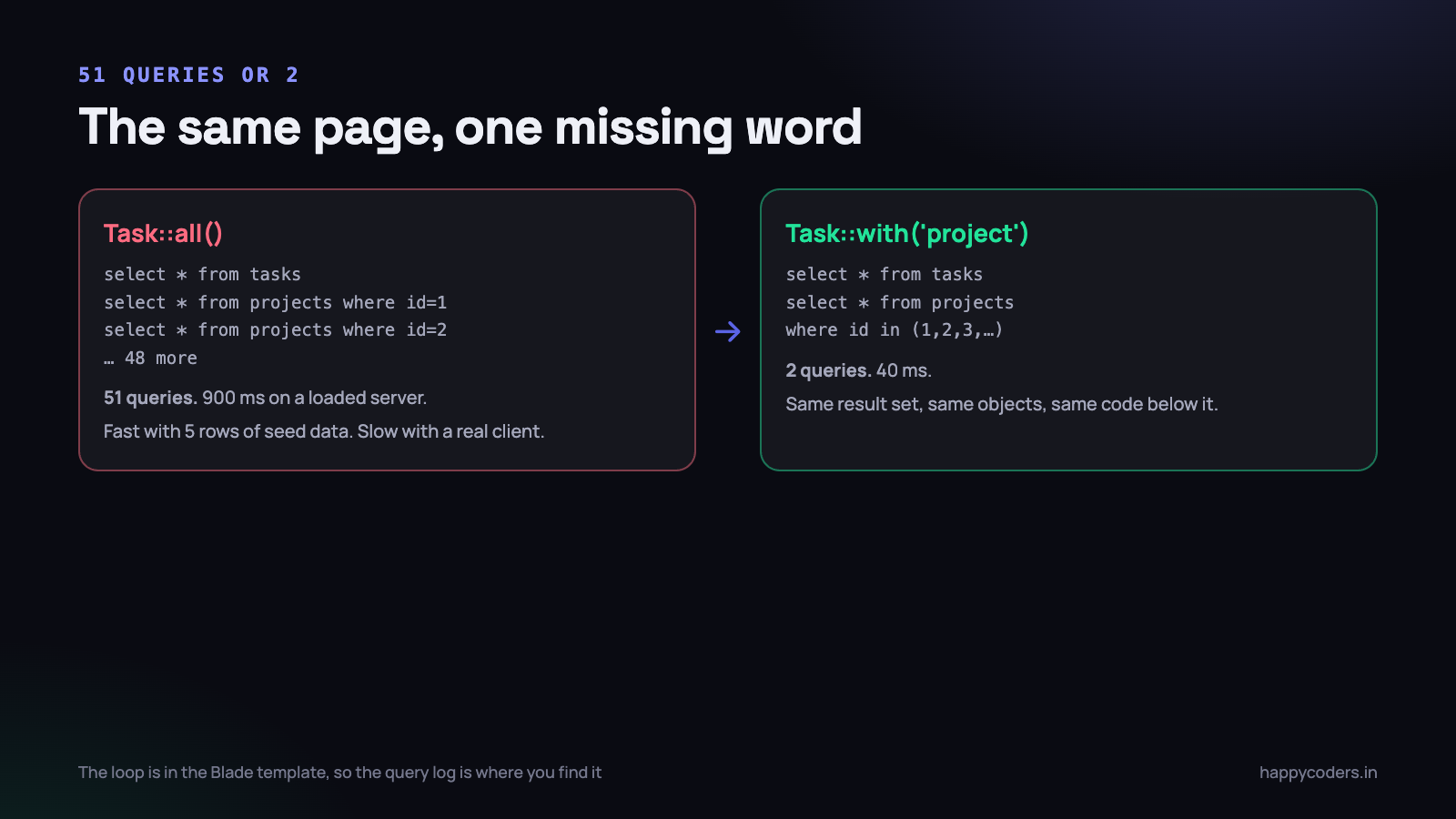
// 2 queries instead of 51
$tasks = Task::with('project')->where('status', 'open')->get();

// nested, and constrained
$projects = Project::with([
    'tasks' => fn ($q) => $q->where('status', 'open')->orderBy('created_at'),
    'tasks.users:id,name',          // only the columns you print
])->get();

// already have the collection? load into it
$tasks->load('project.organisation');
The second query uses where project_id in (1, 2, 3, ...) and Eloquent matches the results back onto the parents in PHP. That is all eager loading is.
The habit that prevents it permanently is to make lazy loading an error in development:
// AppServiceProvider::boot()
Model::preventLazyLoading(! app()->isProduction());
Now an un-eager-loaded access throws an exception locally while the page is still fast enough to be pleasant, instead of appearing as a support ticket in month four. There is more on finding these in the N+1 query problem.
Eager loading is not always the answer.
with(’tasks’)on a list of two hundred projects loads every task of every project into memory, which can be slower than the N+1 it replaced. If you only need a number, usewithCount. If you only need the rows on one page, paginate first.
withCount, withSum and friends
More than half the eager loading I see in real code exists only to call count() on the collection afterwards. That loads thousands of rows to produce one integer.
// loads every task of every project, to print a number
$projects = Project::with('tasks')->get();
// {{ $project->tasks->count() }}

// asks the database for the number instead
$projects = Project::withCount('tasks')->get();
// {{ $project->tasks_count }}

// multiple counts, with constraints and aliases
$projects = Project::withCount([
    'tasks',
    'tasks as open_count' => fn ($q) => $q->where('status', 'open'),
    'tasks as overdue_count' => fn ($q) => $q->whereDate('due_at', '<', now()),
])->get();

// sums and averages work the same way
$projects = Project::withSum('tasks', 'estimate_hours')
    ->withAvg('tasks', 'estimate_hours')
    ->withExists('tasks')
    ->get();
// $project->tasks_sum_estimate_hours
Every one of those is a subquery in the same round trip. On a project dashboard for a mid-sized organisation this is routinely the difference between eighty milliseconds and four seconds, and it is a one-word change.
Constraining a relationship
There are three places to put a condition, and they do different things.
On the relationship itself
public function openTasks()
{
    return $this->hasMany(Task::class)->where('status', 'open');
}
Use this when the constraint is part of what the relationship means. Be careful: a constrained hasMany also applies its condition on create, so $project->openTasks()->create([...]) sets status to open for you. That is convenient when you expect it and confusing when you do not.
At the call site
$project->tasks()->where('status', 'open')->get();   // a query, one round trip
$project->tasks->where('status', 'open');            // a Collection filter
This pair is the most consequential distinction in Eloquent and it is one character. Without the parentheses you get the loaded collection, so the filtering happens in PHP after every row has been fetched. With the parentheses you get a query builder, and the filtering happens in the database.
On a project with forty tasks, nobody notices. On a project with forty thousand time entries, the first form fetches all of them into memory and the request dies on the memory limit.
Filtering the parent by the child
// projects that have at least one overdue task
Project::whereHas('tasks', fn ($q) => $q->where('due_at', '<', now()))->get();

// projects with more than ten open tasks
Project::whereHas('tasks', fn ($q) => $q->where('status', 'open'), '>', 10)->get();

// projects with no tasks at all
Project::doesntHave('tasks')->get();

// filter the parents AND load only the matching children
Project::whereHas('tasks', fn ($q) => $q->where('status', 'open'))
    ->with(['tasks' => fn ($q) => $q->where('status', 'open')])
    ->get();
That last block is worth reading twice. whereHas decides which projects come back; with decides which tasks are attached to them. They are separate decisions, and writing only one of them is a common source of “the filter does not work” bug reports.
One performance note on whereHas: it compiles to a correlated subquery, which is fine over thousands of rows and slow over millions. If it shows up in a slow query log, rewrite that one query as a join, or maintain a counter column on the parent. Do that when you measure it, not before.
Sending relationships to the front end
The default serialisation is another place a relationship costs more than it looks. A model returned from a controller includes whatever relationships happen to be loaded, and nothing that is not — so the same endpoint can return different shapes depending on which branch of the code ran.
class TaskResource extends JsonResource
{
    public function toArray($request)
    {
        return [
            'id' => $this->id,
            'title' => $this->title,
            'project' => new ProjectResource($this->whenLoaded('project')),
            'assignees' => UserResource::collection($this->whenLoaded('users')),
            'open_count' => $this->when(isset($this->open_count), $this->open_count),
        ];
    }
}
whenLoaded() is the important call. Without it, touching the relationship inside the resource triggers a lazy load per row — the N+1 problem again, this time hidden inside the serialiser where a query counter on the controller will not obviously point at it.
Two more habits: select only the columns you send, with with(’users:id,name’), and add $hidden or an explicit resource for anything containing an email address, a phone number or a hash. A relationship serialised wholesale is the standard way a password hash or an internal note reaches a public API response.
The relationship that must never be optional
In any application where more than one company’s data lives in the same tables, the organisation relationship is not a convenience. It is the security boundary, and a missing where organisation_id = ? is not a bug report, it is one customer reading another customer’s data.
Relying on every developer to remember it in every query is a losing arrangement. Go through the relationship from the top instead, or apply a global scope so the condition cannot be forgotten.
// always start from the tenant, so the constraint is structural
$projects = $organisation->projects()->where('status', 'active')->get();

// or make it impossible to forget
class Project extends Model
{
    protected static function booted()
    {
        static::addGlobalScope('org', function (Builder $q) {
            if ($id = auth()->user()?->organisation_id) {
                $q->where('projects.organisation_id', $id);
            }
        });
    }
}
Two warnings about global scopes. Qualify the column with the table name, or the scope breaks the moment the query contains a join and both tables have an organisation_id. And remember that queue workers, console commands and scheduled jobs have no authenticated user, so a scope written around auth() quietly does nothing there — which is exactly where a nightly report ends up emailing the wrong organisation’s numbers.
Pair the scope with a route-model binding that is also scoped, so an id typed into the address bar cannot fetch somebody else’s record. Laravel’s nested bindings do this for you when the parent is in the route.
When a relationship is the wrong tool
Eloquent is an object mapper. It is excellent at loading a record you are about to change, and it gets steadily worse the further you move from that job.
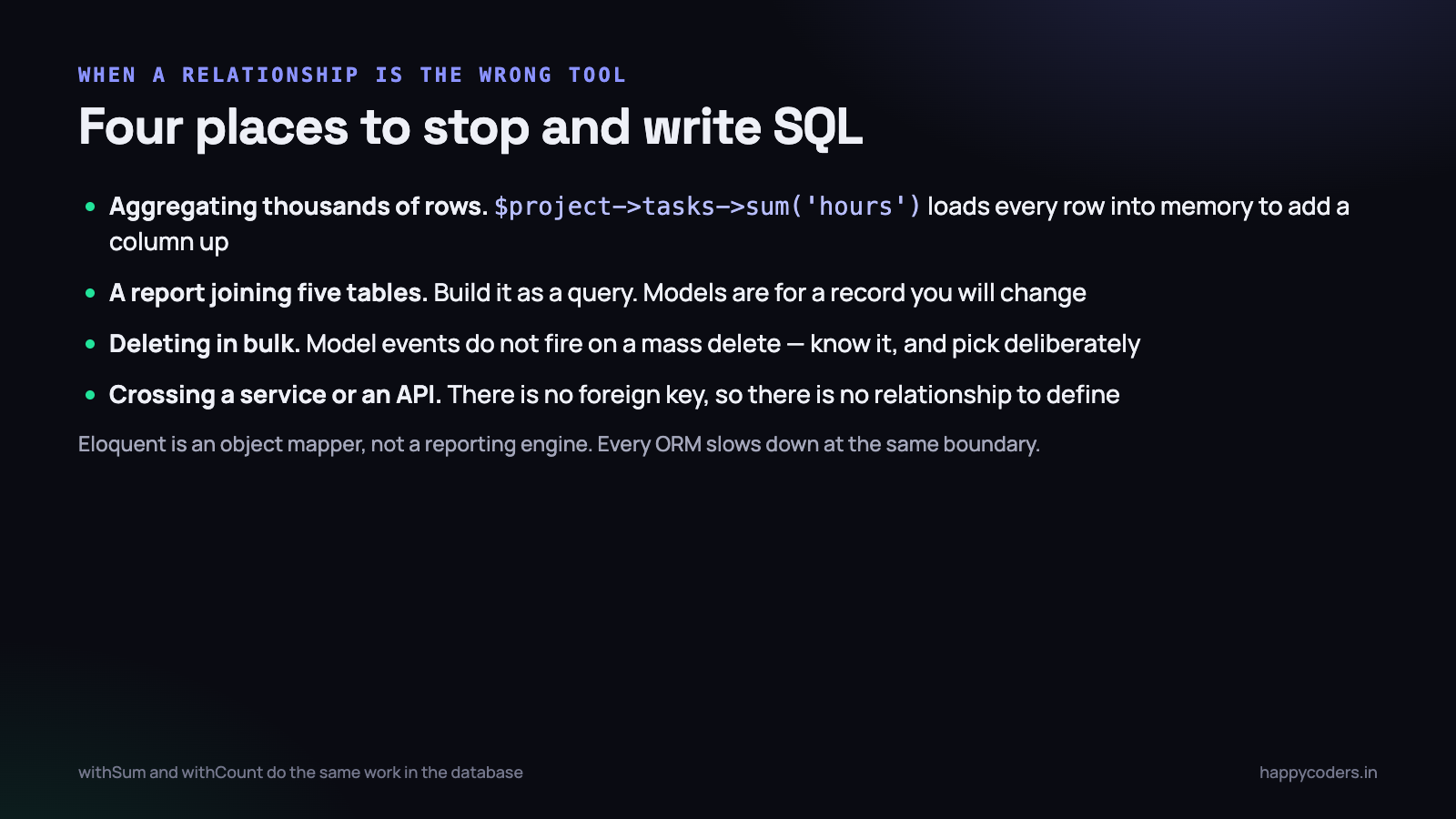
- Aggregating a lot of rows.
$project->timeEntries->sum(’minutes’)hydrates every entry into an object to add one column up. UsewithSum, or a query builderselectRaw. - A report joining five tables. Write it as a query and return arrays. Models exist to be modified; a report row is never modified.
- Bulk updates and deletes.
Task::where(...)->delete()does not fire model events or observers, so anything depending ondeletingsilently does not happen. That is fine when you know it and a data bug when you do not. - Across a service boundary. If the users live in another application or another database, there is no foreign key and therefore no relationship. Fetch and stitch, deliberately.
- Very deep chains.
$entry->task->project->organisation->ownerworks and is four joins hidden inside a template. Load what the page needs at the top, once.
None of this is an argument against Eloquent. It is an argument for noticing which of the two jobs you are doing — changing a record, or answering a question about many records — because the right tool is different for each.
What to do on Monday morning
- Turn on lazy loading prevention in your local environment. One line in
AppServiceProvider, and it finds every N+1 you have without you looking for them. - Install a query counter — Debugbar, Telescope, or a listener on
DB::listenthat logs the count per request. Then open your three busiest pages and read the number. - Grep your Blade templates for
->count()on a relationship. Nearly every one should be awithCount. - Grep for
->tasks->where(and similar — a relationship property followed by a collection filter. Each one is filtering in PHP what the database should have filtered. - Check every pivot has a composite primary key or a unique index. Duplicate pivot rows are quiet, and they double your counts.
- Write the foreign keys explicitly in any relationship on a legacy table. Convention-based guessing on non-conventional columns is the kind of bug that takes an afternoon to see.
Two hours on that list will usually take more time off your slowest page than a week of caching would, and unlike caching it makes the code easier to read rather than harder.




