


Almost every PHP project that is still running after five years started the same way: a folder of pages at the top level, an includes/ directory next to it, and a functions.php that got a little longer every month. It worked, which is the point. It shipped.
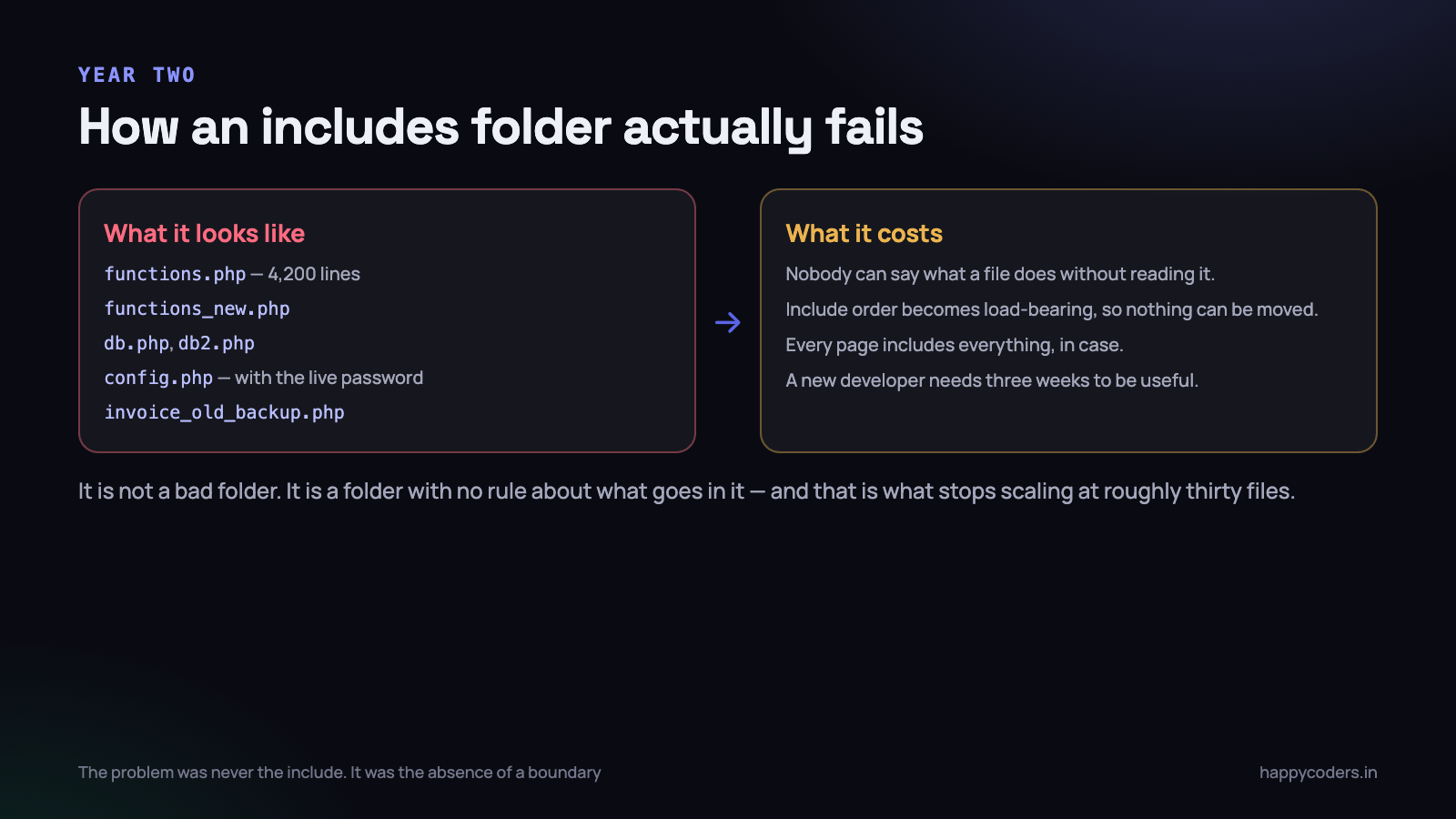
The trouble starts somewhere in year two, and it does not announce itself. A change that should take an hour takes a day. A new developer needs three weeks before they can be trusted with anything. Nobody can move a file, because nobody is certain what includes it. The code is not bad — it is unstructured, which is a different problem with a different fix.
What actually goes wrong with a folder of includes
It is worth being specific, because “it is messy” is not an argument anybody acts on. Four concrete things break.
- Include order becomes load-bearing.
functions.phpuses something defined indb.php, which reads a variable set inconfig.php. Move any one of the three lines and the site breaks in a way that points at the wrong file. - Every page includes everything, because it is safer than working out what each page needs. A contact form loads the invoice library, the PDF generator and the payment gateway.
- Names collide, so they get longer.
get_user()is taken, so the next one isget_user_details(), thenget_user_details_v2(). All three exist and two of them are still called from somewhere. - Nothing has a boundary. Any file can touch the database, print HTML, redirect, and read
$_POST. So to know what one function does, you must read it — and everything it calls.
That last point is the real cost. Structure is not about tidiness. It is about being able to predict what a file does from where it lives, so you do not have to read the whole system to change one thing.
Composer and PSR-4, from nothing
Autoloading is the mechanism that removes the include ordering problem entirely, and setting it up on an existing project takes about ten minutes. You do not need a framework and you do not need to install a single package.
Create a composer.json at the root of the project:
{
  "name": "happycoders/billing",
  "require": {
    "php": ">=8.1"
  },
  "autoload": {
    "psr-4": {
      "App\\": "src/"
    }
  }
}
Then run composer install once. It creates vendor/autoload.php, and that single file replaces every require of a class you will ever write.
PSR-4 is one rule: the namespace mirrors the folder path, and the class name is the file name. Nothing else.
src/Invoice/InvoiceGenerator.php   ->   App\Invoice\InvoiceGenerator
src/Billing/TaxCalculator.php      ->   App\Billing\TaxCalculator
src/Support/Money.php              ->   App\Support\Money
<?php
// src/Invoice/InvoiceGenerator.php
declare(strict_types=1);
namespace App\Invoice;
use App\Billing\TaxCalculator;
final class InvoiceGenerator
{
public function __construct(
private TaxCalculator $tax,
) {}
public function generate(int $projectId): Invoice
{
// ...
}
}<?php
// public/index.php
require __DIR__ . '/../vendor/autoload.php';
use App\Invoice\InvoiceGenerator;
// no other require lines. Ever.
$generator = new InvoiceGenerator(new App\Billing\TaxCalculator());When PHP meets a class it has not seen, Composer works out the file path from the namespace and loads exactly that file. Nothing else is loaded. Include order becomes irrelevant, because nothing is included until it is needed.
Two flags worth knowing
On a production deploy, run composer dump-autoload --optimize --no-dev. It builds a straight class-to-file map instead of computing paths at runtime, which is a measurable saving on a busy site and costs nothing. Add it to your deploy script and forget about it.
And commit composer.lock, never vendor/. The lock file is what makes your server run the same code as your laptop; the vendor folder is derived from it and has no business in git.
A folder layout that holds up
You do not need Laravel’s tree. Six directories cover almost any project, and the value is that each has exactly one rule about what may go in it.
project/
    public/          <- the ONLY web root. index.php, css, js, uploads
    src/             <- your classes. PSR-4, namespaced, no output
    config/          <- arrays that read from the environment
    templates/       <- HTML, with as little PHP as possible
    storage/         <- logs, cache, generated files. Writable
    vendor/          <- Composer's. Never edited
    tests/
    .env             <- secrets. Not in git
    composer.json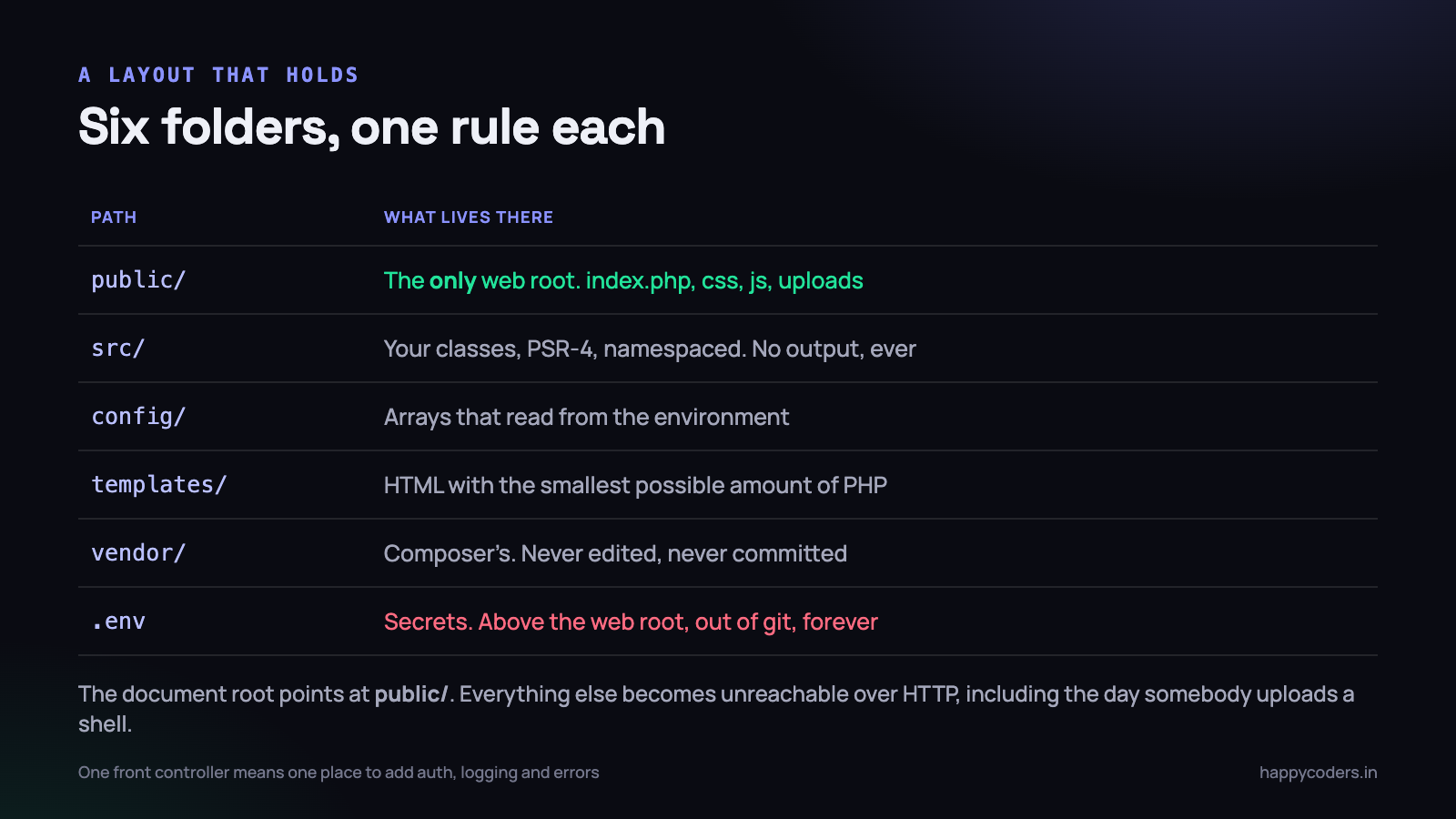
public/ is the only web root, and this is not optional
Point your document root at public/. Everything else — your source, your config, your .env, your vendor folder — becomes unreachable over HTTP. Not obscured. Unreachable.
# nginx
server {
    root /var/www/billing/public;      # NOT /var/www/billing

    location / {
        try_files $uri $uri/ /index.php?$query_string;
    }

    location ~ \.php$ {
        fastcgi_pass unix:/run/php/php8.3-fpm.sock;
        include fastcgi_params;
        fastcgi_param SCRIPT_FILENAME $document_root$fastcgi_script_name;
    }
}
This single change defends against a whole category of accidents: a misconfigured .htaccess that stops hiding config.php, a server upgrade that disables PHP parsing and serves your source as text, a backup file named config.php.bak that is served as plain text because .bak is not PHP.
It also contains the damage when somebody manages to upload a script through your file upload — the uploads directory is the one place in public/ that must have PHP execution switched off, which we covered in PHP file upload security.
One front controller
With a single public/index.php handling every request, there is one place to bootstrap, one place to add authentication, one place to set error handling and one place to log. With forty top-level PHP pages, there are forty of each, and thirty-nine of them are slightly different.
On shared hosting where rewriting is awkward, a middle position works: keep the individual entry files, but make every one of them a three-line file that requires the autoloader and hands off to a class. You get the single bootstrap without fighting the host.
Configuration and secrets
Two rules, and the second is the one that gets broken.
First: configuration is code, secrets are not. A timezone, a page size, a list of allowed file types — those belong in a file in git, because they are decisions. A database password, an API key, an SMTP credential — those belong in the environment, because they differ per server and must never be in a repository.
# .env  - not in git, one per server, chmod 600
APP_ENV=production
DB_HOST=127.0.0.1
DB_NAME=billing
DB_USER=billing_app
DB_PASS=...
RAZORPAY_KEY_SECRET=...
<?php
// config/database.php - IS in git, contains no secrets
return [
'host' => getenv('DB_HOST') ?: '127.0.0.1',
'name' => getenv('DB_NAME') ?: 'billing',
'user' => getenv('DB_USER') ?: 'root',
'pass' => getenv('DB_PASS') ?: '',
'charset' => 'utf8mb4',
];Second: commit a .env.example with every key and no values. It is the only documentation of what the application needs to run that stays accurate, because a missing key breaks the app on day one rather than at 2am in three months.
If secrets are currently in a committed
config.php, moving the file is not enough. They are in the git history, which means they are in every clone, on every laptop and in every old backup. Rotate the credentials as part of the change — not later.
Separating the three jobs a page does
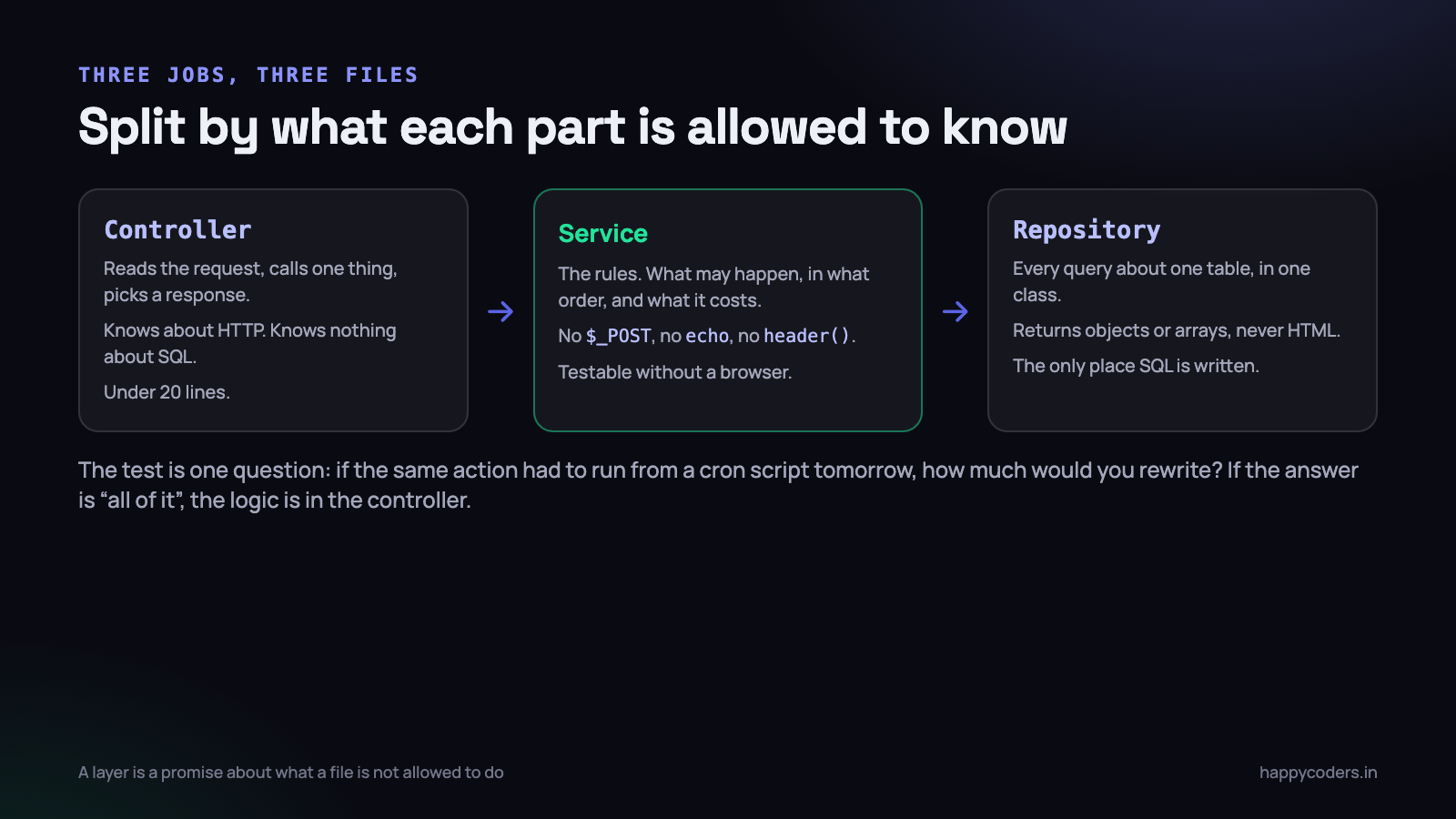
A typical legacy page does three things in one file: it reads the request, it applies the business rules, and it queries the database. Splitting those is the change with the largest return, and it is also the one people over-complicate.
Here is a real example, in the shape of an invoice being generated from a web form.
<?php
// src/Http/InvoiceController.php   - knows about HTTP, nothing else
namespace App\Http;

final class InvoiceController
{
    public function __construct(private InvoiceService $invoices) {}

    public function store(array $request): Response
    {
        $projectId = (int) ($request['project_id'] ?? 0);

        try {
            $invoice = $this->invoices->generateForProject($projectId);
        } catch (ProjectNotBillable $e) {
            return Response::redirect('/invoices?error=' . $e->getMessage());
        }

        return Response::redirect('/invoices/' . $invoice->id);
    }
}
<?php
// src/Invoice/InvoiceService.php - the rules. No HTTP, no echo
namespace App\Invoice;
final class InvoiceService
{
public function __construct(
private TimeEntryRepository $entries,
private InvoiceRepository $invoices,
) {}
public function generateForProject(int $projectId): Invoice
{
$entries = $this->entries->unbilledForProject($projectId);
if ($entries === []) {
throw new ProjectNotBillable('Nothing to bill');
}
$minutes = array_sum(array_column($entries, 'minutes'));
return $this->invoices->create($projectId, $minutes);
}
}<?php
// src/Invoice/TimeEntryRepository.php - the only place SQL is written
namespace App\Invoice;
final class TimeEntryRepository
{
public function __construct(private \PDO $db) {}
public function unbilledForProject(int $projectId): array
{
$sql = 'SELECT id, minutes, started_at
FROM time_entries
WHERE project_id = :pid AND invoice_id IS NULL';
$stmt = $this->db->prepare($sql);
$stmt->execute(['pid' => $projectId]);
return $stmt->fetchAll(\PDO::FETCH_ASSOC);
}
}Each file now has a rule you can state in one sentence. The controller knows about the request and the response and nothing else. The service knows the business rules and has never heard of $_POST. The repository writes SQL and returns data, and never prints anything.
The test that tells you if you have done it
Ask one question: if this same action had to run from a cron job tomorrow, how much of it would you rewrite?
If the answer is “none, I call the service”, the separation is real. If the answer is “all of it, the logic is in the page”, it is not. This is not theoretical — it is the exact situation that arrives when a client asks for invoices to be generated automatically on the first of the month, and the answer decides whether that is a two-hour job or a two-day one.
The same question covers a second case that always comes: an API endpoint that has to do what the web form does. With a service, it is a new controller. Without one, it is a copy-paste and two versions of the rules that drift apart.
Passing dependencies, without a framework
You will have noticed that every class above takes what it needs through its constructor rather than reaching for a global. That is the habit that makes the separation real, and it does not require a dependency injection container.
The difference is between a class that goes and finds a database connection, and a class that is given one:
// before: the class reaches out. Untestable, and the global is now load-bearing
final class InvoiceRepository
{
    public function find(int $id): array
    {
        global $db;
        // ...
    }
}

// after: the class is handed what it needs
final class InvoiceRepository
{
    public function __construct(private \PDO $db) {}
}
The wiring then happens in one place — your bootstrap file — where you can read the whole object graph at a glance:
<?php
// src/bootstrap.php
$config = require __DIR__ . '/../config/database.php';

$db = new PDO(
    "mysql:host={$config['host']};dbname={$config['name']};charset=utf8mb4",
    $config['user'],
    $config['pass'],
    [PDO::ATTR_ERRMODE => PDO::ERRMODE_EXCEPTION,
     PDO::ATTR_EMULATE_PREPARES => false]
);

$invoices = new InvoiceService(
    new TimeEntryRepository($db),
    new InvoiceRepository($db),
);
Thirty lines of that is perfectly reasonable for a medium project, and it is far easier to follow than a container configured in YAML. Add a container when the wiring itself becomes the thing you are maintaining, which for most projects is never.
The payoff is immediate in tests. A service whose repository arrives through the constructor can be handed a fake one that returns three rows from an array, and then the business rules can be tested in milliseconds without a database, a browser or a session.
Templates, and keeping the logic out of them
PHP is a template language, and there is nothing wrong with using it as one. A file in templates/ that loops over an array and prints it is fine, readable and fast. What is not fine is a template that opens a database connection halfway down the page.
The workable rule: a template may loop, branch on a value it was given, and escape output. It may not fetch anything. Everything it prints arrives as a variable, prepared before rendering starts.
<?php
// src/Http/View.php  - twelve lines, no library
namespace App\Http;

final class View
{
    public static function render(string $template, array $data = []): string
    {
        extract($data, EXTR_SKIP);
        ob_start();
        require __DIR__ . '/../../templates/' . $template . '.php';
        return (string) ob_get_clean();
    }
}

// echo View::render('invoice/show', ['invoice' => $invoice]);
That is enough for most projects. Reach for Twig or Blade when you want inheritance, automatic escaping and a syntax that a front-end developer can edit safely — not because plain PHP templates are wrong.
Whichever you use, escape on output, every time: htmlspecialchars($value, ENT_QUOTES, ’UTF-8’) around anything a user supplied. A template that fetches nothing and escapes everything is a template nobody has to audit twice.
storage/, and the folders that need writing to
Logs, cache files, generated PDFs, exported CSVs and temporary uploads all need somewhere to live. Giving them a single storage/ directory outside the web root settles three questions at once: what to back up, what to exclude from git, and which directory the web server user actually needs write permission on.
storage/
    logs/         app-2026-09-16.log
    cache/        compiled templates, computed config
    exports/      generated CSVs and PDFs, served through PHP
    tmp/
Note that exports/ is deliberately not in public/. A generated invoice PDF should be delivered by a script that checks who is asking, not by a URL that anybody can guess. Serving it through PHP costs a few lines and removes the sequential-filename problem, where changing invoice-1041.pdf to invoice-1042.pdf in the address bar returns somebody else’s bill.
Set an error handler and a log destination in your one bootstrap file. Display errors off in production, log everything, and write the log somewhere you will actually read. A project with no log is a project where every production problem starts with guessing.
Where the helpers go
Every project has a format_money() and a slugify(), and they are the first thing to end up back in a shared functions.php. Two options, both fine.
The first is a class of static methods, grouped by subject, which autoloads like everything else:
<?php
namespace App\Support;

final class Money
{
    public static function format(int $paise): string
    {
        return "\u{20B9}" . number_format($paise / 100, 2);
    }
}

// App\Support\Money::format(125000)  ->  the rupee symbol, then 1,250.00
The second is a plain functions file, autoloaded by Composer on every request, for the handful you genuinely want as bare functions in templates:
{
  "autoload": {
    "psr-4": { "App\\": "src/" },
    "files": ["src/helpers.php"]
  }
}
The discipline is the same either way: a helper is a pure function of its arguments. It does not query the database, read a session, or print. The moment a helper needs the database it is not a helper, it is a service that has been misfiled, and leaving it there is how the old functions.php grows back.
Migrating a legacy project without a rewrite
The rewrite is the trap. A branch called restructure that runs for four months ends in one of two ways: it is abandoned, or it is merged in a panic and takes a fortnight of bug reports with it. Meanwhile the old code kept receiving changes, and the two versions diverged the entire time.
Do it incrementally. The old require lines keep working throughout, because Composer’s autoloader only handles the classes it knows about and ignores everything else. The two systems sit side by side happily for as long as you need.
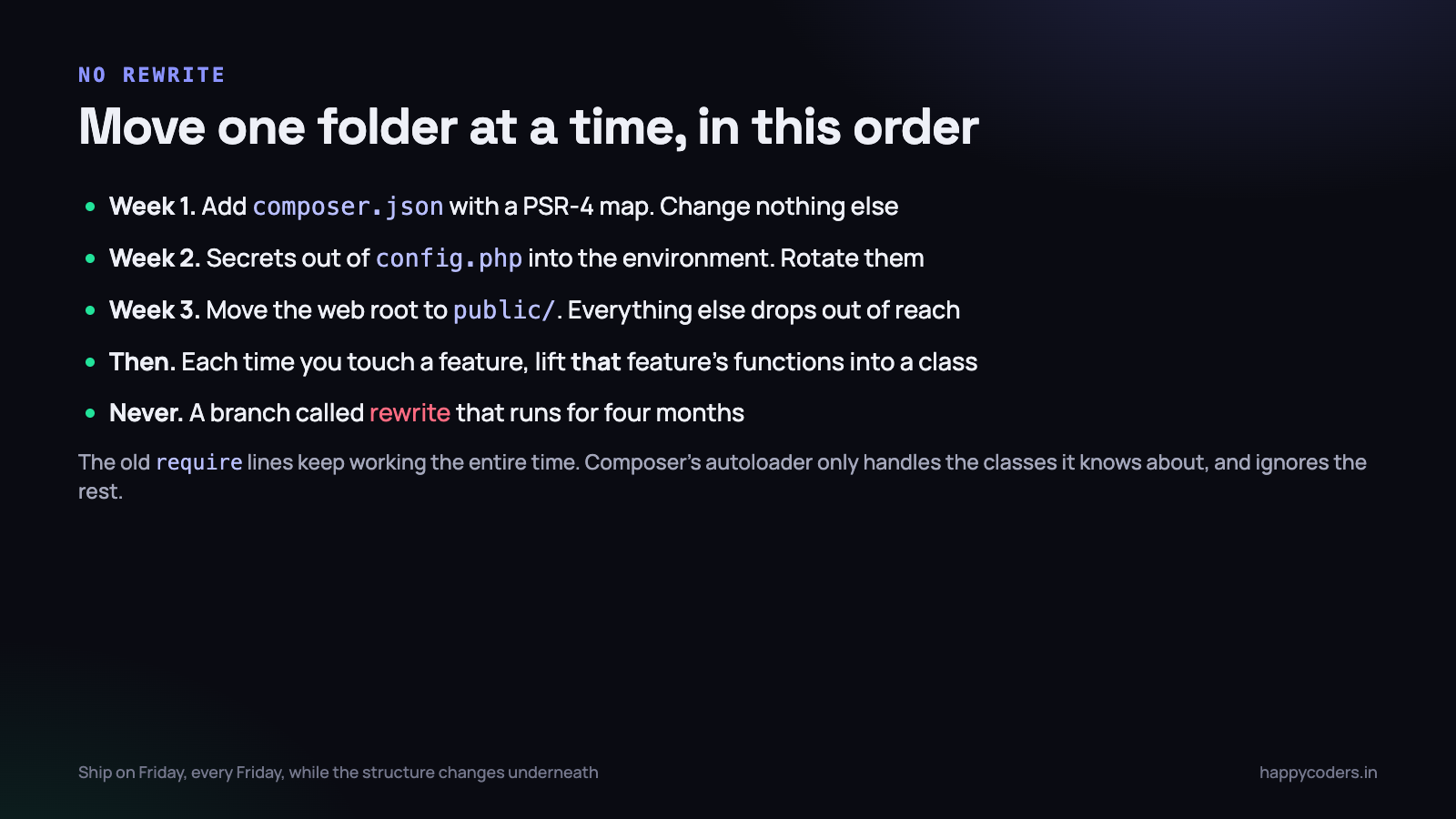
- Add
composer.jsonand an emptysrc/. Require the autoloader at the top of your existing bootstrap. Change nothing else. Deploy it. Nothing is different yet, and that is the point — the mechanism is in place. - Move the secrets out. Environment variables, a
config/that reads them, a committed.env.example, and rotated credentials. One afternoon, and the highest-value step on this list. - Move the web root to
public/. Create it, moveindex.php, the assets and the uploads into it, repoint the document root. Everything else leaves the internet in one deploy. - Extract the next thing you were going to change anyway. Not the biggest mess — the next ticket. If it touches invoices, lift the invoice functions into
App\Invoiceas you work, and leave the old ones as thin wrappers so untouched callers keep working. - Delete the wrapper once nothing calls it.
grep -rnfor the old function name. When there are no results, remove it. This is the step that actually finishes the migration. - Add a test the first time you extract something. Once the logic is in a class with its dependencies passed in, it is testable without a browser, and that is most of why you moved it.
Tie the work to tickets, not to a cleanup project. A cleanup project competes with features and loses. Extraction done inside the ticket you were doing anyway is invisible on the plan and finishes the parts of the codebase that people actually touch — which are the parts that matter.
You will end up with a project that is half-migrated for a long time. That is fine, and it is far better than the alternative. The parts that change often will be clean, because they are the parts you kept touching. The parts that never change will still be loose files in includes/, and they will keep working exactly as they have for six years.
What to do on Monday morning
- Check where your document root points. If it is the project root rather than a
public/folder, that is today’s job and it is worth more than the rest of the list combined. - Search the repository for passwords and API keys. Anything you find must be rotated, not just moved.
- Add
composer.jsonwith a PSR-4 map, runcomposer install, and require the autoloader. Fifteen minutes, no behaviour change. - Write down the six-folder layout in your README, even if only two of the folders exist yet. It is the rule people will follow when they add the next file.
- Take the next ticket and extract one class while you do it. One. Leave a wrapper behind.
- Add
composer dump-autoload --optimize --no-devto your deploy script.
None of this needs a framework, a migration plan or permission from anybody. It needs one decision — that from now on, new code goes in src/ with a namespace — and the discipline to keep making it on ordinary days when nobody is watching.




