


A file upload is the most dangerous feature in most applications, because it is the one place where a user puts a file of their choosing onto your server. Get it wrong and the outcome is not a data leak — it is somebody running their own code as your web server.
Almost every tutorial gives the same four checks. Two of them do nothing. This is which is which, and what to do instead.
The attack, so the checks make sense
A user uploads invoice.php containing one line:
<?php system($_GET['c']); ?>Your code saves it into /public/uploads/. The attacker then visits https://yoursite.com/uploads/invoice.php?c=ls, and your web server does what it does with any .php file in a public directory: it executes it.
They now have command execution as the web server user. From there: read your .env, connect to your database, write a persistent backdoor, pivot to whatever else the server can reach.
Everything below is about preventing that one sequence, and its variants.
The checks that do not work
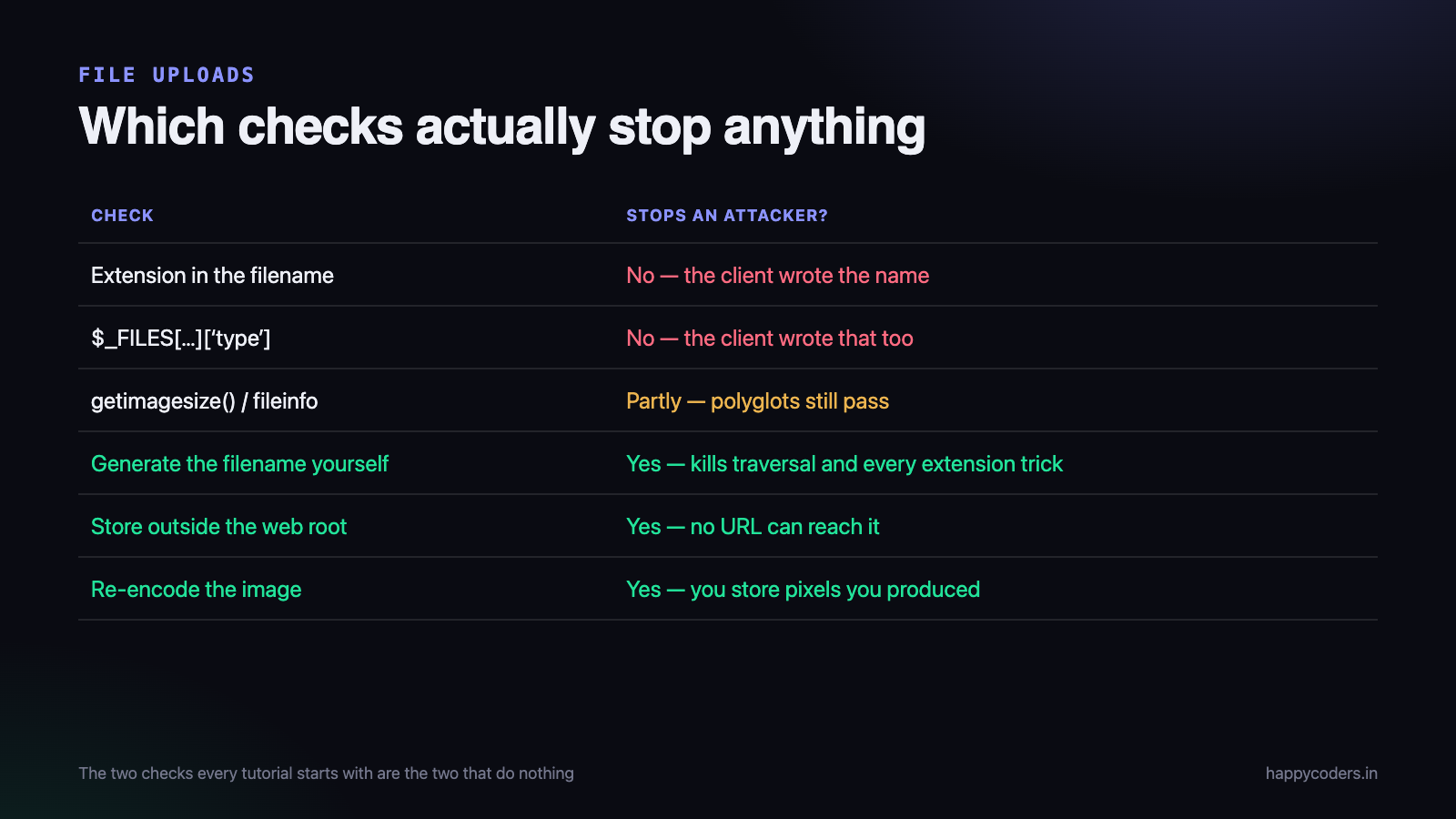
Checking the file extension in the name
<?php
// this is not a security control
$ext = pathinfo($_FILES['f']['name'], PATHINFO_EXTENSION);
if (!in_array($ext, ['jpg', 'png'])) { die('bad file'); }
The filename is supplied by the client. It is a suggestion, not a fact. It is also the weakest link in a chain of things that have historically gone wrong:
- Other executable extensions.
.php5,.phtml,.phar,.inc— whatever your server happens to be configured to hand to PHP. - Double extensions.
shell.php.jpghas been executable on misconfigured Apache setups that pass anything containing.phpto the interpreter. - Case.
.PhPdefeats a naive comparison. - Null bytes.
shell.php\x00.jpg— fixed in modern PHP, still present in older code paths.
An extension allow-list is worth having as a first filter, because it stops accidents and reduces noise. It is not a defence, and a system that relies on it is not protected.
Trusting the Content-Type the browser sent
<?php
// $_FILES['f']['type'] comes from the request. The client wrote it.
if ($_FILES['f']['type'] !== 'image/jpeg') { die('bad file'); }
This value is part of the multipart request body. Any HTTP client can set it to anything. It takes one line in curl to upload a PHP script announcing itself as image/jpeg.
Never use $_FILES[...]['type'] for a security decision. It exists to describe intent, not to certify content.
The checks that work
1. Store uploads outside the web root
This is the single most effective control and it makes most of the others unnecessary. If the file is not in a directory the web server will serve, there is no URL that can reach it, and therefore no way to execute it.
<?php
// not /var/www/html/uploads
$dir = '/var/app/storage/uploads';
Serve files back through a PHP script that checks permission and sends the bytes with a content type you decided:
<?php
$file = $repository->findForUser($id, $currentUser);   // authorisation happens here
if (!$file) { http_response_code(404); exit; }

header('Content-Type: ' . $file->safeMimeType);        // your value, not theirs
header('Content-Disposition: attachment; filename="' . $file->downloadName . '"');
header('X-Content-Type-Options: nosniff');
readfile($file->storagePath);
This also gives you per-user access control on files, which a public directory can never have. Most applications need that anyway and discover it late.
2. Generate the filename yourself
Never use any part of the uploaded name for the stored name. Generate one, and keep the original only as a label in the database.
<?php
$stored   = bin2hex(random_bytes(16)) . '.' . $safeExtension;
$original = $_FILES['f']['name'];   // store this in the DB, never on disk
This removes path traversal (../../), removes every extension trick at once, removes collisions, and removes the class of problems caused by unusual characters in filenames.
3. Verify the content, not the label
Look at the bytes. For images, the strongest check is that an image library can actually parse it and report sensible dimensions:
<?php
$info = @getimagesize($tmpPath);
if ($info === false) { die('not an image'); }

$allowed = [IMAGETYPE_JPEG => 'jpg', IMAGETYPE_PNG => 'png', IMAGETYPE_GIF => 'gif'];
if (!isset($allowed[$info[2]])) { die('unsupported image type'); }
$safeExtension = $allowed[$info[2]];
For non-images, read the type from the content with fileinfo rather than trusting the request:
<?php
$finfo = new finfo(FILEINFO_MIME_TYPE);
$type  = $finfo->file($tmpPath);          // derived from the bytes
if (!in_array($type, ['application/pdf', 'text/csv'], true)) { die('bad file'); }
Content verification is necessary and not sufficient on its own. A file can be a valid image and contain PHP source in its metadata — a polyglot. That file passes
getimagesize()and still executes if the server is willing to run it. This is exactly why rule one — keep it out of the web root — matters more than any inspection.
If the files must be publicly served
Sometimes there is a real reason — a CDN in front, or images referenced directly from static pages. Then the goal becomes making the directory incapable of executing anything.
Turn off execution in that directory
# Apache, in the uploads directory
php_flag engine off
<FilesMatch "\.(php|php5|phtml|phar|inc)$">
    Require all denied
</FilesMatch>
# nginx, in the server block
location ^~ /uploads/ {
location ~ \.php$ { return 403; }
}Test the configuration by putting a harmless PHP file in the directory and requesting it. If you see the source code rather than its output, it is working. Do this after every server change — configurations get rewritten.
Serve uploads from a different domain
A separate domain for user content means that even a successful XSS in an uploaded HTML or SVG file runs on an origin with no access to your session cookies. This is why the large platforms do it, and it is the one architectural decision here that protects against several classes of problem at once.
Be careful with SVG
SVG is XML, and XML can contain script. An uploaded SVG served inline is stored XSS, and it passes anything that checks “is this an image”. Either reject SVG, or sanitise it with a dedicated library, or always serve it with Content-Disposition: attachment so it downloads rather than renders.
The limits everyone forgets
Availability is part of security, and uploads are the easiest way to fill a disk.
- Check
$_FILES[...]['error']first, before anything else.UPLOAD_ERR_OKor stop — a partial upload has no usable content. - Set
upload_max_filesizeandpost_max_sizein PHP, and a body size limit in the web server. Enforce it in code too, because the PHP limits behave oddly when exceeded. - Cap the number of files per request with
max_file_uploads. - Reject enormous image dimensions. A 40,000 × 40,000 pixel PNG is a small file that becomes gigabytes of memory when your thumbnailer opens it. Check dimensions before processing, not after.
- Rate-limit per user, and monitor total storage. Someone will find the endpoint.
One more thing the request lies about
Two small habits close the remaining gaps, and both are one line.
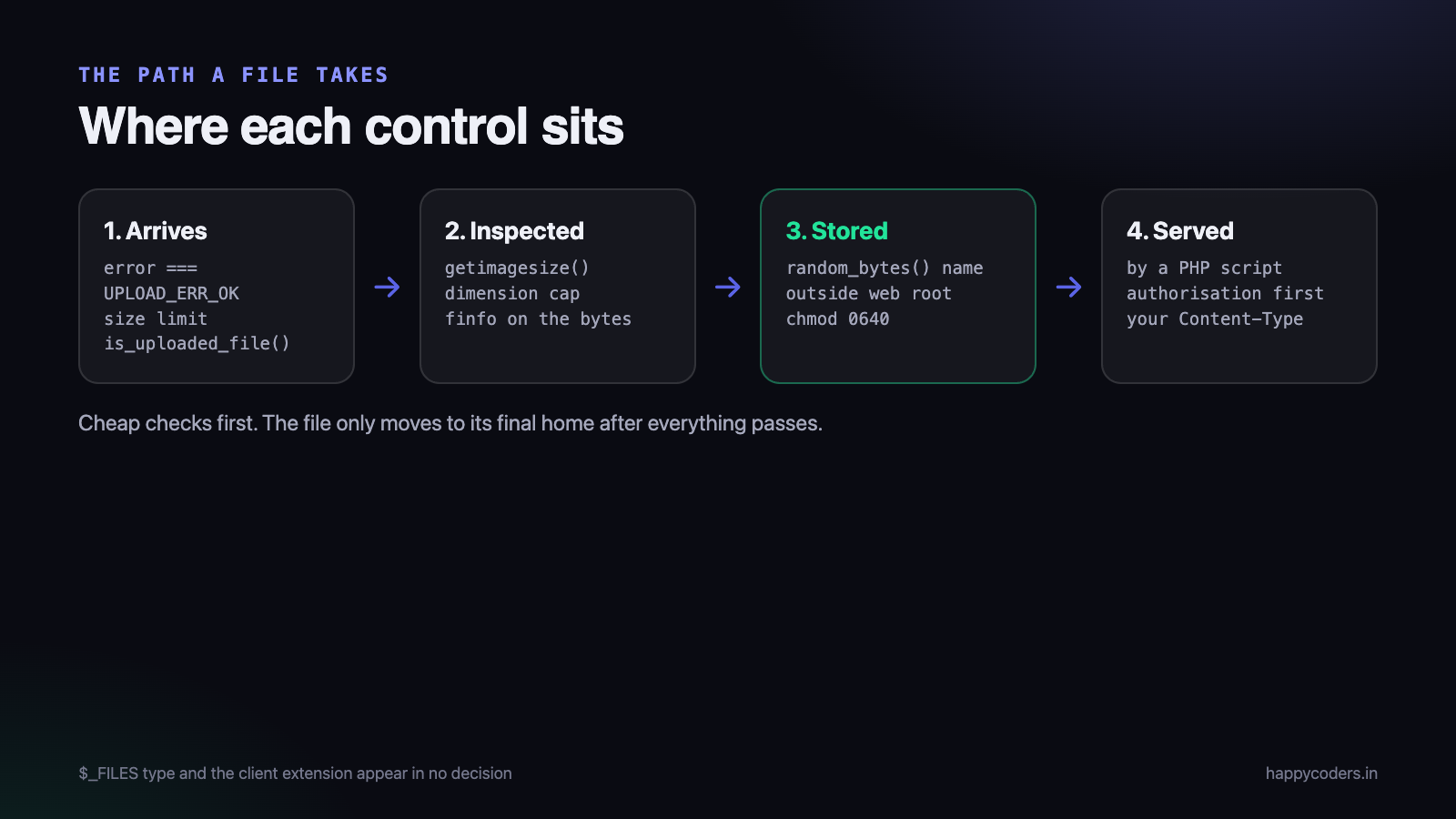
Call is_uploaded_file() before you trust the temporary path. It confirms the file genuinely arrived through an HTTP upload rather than being an arbitrary server path that reached your handler some other way. Use move_uploaded_file() rather than rename() for the same reason — it performs the same check internally.
Set restrictive permissions on the stored file. chmod 0640 means the web server can read it and nothing else on the box can. It costs nothing and it limits what a compromise elsewhere on the machine can reach.
A complete handler
<?php
public function store(Request $request): void
{
    $f = $request->file;

    if ($f['error'] !== UPLOAD_ERR_OK)        { throw new UploadFailed(); }
    if ($f['size'] > 5 * 1024 * 1024)         { throw new TooLarge(); }
    if (!is_uploaded_file($f['tmp_name']))    { throw new NotAnUpload(); }

    $info = @getimagesize($f['tmp_name']);
    if ($info === false)                      { throw new NotAnImage(); }
    if ($info[0] > 8000 || $info[1] > 8000)   { throw new TooManyPixels(); }

    $types = [IMAGETYPE_JPEG => 'jpg', IMAGETYPE_PNG => 'png'];
    if (!isset($types[$info[2]]))             { throw new UnsupportedType(); }

    $name = bin2hex(random_bytes(16)) . '.' . $types[$info[2]];
    $path = '/var/app/storage/uploads/' . $name;      // outside the web root

    if (!move_uploaded_file($f['tmp_name'], $path))   { throw new StoreFailed(); }
    chmod($path, 0640);

    $this->files->record([
        'stored_name'   => $name,
        'original_name' => $f['name'],       // label only
        'mime'          => image_type_to_mime_type($info[2]),
        'owner_id'      => $request->user()->id,
    ]);
}
Note the order: cheap checks first, and the file only moves to its final location after everything has passed. Note also that $_FILES[...]['type'] and the client’s extension appear nowhere in any decision.
Re-encode images, where you can
The strongest control for images is not to keep the uploaded file at all. Open it, re-encode it, and store your own output:
<?php
$img = imagecreatefromjpeg($tmpPath);   // fails on anything that is not a real JPEG
imagejpeg($img, $finalPath, 85);
imagedestroy($img);
Whatever was hidden in the original — metadata, appended payloads, polyglot tricks — does not survive. You are storing pixels you produced, not bytes somebody sent you. It costs CPU, and for avatars and photos it is usually worth it.
As a bonus, this strips EXIF data, which frequently contains the GPS coordinates of wherever the photo was taken. Users rarely expect that to be published with their profile picture.
How to test your own upload endpoint
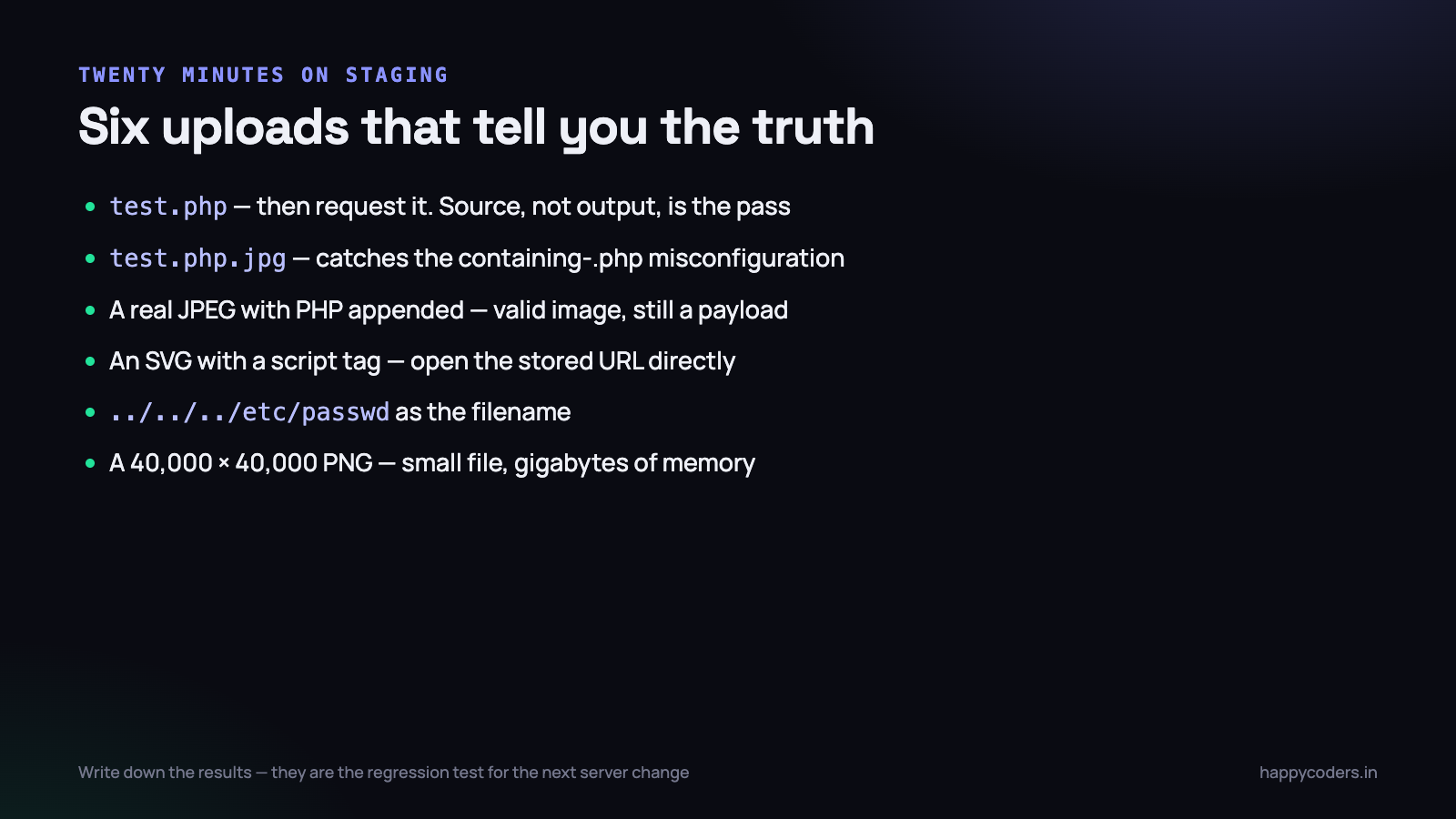
Reading a checklist is not the same as knowing. Six uploads, on your own staging environment, will tell you where you stand in about twenty minutes.
- A plain PHP file named
test.php. It should be rejected. Then find where it went if it was not, and try to request it in a browser. Seeing the source rather than the output is the pass condition. - A PHP file renamed
test.php.jpg. Catches servers configured to hand anything containing.phpto the interpreter. - A real JPEG with PHP appended to it. Take any photo, append
<?php echo 1; ?>to the end of the file, and upload. It is a valid image, so content checks pass — the question is whether it can ever be executed. - An SVG containing a script tag. Then open the stored file’s URL directly. If it renders and the script runs, you have stored XSS.
- A filename of
../../../etc/passwd. Confirms you are generating names rather than using theirs. - A 40,000 × 40,000 pixel PNG. A small file. If your thumbnailer opens it, memory disappears and the process dies — a one-request denial of service.
Do this on your own systems only, with permission, on staging rather than production. Write down the results; they are also the regression test for the next time somebody changes the server configuration.
Cloud storage changes the picture, but not the rules
A lot of applications now push uploads straight to object storage rather than keeping them on the server. That removes the execution problem entirely — object storage does not run PHP — but it introduces different mistakes, and they are easy to make.
- Public buckets. The commonest cloud data leak there is. If files are meant to be private, generate short-lived signed URLs instead of making the bucket readable.
- Direct browser uploads with a wide policy. Pre-signed upload URLs are convenient, and a policy that does not pin the content type, the size and the key prefix lets a user write anything anywhere in your bucket.
- Content type set by the client. Same mistake as before, new location. If the object is stored with a content type the uploader chose, the storage service will serve it back with that type — including
text/html. - Validation skipped because the file never touched your server. The file still ends up in front of your users. Validate it after upload, in a job, and quarantine anything that fails.
The underlying rule has not changed: the content is not what the uploader says it is, and the place you store it must not be able to execute it. Cloud storage gives you the second half for free and none of the first.
If you think it already happened
Finding a stray .php file in an uploads directory is not a code review finding; it is an incident. The sequence matters.
- Do not delete it first. Copy it somewhere safe. It is the evidence of how they got in, and the timestamps tell you when.
- Take the application offline or block the directory at the web server, before investigating.
- Search for others. Recently modified PHP files anywhere under the document root, not only in uploads.
find . -name "*.php" -mtime -30is a starting point, and check the ones you do not recognise. - Assume credentials are gone. Anything readable by the web server user — database passwords, API keys, mail credentials, the
.envfile — is compromised. Rotate all of it. - Check for persistence before restoring: scheduled tasks, new users, modified startup scripts, SSH keys. Restoring a backup on top of a system that still has a cron job in it achieves nothing.
- Then fix the upload, and re-run the six tests above.
It is worth deciding this order in advance, because the instinct in the moment is to delete the file and feel better, which destroys the only record of what happened.
It is also worth writing down, somewhere a future colleague will find it, which of these controls your application relies on. Upload code gets rewritten during redesigns, and the person doing it six months from now will not know that the directory being outside the web root was load-bearing rather than an accident of layout.
The short version
- Store outside the web root. This is the one that matters.
- Generate the filename. Keep the original as a label only.
- Verify content with
getimagesize()or fileinfo — never the client’s type. - Serve through a script that checks permission and sets the content type.
- If it must be public: disable execution there, use a separate domain, and be careful with SVG.
- Re-encode images and store your own output.
- Limit size, dimensions, count and rate.
- Test by uploading a harmless PHP file and requesting it.
The extension check and the Content-Type check are the two every tutorial starts with, and neither survives an attacker with curl. If you only change one thing after reading this, move the directory.
Related reading on the same theme — never trust what the request tells you: preventing XSS in PHP and preventing SQL injection in PHP.




