


A redirect is four words of configuration that can either preserve a decade of search rankings or delete them. It is also the single most common way a working website is taken completely offline by somebody who was trying to help — one bad line in .htaccess and every page on the domain returns a 500, including the admin panel you would use to undo it.
This is the practical version. What to write for the five jobs that make up almost all real redirect work, why the choice between 301 and 302 is a business decision rather than a technical detail, how to test properly before and after, and what to do at the moment you realise you have locked yourself out.
301 and 302 are not interchangeable
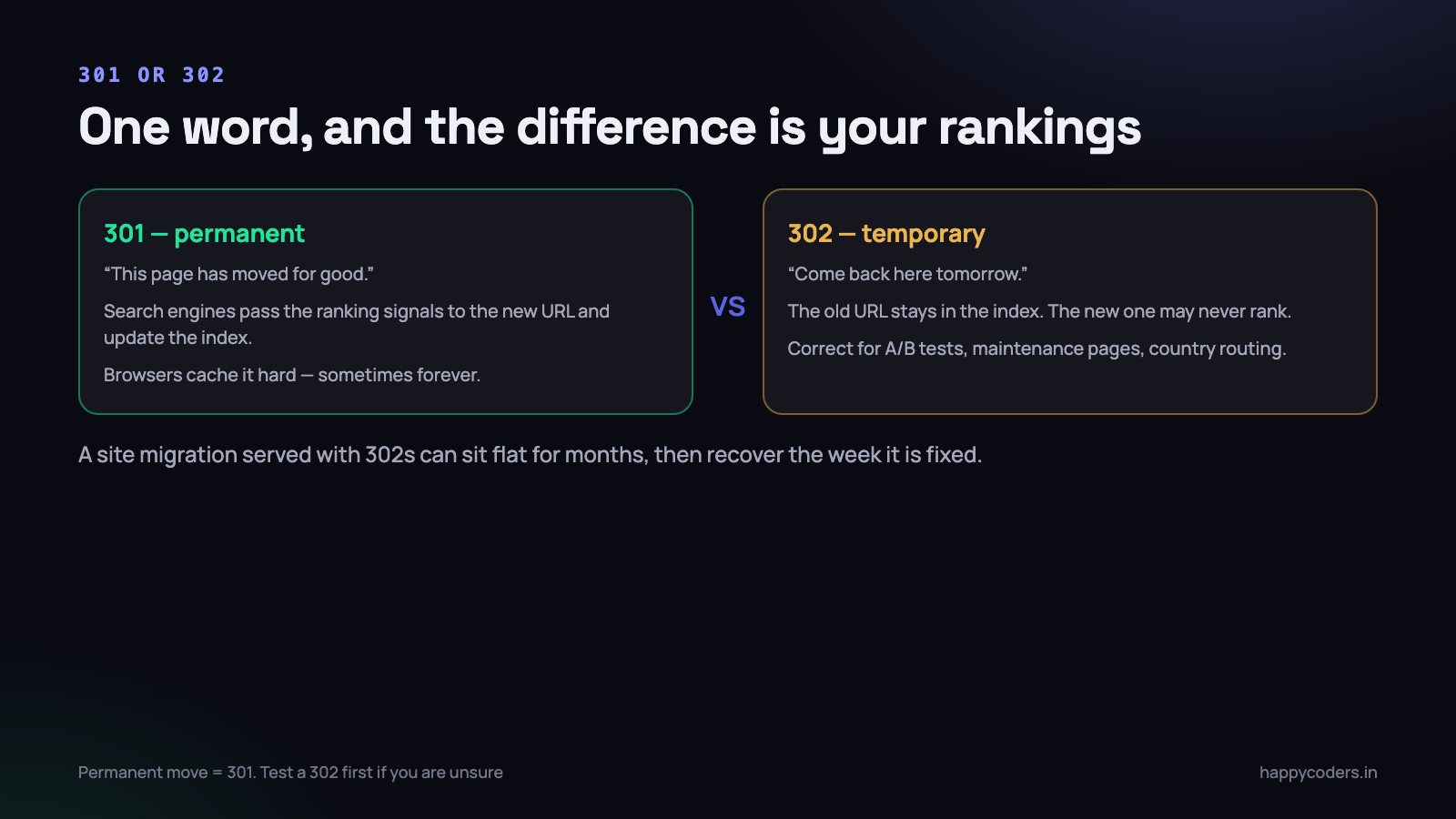
Both send a visitor from one URL to another and both look identical in a browser. What differs is what search engines do afterwards, and that difference is worth real money.
A 301 is permanent. It says the page has moved for good. Search engines eventually drop the old URL from their index, transfer the ranking signals it had accumulated to the new one, and update any links they show. This is what you want for a moved page, a renamed section, a new domain, or forcing HTTPS.
A 302 is temporary. It says “go here for now, but keep asking at the original address.” The old URL stays indexed. The new URL may never rank on its own, because search engines correctly treat it as a detour rather than a destination.
The expensive mistake is a site migration served with 302s. Everything works. Every visitor lands in the right place. Nobody notices for weeks, while traffic stays flat instead of recovering, because from a search engine’s point of view the new pages are not the real pages. We have watched a site sit at sixty per cent of its previous traffic for two months and then recover within a fortnight of changing one character in a rule.
302 has genuine uses: an A/B test, a maintenance page, routing a visitor to a country-specific page based on where they are, a temporary promotion. In every one of those cases the original URL really is coming back.
A 301 is cached aggressively by browsers, sometimes indefinitely. If you set one by mistake and fix it, your own browser may keep following the old rule for days. That is not the rule failing — it is the browser obeying what you told it the first time. Test in a private window or with curl.
The other codes you will meet
- 307 and 308 are the strict versions of 302 and 301. They guarantee the request method is preserved, so a POST stays a POST. For ordinary page redirects a 301 is fine and better understood by every tool. For API endpoints, prefer 308.
- 410 Gone is not a redirect and is sometimes the right answer. If a page is genuinely deleted with no equivalent, a 410 tells search engines to drop it. Redirecting it to the homepage instead is worse than useless — search engines treat a mass of unrelated redirects to the homepage as soft 404s anyway.
- A meta refresh or a JavaScript redirect is not a substitute. It is slower, it flashes a blank page, and it passes ranking signals unreliably. Use the server.
The five rules you actually need
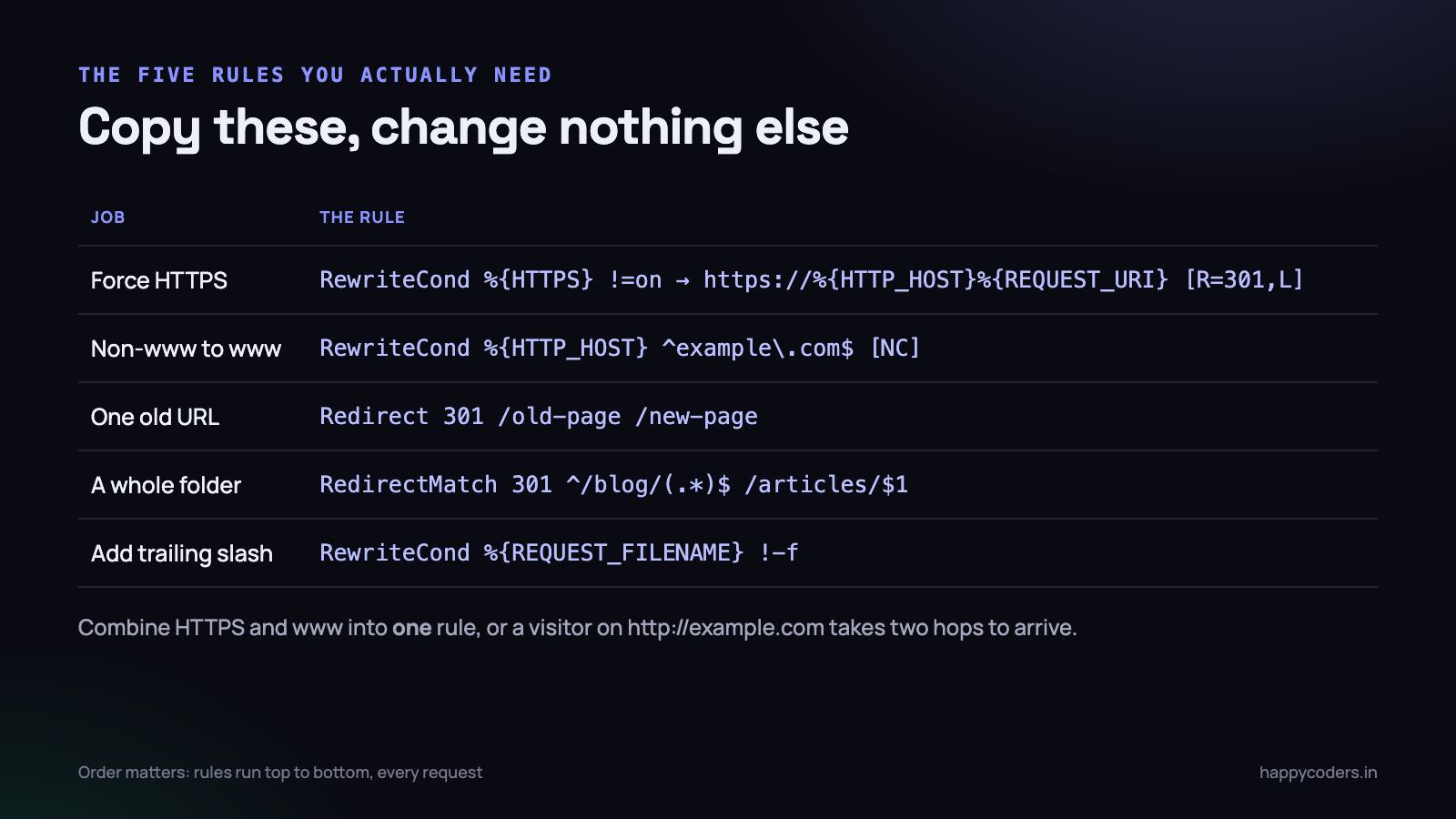
Almost all redirect work on a normal site is one of these five jobs. Copy them, change the domain, change nothing else.
Force HTTPS and www in one hop
This is the rule to get right first, because doing it in two separate blocks is how most sites end up with a redirect chain on every single visit. Combine the conditions so a visitor arriving at http://example.com/page reaches the final URL in one step.
RewriteEngine On

# One rule: force HTTPS and www together
RewriteCond %{HTTPS} !=on [OR]
RewriteCond %{HTTP_HOST} !^www\. [NC]
RewriteRule ^(.*)$ https://www.example.com/$1 [R=301,L]
The [OR] is doing the work. Without it, Apache requires both conditions to be true, and a visitor already on HTTPS but without www would not be redirected at all. With it, either problem triggers the same single rewrite to the correct final address.
If you prefer the non-www version — and it does not matter which you choose, only that you choose one and never change it — invert the host condition.
# The non-www version
RewriteCond %{HTTPS} !=on [OR]
RewriteCond %{HTTP_HOST} ^www\.(.+)$ [NC]
RewriteRule ^(.*)$ https://example.com/$1 [R=301,L]
One old URL to one new URL
For a handful of individual pages, the simple Redirect directive is easier to read than a rewrite and just as correct. The first path is relative to the domain root; the second can be a path or a full URL.
Redirect 301 /old-services-page /services
Redirect 301 /2019/09/our-old-post /blog/our-new-post
One caution: Redirect is prefix-matching. Redirect 301 /services /solutions will also catch /services-and-pricing and send it to /solutions-and-pricing, which almost certainly does not exist. When a path is a prefix of other paths, use RedirectMatch with anchors instead.
# Exactly /services, nothing else
RedirectMatch 301 ^/services/?$ /solutions
A whole folder, keeping the rest of the path
Moving /blog/ to /articles/ without listing every post. The capture group keeps whatever followed.
RedirectMatch 301 ^/blog/(.*)$ /articles/$1This is the right tool when the structure is preserved. It is the wrong tool when it is not — if the slugs changed as well as the folder, you need a mapping, and a redirect rule per URL is entirely reasonable for a few hundred pages. Generate the list from a spreadsheet rather than typing it.
Trailing slashes, one way or the other
/about and /about/ are different URLs. Serving the same content at both is a duplicate content problem and splits any links you earn. Pick one form and redirect the other, being careful not to break real files.
# Add a trailing slash to directories, never to files
RewriteCond %{REQUEST_FILENAME} !-f
RewriteCond %{REQUEST_URI} !(.*)/$
RewriteRule ^(.*)$ /$1/ [R=301,L]
The !-f condition is the important line. Without it, a request for /style.css gets redirected to /style.css/, and your stylesheet stops loading. This is a genuinely common way to break a site with a rule that looks fine in a test on a page URL.
Moving to a new domain
Same pattern, keeping the path so every deep link survives. Keep the old domain and this rule alive indefinitely — certainly for a year, and in practice for as long as you keep paying for the domain, because old links keep sending people for far longer than anybody expects.
RewriteEngine On
RewriteRule ^(.*)$ https://www.newdomain.com/$1 [R=301,L]
Chains and loops
Two failure modes that both come from rules that are individually correct.
A chain
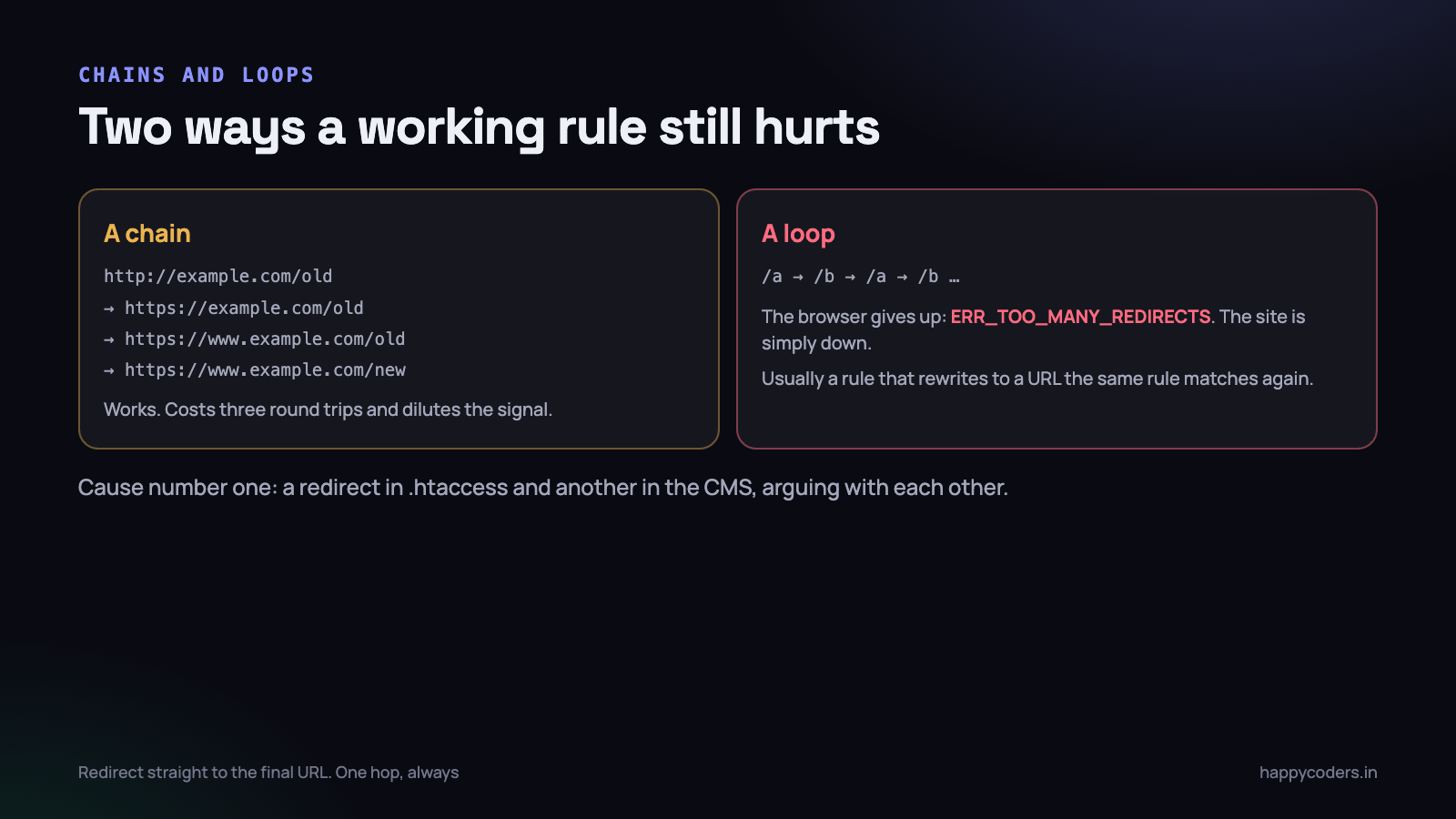
A visitor arriving at http://example.com/old-page gets redirected to the HTTPS version, then to the www version, then to the new page. Three round trips before anything renders. On a slow mobile connection that is a noticeable delay, and search engines are documented as being less willing to follow long chains.
The cause is nearly always what you would expect: HTTPS handled in one rule, www in another, and page-level redirects written later without considering the first two. The fix is the combined rule above, plus writing every page-level redirect straight to the final canonical URL — correct protocol, correct host, correct path — rather than to a path that will be rewritten again.
A loop
A rule whose destination matches the rule itself. The browser follows it, arrives, gets redirected again, and after about twenty hops gives up with ERR_TOO_MANY_REDIRECTS. The site is simply down, for everybody, and the page that tells you so contains no clue about which rule caused it.
- A redirect in
.htaccessand another in the CMS. The commonest cause by a distance. WordPress with a site URL set to www and an.htaccessrule forcing non-www will bounce forever. - An HTTPS rule behind a proxy or CDN. Cloudflare terminates TLS and talks to your server over HTTP, so
%{HTTPS}is off on every request, and the rule fires every time. Check%{HTTP:X-Forwarded-Proto}instead. - A trailing-slash rule that matches its own output. Add the slash, the new URL still matches the pattern, add another.
# The Cloudflare-safe HTTPS rule
RewriteCond %{HTTP:X-Forwarded-Proto} !https
RewriteCond %{HTTPS} !=on
RewriteRule ^(.*)$ https://www.example.com/$1 [R=301,L]
Test with curl, before and after
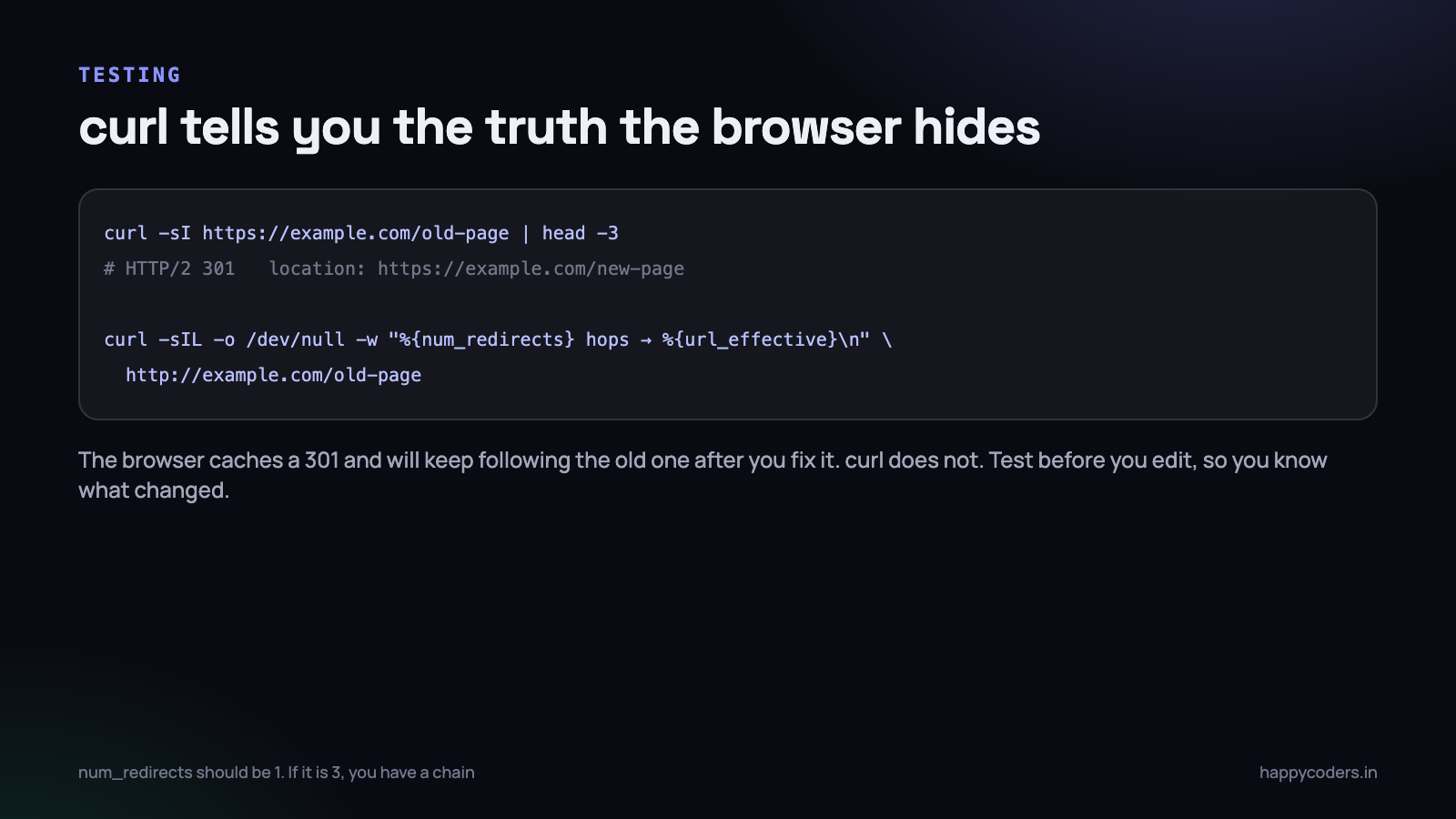
A browser is the worst tool for testing redirects. It caches 301s, it follows chains invisibly, and it shows you only the final page. curl shows the actual exchange and caches nothing.
# What does this URL do right now?
curl -sI https://www.example.com/old-page | head -3

# Follow the whole chain and count the hops
curl -sIL -o /dev/null \
  -w "%{num_redirects} hops -> %{url_effective}\n" \
  http://example.com/old-page

# See every hop, with its status code
curl -sIL http://example.com/old-page | grep -i "^HTTP\|^location"
Three things to check in the output. The status must be 301 where you intended a permanent move. num_redirects should be 1 for a visitor arriving at the worst-case starting URL — the http, non-www, old-path version. And the final URL must be the one you actually wanted, with the path intact.
Run all of that before you edit anything and save it to a file. Doing a migration without a before-state is how you end up unable to answer whether a URL used to work.
- Export every URL that currently gets traffic from Search Console or your analytics, before the change.
- Write the mapping as a spreadsheet — old URL, new URL, one row each — and generate the rules from it rather than writing them by hand.
- Test on staging with the same rules and the same server software.
- After deploying, run the whole list through curl in a loop and check for anything returning 404, 500, or more than one hop.
- Watch Search Console for two weeks. Crawl errors appear there before they appear in your traffic figures.
What belongs in .htaccess and what does not
Not every redirect should live in the file, and on a CMS-driven site most of them should not.
- .htaccess is right for site-wide rules that must run before any application code: HTTPS, www, a domain move, blocking access to a path. These have to be at the server level because they apply to requests your application will never see.
- The CMS is right for content-level redirects — a post that got renamed, a product that was discontinued. A redirect plugin gives non-technical staff a screen they can use, keeps the rules in the database where they are backed up with everything else, and costs one database lookup on requests that would 404 anyway.
- Nginx does not read .htaccess at all. If your host runs nginx, the file is ignored entirely and silently. Rules go in the server configuration, which means a restart and usually a support ticket. Check which server you are on before spending an afternoon editing a file that does nothing.
- A CDN can do redirects too, and doing them at the edge is faster because the request never reaches your server. It also means a redirect that exists in a place nobody thinks to look. Document it.
Never split the same job across two layers. HTTPS forced in .htaccess and again in the CMS and again at the CDN is how you get a loop that only appears for some visitors, in some countries, on some devices.
Five details that cause most of the confusion
Once the rules are written, these are the things that make a correct-looking rule behave oddly.
- The
[L]flag does not mean stop. It means stop processing this pass. If the rewritten URL is handled again — which it usually is in.htaccess— the whole file runs from the top on the new URL. This is why a rule can appear to fire twice. - Query strings are not part of the match. A
RewriteRulepattern sees the path only. To match on a parameter you need aRewriteCondon%{QUERY_STRING}, and to drop the original parameters you need a trailing?on the destination. - A leading slash is present in some contexts and not others. In
.htaccess, theRewriteRulepattern is matched against the path with the leading slash stripped, which is why every example above starts^(.*)$rather than^/(.*)$. In a virtual host config the slash is there. Copying a rule between the two is a common cause of a rule that silently matches nothing. - WordPress rewrites everything anyway. Your custom rules must sit above the
# BEGIN WordPressblock, because that block ends by sending all unmatched requests toindex.php. Anything written below it will never run. WordPress also rewrites its own block on permalink changes and will delete anything it finds inside the markers. - Regex is greedy and case-sensitive. Add
[NC]when a host or path might arrive in mixed case, and anchor patterns with^and$unless you deliberately want a prefix match.
# Redirect based on a query parameter, and drop it
RewriteCond %{QUERY_STRING} (^|&)id=42($|&)
RewriteRule ^product\.php$ /products/steel-frame? [R=301,L]
When a rule locks you out
It will happen eventually. A syntax error gives every URL on the domain a 500, including the dashboard. Or a loop makes every page unreachable. Either way the browser-based tools you would normally reach for are gone.
- Keep a copy before you edit.
cp .htaccess .htaccess.baktakes one second and makes the rest of this list unnecessary. - Get file access another way. SSH, SFTP, or the file manager in your hosting panel — which is on a different domain and therefore still works.
- Rename the file, do not edit it.
mv .htaccess .htaccess.broken. The site comes back immediately, usually with broken permalinks, which is a far better position to be in. - Add the rules back a few lines at a time, testing after each block. You will find the bad one in minutes instead of guessing.
- Check the error log. Apache writes the exact line number and reason for a 500 caused by a syntax error. It is the fastest route to the answer and the one people skip.
- If you are mid-deployment with no shell access, ask your host’s support to rename the file. On Indian shared hosting this is usually a five-minute chat, and it is what the support channel is for.
Before touching
.htaccesson a live site, open your hosting file manager in a second browser tab and log in. If the change breaks the site, you already have the recovery tool open, which turns a panicked half hour into thirty seconds.
What to do on Monday morning
- Run the curl chain check on your homepage starting from
http://example.comwith no www. If it reports more than one hop, you have a chain on every first visit and the combined rule above fixes it. - Check whether your redirects are 301 or 302. Any permanent move still being served as a 302 is quietly costing you rankings today.
- Back up the file and put a dated comment at the top of each rule block saying what it is for and who added it. In two years nobody will remember, including you.
- Find out whether your server is Apache or nginx, so you know whether the file is even being read.
- Move content-level redirects out of the file and into your CMS, keeping
.htaccessfor the handful of site-wide rules. - Test a redirect that should 404. Deleted pages with no equivalent should return 404 or 410, not a redirect to the homepage.
Redirects are not difficult, but they are unforgiving in a specific way: a mistake either does nothing visible for six weeks or takes the whole site down in one second. Test before, test after, keep a backup of the file, and neither outcome is a problem.




