


Attendance was a solved problem when everybody walked past the same machine. One thumb, one timestamp, one register. The moment part of the team works from home, from a client site, or from a different city, that register stops describing anything real — and most companies replace it with something worse.
This is what Indian teams are actually using in 2026, what each method genuinely measures, and where each one falls apart.
What are you actually trying to find out?
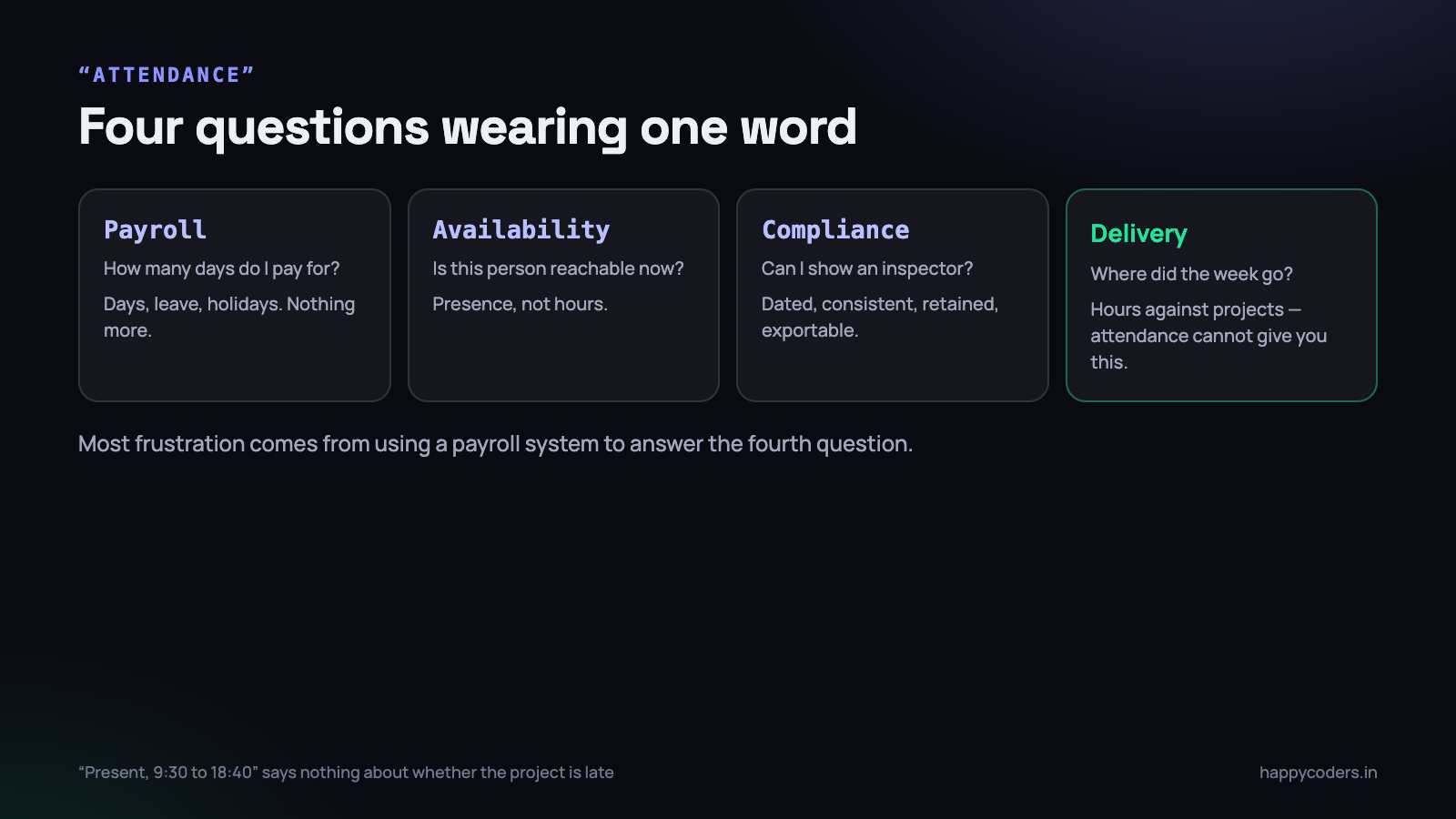
This sounds obvious and is almost always skipped, which is why so many attendance systems answer a question nobody asked. There are four different questions hiding inside “attendance”, and they need different answers.
- Payroll. How many days do I pay for this month? Needs days, leave and holidays. Nothing more.
- Availability. Is this person reachable right now? Needs presence, not hours.
- Compliance. Can I show a labour inspector a record? Needs a consistent, dated, retained log.
- Delivery. Where did the week actually go, and is this project on track? Needs hours against projects — which attendance cannot give you at all.
Most of the frustration with attendance systems comes from using one built for the first question to answer the fourth. A record that says “present, 9:30 to 18:40” tells you nothing about whether the project is late.
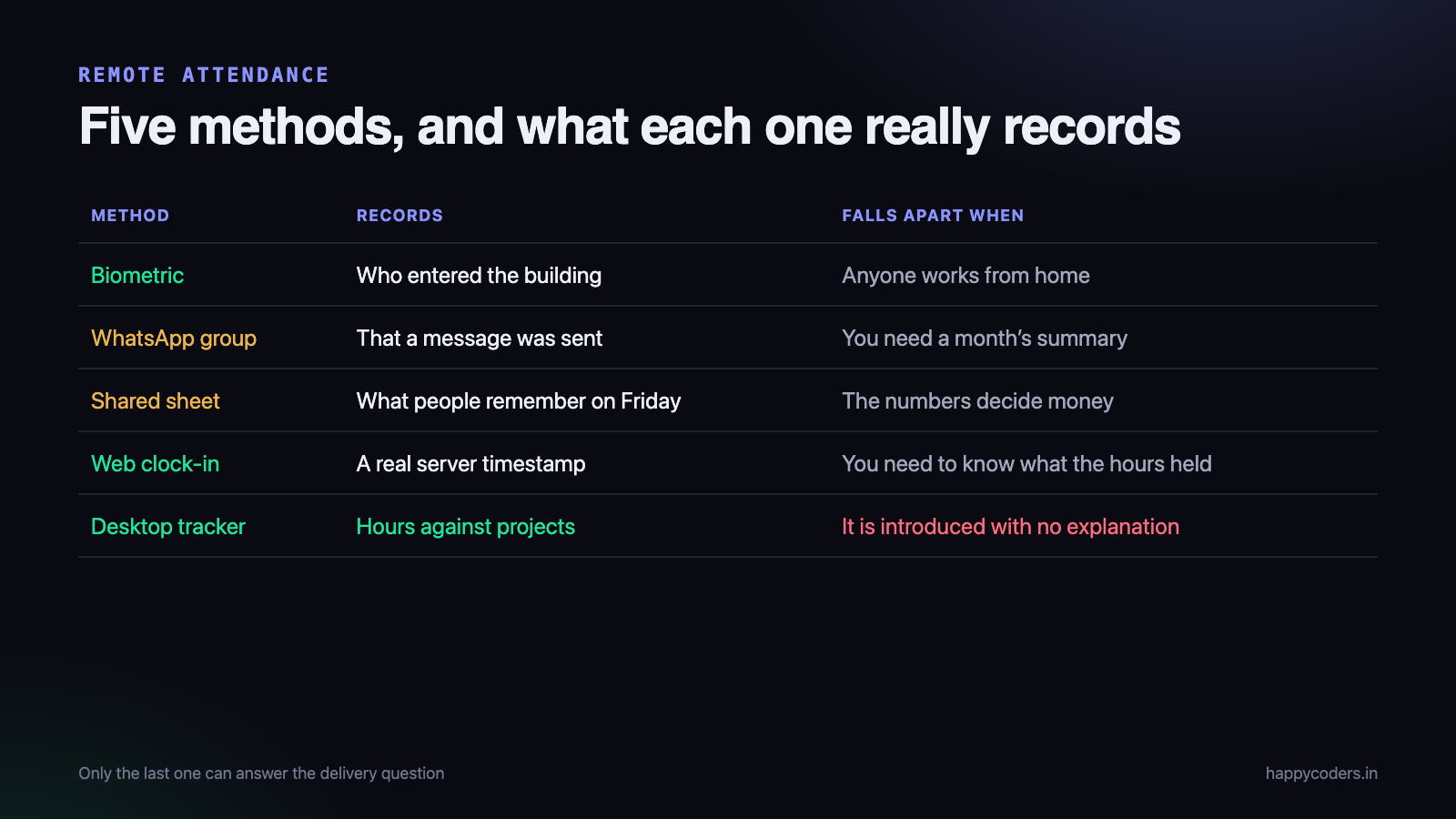
The five methods, honestly
1. The biometric machine
Still the default in most Indian offices, and still the best answer for anyone who comes to a building — factory staff, office administration, a delivery team that reports in.
For a remote team it stops working completely, and the workarounds are worse than the problem. Companies that tried to keep the machine as the source of truth ended up with a monthly ritual of manual corrections, which is a spreadsheet with extra steps and a hardware bill.
- Good for: on-site staff, a legal register, no ambiguity about who was in the building.
- Falls apart when: anybody works from home, visits a client, or travels.
2. The WhatsApp group
Extremely common and rarely admitted to. A group where everyone types “Good morning, starting” and “Signing off”.
Its real advantage is that it costs nothing and everybody already has the app. Its real cost is that somebody has to read a hundred messages at month end and turn them into a sheet, and that a message saying “starting” can be sent from anywhere, at any time, including from bed.
- Good for: a team of five, temporarily.
- Falls apart when: you need a month’s summary, a dispute needs settling, or somebody leaves and takes the history with them.
3. The shared spreadsheet
The next step up, and genuinely workable for a small team. Columns for dates, rows for people, someone responsible for it.
It fails in the ordinary ways spreadsheets fail: everyone fills it in on Friday from memory, one person edits the wrong row, there is no history of who changed what, and the file quietly forks into three versions. It is also entirely self-reported, which means it records intentions rather than events.
- Good for: under ten people, with one disciplined owner.
- Falls apart when: the team grows, or the numbers start deciding money.
4. Web clock-in
A page the person opens and presses “clock in” on. The timestamp is recorded by the server, so it is a real event rather than a recollection.
This is a genuine improvement over the first three and enough for many companies. It is also easy to do from a phone on the way to somewhere else, which is either fine or not depending on what you are measuring. If it matters, most systems let you restrict clock-in to the desktop app or to particular people.
- Good for: distributed teams, field staff, anyone without a fixed machine.
- Falls apart when: you need to know what the hours contained, not just that they happened.
5. A desktop tracker
An application on the work machine that records when work started and stopped, and — depending on settings — what applications were in use, how active the machine was, and periodic screenshots.
This is the only method on the list that can answer the delivery question, because it is the only one that records what the hours were spent on. It is also the method most likely to cause a problem with the team, and that is a management issue rather than a software one.
- Good for: project-based work, agencies, anybody who needs to quote accurately.
- Falls apart when: it is introduced without explanation, or the first thing anybody does with it is discipline somebody.
What most companies land on
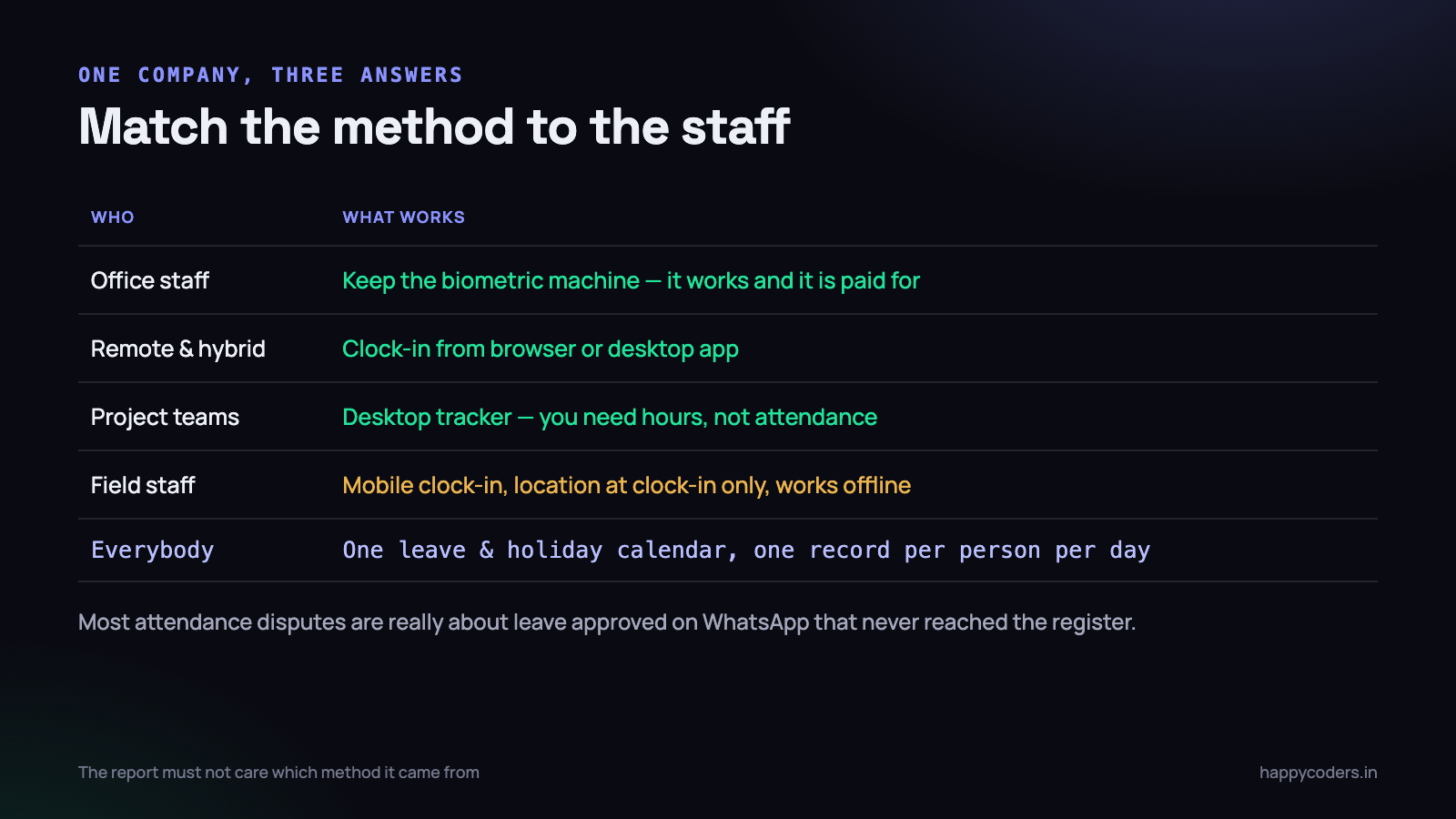
In practice the arrangement that survives is usually a split, not a single system.
- Office staff — the biometric machine stays, because it works and it is already paid for.
- Remote and hybrid staff — clock-in from the app or the browser, which produces a comparable record.
- Project teams — the desktop tracker, because the company needs hours against projects, not attendance.
- Everybody — one leave and holiday calendar, so that “absent” and “on leave” are different things everywhere.
That last point is small and matters enormously. A large share of attendance disputes are not about attendance at all — they are about a leave that was approved on WhatsApp and never reached the register.
Field staff are a different problem
Sales teams, service engineers, delivery staff and site supervisors do not sit at a machine, and every system above assumes they do. They are also the group most often forced into a system built for desk workers, which is why it fails.
What works for them is narrower and simpler:
- Mobile clock-in with a location stamp at the moment of clocking — not continuous tracking. There is a large difference between recording where somebody started their day and following them all day, and it is both a trust difference and, increasingly, a legal one.
- Offline tolerance. Coverage is unreliable outside cities. If the app cannot record a clock-in without a signal, it will be worked around within a week.
- Nothing to install where possible. Many field staff use personal phones. A heavy app on a personal device is resented, and reasonably so.
- A visit record, not an hours record. For most field roles, “six sites visited, here is the log” is a more useful answer than a timesheet.
If you take continuous location tracking seriously as an option, take the consent question seriously too: tell people plainly what is collected, when it is collected, and for how long it is kept. That conversation is far cheaper before the rollout than after.
Hybrid is where most systems actually break
Fully remote is easy to design for; fully office-based is already solved. It is the mixed week — three days in, two days at home, occasionally at a client — that defeats most setups, because the record for the same person comes from three different places and nothing reconciles.
The rule that fixes it: one record per person per day, from whichever method they used, in one place. The biometric machine, the web clock-in and the desktop tracker can all feed it, but the report must not care which one it came from. If a manager has to open two systems and mentally merge them, they will stop doing it by the third month and go back to asking people directly.
The related decision is which method wins when two disagree — the machine says present at 9:15, the tracker’s first entry is 11:40. Both are recording something true. Pick one as authoritative for payroll, say so out loud, and use the other for delivery questions only.
The things that break, and the fixes
- Time zones and late sessions. Somebody starts at 22:30 and stops at 01:15. Which day is that? Pick a rule — we attribute the session to the day it started — write it down, and make every report use the same one.
- Leave that never reaches the record. If leave is approved in chat, it will not appear in the report. One place to request and approve it, or this problem is permanent.
- Half days and client visits. Decide in advance how they are recorded, or you get five different conventions and a monthly argument.
- The forgotten clock-out. Somebody leaves the timer running overnight and the report says nineteen hours. People must be able to correct their own entries, or they stop trusting the whole system.
- Two systems that disagree. The machine says present, the tracker says four hours. Both are true. Decide which one is authoritative for payroll and stop comparing them.
- Network drops. A tracker that loses an afternoon because the internet went down will be abandoned within a fortnight. It has to buffer locally and upload later.
What the law expects
This is not legal advice and the detail varies by state, but the shape is consistent: Indian establishments are expected to maintain a register of attendance and wages, keep it for a defined period, and produce it on inspection. Several states now accept electronic registers, which is why digital attendance has become normal rather than risky.
Two practical consequences. First, whatever you use has to be retained — a tool that keeps only the last 30 days on your plan is a compliance problem, not just an inconvenience. Second, it has to be exportable in a form a person can read, because an inspector will not log into your dashboard.
Check the current requirement for your state and establishment type with your own compliance advisor before deciding anything. The point here is only that retention and export belong on your evaluation checklist, and they usually are not on it.
Attendance is not productivity, and saying so helps
The most common failure is not technical. It is announcing an attendance system in a way that makes the team believe the company has stopped trusting them.
Three things make the difference, and none of them are features:
- Say what it is for, in one sentence, before you install anything. “So we can quote projects properly and stop losing money on revisions” is a reason people accept. Silence gets filled with a worse explanation.
- Make the first report about a project, not a person. This sets the tone permanently, and it is a choice managers make rather than software.
- Never use it for discipline first. If the first visible outcome is a conversation about somebody’s short Tuesday, data quality collapses within a fortnight and never recovers.
Teams accept being measured. They resist being watched. The difference is entirely in what gets measured and what is done with it.
Start with the report, then choose the system
A better way to run the decision than comparing feature lists: write down, on paper, the exact report you want to open on the first of next month. The columns, the rows, who reads it, and what they will do differently because of it.
Most companies find this harder than expected, and that difficulty is the useful part. “Days present per person” takes ten seconds to specify and is genuinely all some companies need — in which case a clock-in and a leave calendar is the whole answer, and a tracker would be expensive theatre.
Others get halfway through and realise the report they actually want is “hours per project per client, with who worked on what” — at which point they have learnt something important: they were never really asking about attendance. No attendance system of any kind produces that, and buying a better one would not have helped.
Doing this first also prevents the most common waste in the whole exercise: turning on every available feature because it is included. Screenshots, activity levels, application logs and location all have a legitimate use and all have a cost in trust. Turn on only what the report you wrote down actually needs, and you will find it is usually less than the default.
A checklist for choosing
- Which of the four questions do you actually need answered?
- Does it work for office, remote and field staff without three systems?
- Is leave and holiday in the same place as attendance?
- Can a person correct their own mistake?
- Does it survive a network drop?
- How long is data retained, and can you export it?
- Is the desktop app optional, or forced on people who do not need it?
- What does the first report a manager opens actually show?
Happy Tracker covers clock-in from the browser or the desktop app on Mac, Windows and Ubuntu, with per-member control over which is allowed, leave types and a holiday calendar in the same place, and entries people can correct themselves. It is free for up to five users with no time limit, which is enough to run the pilot described above before anybody pays anything.




