


Toggl Track is a good product. It has been around a long time, the interface is clean, and a great many teams are happy on it. This is not going to be a page that pretends otherwise.
It is also priced in dollars for companies earning in dollars, and that single fact changes the arithmetic completely for an Indian services team. This is a head-to-head on the things that actually decide the choice — including the places where Toggl is clearly better than us.
Price, which is the part that moves
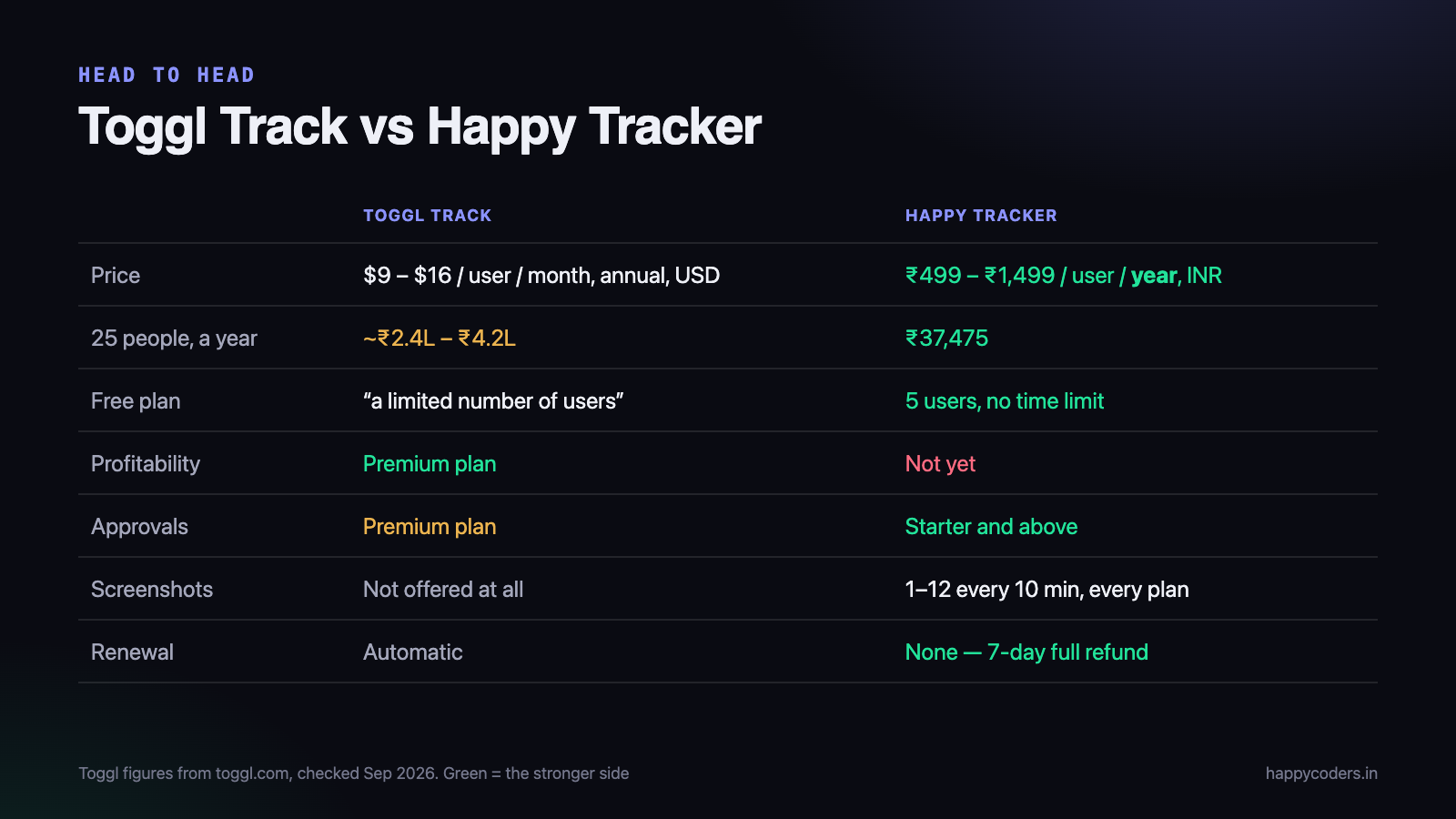
Toggl Track’s published pricing is $9 per user per month on Starter and $16 on Premium when billed annually — or $12 and $24 if you pay monthly. There is a free plan, described on their pricing page as free “for a limited number of users”.
Happy Tracker is ₹499 to ₹1,499 per user per year, in rupees, with a free plan for up to five users and no time limit.
Those are not comparable units, so here is the year, for 25 people:
- Toggl Starter: 25 × $9 × 12 = $2,700 ≈ ₹2.4 lakh
- Toggl Premium: 25 × $16 × 12 = $4,800 ≈ ₹4.2 lakh
- Happy Tracker: 25 × ₹1,499 = ₹37,475
Add the 2–3.5% foreign card markup to the first two and the gap widens slightly. Prices and tiers change — these are from Toggl’s own pricing page in September 2026, and you should check them yourself before deciding anything.
Which Toggl row applies to you depends on the feature gating, and this catches people out. Billable rates are on Starter, but timesheet approvals, profitability reports and labour costs are Premium. If you are buying a tracker to find out whether projects make money, the number to compare is ₹4.2 lakh, not ₹2.4 lakh.
Where Toggl is genuinely better
Four things, said plainly.
Project profitability and budgets
Toggl Premium has profitability reports and labour costs. It will tell you what a project cost against what it earned. We do not have this yet. If that specific report is the reason you are buying software, Toggl does it today and we do not, and no amount of price advantage changes that.
Integrations
Toggl connects to a very long list of other tools — project management, calendars, developer tools, browser extensions that start a timer from inside another app. Our list is short. If your team lives inside a tool that Toggl integrates with and we do not, that friction is real and daily.
Maturity
A decade of edge cases handled, a large support organisation, extensive documentation, and a product that very rarely surprises you. We are younger. Some things are rougher, and we fix them faster, but “we fix them faster” is not the same as “they were never broken”.
Reporting depth
Toggl’s reporting has more dimensions, more saved-report options and more export formats. If you have somebody whose job includes slicing time data several ways every week, they will find more to work with there.
Where we are better
The price, in the currency you earn in
Covered above. For a 25-person team the difference is between roughly ₹37,000 and ₹2.4–4.2 lakh a year. You also get an Indian invoice with GST on it that your accountant can claim input credit against, instead of an overseas subscription and a reverse-charge conversation.
The free plan
Five users, no time limit, and the screenshot and activity features are not stripped out of it. For a small agency or a founding team that is a genuinely usable product rather than a trial.
Screenshots and activity on every plan
Happy Tracker captures 1 to 12 screenshots every ten minutes, configurable, on every plan including the free one. Toggl Track does not do screenshot monitoring at all — that is a deliberate product decision on their side, not an oversight, and whether it counts as an advantage depends entirely on your work.
If you run an agency with external contractors and a client who asks for evidence of hours, it matters. If you run a salaried product team, you probably should not turn it on at all, and the fact that Toggl does not offer it is a point in their favour rather than against.
Desktop apps on Linux
Native trackers for macOS, Windows and Ubuntu. A surprising number of Indian development teams run Linux on the desk, and they usually end up with a worse experience on tools where Linux is an afterthought.
Refunds and renewal
Seven-day full refund on any payment, and no automatic renewal. If you forget about us, it stops rather than billing you. That is unusual and deliberate.
Support in your time zone, by someone who can change the product
A support request here reaches the people who write the code, during Indian business hours. Sometimes the answer is “that is a fair point, we will fix it” and it is fixed in a fortnight. That is a real advantage of being small, and it stops being true as we grow.
Which should you choose?
This genuinely depends, and the deciding factors are few.
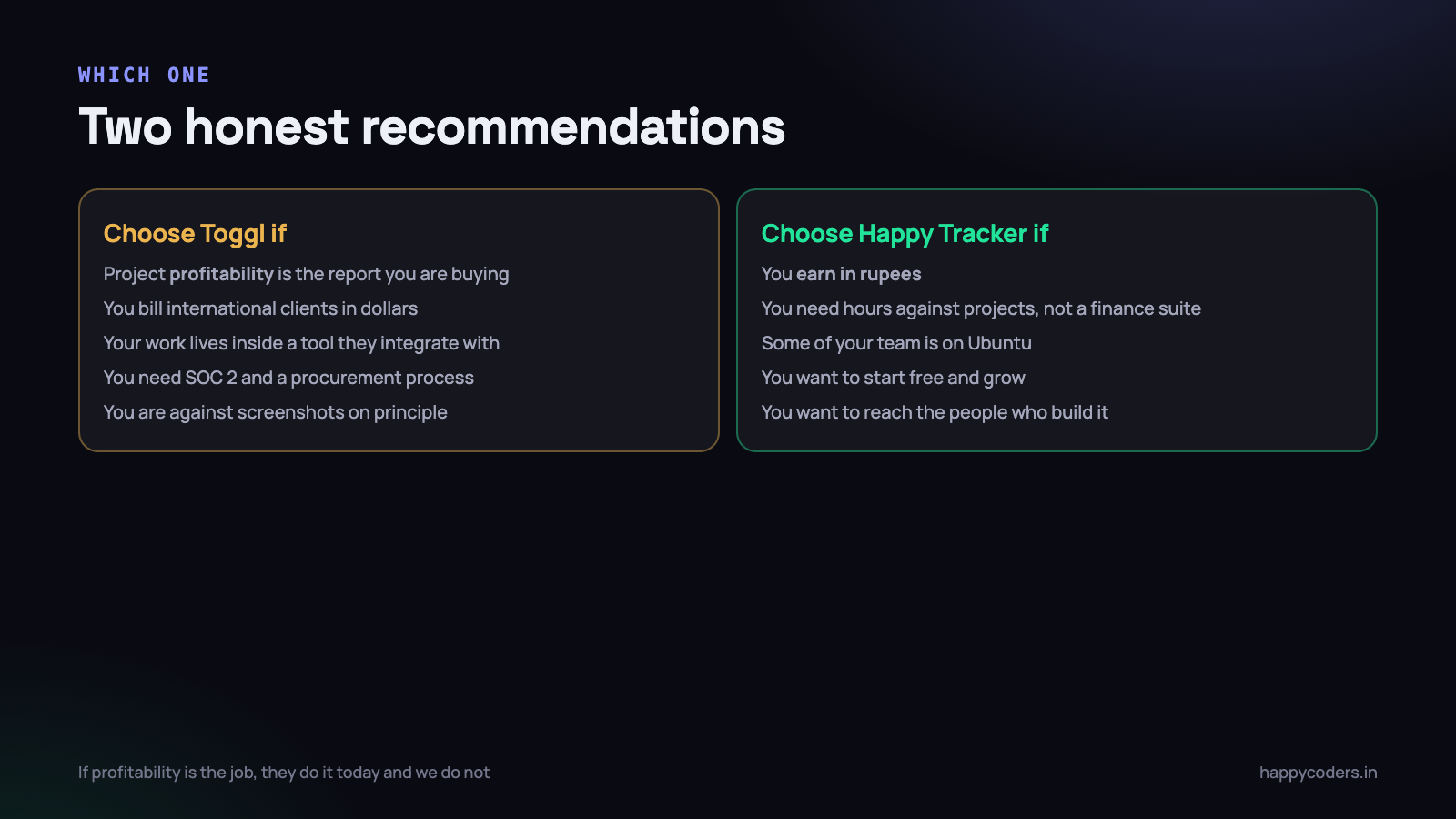
Choose Toggl Track if
- Project profitability is the report you are buying. They have it, we do not.
- You bill international clients in dollars, so the pricing is proportionate to your revenue.
- Your work already lives inside a tool Toggl integrates with and starting a timer from there would be used every day.
- You need maturity above all — a large finance team, an audit requirement, a procurement process that asks about SOC 2.
- You are opposed to screenshot monitoring on principle and want a tool that does not offer it at all.
Choose Happy Tracker if
- You earn in rupees and the dollar arithmetic above made you wince.
- You need hours against projects and tasks, and reports managers will actually open — rather than a finance-grade analysis suite.
- Some of your team is on Ubuntu.
- You want to start free and grow without a card or a countdown.
- You want to be able to reach the people who build it.
What both do, so you can stop comparing them
A long feature table hides the fact that most of it is the same on both sides. These are table stakes in 2026 and neither product will be the reason you struggle:
- Timers and manual entries, editable after the fact by the person who made them.
- Projects, tasks and clients, with time attributed to each.
- Billable and non-billable time, with rates per person.
- Desktop and browser tracking, with idle detection.
- Weekly and monthly reports per person, project and client.
- CSV export of raw entries.
- Roles, so not everybody can see everybody else’s numbers.
If a comparison page tries to win on any of these, treat the rest of it with suspicion. The genuine differences are the five or six things listed earlier, and the price.
Run a two-week pilot, and test the right four things
Both products are free to try, so the sensible thing is to stop reading comparison pages — including this one — and run a real pilot. One team, one live project, two weeks. Not a demo account with sample data.
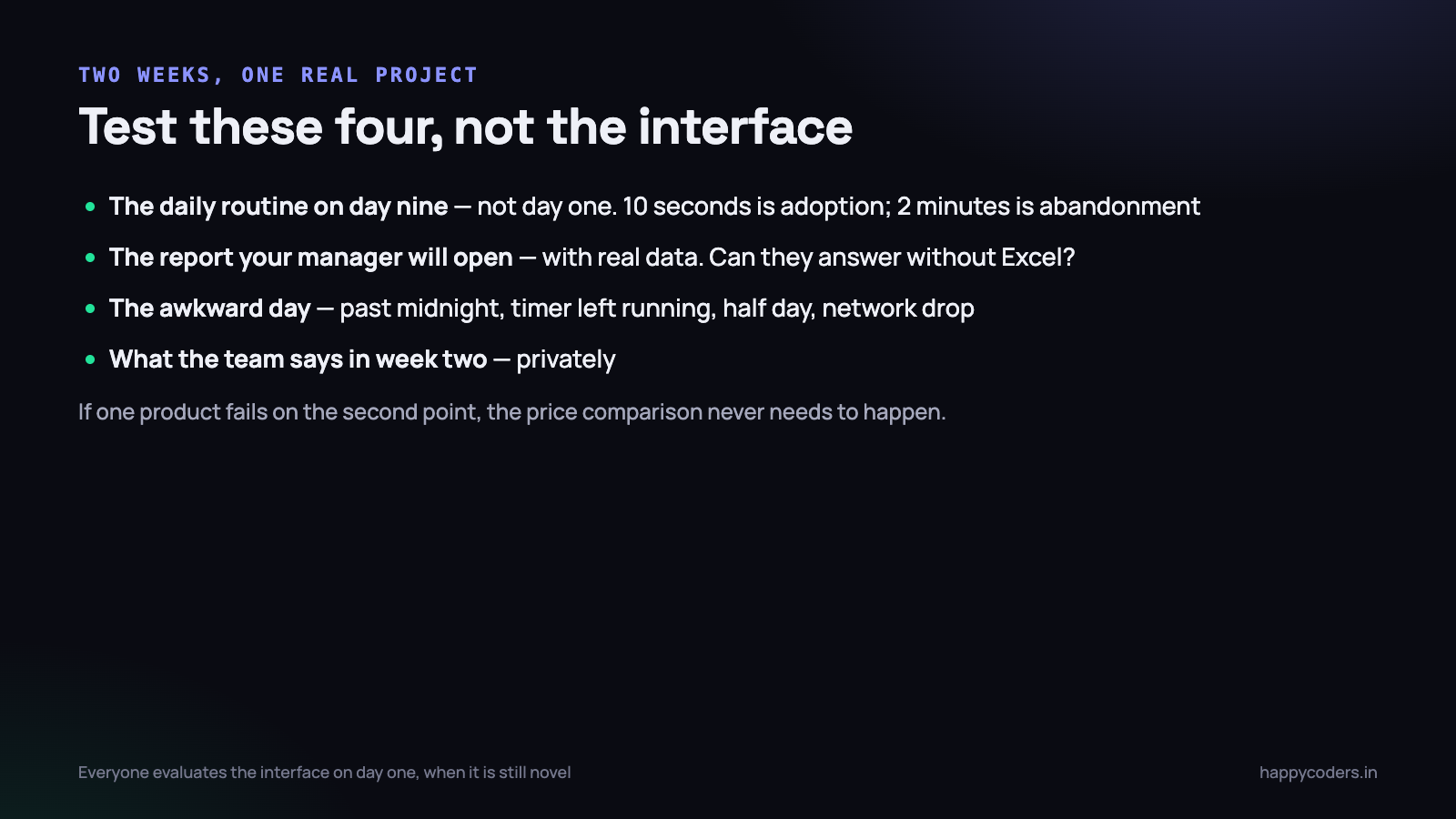
Most pilots test the wrong things, because people evaluate the interface on day one when it is novel. Test these instead:
- The daily routine, on day nine. Not day one. How long does it take somebody to start, switch task and stop — once the novelty has worn off and they are busy? Ten seconds is adoption. Two minutes is abandonment.
- The report your manager will open. Produce the actual month-end report with real project data in it. Can they answer their question without exporting to Excel? This is the thing you are paying for, and it is the thing least often tested.
- The awkward day. Somebody works late past midnight, somebody forgets to stop the timer overnight, somebody takes a half day, the internet drops for an afternoon. Deliberately create these. Every tracker handles the normal day; they differ entirely on the odd one.
- What the team says in week two. Ask them directly and privately. The tool that half the team quietly stops opening has already failed, and no feature list will tell you which one that is.
Write down the answers for both products before comparing prices. If one of them fails on point two, the price comparison never needs to happen.
A question worth asking before either
Some teams discover during a pilot that they did not need a time tracker at all — they needed to know why one client is unprofitable, and the answer turned out to be the contract rather than the hours.
A quick way to check: write down the decision you expect to make differently once you have the data. “We will re-quote the retainer clients” is a decision. “We will have visibility” is not one, and a team that cannot name the decision usually stops using whichever tool they bought within a quarter.
If you can name it, you will know within the two weeks whether the data actually supports making it — which is worth far more than either product’s feature list.
Moving between them
Worth saying plainly because it is the fear that stops most evaluations: your time entries are yours. Toggl exports to CSV, and so do we. Whichever direction you move, the historical data comes with you as a file you can read, and you should confirm that on any tool before you commit — not only ours.
The practical advice is not to migrate mid-project. Finish the quarter on the old tool, start the new one on the first of the next month, and keep the export from the old one in a folder. Merging half a project across two systems is more painful than either migration.
Three questions people ask us about this
“Is a cheaper tool cheaper because it is worse?”
Sometimes. Here the main reason is simpler: we sell into a market where salaries are lower, so the software is priced against what it saves an Indian company rather than an American one. A tool priced at $16 a seat is not sixteen dollars’ worth of better — it is priced for a customer whose hourly rate is five times yours.
The honest caveat is that some of the gap is capability, and we listed it above rather than hiding it. Profitability reporting and the integration catalogue are real, and if you need them you should pay for them.
“What happens if you shut down?”
A fair question to ask any small vendor, and one most of them dodge. Export your entries to CSV periodically — monthly is plenty — and keep the files. That is sensible practice with any subscription tool, including the large ones; companies get acquired and products get discontinued at every size.
“Can we use both?”
Occasionally teams keep one for a client who insists on a particular export format and run the other internally. It works, and it is twice the admin. If you find yourself planning it, the real question is usually which of the two reports your managers genuinely read — and it is almost never both.
The honest summary
Toggl Track is the more complete product, and if project profitability is what you are buying, it is the correct answer today. We would rather tell you that than sell you something that does not do the job.
For a team billing in rupees that needs time against projects, attendance that works for remote and office staff, and a report that answers “where did the month go”, the feature gap is small and the cost gap is not. That is the trade, stated as clearly as we can.
One last thing worth saying about comparison pages in general, including this one: every company that writes them is the same company selling one of the two products, and that shapes what gets emphasised however carefully it is written. Read ours, read theirs, then ignore both and run the pilot. Two weeks of your own data settles the question in a way that no page written by an interested party ever can.
The free plan is five users with no time limit, so you can check the claim rather than take our word for it. Happy Tracker.




