


The software is the easy part. Installing a time tracker takes an afternoon. Getting a team to use it honestly, six months later, is an entirely different problem — and it is a management problem, not a technical one.
Rollouts fail in a predictable way. There is an announcement nobody was expecting, a fortnight of compliance, a conversation where somebody is questioned about a short Tuesday, and then a slow collapse into timers started at 9:00 and stopped at 18:00 every single day regardless of what happened. The data is now worse than useless, because it looks real.
Why people resist, accurately
It is worth being precise about the objection, because the usual reassurance answers the wrong one.
Almost nobody objects to their work being measured. Developers already log hours against tickets, designers already mark work done, everybody already reports status in a standup. What people object to is a change in what the measurement will be used for, announced by a company that did not explain itself.
The unspoken questions are specific:
- “Is this because of me?” If the rollout follows a difficult conversation with one person, everyone assumes it did.
- “Will a slow week be held against me?” Every job has weeks where the visible output is low and the work was real.
- “Is somebody watching my screen?” Especially if screenshots are mentioned, or not mentioned.
- “Do I now have to justify every hour?” The fear of a new layer of paperwork, forever.
- “Does this mean the company does not trust us?” The one nobody says out loud.
Answering these before they are asked is most of the work. Answering them after they have hardened into an opinion is much harder.
Decide what it is for, in one sentence
Before anything is installed, the person leading this has to be able to finish this sentence: “We are doing this so that…”
Good endings, in that they are true and specific:
- “…we can quote projects properly instead of guessing, and stop losing money on revisions.”
- “…we can tell a client what a change request actually costs, with a record instead of an argument.”
- “…we can see who is over capacity before they burn out, rather than after.”
- “…we can bill our retainer clients for what we really did.”
Bad endings, all of which the team will hear even if you do not say them: “…we can see who is working hard”, “…we have visibility”, “…management asked for it.”
If you cannot finish the sentence honestly, stop. A rollout without a reason is the one that gets the worst reception, because the team fills the silence with the worst available explanation and they are usually not wrong to.
The announcement
Do it in person or on a call, not over email, and not in a written policy document. Five minutes, and cover four things in this order.
- Why. The sentence above. Say it first, plainly, with the business reason attached.
- What is recorded, exactly. Not a summary — specifics. Which hours, whether screenshots are on, whether application names are recorded, who can see what. Show a screen.
- What is not recorded. Just as specific, and just as important. Keystrokes. Personal devices. Anything outside working hours. Say the words.
- What happens with it. Who opens the reports, how often, and what decisions they inform. If the answer includes performance reviews, say so now — finding out later is what destroys trust permanently.
Then take questions and answer them honestly, including “yes, I will be able to see that.” A leader who is visibly uncomfortable answering is more damaging than the feature they are uncomfortable about.
If you personally would not want it running on your machine, do not roll it out. Install it on your own machine first, for a full week, before anybody else. That single act changes the conversation more than any explanation, and it will also teach you which of the settings are genuinely annoying.
Turn most of it off
Modern trackers can record a great deal. That does not mean you should switch it on, and the default configuration is rarely the right one.
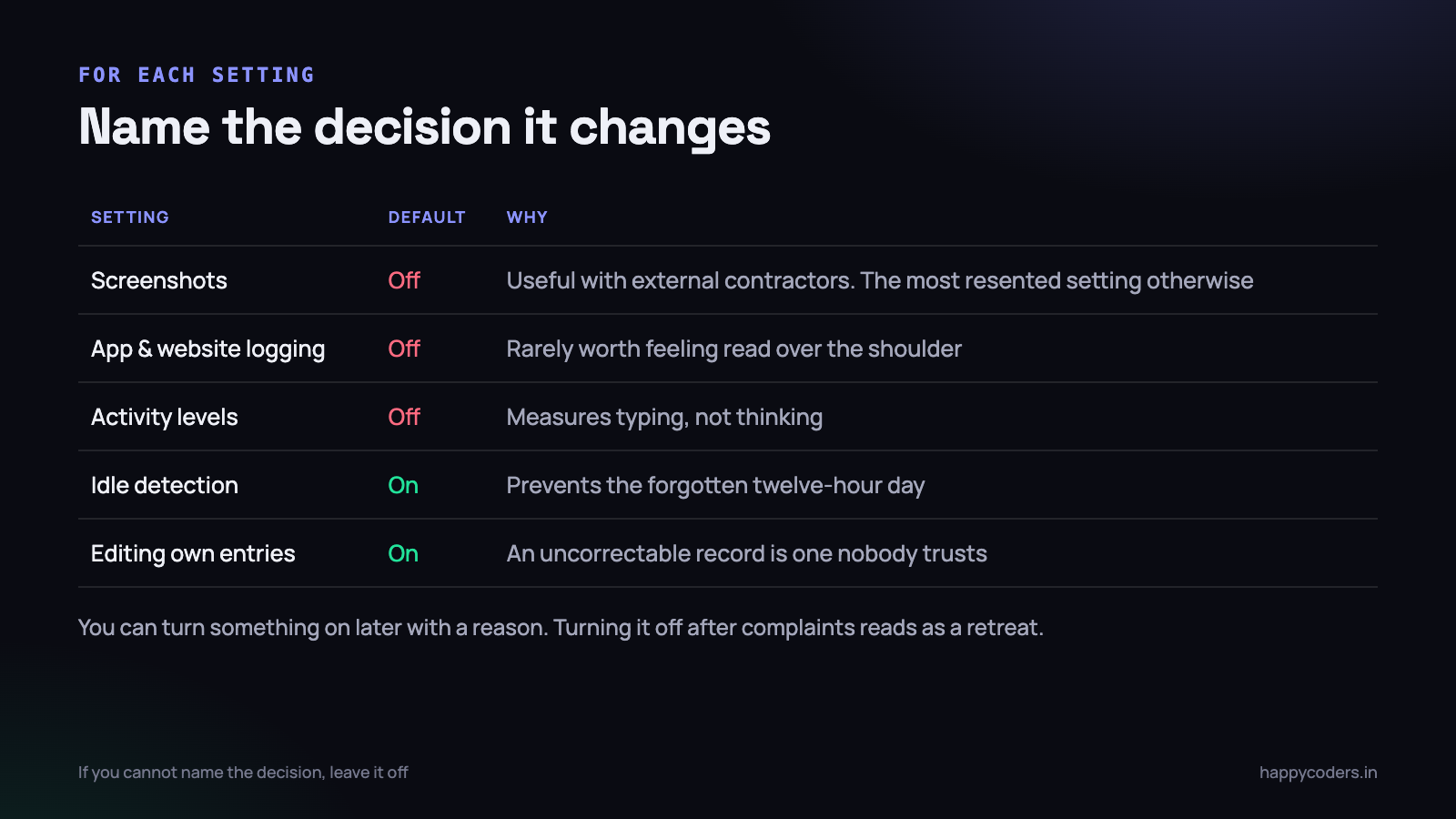
Go through the settings and, for each one, ask: which decision does this change? If you cannot name a decision, turn it off.
- Screenshots. Genuinely useful if you have external contractors and a client asking for evidence. Almost never useful for a salaried in-house team, and by far the most resented setting. Off, unless you can name the reason.
- Application and website logging. Answers “what tools does this work involve”. Rarely worth the feeling of being read over the shoulder. Off for most teams.
- Activity levels. Keyboard and mouse intensity. Measures typing, not thinking, and penalises exactly the people doing the hardest work. Off, or at minimum never shown per person.
- Idle detection. Keep it. It prevents the twelve-hour day caused by a forgotten timer, which protects the person as much as the data.
- Manual editing of entries. Keep it, definitely. A system where a wrong entry cannot be corrected is a system people stop trusting in the first fortnight.
You can always turn something on later with a reason. Turning something off after people have objected reads as a retreat, and they will assume it is temporary.
The first report decides everything
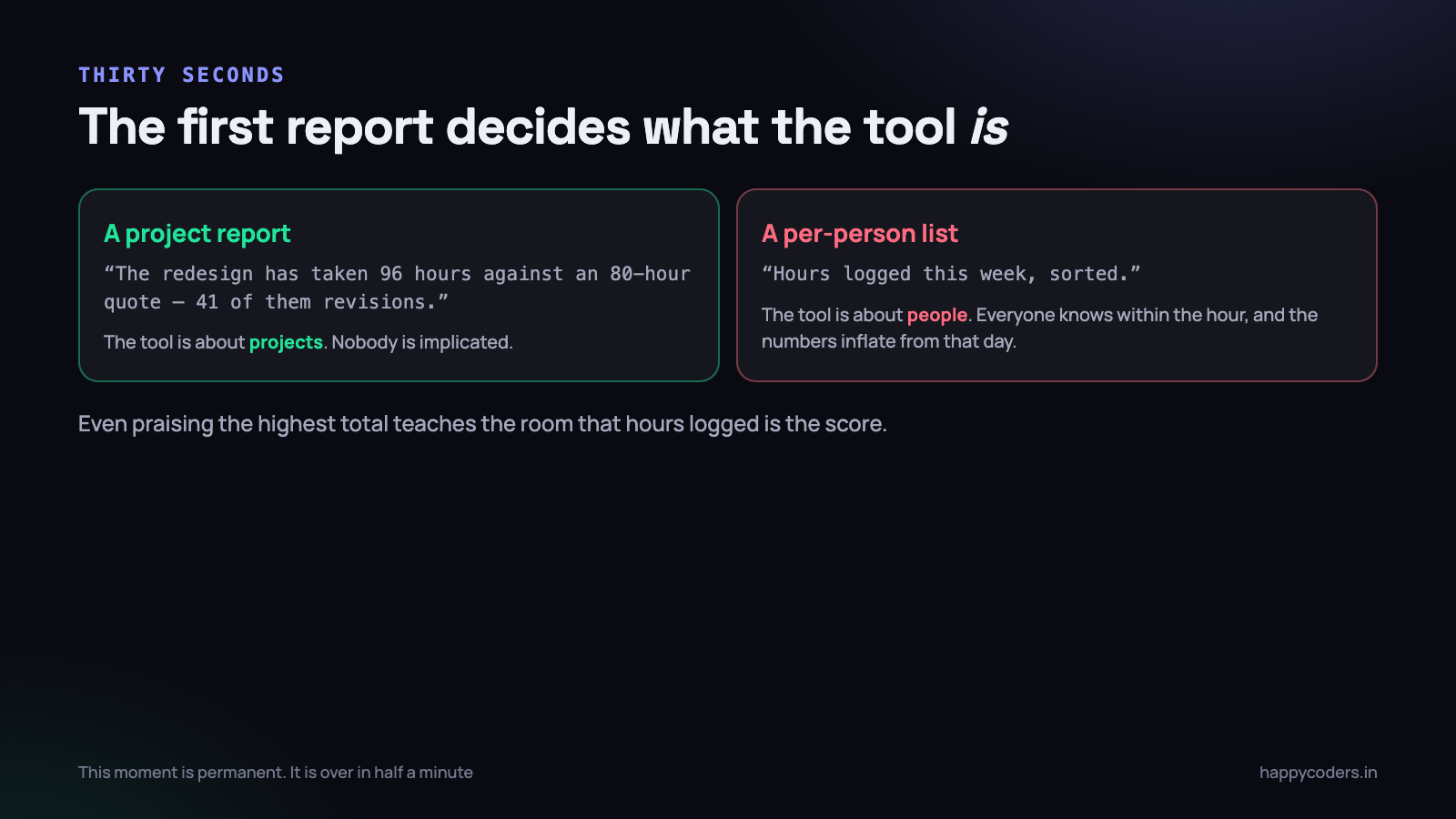
This is the single highest-leverage moment in the whole rollout, and it is over in about thirty seconds.
The first thing anybody sees from the new system sets what the system is, permanently. If it is a project report — “the redesign has taken 96 hours against an 80-hour quote” — then the tool is about projects. If it is a per-person list sorted by hours, the tool is about people, and everyone knows it within the hour.
So: make the first report a project report. Show it to the whole team, not only to managers. Point at something it revealed that was genuinely surprising and not anybody’s fault — revisions taking 40% of a project is a good example, because it implicates the process rather than a person.
Do not, in the first month, mention anybody’s individual total out loud. Not even positively. “Well done Priya, you logged the most hours” teaches the whole room that hours logged is the score, and from that day the numbers are inflated.
Answering the five questions, in advance
Since the objections listed at the top are predictable, prepare the answers. These are the ones that work, and the reason each one works.
“Is this because of me?”
Say the trigger out loud. “We under-quoted the Nandini project by three weeks and could not explain why” is an answer. It points at a business event rather than a person, and it is checkable, which is what makes it land.
If the honest trigger is one person’s performance, do not roll out software. Have the conversation. Introducing a company-wide system to avoid one difficult discussion is transparent to everybody and poisons the tool.
“Will a slow week be held against me?”
Commit to something specific rather than reassuring in general: individual totals will not be discussed in one-to-ones, and no performance decision will reference logged hours. Then keep it. The first breach is the last day anybody trusts the numbers.
“Is somebody watching my screen?”
Show them. Open the settings page on the projector and point at the screenshot toggle in the off position. A demonstration settles this; a sentence does not.
“Do I now have to justify every hour?”
“No. Nobody will ask you about an entry unless you ask us about it first.” Then make sure no manager does. This is the promise most often broken by accident, usually by a well-meaning manager asking a curious question in week two.
“Does this mean you do not trust us?”
The only answer that works is a true one about the business: we cannot price work we cannot measure, and guessing has been costing us money. Trust is not the variable — information is. If you find yourself reaching for “of course we trust you” and nothing else, the team will notice the absence of a reason.
Six months later
Rollouts that survive the first month often die quietly in the fourth, for two reasons.
Nothing ever changed because of the data. If three months of tracking has not altered a single quote, deadline or staffing decision, the team has correctly worked out that it is admin for its own sake. Use it visibly at least once a quarter and say so — “we have moved the retainer from 20 to 28 hours because of what the last quarter showed” is worth more than any reminder email.
The project list rotted. New clients get logged against “General”, old projects never get closed, and within a few months half the hours land in a bucket nobody can report on. Fifteen minutes of maintenance a month prevents this, and nobody ever schedules it. Put it in one person’s calendar.
One more habit worth building: re-ask the team once a quarter whether anything about it is annoying. The answers are usually small and cheap — a missing project, a setting that nags, a report nobody uses — and fixing them is the difference between a tool people tolerate and one they keep.
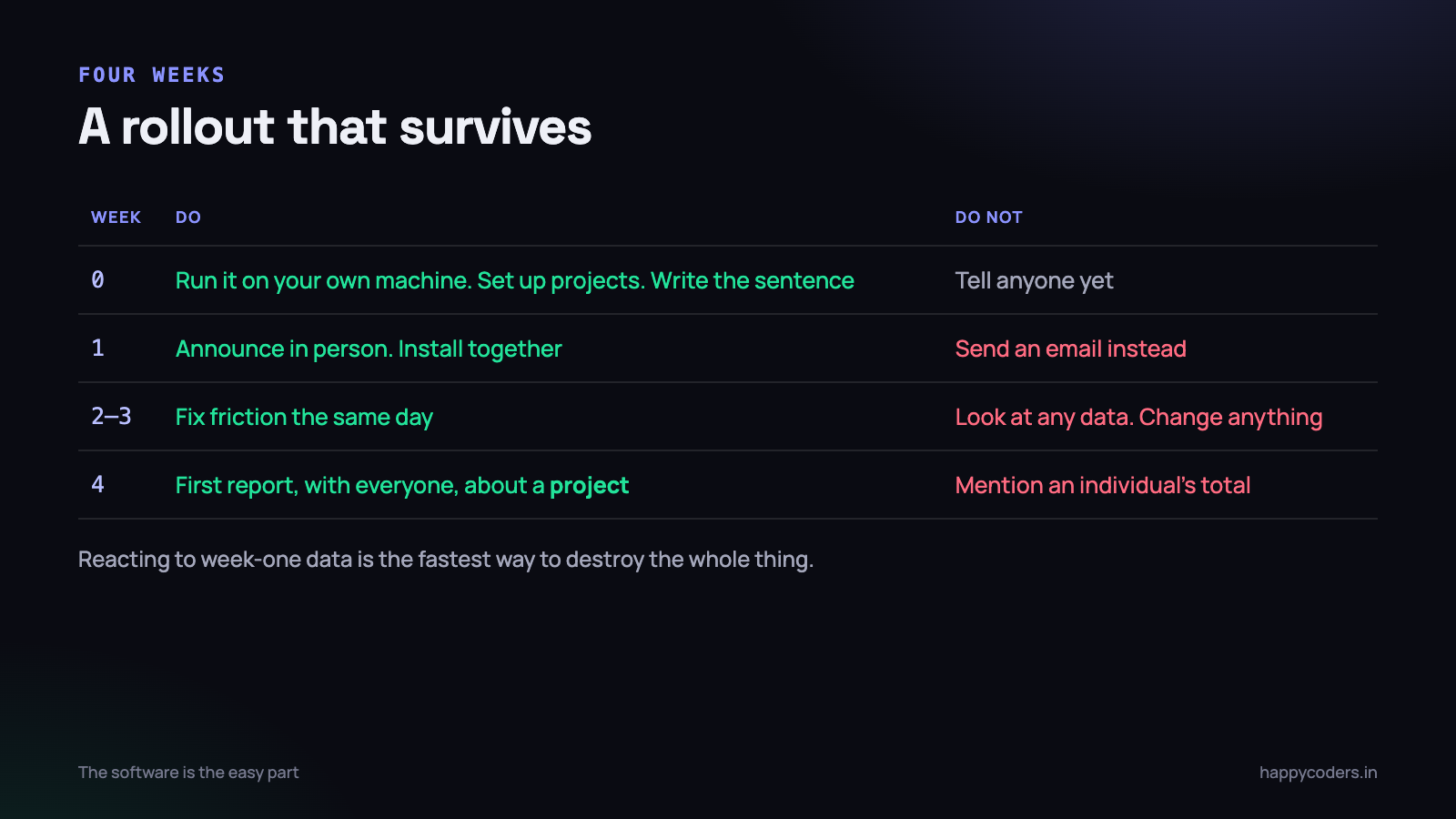
A four-week plan
Week 0 — before anybody knows
You run it on your own machine. Set up the projects and clients so people are not typing them in themselves. Decide the settings. Write the sentence.
Week 1 — announce and install
The five-minute conversation. Install together in one session so nobody is fighting it alone. Explicitly say the first month is for getting used to it, and that nothing will be decided from that month’s numbers.
Weeks 2 and 3 — leave it alone
The hardest and most important instruction: look at nothing, and change nothing. The first weeks always look odd because people are still learning. Reacting to week one data is the fastest way to destroy the whole thing.
Do fix friction as it is reported. If starting a timer takes too long, or the project list is wrong, fix it that day. Responsiveness here buys enormous goodwill.
Week 4 — the first report, together
Produce the project report and go through it with everyone. Ask the team what it got wrong — there will be something, and inviting the correction publicly is what makes the data reliable from month two.
End by saying what will change because of it. If nothing changes, people correctly conclude the exercise was pointless and quietly stop.
What to do about the person who does not comply
There will be one. Before treating it as a discipline matter, check the three ordinary explanations, because it is usually one of them:
- Friction. Their work does not fit the project list, or the app is annoying on their machine. Fixable in ten minutes, and they will not report it unless asked.
- They did not understand why. They missed the meeting, or heard it second-hand as “they are monitoring us now.”
- They are worried about what it will show. Often because they are genuinely overloaded, or spending time on something they think they should not be. That is a management conversation worth having, and it has nothing to do with the software.
Making an example of the first person who does not comply guarantees compliance and destroys accuracy. You will get timers running from 9:00 to 18:00 every day, forever, and no way to tell.
Signs it is working
- Somebody corrects their own entry without being asked. They trust the record enough to want it right.
- Somebody uses the data in an argument — with a client, or with you. That means they consider it theirs.
- A quote changes because of what last quarter showed.
- Nobody mentions it. The strongest signal of all. It has become part of the furniture.
And one sign it is failing that is easy to misread as success: everybody logs exactly eight hours every day. Real work does not look like that. Uniform data means people are filling in what they think is expected, and you have lost the thing you were buying.
The short version
- Finish the sentence “we are doing this so that…” honestly, or do not start.
- Announce it in person. Say what is recorded and what is not.
- Run it on your own machine first.
- Turn off everything whose decision you cannot name.
- Make the first report about a project, never a person.
- Change nothing for three weeks.
- Let people edit their own entries.
- Never make an example of the first non-complier.
Happy Tracker has per-member device permissions, per-plan control over screenshots and activity, entries people can correct themselves, and sprint and project reports that are about the work rather than the worker — which is the configuration this article argues for. It is free for five users, so the pilot costs nothing.




