


Almost every time tracking tool advertises a small number: five dollars a user, nine dollars a user, twelve dollars a user. Small numbers are easy to approve. The problem is that the number is per user, per month, in dollars, billed for a year, and by the time it reaches your accounts it is none of those things.
This is the actual arithmetic for an Indian team, the costs that are not on the pricing page, and the questions worth asking before anybody signs.
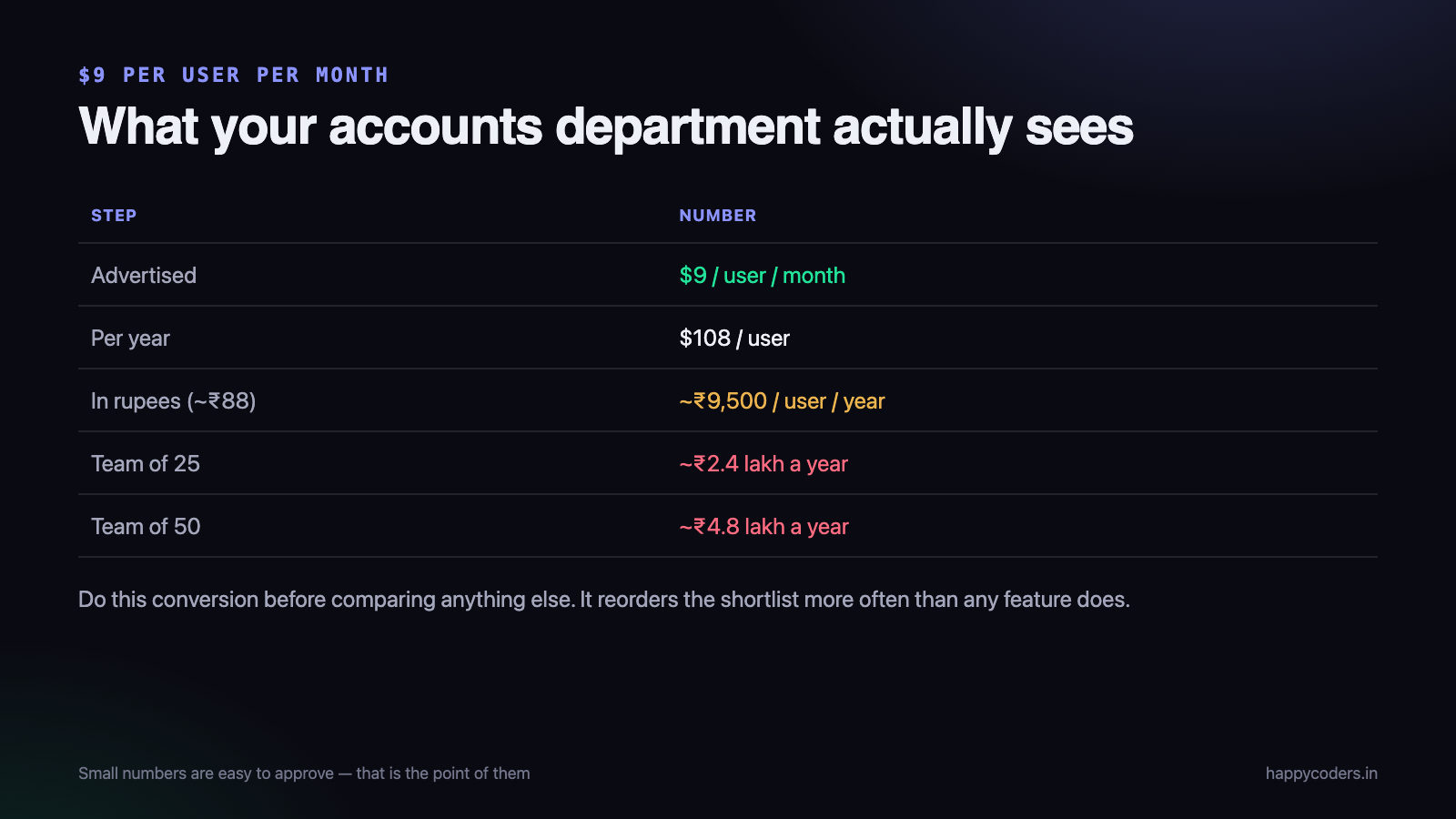
Step one: turn the sticker price into a yearly rupee number
A tool at $9 per user per month, billed annually, is $108 per user per year. At roughly ₹88 to the dollar that is about ₹9,500 per user per year before anything else is added.
For a team of 25 that is around ₹2.4 lakh a year. For 50 people, close to ₹4.8 lakh. Those are numbers that need a real approval, and they came from a pricing page that said “$9”.
Do this conversion first, every time, before you compare anything else. It reorders the shortlist more often than any feature does.
The price bands, and what you get in each
Free — ₹0
Most tools have a free tier. The question is always what it is limited by:
- Limited by users — free up to a handful of people, then everybody pays. Genuinely useful for a small team, as long as the limit is stated and there is no time bomb.
- Limited by time — a 14-day trial dressed up as a free plan. Fine for evaluating, useless for running on.
- Limited by history — free, but you can only see the last week or month. This is the one that hurts, because you find out at the end of the quarter when you need the report.
Read the limit carefully. “Free forever” with a seven-day data window is not a free plan; it is a demo.
The rupee band — roughly ₹400 to ₹2,000 per user per year
Tools priced in India, for Indian teams. You pay in rupees, the invoice has GST on it, and there is no currency risk. For a 25-person team this band works out to somewhere between ₹10,000 and ₹50,000 a year in total.
The trade-off is usually maturity of the reporting and the size of the integration list. Whether that matters depends entirely on whether you would have used those integrations.
The dollar band — roughly ₹4,500 to ₹13,000 per user per year
The well-known international tools. Deep features, long histories, large integration catalogues, and pricing designed for companies billing in dollars.
For an Indian services company billing in rupees, this band is where the arithmetic starts to hurt: the tool is priced against a Western salary, while your margin is calculated against an Indian one.
Enterprise — “contact us”
No published price, minimum seat counts, an annual contract and a procurement process. Occasionally the right answer for a 500-person company. Almost never the right answer for a 25-person one, and asking for a quote is how you acquire a salesperson who calls for six months.
The costs that are not on the pricing page
The subscription is the number everyone compares. These are the ones that change the total.
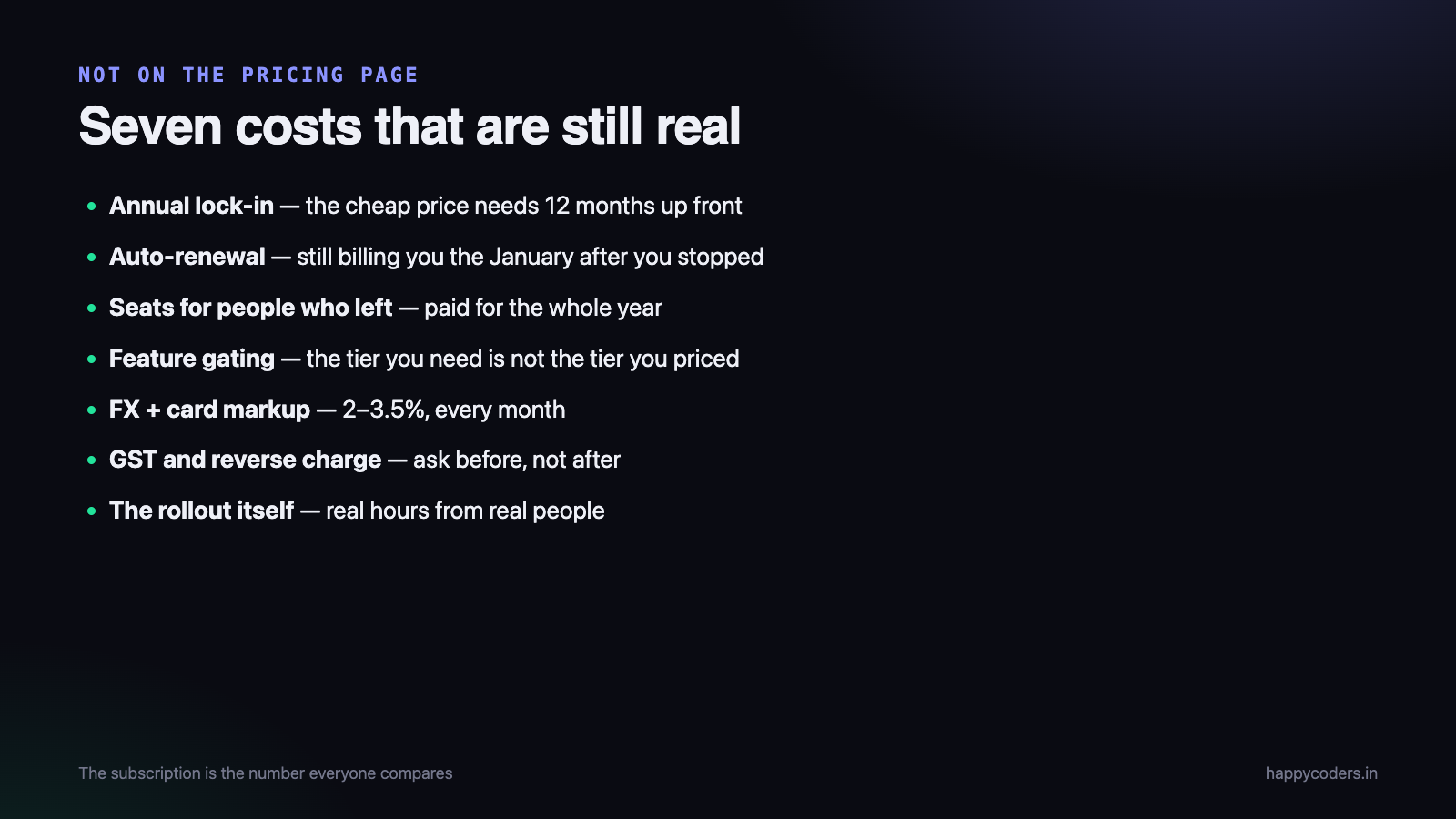
- Annual lock-in. The advertised price is almost always the annual one; monthly is 25–35% higher. So the cheap number requires paying twelve months up front for a tool nobody has used yet.
- Automatic renewal. Most tools renew silently. A tool you stopped using in March is still billing you the following January unless somebody remembered to cancel.
- Paying for people who left. Seats are usually billed for the year. If three people leave in month four, you have paid for three seats for eight more months.
- Feature gating. The plan you priced is rarely the plan you need. Approvals, invoicing, profitability and single sign-on tend to live one tier up — and you find out after the rollout.
- Foreign exchange and card fees. A dollar subscription on an Indian card typically carries a 2–3.5% markup, every month, and the rupee amount moves.
- GST. On an Indian invoice you pay it and claim input credit. On an overseas subscription there may be reverse-charge obligations. Ask your accountant before, not after.
- The rollout itself. Setting up projects, training people, fixing the first month of wrong entries. Real hours from real people, and the same for every tool — but only if you plan for it.
The comparison that actually helps
Put the total annual rupee cost next to the number of people, not the monthly per-seat price next to a feature list. The table stops flattering the expensive option immediately.
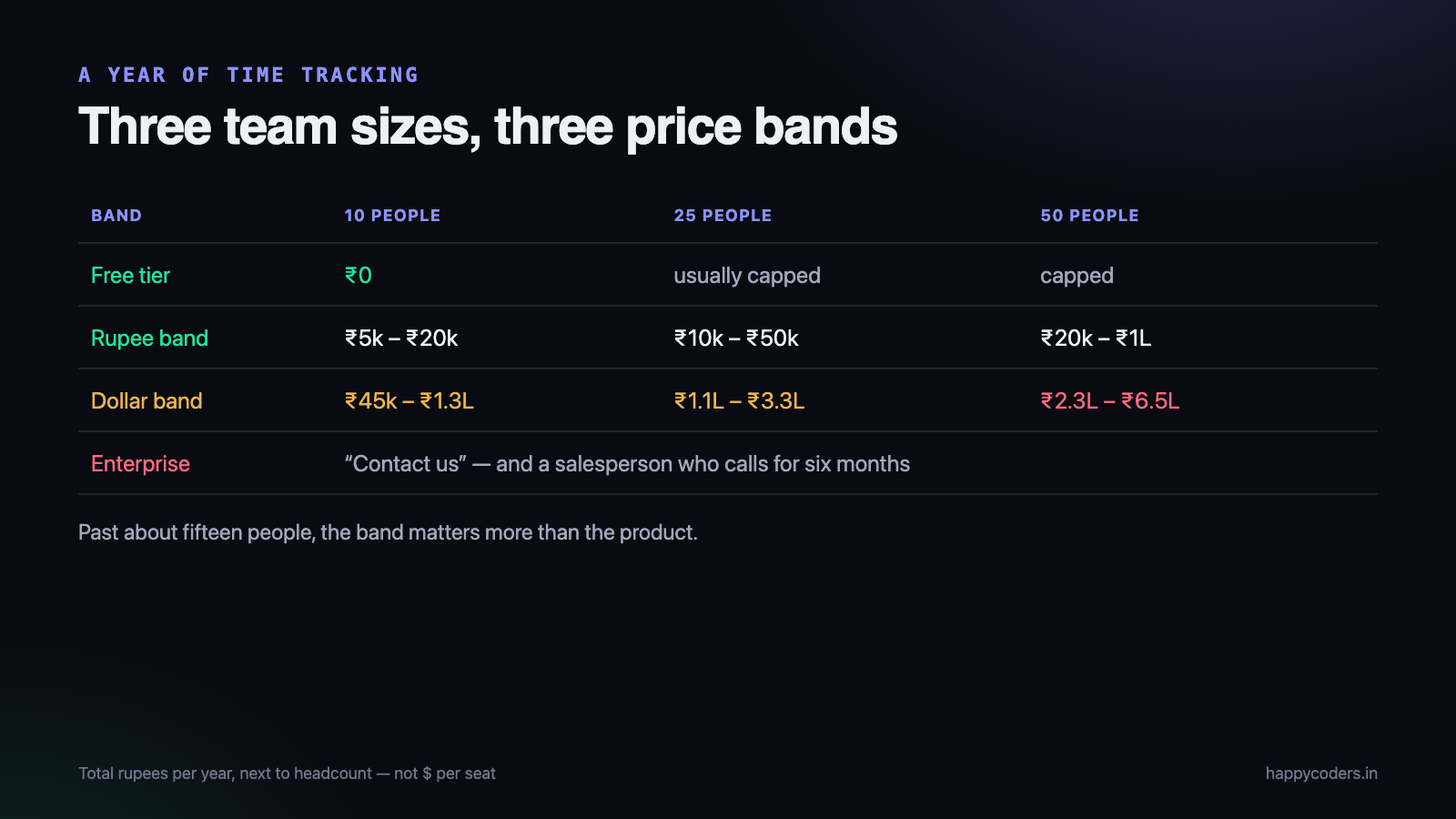
Two things usually become obvious. Small teams should be paying almost nothing, because nearly every tool has a usable free tier at that size. And past about fifteen people the choice of pricing band matters more than the choice of features, because the gap between bands is larger than the gap between products.
What you are actually paying for
It is worth being clear about where the money goes, because it explains the bands.
- Capture — timers, desktop apps, idle detection, screenshots. Table stakes; almost everyone does this.
- Structure — projects, tasks, clients, teams, roles. Also common, and where the differences are small.
- Reporting — the part people actually pay for. Whether you can answer “where did last month go” without exporting to Excel.
- Money — billable rates, invoices, budgets, profitability. This is almost always the top tier, in every product.
- Governance — approvals, audit trails, single sign-on, retention policies. Priced for companies that have a compliance requirement.
Most teams need the first three and pay for all five. Working out which of these you will genuinely use, before looking at any pricing page, is the single most effective way to spend less.
A worked example
A 20-person agency in Coimbatore. They want: time against projects, a monthly report per client, and a way to see who is over capacity. No invoicing — they already use Tally. No SSO.
- Dollar-band tool, mid tier: 20 × $9 × 12 = $2,160 ≈ ₹1.9 lakh a year, plus card markup. Reporting they will use, plus approvals and profitability they will not.
- Rupee-band tool: 20 × ₹1,200 = ₹24,000 a year, GST on an Indian invoice, no currency exposure.
- Free tier of either: ₹0 — but almost certainly capped below 20 users.
The difference is about ₹1.65 lakh a year. That is not a rounding error; it is a junior developer’s salary for several months. The question worth asking is whether the extra features in the dollar-band tool are worth that, and for this agency — who said no to invoicing and SSO — the honest answer is no.
For a different company, one that bills international clients in dollars and needs SSO for a client’s security review, the answer flips. That is the point: the answer depends on your list, not on the product.
What a competitor’s page looks like once you do the sum
A concrete example, because the abstraction is easy to wave away. Toggl Track’s published pricing is $9 per user per month on Starter and $16 on Premium when billed annually, or $12 and $24 billed monthly. Its free plan is described as free “for a limited number of users”.
Run the annual arithmetic for a 25-person team:
- Starter: 25 × $9 × 12 = $2,700 ≈ ₹2.4 lakh a year
- Premium: 25 × $16 × 12 = $4,800 ≈ ₹4.2 lakh a year
And the feature gating matters here, because it decides which of those two numbers is yours. Billable rates arrive on Starter, but timesheet approvals, profitability reports and labour costs are all Premium. If the reason you are buying a tracker is to find out whether projects make money, the number you should be comparing is the second one, not the first.
None of that makes it a bad product — it is a good one, and the profitability reporting is genuinely more advanced than ours. It makes it a product priced for a company whose revenue is also in dollars. Those figures are from Toggl’s own pricing page, checked in September 2026; prices and tiers change, so check them yourself before deciding anything.
Three traps that cost real money
Buying the tier you were quoted, not the tier you need
This is the most expensive mistake and the easiest to make. Somebody prices the entry plan, gets approval for that figure, rolls it out, and discovers in week three that approvals are a tier up. Now the budget is wrong by 70% and the rollout has already happened, so nobody wants to reverse it.
The fix costs nothing: write your three must-have features on paper before opening any pricing page, then find the cheapest tier on each product that contains all three. Compare those.
Paying monthly “to be safe”
Monthly billing is typically 25–35% more expensive. Teams choose it to avoid being locked in, and then stay for three years anyway — paying a third more the whole time for flexibility they never used.
The sensible version is to pilot properly for a month, decide, and then commit annually. If the product has a real refund window, the annual commitment carries very little risk in the first place.
Counting seats wrong
Ask who genuinely needs a seat. In most agencies the answer is smaller than the headcount: the delivery team tracks time, while the accountant, the office manager and the two directors do not need to. Many tools charge for anyone with a login, so a viewer-only account for a director is a full seat.
On a 40-person company, being careful here is often eight or ten seats — which in the dollar band is close to ₹1 lakh a year.
Six questions before anybody signs
- What is the total rupee cost for our headcount, for one year? Not the per-seat price.
- What exactly is the free plan limited by — users, time, or history?
- Which tier has the three things we actually need? Price that tier, not the cheapest one.
- Does it auto-renew, and what is the refund policy? Get the answer in writing.
- What happens to our data if we leave? Can we export every entry, or only a summary?
- Will our team actually use it? A cheap tool nobody opens costs more than an expensive one everybody does.
Run a genuine two-week pilot with one real team and one real project before committing to a year. Not a demo — a pilot, with real work in it. Most of the problems that make people abandon a tool show up in week two, and none of them show up in a sales call.
The cheapest tool is the one people use
One number never appears on a pricing page and it dominates everything above: adoption. A ₹24,000 tool that half the team stops opening in month two has cost you ₹24,000 and produced nothing. A ₹1.9 lakh tool that every project runs through has paid for itself if it catches one over-running project a year.
So the question “which is cheaper” is the wrong last question. The right one is which will still be in use in six months, and that turns on things no pricing table shows: whether the desktop app is annoying, whether the daily routine takes ten seconds or two minutes, and whether the first report a manager sees is about a project or about a person.
That last one decides more rollouts than any feature. Teams accept a tool that measures work. They quietly abandon one that they believe is measuring them.
Our own numbers, plainly
Since this is our blog, it would be odd not to state them. Happy Tracker is ₹499 to ₹1,499 per user per year, priced in rupees, with a free plan for up to 5 users and no time limit. There is a 7-day full refund on any payment and no automatic renewal — if you forget about it, it stops rather than bills you.
And one thing we do not yet have: budgets and project profitability reports. If deciding whether a project made money is the thing you are buying software for, the dollar-band tools do that today and we do not. We would rather you knew that now than found out in month two.
If what you need is hours against projects, a report your managers will actually open, and a bill in rupees with GST on it, the arithmetic above is most of the decision.
Happy Tracker is our time-tracking software for service teams — hours against projects, attendance, leave and invoices, priced in rupees and free for up to five users. See how it works.




