


GraphQL is often presented as the modern replacement for REST, and REST as the thing you use because you have always used it. Both framings are wrong. They solve different problems, and the right choice depends on facts about your project that have nothing to do with which is newer.
This is what each one actually is, the specific problems GraphQL was built to fix, the costs it brings with it, and a way to decide.
The problem GraphQL was built for
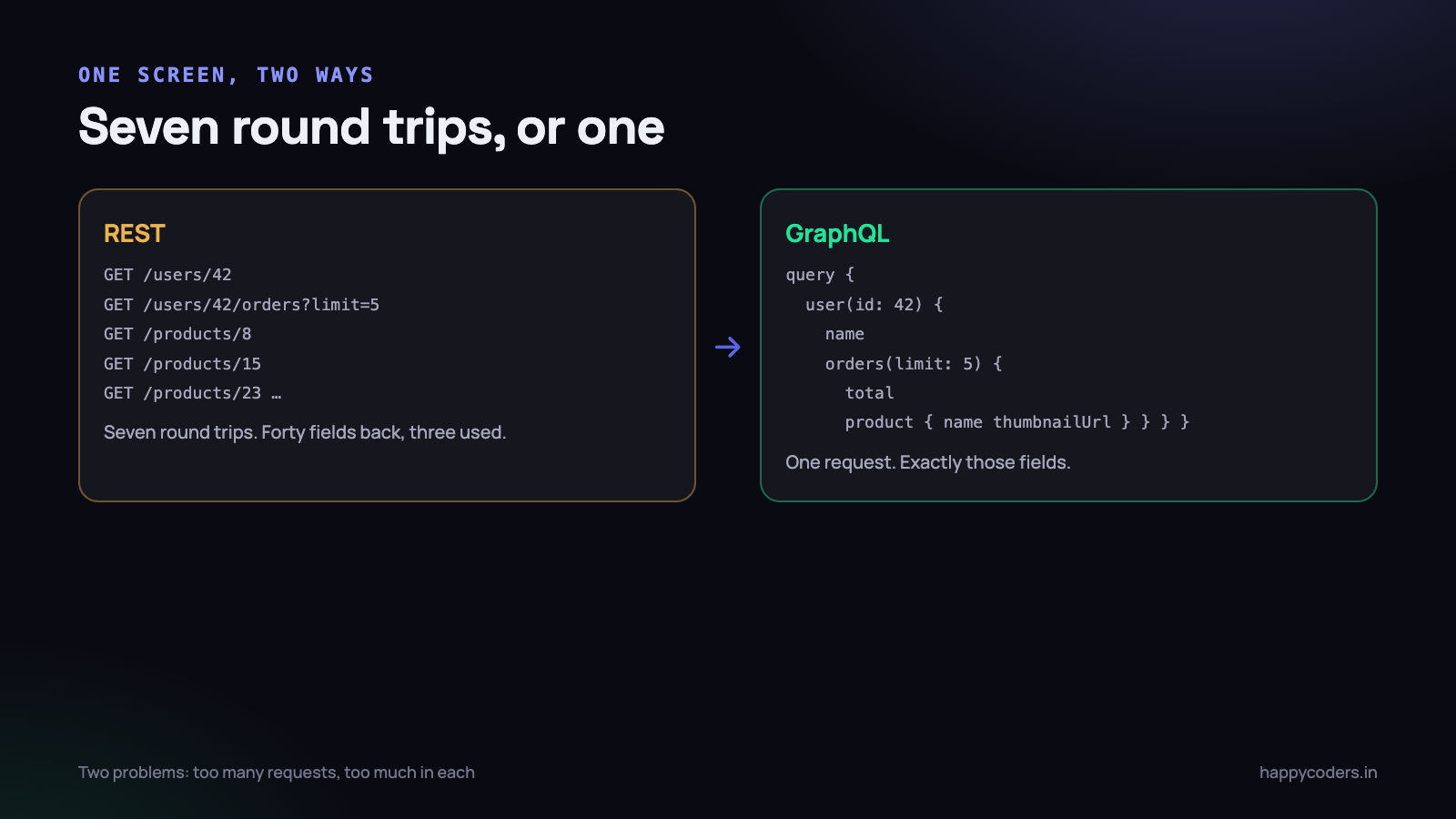
A mobile screen shows a user, their last five orders, and the product name and thumbnail for each order. With a conventional REST API that is:
GET /users/42                  -> the user
GET /users/42/orders?limit=5   -> five orders
GET /products/8                -> product for order 1
GET /products/15               -> product for order 2
GET /products/23               -> ... and so on
Seven requests, each with its own round trip. On a good connection that is fine. On a phone on patchy mobile data in a lift, it is a screen that takes four seconds to fill in and does it in pieces.
The second problem is the opposite shape. GET /users/42 returns forty fields — addresses, preferences, timestamps, a settings object — and the screen needs three of them. You paid for the bytes and the database work anyway.
These are the two problems: too many requests, and too much data in each. GraphQL addresses both directly.
query {
  user(id: 42) {
    name
    orders(limit: 5) {
      total
      product { name thumbnailUrl }
    }
  }
}
One request. Exactly the fields asked for, nothing else. When your problem is the one above, this is a genuine and substantial improvement, and no amount of REST discipline gets you all the way there.
What REST is genuinely good at
REST is not a technology, it is a convention: resources have URLs, HTTP verbs describe what you are doing to them, and status codes describe what happened. Everything in the web platform already understands it, and that turns out to be worth a great deal.
- Caching is free.
GET /products/8is cacheable by the browser, by a CDN, by a reverse proxy, by the phone’s HTTP layer. None of them need to know anything about your application. - Everything speaks it. curl, Postman, browser dev tools, monitoring tools, your hosting provider’s logs. A production problem can be reproduced by anybody with a terminal.
- The logs are readable. One line per request and you know what was called and how long it took. Every GraphQL request is
POST /graphql, and the log tells you nothing. - Rate limiting and authorisation are per-endpoint, which means they are simple. GraphQL requires thinking about cost per field.
- Every developer already knows it. There is no onboarding cost, and no new failure mode to learn.
Most of these advantages are invisible until the day something breaks at 2am. That is exactly when they matter most.
What GraphQL costs
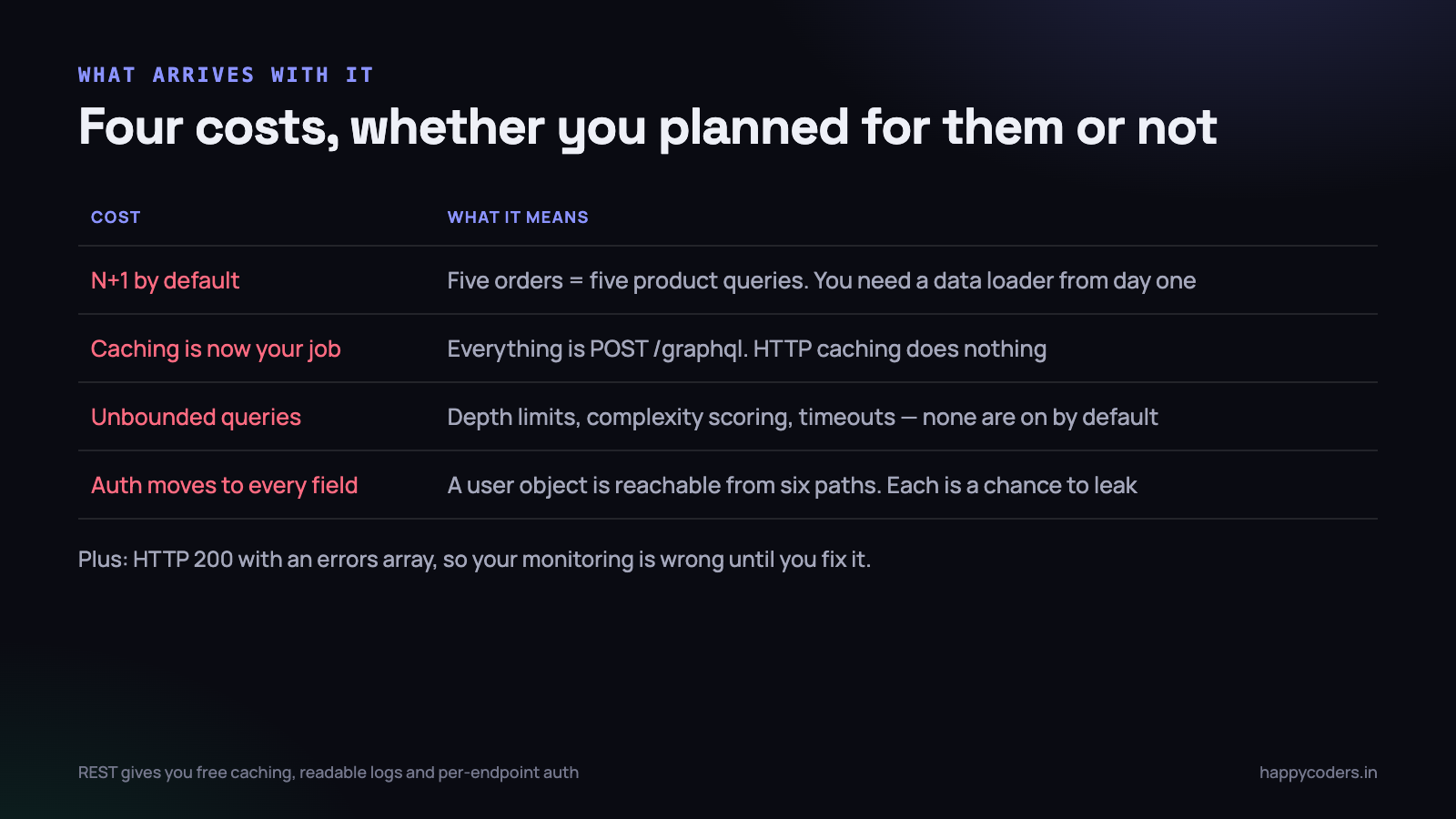
These are the four that catch teams out, in roughly the order they arrive.
The N+1 problem, arriving by default
A query asking for five orders and each order’s product runs the product resolver five times — five separate database queries. Ask for fifty orders and it is fifty. Nothing in the query looks expensive.
The fix is batching with a data loader, and it is not optional. It is a thing every GraphQL server needs and a thing every team discovers after their first slow page rather than before.
Caching becomes your job
Because everything is a POST to one URL, HTTP caching does nothing. You have to build caching inside the application — per field, per user, with your own invalidation. This is real work, and it replaces something that used to be free.
A client can ask for something enormous
query {
  users { orders { product { reviews { author { orders { ... } } } } } }
}
A public GraphQL endpoint with no limits is a denial of service waiting to be discovered. You need query depth limits, complexity scoring and timeouts, and none of them are on by default.
Authorisation moves into every field
With REST, /admin/users is checked once at the endpoint. With GraphQL, a user object can be reached through half a dozen paths — from a comment, from an order, from a project — so the check has to live on the field, and every new relationship is a chance to leak something.
Where the difference does not matter
Worth saying plainly, because comparison articles tend to overstate it: for a great many applications, both work fine and the choice is not important.
If your API is consumed by one web front end that you also write, on a desktop-shaped screen, over a decent connection, with a handful of screens — the over-fetching costs you milliseconds and the extra round trips are not noticeable. Either approach will be fine, and the deciding factor should be what your team already knows.
Choosing
Choose REST when
- You have one or two clients and you control them. You can shape the endpoints to the screens and get most of GraphQL’s benefit for none of its cost.
- The API is public or partner-facing. Everyone knows REST, it is easy to document, and rate limiting is straightforward.
- Caching matters — read-heavy, largely public data. Losing free HTTP caching is a serious downgrade.
- The team has not used GraphQL. The learning curve is on the server side, and it is steeper than it looks from the client.
- You are uploading files, streaming, or doing anything binary. GraphQL handles these awkwardly at best.
Choose GraphQL when
- Many different clients need different shapes of the same data — web, iOS, Android, a partner integration, an internal dashboard. This is the case it was built for and it is genuinely better.
- Mobile over poor networks is your main use. Collapsing seven round trips into one is worth a lot on 3G.
- Front-end teams are blocked waiting for endpoints. If “we need a new endpoint for this screen” is a two-week wait, GraphQL removes the dependency entirely. This is an organisational reason and it is often the real one.
- Your data is genuinely a graph — deeply linked, and clients traverse it in unpredictable ways.
The option most teams should take first
Before adopting GraphQL, try fixing REST. Most over-fetching and round-trip pain has a cheaper answer.
Sparse fieldsets
GET /users/42?fields=name,email,avatarTwenty lines of server code, and the over-fetching problem is gone for the endpoints that needed it.
Embedding related resources
GET /users/42?include=orders.productOne request instead of seven, and the response is still a plain cacheable GET. This is what JSON:API standardised, and it covers a surprising share of what people reach for GraphQL to do.
Endpoints shaped for screens
“Pure” REST says one endpoint per resource. Nothing is actually stopping you adding GET /dashboard that returns precisely what the dashboard needs. It is not elegant. It is one request, cacheable, obvious in the logs, and it took an hour.
If two or three of these solve your problem, you have avoided a large migration and a permanent increase in the complexity of your backend.
You can also have both
This is common and under-discussed. Nothing requires one answer for the whole system.
A frequent arrangement: REST for the public API, webhooks, file uploads and anything a partner integrates with; GraphQL for the internal mobile and web clients that need flexible shapes. They read the same services and the same database, and each is used where it is better.
The sensible way in is to add a GraphQL endpoint alongside the REST one for a single screen that genuinely hurts, and see whether the team likes maintaining it after three months. Migrating everything first and evaluating afterwards is how teams end up with two half-finished APIs.
Four things nobody mentions until you are committed
Errors work differently, and it surprises people
A GraphQL response returns HTTP 200 with an errors array even when things went badly, because part of the query may have succeeded. Every piece of tooling that decides “did this work?” by looking at the status code — monitoring, alerting, the retry logic in your HTTP client, your uptime checker — is now wrong.
It is fixable, and it is a day of work that nobody budgets for, usually discovered when an outage fails to page anybody.
Versioning is genuinely better
This is a real GraphQL advantage that gets less attention than the query flexibility. Instead of /v1/ and /v2/ living in parallel forever, you add fields and deprecate old ones, and the schema tells clients which is which. Old clients keep working because they only ask for what they already knew about.
For an API with mobile apps in the wild — where old versions run for years because people do not update — this is worth more than most of the performance argument.
The schema is documentation that cannot go stale
A typed schema that tools introspect means the API documentation is generated from the thing itself. Anybody who has maintained a hand-written REST document knows what it is worth for it to be impossible for the docs to drift from reality.
You can get close with REST using OpenAPI, but only if the specification is generated from the code rather than written beside it. Written beside it, it drifts within a month.
File uploads stay awkward
There is no upload in the GraphQL specification. The common approach bolts multipart on through a community convention, and it works, and it always feels like the thing the design did not anticipate. Most teams end up with a plain REST endpoint for uploads next to their GraphQL API, which is fine — but it means “we moved to GraphQL” is rarely the whole truth.
A question that settles it faster than any feature list
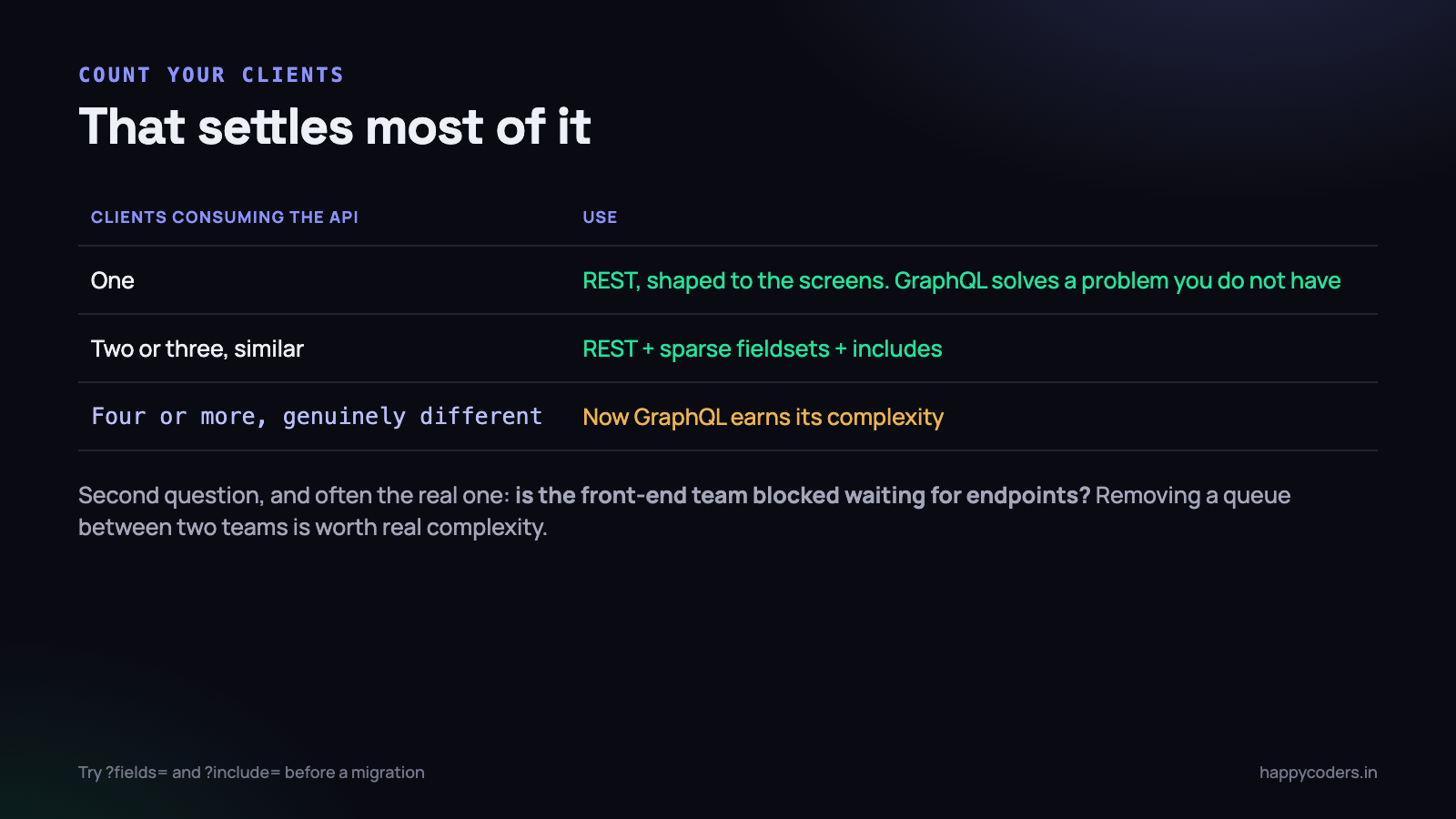
How many different clients consume this API, and are they shaped differently from each other?
- One client. REST, shaped to the screens. GraphQL is solving a problem you do not have.
- Two or three similar clients. REST with sparse fieldsets and includes. Still not worth it.
- Four or more, genuinely different — different platforms, different screens, different teams, changing at different speeds. Now GraphQL is earning its complexity.
The second most useful question is organisational rather than technical: is the front-end team blocked waiting for back-end endpoints? If yes, and it is a recurring bottleneck, that alone can justify GraphQL even on a project where the technical case is thin. Removing a queue between two teams is worth real complexity.
If you do adopt it, do these three things on day one
Teams that regret GraphQL almost always skipped one of these, and retrofitting them is much harder than starting with them.
- Install a data loader before you write the second resolver. Not after the first slow page. Batching is the difference between one query and fifty, and adding it to an existing resolver tree is a rewrite.
- Turn on depth and complexity limits immediately, even internally. An accidental recursive query from your own front end will take the database down just as effectively as a malicious one.
- Decide where authorisation lives and write it down. Per field, in the resolver, using one shared mechanism. If two developers solve it two different ways in the first month, you will be finding holes for a year.
The short version
- GraphQL solves too many requests and too much data per request.
- REST gives you free caching, readable logs, universal tooling and simple authorisation.
- GraphQL brings N+1 by default, application-level caching, query cost limits and per-field authorisation.
- Try sparse fieldsets, includes and screen-shaped endpoints first.
- Many clients with different shapes, or a blocked front-end team, is the real case for GraphQL.
- One client on a good connection makes the choice unimportant — use what the team knows.
- Running both is normal, and starting with one screen is the safe way in.
Neither is a modern or legacy choice. Pick by counting your clients and your round trips, and be honest about which of GraphQL’s costs your team has the appetite to carry. The worst outcome is adopting it because it is what the conference talks were about, discovering the caching and authorisation work six months in, and having neither the old simplicity nor the promised flexibility.
If you go the GraphQL route, the first thing that will bite you is the N+1 problem — the same one that turns up in ordinary ORM code. We have written about where background work belongs and similar backend trade-offs elsewhere on this blog.




