


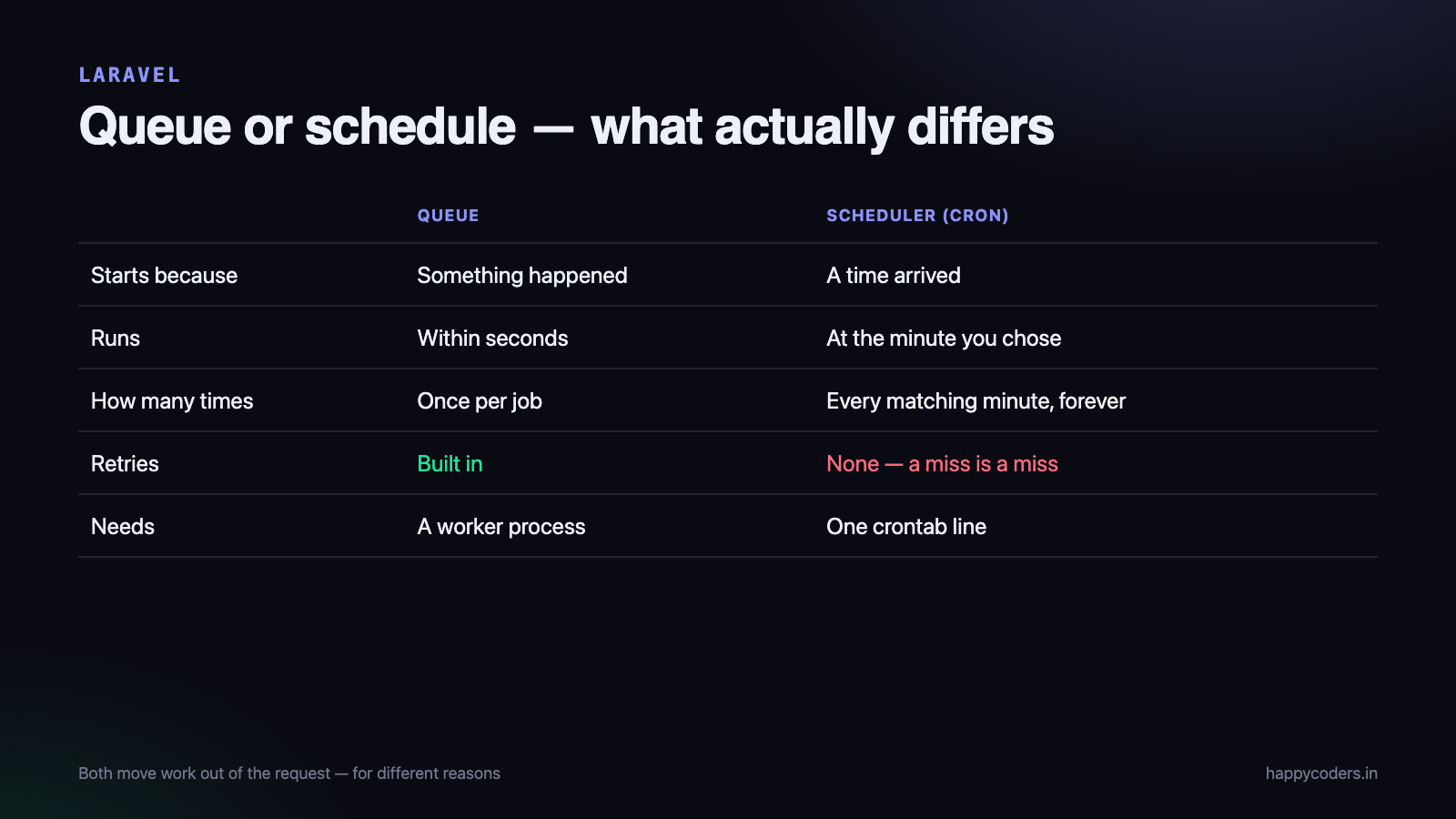
Both a queue and a cron job move work out of the request that triggered it, so they look interchangeable until the first time you pick the wrong one. The difference is simple once stated: a queue runs work as soon as possible, once, because something happened. A cron job runs work on a clock, whether or not anything happened.
What a queue is
A queue is a list of jobs waiting to be run by a separate process. Your application pushes a job onto it and returns immediately; a worker picks it up and runs it moments later.
<?php
// in a controller - the user does not wait for this
SendWelcomeEmail::dispatch($user);
GenerateInvoicePdf::dispatch($order)->onQueue('reports');
NotifyClient::dispatch($order)->delay(now()->addMinutes(10));
The worker is a long-running process you start yourself:
php artisan queue:work --queue=high,default --tries=3 --timeout=90Queues exist so that a user is not kept waiting. Sending an email, resizing an image, calling a payment gateway, generating a PDF — none of these need to finish before the response is returned.
What a cron job is
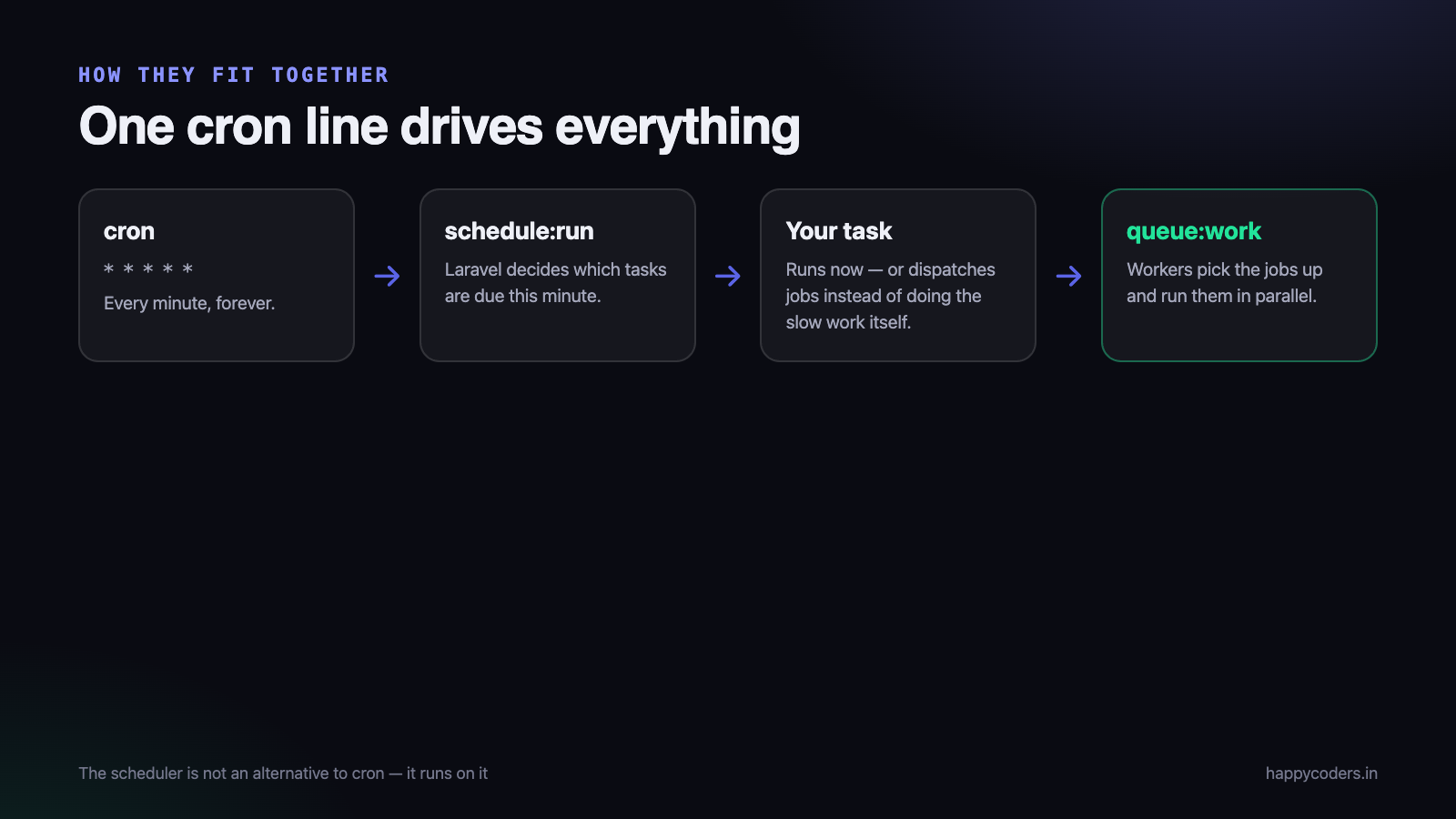
Cron is a service in the operating system that runs a command at fixed times. Laravel uses exactly one cron entry, and does the rest itself:
* * * * * cd /path-to-your-project && php artisan schedule:run >> /dev/null 2>&1That single line runs every minute. Laravel then decides which of your scheduled tasks are due at that minute and runs them. In Laravel 11 and newer, the schedule is defined in routes/console.php; in older versions it is in app/Console/Kernel.php.
<?php
use Illuminate\Support\Facades\Schedule;

Schedule::command('reports:daily')->dailyAt('06:00');
Schedule::command('subscriptions:renew')->hourly()->withoutOverlapping();
Schedule::call(fn () => Cache::forget('stats'))->everyFifteenMinutes();
The relationship people miss
The scheduler is not an alternative to cron — it runs on cron. One cron entry, every minute, and Laravel takes over. And the scheduler can put work onto the queue, so the two are often used together.
<?php
// runs on the clock, but the slow part happens on a queue worker
Schedule::job(new RebuildSearchIndex)->dailyAt('02:00');
That matters in practice: a scheduled task that takes eleven minutes will still be running when the next minute’s schedule:run starts. Dispatching to the queue keeps the scheduler quick, and withoutOverlapping() protects tasks that must never run twice at once.
Side by side
- Trigger — queue: something happened in the app. Cron: the clock reached a time.
- Timing — queue: within seconds. Cron: at the minute you chose, no sooner.
- Runs how often — queue: once per dispatched job. Cron: every time the schedule matches, forever.
- Knows about the request — queue: yes, you pass it the data. Cron: no, it starts cold and has to find its own work.
- Retries — queue: built in (
--tries, backoff,failed_jobs). Cron: none; a failed run is simply missed. - Needs a worker process — queue: yes, kept alive by Supervisor or systemd. Cron: no, one crontab line.
Which to use
Use a queue when
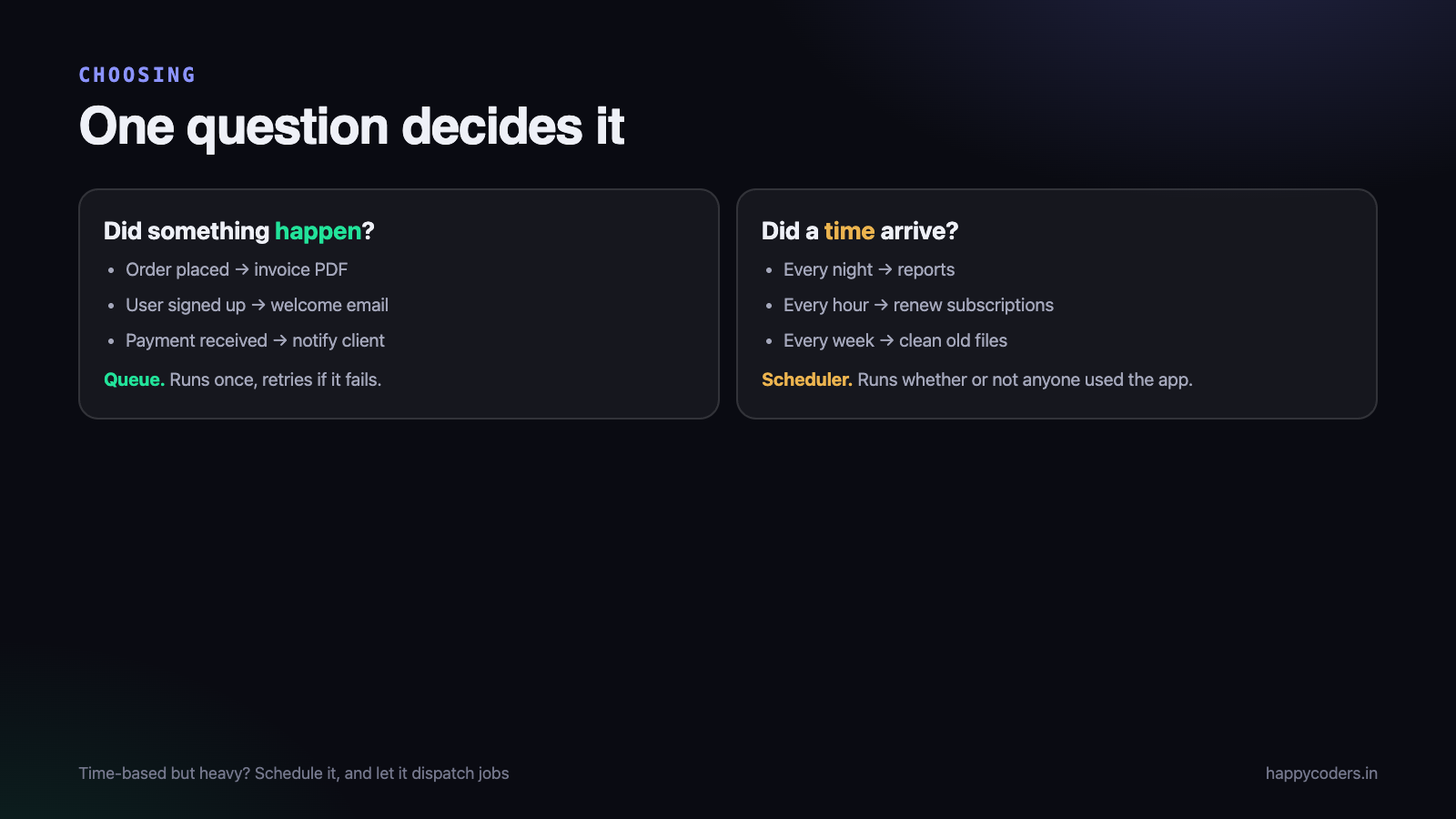
- A user action starts the work — welcome email, invoice PDF, webhook delivery, image processing.
- The work is slow and the user should not wait for it.
- Each item must run exactly once and be retried if it fails.
- Volume is bursty: a hundred orders in a minute become a hundred jobs.
Use the scheduler (cron) when
- The work belongs to a time, not to an event — nightly reports, daily digest emails, monthly invoices.
- Something must be cleaned up regularly: old files, expired sessions, stale cache.
- You are polling something external that cannot notify you.
- Housekeeping must happen even on a day when nobody used the application.
Use both when
The task is time-based but heavy. Schedule it, and have the scheduled command dispatch jobs. A nightly command that queues five thousand emails finishes in a second; the workers then take as long as they need.
Mistakes that cost a night
- Deploying code without restarting the workers. A queue worker loads your code once and keeps it in memory, so it will happily run the old version for days. Run
php artisan queue:restarton every deploy. - No supervisor.
queue:workstarted by hand dies with the terminal. Use Supervisor or systemd so it restarts automatically. - Forgetting the single cron line. Every scheduled task silently never runs, and nothing errors. Check with
php artisan schedule:list. - Long scheduled tasks without
withoutOverlapping(), so two copies run at once and process the same rows twice. - Ignoring
failed_jobs. Failures land there quietly. Watch the table, and retry withphp artisan queue:retry all. - Passing a whole model into a job and expecting it unchanged. Laravel serialises the model and reloads it when the job runs, so it sees the row as it is then, not as it was at dispatch.
A note on shared hosting
On shared hosting a long-running queue:work process is often not allowed, and cron may be restricted to certain intervals. Two common workarounds: run php artisan queue:work --stop-when-empty from the scheduler every minute, or use the sync driver in development and move to a proper worker when you can run one. The second is honest about the trade — with sync, jobs run inside the request, so nothing is actually offloaded.
Choosing a queue driver
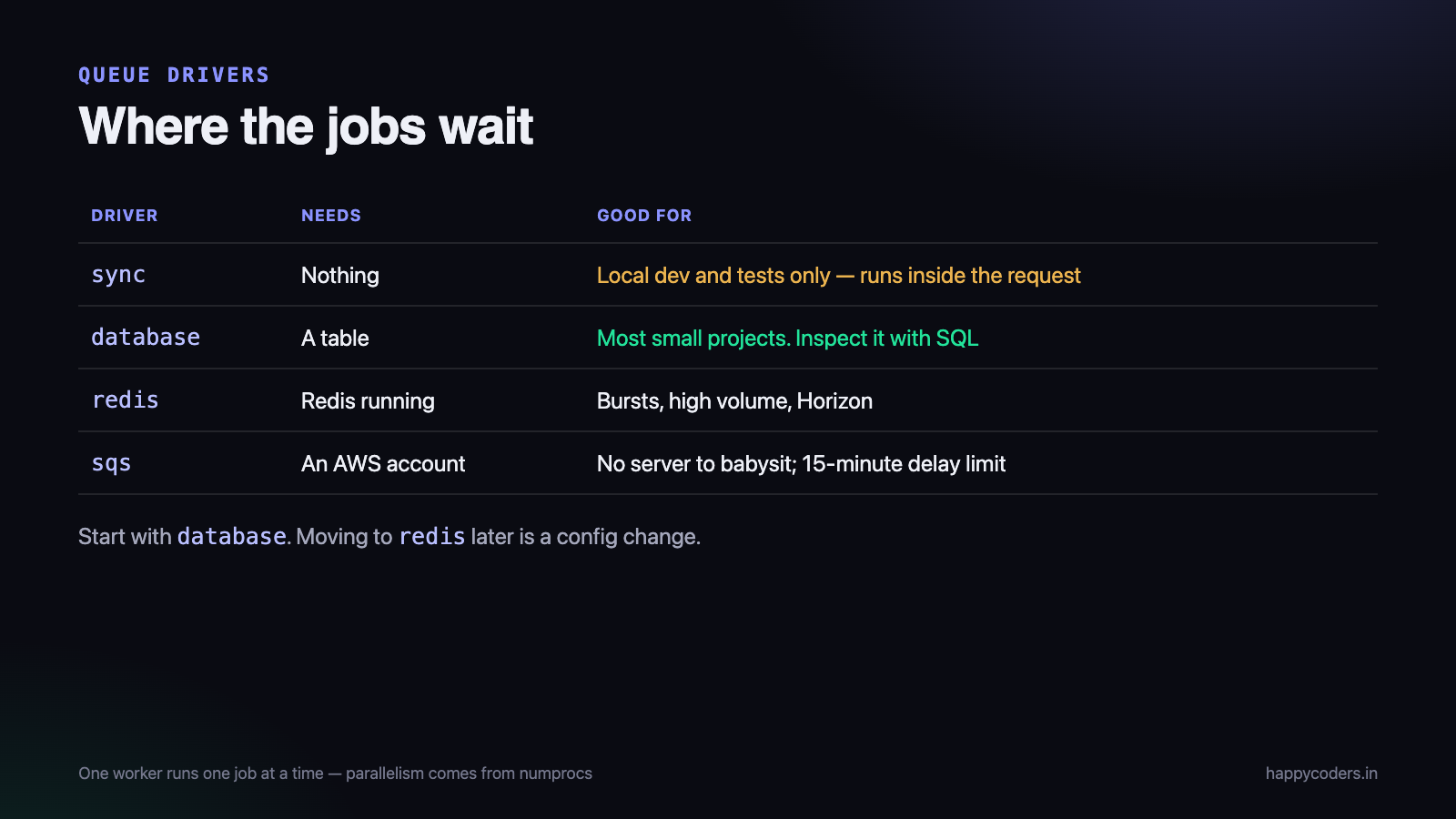
The driver decides where jobs wait. Four are common, and the choice is usually obvious once the trade-offs are stated.
sync— runs the job immediately, inside the request. Nothing is offloaded. Correct for local development and for tests; never in production, because the user waits for everything.database— jobs go into a table. No extra service to run, easy to inspect with SQL, and perfectly adequate for a few thousand jobs a day. It does put write load on your database.redis— fast, handles bursts, and required if you want Horizon. Needs Redis running and kept alive.sqs— Amazon’s managed queue. No server of your own to babysit, at the cost of a hard 15-minute delay limit and a visibility timeout that has to match your job timeout.
Most Indian small-team projects are well served by database until volume makes it uncomfortable, then redis. Moving between them is a config change, so starting simple costs nothing.
Keeping the worker alive
A worker started by hand dies when the terminal closes, the connection drops, or the server reboots. On a normal Linux server, Supervisor keeps it running:
[program:app-worker]
process_name=%(program_name)s_%(process_num)02d
command=php /var/www/app/artisan queue:work --queue=high,default --sleep=3 --tries=3 --max-time=3600
autostart=true
autorestart=true
stopwaitsecs=3600
user=www-data
numprocs=2
redirect_stderr=true
stdout_logfile=/var/log/worker.log
Two details in that file matter more than the rest. numprocs=2 runs two workers, which is how you get parallelism — one worker does one job at a time, however powerful the server is. And stopwaitsecs must be longer than your longest job, or Supervisor will kill a job halfway through a restart.
--max-time=3600 makes the worker exit after an hour so Supervisor starts a fresh one. PHP was not designed for processes that live for weeks, and a scheduled restart is the simplest defence against a slow memory leak.
Making a job safe to run twice
Queues guarantee that a job is delivered, not that it runs exactly once. A worker that is killed mid-job, or a job that times out and is retried, can run twice. If the job sends an email, the customer gets two.
Two tools, for two different problems:
<?php
use Illuminate\Contracts\Queue\ShouldBeUnique;

class RebuildReport implements ShouldQueue, ShouldBeUnique
{
    public $uniqueFor = 3600;             // no second copy queued for an hour

    public function uniqueId(): string
    {
        return (string) $this->report->id;   // unique per report, not globally
    }
}
ShouldBeUnique stops a second copy being queued while one is pending. It does not make the work itself idempotent — that is your job. Before sending, check whether the thing has already been done:
<?php
public function handle(): void
{
    if ($this->invoice->sent_at !== null) {
        return;                            // already handled; a retry must be harmless
    }
    Mail::to($this->invoice->client)->send(new InvoiceMail($this->invoice));
    $this->invoice->update(['sent_at' => now()]);
}
Timeouts, retries and the setting people get wrong
Three numbers interact, and getting them out of order causes duplicate runs that look like a bug in your code.
--timeout— how long a single job may run before the worker kills it.retry_after(inconfig/queue.php) — how long before the queue assumes a job died and hands it to another worker.--tries— how many attempts before the job is written tofailed_jobs.
retry_after must be larger than --timeout. If a job may run for 90 seconds and retry_after is 60, a second worker picks it up while the first is still working, and the job runs twice. This is the single most common queue misconfiguration.
For jobs that call an external API, add backoff so a retry does not hammer a service that is already struggling:
<?php
public $tries = 5;
public array $backoff = [10, 30, 120, 600];   // seconds between attempts
Knowing when something went wrong
Queues fail quietly. Nothing appears on a screen, nobody is waiting, and a failed job simply sits in a table.
- Watch
failed_jobs. Check it daily, or send yourself an alert from theQueue::failing()event. Retry withphp artisan queue:retry allonce the cause is fixed. - Use Horizon if you are on Redis. It shows throughput, wait time and failures on one screen, and is the fastest way to see that a queue is backing up.
- Check the scheduler is actually running with
php artisan schedule:list, which prints each task and its next due time. If the list looks right but nothing happens, the cron line is missing. - Send scheduled task output somewhere —
->emailOutputOnFailure()or->appendOutputTo(). A nightly task that has been failing for three weeks is a common discovery.
A worked example: an order confirmation
Putting it together. A customer places an order. The confirmation email, the invoice PDF and the webhook to the client’s system are all slow, and none of them should hold up the response.
<?php
// controller - returns immediately
$order = Order::create($data);

SendOrderConfirmation::dispatch($order);
GenerateInvoicePdf::dispatch($order)->onQueue('reports');
NotifyPartnerSystem::dispatch($order)->delay(now()->addSeconds(30));

return response()->json(['id' => $order->id], 201);
And separately, on the clock, a task that has nothing to do with any single order:
<?php
Schedule::command('orders:chase-unpaid')->dailyAt('10:00')->withoutOverlapping();
Schedule::command('invoices:month-end')->monthlyOn(1, '02:00');
That is the whole distinction in one file: three jobs because three things happened, two schedules because two times matter.
Batches and chains
Two features solve problems that plain jobs handle badly, and most projects need them eventually.
A chain: things that must happen in order
<?php
Bus::chain([
    new GenerateInvoicePdf($order),
    new EmailInvoice($order),
    new MarkInvoiceSent($order),
])->dispatch();
Each job runs only if the previous one succeeded. If the PDF fails, no email goes out claiming an invoice is attached.
A batch: many things at once, then one thing at the end
<?php
Bus::batch($clients->map(fn ($c) => new SendMonthlyStatement($c)))
    ->then(fn (Batch $b) => Log::info("sent {$b->totalJobs} statements"))
    ->catch(fn (Batch $b, Throwable $e) => Notification::route('mail', 'ops@example.com')
        ->notify(new BatchFailed($b)))
    ->name('monthly statements')
    ->dispatch();
A batch runs the jobs in parallel across your workers and still gives you one callback when they have all finished — which is how you send yourself a “month end finished” message that means something.
More than one queue
By default everything lands on default, so a thousand queued report PDFs sit in front of a password-reset email that a user is waiting for.
<?php
SendPasswordReset::dispatch($user)->onQueue('high');
GenerateMonthlyReport::dispatch($month)->onQueue('reports');
php artisan queue:work --queue=high,default,reportsThe order in --queue is the priority order: the worker empties high before it looks at default. A common setup is two workers on high,default and one on reports, so slow bulk work can never starve the things a person is waiting for.
Testing jobs without running them
Queued work is easy to test, and untested queued work is where silent bugs live — because nobody is watching when it runs.
<?php
public function test_placing_an_order_queues_the_confirmation(): void
{
    Queue::fake();

    $this->postJson('/orders', ['product_id' => 1])->assertCreated();

    Queue::assertPushed(SendOrderConfirmation::class, fn ($job) => $job->order->product_id === 1);
    Queue::assertNotPushed(NotifyPartnerSystem::class);   // not until payment clears
}

public function test_the_job_itself_marks_the_invoice_sent(): void
{
    $invoice = Invoice::factory()->create(['sent_at' => null]);

    (new EmailInvoice($invoice))->handle();              // run it directly

    $this->assertNotNull($invoice->fresh()->sent_at);
}
Two different tests, deliberately. The first proves the controller queues the right work; the second proves the job does the right thing. Testing both through the queue at once tells you less and breaks more often.
A deployment checklist
More queue incidents come from deployments than from code. The order matters:
- Deploy the code.
- Run migrations.
php artisan queue:restart— otherwise the old workers keep running the old code, sometimes for days.php artisan schedule:listto confirm scheduled tasks still look right after the release.- Check
failed_jobsan hour later. A deployment that breaks a job shows up there first.
Step three is the one that gets forgotten, and its symptom is maddening: the site is clearly running new code, while queued emails use a template you deleted last week.
What to do when the queue backs up
One day the queue has nine thousand jobs in it and the newest one will run some time tomorrow. The cause is almost always one of three things, and the fix is different for each.
- Not enough workers. One worker runs one job at a time. If each job takes two seconds and a thousand arrive at once, one worker needs half an hour. Raise
numprocsin Supervisor and the backlog clears in proportion. - One slow job type blocking everything. Move it to its own queue and give it its own worker, so report generation cannot delay password resets.
- Jobs failing and retrying forever. Check
failed_jobsand the retry settings. A job with high tries and a long backoff can occupy a worker for hours while achieving nothing.
Before adding workers, look at what the jobs are doing. A job that makes five separate API calls where one batched call would do is a code problem, and doubling the workers only doubles the load on the API you are already annoying.
Frequently asked questions
Can I run the scheduler without cron?
On a server, cron is the normal way. Laravel does not keep its own clock — something outside has to call schedule:run every minute, and cron or systemd timers are that something.
Which queue driver should I use?
Redis or a database table covers most applications. The database driver needs no extra service and is perfectly good until volume grows; Redis is faster and handles bursts better.
How do I know a job failed?
Failed jobs are recorded in the failed_jobs table after the configured number of tries. Check it regularly, or send an alert from the failed event — silence is not success.
Do queues work with sessions?
No, and this catches people. A job runs in a separate process with no request, no session and no logged-in user. Pass everything the job needs when you dispatch it.




