
Laravel Queue vs Cron Job: Key Differences Explained
Laravel queues and cron jobs solve different problems. What each one is for, how the scheduler actually uses cron, and how to decide which to reach for.
Read article


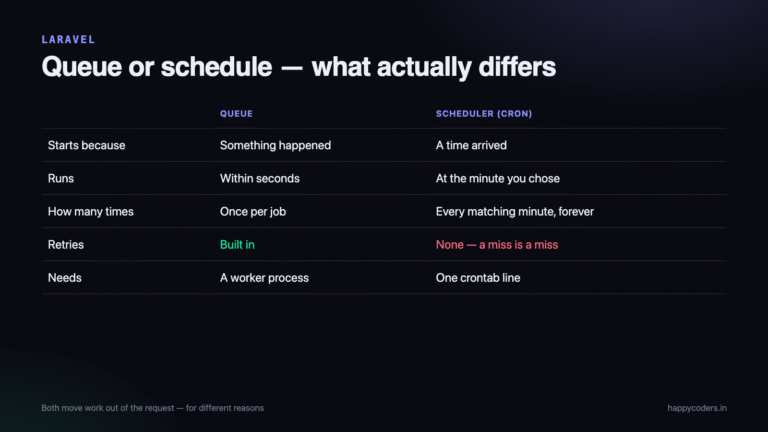
Laravel queues and cron jobs solve different problems. What each one is for, how the scheduler actually uses cron, and how to decide which to reach for.
Read article
Laravel package development allows you to create reusable functionality that can be shared across multiple projects. Start by creating a custom folder structure under the packages/ directory. Define your composer.json, service provider, and class files inside a src/ folder. Register autoload paths and service providers to integrate with the main app. This enables clean separation […]
Read article
Laravel provides centralized exception handling through the Handler.php file, allowing custom error responses and logging. You can define custom exceptions, use try-catch blocks for critical code, and log errors using Laravel’s built-in logging system. Integration with tools like Sentry or Bugsnag allows real-time error tracking. Custom error views enhance user experience by showing friendly messages […]
Read article
Laravel provides a simple and flexible notification system that supports channels like email, database, SMS, and Slack. You can create notifications using the artisan make:notification command and send them using the notify() method. Each notification can define how it should be delivered using the via() method. You can customize the content using methods like toMail() […]
Read article
Laravel makes email sending simple using its built-in Mail facade and Mailable classes. You can configure your SMTP settings in the .env file and create reusable email templates using Blade views. The php artisan make:mail command generates a mailable class for organizing email logic. Emails can be sent via various drivers like SMTP, Mailgun, or […]
Read article
Laravel provides multiple ways to pass data between controllers, views, routes, and sessions. You can use the view() function to send data from a controller to a Blade view. Route parameters and form inputs allow dynamic data handling via the Request object. Sessions and flash messages help store data across requests. Choosing the right method […]
Read article
Laravel provides a simple and powerful way to validate user input using the validate() method or custom Form Request classes. You can define rules for required fields, data types, max length, and more. Validation errors are automatically redirected with error messages. Blade views can display these errors using the $errors variable. This ensures clean, secure, […]
Read article
In Laravel, both cookies and sessions store user data across requests but differ in where and how they store it. Cookies are stored in the user’s browser and are ideal for lightweight, persistent data like preferences. Sessions store data on the server and are better for sensitive or temporary data like login state. Sessions are […]
Read article
In Laravel, a session is a way to store user-specific data across multiple HTTP requests. It allows you to remember information (like login status, flash messages, or temporary values) while the user navigates your application. Key Features of Laravel Session Stores data per user, temporarily Automatically managed using session IDs (in cookies) Data is stored […]
Read article
In Laravel, a cookie is a small piece of data stored on the user’s browser, used to remember information between requests — like login status, preferences, or cart items. Laravel provides a convenient, secure way to set, get, and delete cookies. Key Features of Laravel Cookies Automatically encrypted and signed for security Can be read/write […]
Read article



