


Nearly every front end we are asked to fix has the same block of code in it. A try, a fetch, a .json(), a catch that shows “Something went wrong”. It looks careful. It looks like error handling was considered. It is, in practice, the reason nobody can tell you why the page broke.
The problem is that fetch behaves differently from what almost everyone assumes on their first day with it, and the difference is not small. It quietly changes which failures reach your catch block and which ones sail straight through it into the success path.
This post is the whole of it: the trap, the four distinct failures that need distinct treatment, timeouts that actually cancel the request, retries that do not double-charge a customer, error messages a human can act on, and a small reusable wrapper that puts it all in one place.
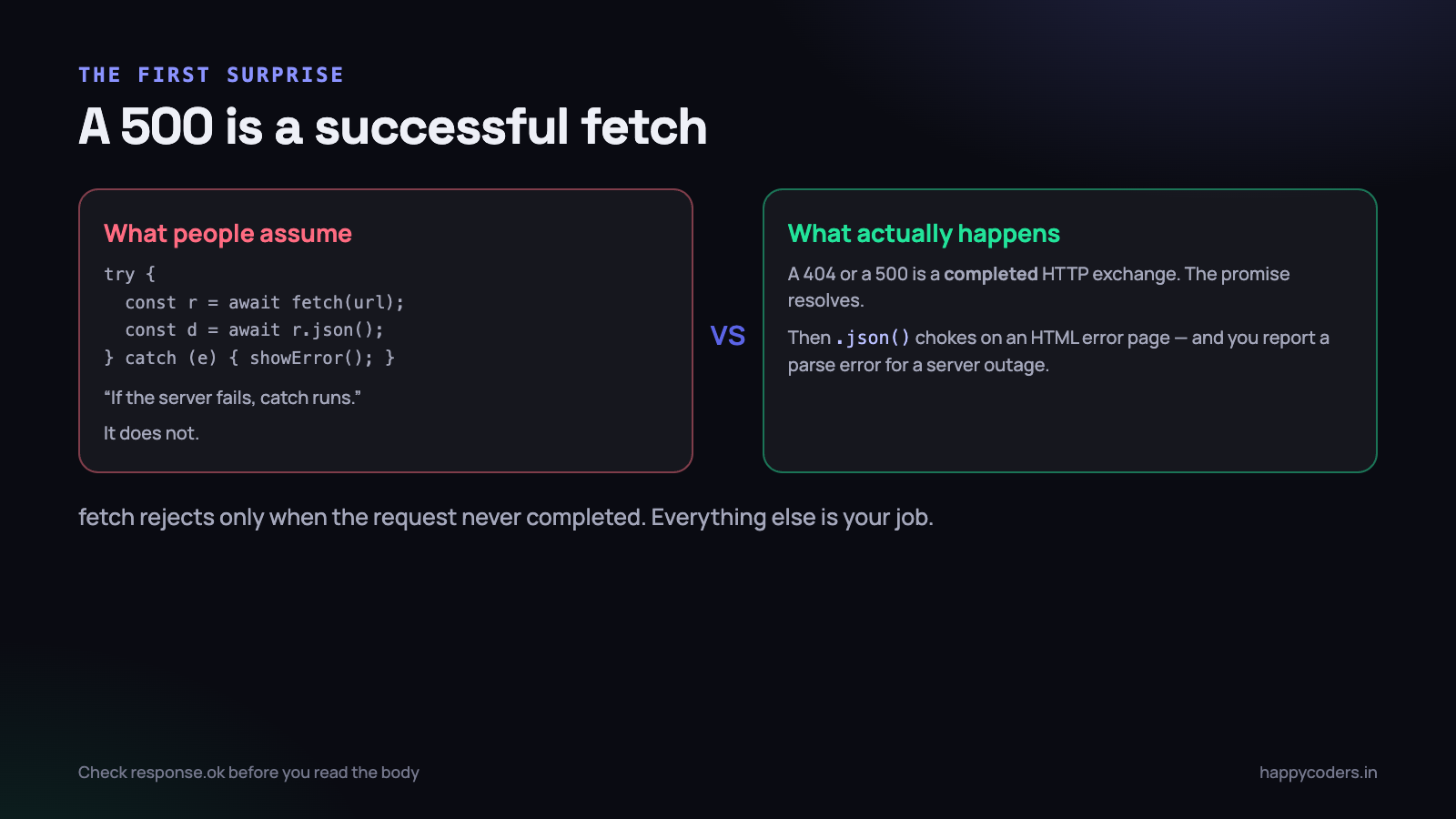
The trap: a 404 is a successful fetch
The promise returned by fetch rejects only when the request could not be completed at all. No network. DNS did not resolve. The connection dropped. CORS blocked it before the response was readable. The request was cancelled.
A response that arrived carrying status 404, or 500, or 503, is a completed HTTP exchange. The browser did its job. The promise resolves normally, and your try block carries on as if everything is fine.
// This looks defensive. It is not.
try {
  const res  = await fetch('/api/invoices/4471');
  const data = await res.json();
  render(data);
} catch (err) {
  showToast('Something went wrong');
}
Walk that through with a server returning a 500 and an HTML error page, which is what most stacks do by default. fetch resolves. res.json() is handed <!DOCTYPE html> and throws a SyntaxError. The catch block runs, and the user is told “Something went wrong”.
The outcome is right by accident and wrong in every way that matters. You have logged a JSON parsing error for a server outage. Your monitoring shows a front-end bug. The developer looking at it on Monday goes hunting through parsing code for a fault that was never there.
This is the single most common source of misleading front-end error reports we see. The error your logging captured is not the error that happened — it is the second failure caused by the first one.
Four failures, and they are not interchangeable
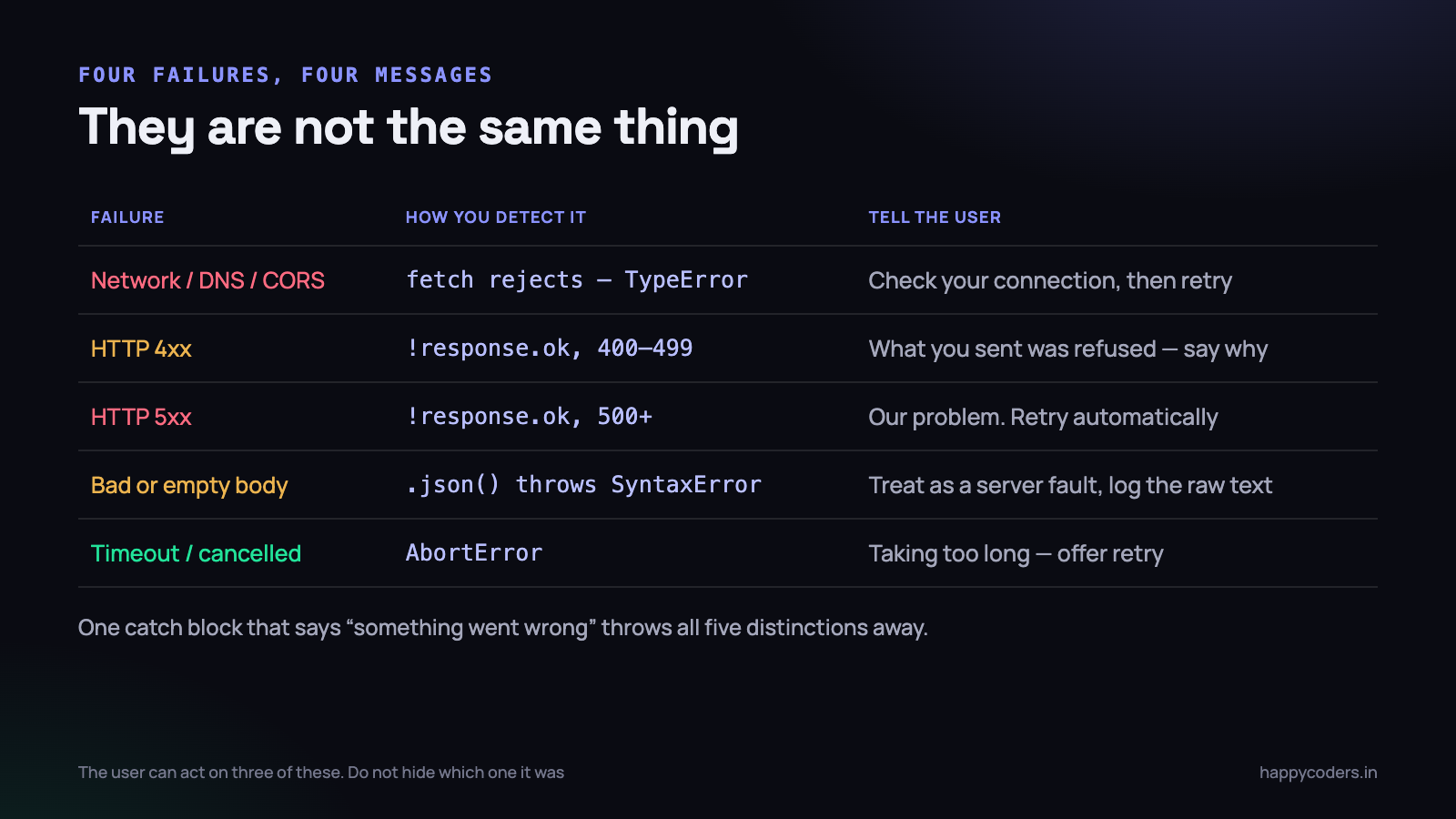
Before writing any code, separate the things that can actually go wrong. There are four, plus cancellation, and a user can do something useful about three of them.
- The request never completed. Aeroplane mode, a dead Wi-Fi hop, DNS failure, a CORS rejection, the server refusing the connection.
fetchrejects with aTypeError, usually saying “Failed to fetch”, which is deliberately vague for security reasons. You cannot tell offline from CORS from a dead server, so do not pretend to. - The server refused what you sent — a 4xx. The request arrived and was understood and rejected. 401 means sign in again. 403 means you are signed in and not allowed. 404 means it is gone. 422 usually means field-level validation failed and the body contains the details. Retrying any of these unchanged is pointless.
- The server broke — a 5xx. Not the user’s fault, not something they can fix, and often transient. This is the one category worth retrying automatically.
- The body was not what you expected. Status 200, but an empty body, an HTML maintenance page, or truncated JSON from a proxy that gave up.
.json()throws. Treat it as a server fault, not a user error. - You cancelled it. A timeout fired, or the user navigated away and you aborted in-flight requests. This produces an
AbortError, and it must never be shown as a failure when it was your own cleanup.
Collapsing all five into one message is the actual bug. A user who is offline needs to be told to check their connection. A user whose session expired needs a sign-in link. A user who typed a duplicate invoice number needs to know which field is wrong. Only the 5xx case genuinely deserves a generic apology.
Checking the response properly
The fix starts with three lines. response.ok is true for any status in the 200–299 range and false otherwise, which is exactly the check the language does not do for you.
const res = await fetch('/api/invoices/4471');

if (!res.ok) {
  // The exchange succeeded. The result did not.
  throw new HttpError(res.status, await safeBody(res));
}

const data = await res.json();
Throwing a custom error type rather than a string matters more than it looks. It lets the calling code ask which failure this was without matching on message text, which breaks the first time somebody edits a sentence.
class HttpError extends Error {
  constructor(status, body) {
    super(`HTTP ${status}`);
    this.name    = 'HttpError';
    this.status  = status;
    this.body    = body;                 // parsed if it was JSON, else text
    this.isServer = status >= 500;       // ours
    this.isClient = status >= 400 && status < 500;  // theirs
  }
}

class NetworkError extends Error {
  constructor(cause) {
    super('Could not reach the server');
    this.name = 'NetworkError';
    this.cause = cause;
  }
}
Read the error body, carefully
Most APIs return something useful in the body of a 422 or a 400 — a message, a field name, a validation map. Throwing that away and printing the status code wastes the most helpful information in the whole exchange.
But reading it has to be defensive, because the error body is exactly where you cannot rely on the content type. Parse it conditionally and never let the parse itself become the error you report.
async function safeBody(res) {
  const type = res.headers.get('content-type') || '';
  try {
    if (type.includes('application/json')) return await res.json();
    const text = await res.text();
    return text.slice(0, 500);   // enough to log, not enough to flood
  } catch {
    return null;                 // body unreadable; the status still stands
  }
}
Note the truncation. An HTML error page from a PHP stack can be forty kilobytes of stack trace. You want it in the log, you do not want it in a toast, and you certainly do not want it sent to an analytics endpoint on every failure.
Requests that never come back
A request that hangs is worse than one that fails. The spinner spins, the button stays disabled, and the user eventually reloads the page — which, on a form that was halfway to submitting, is how duplicate records get created.
fetch has no timeout option. It will wait as long as the browser allows, which on a stalled mobile connection can be well over a minute. AbortController is the mechanism that fixes this, and it is the same mechanism you use to cancel requests when a component unmounts or the user types a new search term.
async function fetchWithTimeout(url, options = {}, ms = 10000) {
  const controller = new AbortController();
  const timer = setTimeout(() => controller.abort(), ms);

  try {
    return await fetch(url, { ...options, signal: controller.signal });
  } finally {
    clearTimeout(timer);   // runs on success, failure and abort alike
  }
}
The finally is not optional tidiness. Without it you leave a timer per request, and on a page that polls every few seconds you have leaked thousands of them by lunchtime.
Modern browsers also have AbortSignal.timeout(ms), which is one line and does the same thing. Use it where you can; use the controller version when you also need a way to cancel manually, because you can combine both with AbortSignal.any().
// Short version, if you do not need manual cancellation too
const res = await fetch(url, { signal: AbortSignal.timeout(10000) });

// Both: a timeout AND a cancel-on-unmount signal
const res2 = await fetch(url, {
  signal: AbortSignal.any([AbortSignal.timeout(10000), componentSignal]),
});
Pick timeouts per endpoint, not one global number. A search suggestion that has not answered in two seconds is useless. A PDF generation endpoint might legitimately take forty. A single ten-second default applied to both gives you a search box that feels broken and report generation that fails just before it would have worked.
An abort is not always an error
Distinguish the two reasons a request aborted. If your own code cancelled it because the user moved on, silently discard it. If the timeout fired, that is a real failure the user should see.
catch (err) {
  if (err.name === 'AbortError') {
    if (userNavigatedAway) return;              // not an error at all
    throw new TimeoutError('The server took too long to respond');
  }
  throw err;
}
The race nobody notices until a demo
There is a second failure that is not an error at all and still shows wrong data. A user types in a search box. Four requests go out. The third one is slow, the fourth is fast, and the fourth answer arrives first. Then the third arrives and overwrites it. The screen now shows results for a query the user has already finished typing past.
No exception is thrown, nothing is logged, and it is almost impossible to reproduce deliberately. The fix is the same controller: keep the one in flight, abort it before starting the next.
let inFlight = null;

async function search(term) {
  inFlight?.abort();                 // cancel the previous one
  inFlight = new AbortController();
  try {
    return await api(`/api/search?q=${encodeURIComponent(term)}`,
                     { signal: inFlight.signal });
  } catch (err) {
    if (err.name === 'AbortError') return;   // superseded, not failed
    throw err;
  }
}
The same pattern belongs in any component that fetches on mount and can be unmounted quickly — a modal, a tab, a route. Abort on cleanup, and the stale response never reaches a component that no longer exists.
Retry, and the requests that must never be retried
Retrying is genuinely useful. On Indian mobile networks a single dropped request during a train journey or a lift ride is routine, and one silent retry turns a visible failure into nothing the user ever notices.
Retrying the wrong request is how a customer gets charged three times. The rule is simple enough to memorise, and it is about whether repeating the request can change the world twice.
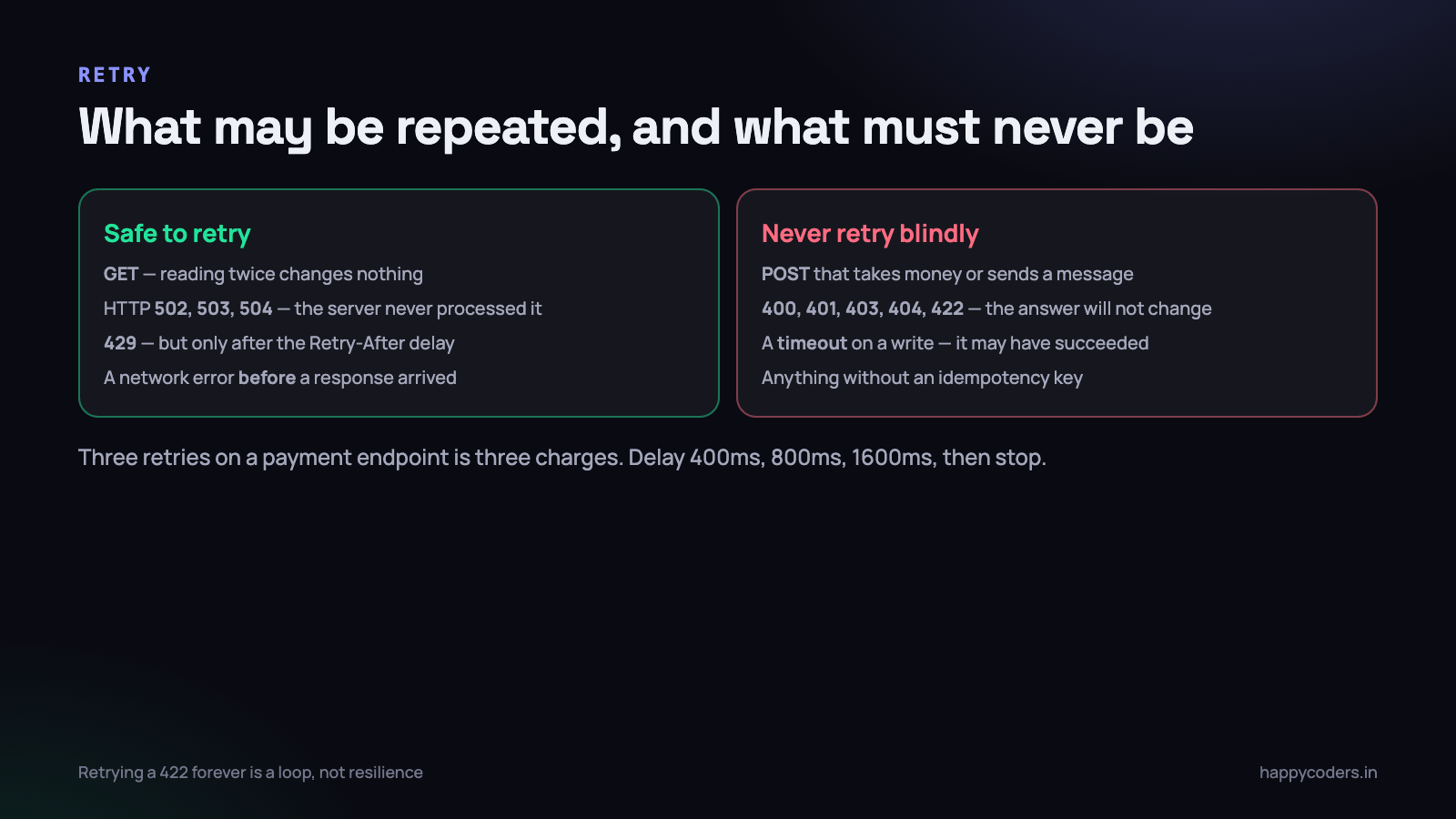
- Retry a GET freely. Reading something twice has no consequence. This covers the large majority of requests in most applications.
- Retry 502, 503 and 504. These come from a gateway or load balancer, which means the request very probably never reached your application at all.
- Respect 429. You are being rate limited. Read the
Retry-Afterheader and wait exactly that long. Retrying a 429 immediately makes the situation worse and can get the whole IP blocked. - Never retry a 400, 401, 403, 404 or 422. The answer will not change. A retry loop on a 422 is an infinite loop with a delay in it.
- Never blindly retry a POST, PUT or DELETE that has a side effect — a payment, an email, an SMS, a stock decrement. If it must be retryable, send an idempotency key and let the server recognise the repeat.
- Never retry a timeout on a write. This is the dangerous one. A timeout tells you nothing about whether the server processed the request. It may have completed and the response was lost. Ask the server what the current state is instead of repeating the write.
const RETRYABLE = new Set([502, 503, 504]);

async function withRetry(fn, { tries = 3, base = 400 } = {}) {
  for (let attempt = 1; ; attempt++) {
    try {
      return await fn();
    } catch (err) {
      const retryable =
        err instanceof NetworkError ||
        (err instanceof HttpError && RETRYABLE.has(err.status));

      if (!retryable || attempt >= tries) throw err;

      // exponential backoff + jitter, so a thousand clients
      // do not all come back in the same millisecond
      const wait = base * 2 ** (attempt - 1) + Math.random() * 200;
      await new Promise(r => setTimeout(r, wait));
    }
  }
}
The jitter matters at scale. Without it, every client that failed during a thirty-second outage retries at exactly 400ms, then exactly 800ms, and your server comes back up straight into a synchronised stampede that knocks it over again.
Three attempts is plenty for a user-facing request. Beyond that you are no longer improving reliability, you are making the page feel frozen. If the third attempt fails, tell the user and offer a button.
What the user should actually see
“Something went wrong” is not an error message. It is an admission that nobody decided what to say. Every message you show should answer three questions: what failed, whose problem it is, and what to do next.
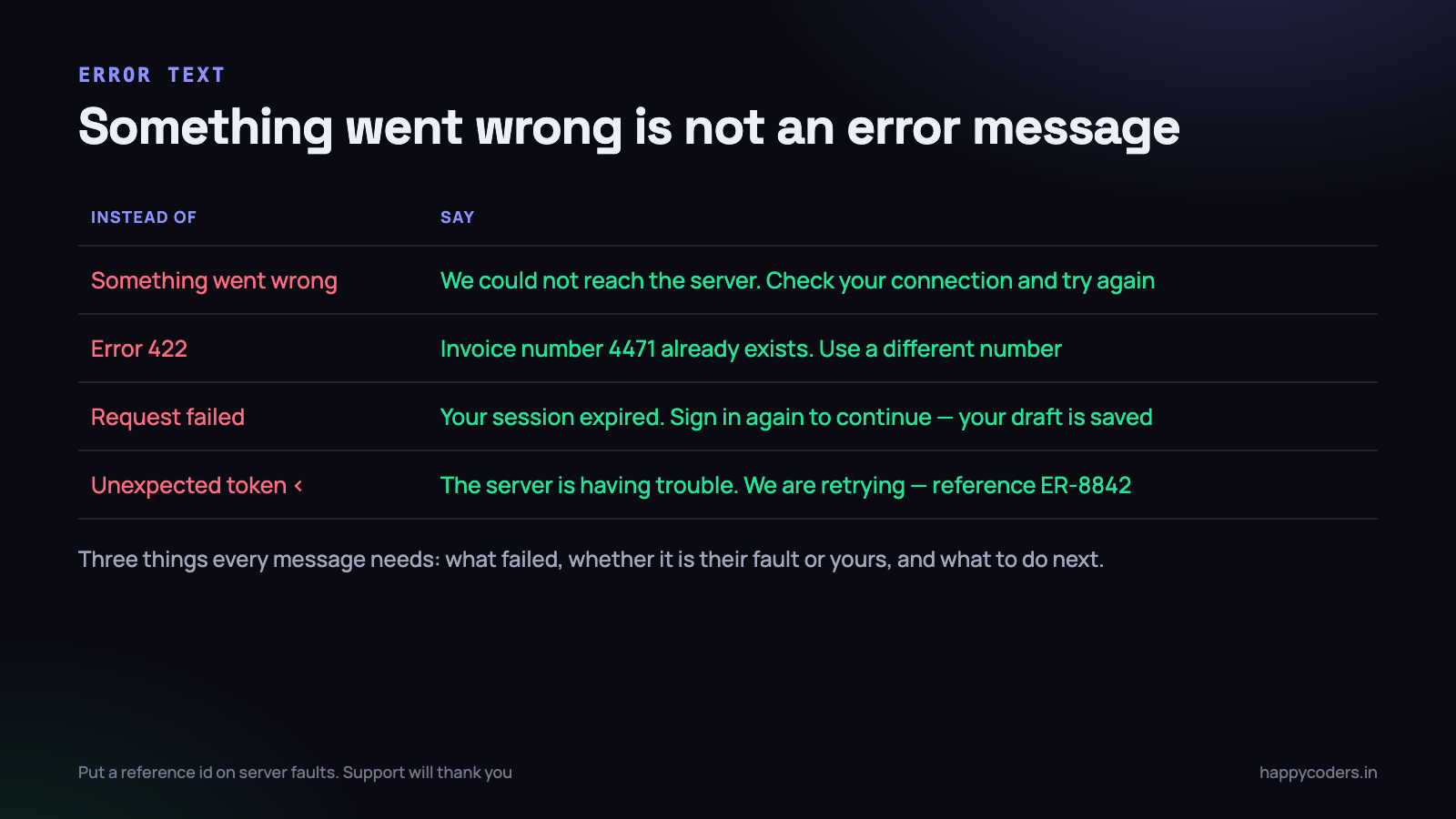
- Network failure. “We could not reach the server. Check your connection and try again.” Offer a Retry button that repeats the exact request rather than reloading the page and losing the form.
- 401. “Your session has expired. Sign in again to continue.” Save the in-progress form to
sessionStoragefirst, and restore it afterwards. Losing twenty minutes of typing to an expired token is a genuinely enraging experience. - 403. “You do not have permission to do this. Ask an administrator for access.” Never a retry button — retrying cannot help and implies it might.
- 404. “That record no longer exists. It may have been deleted.” Give them a link back to the list.
- 422. Put the messages on the fields they belong to. A banner saying “validation failed” above a form of eighteen inputs is a puzzle, not a message.
- 5xx. “The server is having trouble. We are trying again.” Include a short reference id that also appears in your logs, so a support conversation starts with a fact instead of a description.
Keep the raw technical detail — status, URL, response body, reference id — and send it to your logging. Never put it on screen. The user cannot act on Unexpected token < in JSON at position 0, and the people who can act on it should be reading it in a log, with the request that produced it.
One wrapper, used everywhere
None of the above belongs scattered through your components. Write it once, export one function, and let every call site be three lines. This is the version we keep reaching for, complete enough to paste in.
export async function api(url, {
  method = 'GET',
  body,
  headers = {},
  timeout = 10000,
  retries,
  signal,
} = {}) {
  const isWrite = method !== 'GET' && method !== 'HEAD';
  const tries = retries ?? (isWrite ? 1 : 3);   // writes: no retry by default

  const run = async () => {
    const signals = [AbortSignal.timeout(timeout)];
    if (signal) signals.push(signal);

    let res;
    try {
      res = await fetch(url, {
        method,
        headers: body
          ? { 'Content-Type': 'application/json', ...headers }
          : headers,
        body: body ? JSON.stringify(body) : undefined,
        signal: AbortSignal.any(signals),
        credentials: 'same-origin',
      });
    } catch (err) {
      if (err.name === 'AbortError' || err.name === 'TimeoutError') {
        if (signal?.aborted) throw err;          // we cancelled: stay quiet
        throw new TimeoutError('The server took too long to respond');
      }
      throw new NetworkError(err);               // offline, DNS, CORS
    }

    if (!res.ok) throw new HttpError(res.status, await safeBody(res));

    if (res.status === 204) return null;
    const type = res.headers.get('content-type') || '';
    if (!type.includes('application/json')) {
      throw new HttpError(res.status, await res.text());  // 200 but not JSON
    }
    return res.json();
  };

  return withRetry(run, { tries });
}
Three details in there are worth pointing out, because they are the ones that get left out of hand-written versions.
- Writes do not retry by default. The default is one attempt for anything that is not a GET or HEAD. Turning retries on for a specific write is then a deliberate decision at the call site, made by somebody who has thought about idempotency.
- A 204 returns null, not a parse error. No content means no body. Calling
.json()on it throws, and that throw is indistinguishable from a real parsing failure unless you handle the status explicitly. - A 200 that is not JSON is treated as a failure. This is the case that catches session timeouts redirecting to an HTML login page, and maintenance pages served with status 200. Without this check they arrive as a confusing
SyntaxErrorfrom deep inside your rendering code.
The call sites then become boring, which is the point.
try {
  const invoice = await api(`/api/invoices/${id}`);
  render(invoice);
} catch (err) {
  showError(messageFor(err));   // one function, mapping error type to words
}

// A write, with an explicit idempotency key so a retry is safe
await api('/api/payments', {
  method: 'POST',
  body: { amount: 24000, invoice_id: id },
  headers: { 'Idempotency-Key': crypto.randomUUID() },
  retries: 3,
});
Testing that it works
Error paths are the least-tested code in most applications, because reproducing them by hand is tedious. It does not have to be. Every one of these can be triggered in under a minute.
- Offline. DevTools, Network tab, throttling set to Offline. Submit the form. You should see the connection message and a working Retry, not a parse error.
- Slow. Throttle to Slow 3G and check the timeout fires with a sensible message rather than the spinner running forever.
- 500. Point one endpoint at a URL that returns an HTML error page. Verify the log records “HTTP 500” and not a
SyntaxError. - 401 mid-session. Delete the session cookie in DevTools while a long form is half filled in, then submit. The draft must survive.
- Navigate away mid-request. Start a slow request and immediately change page. No error toast should appear at all.
- Double-click submit. The oldest bug in the book, and still everywhere. Either disable the button on the first click or key the request so the server rejects the duplicate.
If you are also writing the API, our notes on error handling in PHP cover the other half of this — returning a consistent JSON error body with the right status code makes every one of the front-end cases above easier to handle well.
What to do on Monday morning
This is an afternoon of work in most codebases, and it does not need a refactor or a new library.
- Search for
fetch(across the project. Count the call sites. Every one without anres.okcheck nearby is a place where a 500 is being reported as a parse error. - Write the wrapper once, in one file, with the error classes. Half an hour, most of which is above.
- Convert the noisiest screen first — whichever page generates the most support messages. Confirm the logging now shows a status code.
- Write the message map. One function, one case per error type, in plain words. Show it to somebody who does not write code and ask them what they would do next.
- Turn off retries for every write until you have looked at each one and decided whether it is idempotent.
- Run the six tests above before you call it finished. Ten minutes, and it is the only way to know the error paths run at all.
The measurable result is not fewer errors — the same things fail as before. It is that when something fails, the log says what failed, and the person in front of the screen is told something they can act on. That difference is worth an afternoon.




