


A ruled notebook on the reception desk, a column for signature and a column for time, and a pen tied to it with string. It is still how a large number of Indian companies record attendance, and for a single-office business with everybody in by half past nine, it works.
Then something changes. Two people start working from home on Wednesdays. A client wants hours broken down by project. Payroll takes a full day because somebody is adding columns of handwritten times. A former employee disputes their leave balance and the only evidence is a register with three different people’s handwriting in it.
This article is about making that switch calmly: what actually breaks, what to migrate, how to run both systems in parallel for a month, and — most importantly — how to announce it so it is heard as an upgrade rather than as surveillance.
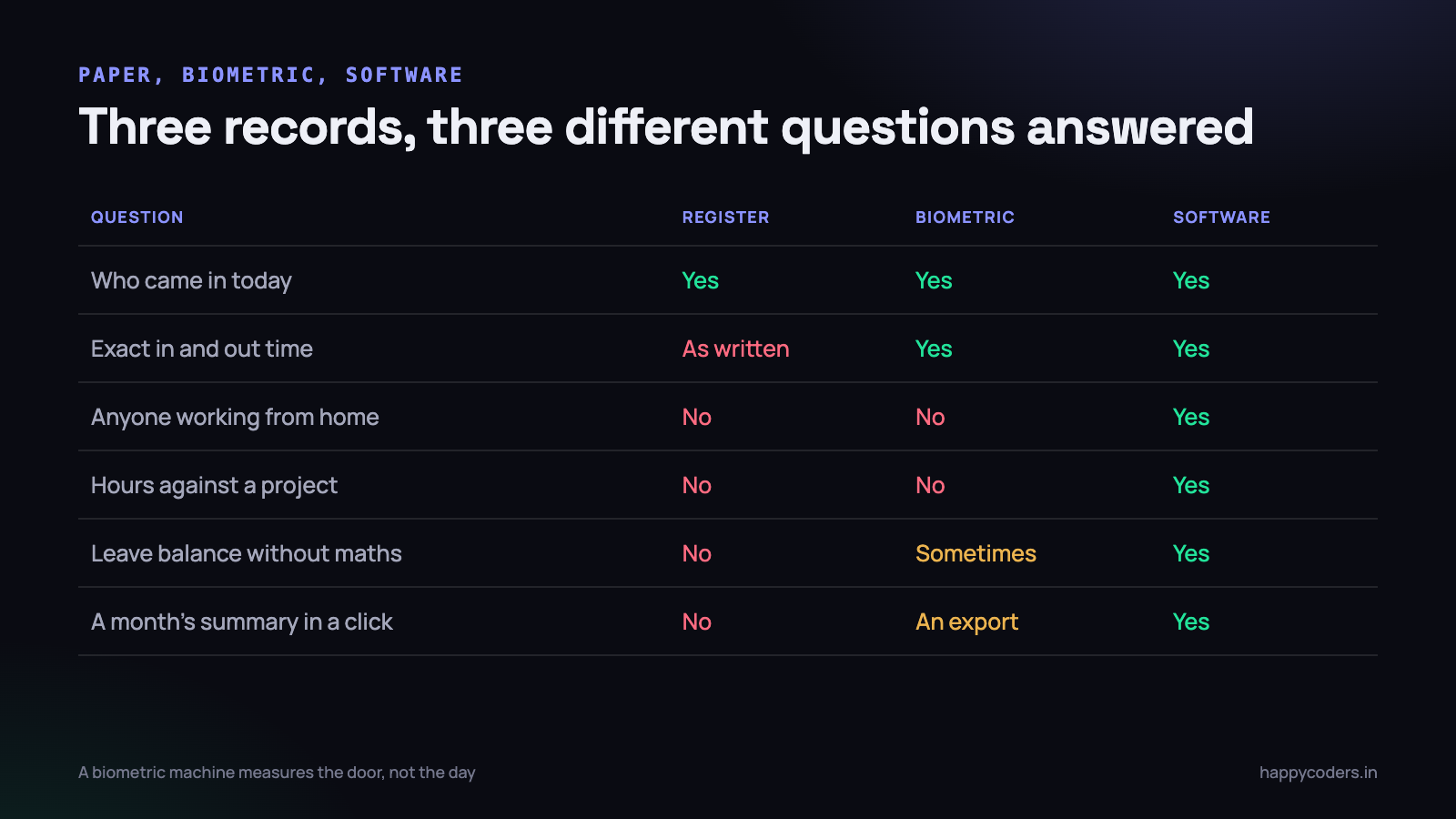
What actually breaks with a register
The register is not a bad system. It is a system that answers exactly one question — did this person come in today — and companies outgrow it by starting to ask other questions.
It records presence, not hours
A signature at 9:35 and another at 18:40 looks like nine hours. It is not. It is two moments with an unknown quantity between them, which includes lunch, two tea breaks, a bank errand and forty minutes of a birthday celebration in the pantry. For statutory purposes that may be fine. For working out whether a project is running over, it is useless.
The distinction matters more than it sounds, because the two records are often confused in conversation. “Everybody was present all month” and “the project is three weeks late” are both true at once, and a register cannot explain how.
It has nothing to say about anyone not in the building
This is the failure that usually triggers the change. The moment one person works from home, the register develops a hole, and the hole is filled by WhatsApp messages, a shared sheet, or somebody’s memory. Now you have two attendance systems that disagree, and the one on paper is treated as authoritative even though it is the one with missing days.
Hybrid working made this universal in Indian offices after 2020, and most companies never resolved it. They simply stopped recording the remote days properly and hoped nobody would need them later. Payroll always needs them later.
The maths is manual, and manual maths is wrong
At the end of the month somebody sits with the register and a calculator. Present days, half days, leave taken against leave available, holidays, the Saturday somebody came in. It takes hours, it is tedious, and it contains errors — not because anybody is careless, but because that is what happens when a human adds two hundred handwritten numbers.
Then the errors are discovered by employees, one at a time, over the following month. Each one costs a conversation, and each one costs a little trust in the whole record.
It cannot be searched, backed up, or produced on demand
“How many days did Priya take in the last financial year?” is a twenty-minute job with a stack of registers and a two-second job with software. So is producing a year of attendance for an inspection, an audit, or a dispute. And a register has exactly one copy, which lives in a cupboard that has a monsoon above it.
What a biometric machine still cannot tell you
Many companies solved the handwriting problem years ago by putting a fingerprint or face reader on the wall. That fixes the two weakest parts of the register — the times are now exact, and nobody can sign in for a colleague — and it fixes nothing else.
A biometric machine measures a door. It knows who crossed it and when. Everything you actually want to know sits beyond that.
- It cannot see anyone working from home. Same hole as the register, now with a more expensive device attached.
- It records in and out, not hours worked. The gap between the two still contains everything it always contained.
- It knows nothing about projects. Nine hours in the building tells you nothing about which client to invoice, which is the question a services business most needs answered.
- Leave usually lives somewhere else. The machine records a missing day. Whether it was approved annual leave, sick leave or an absence is in an email, a WhatsApp message, or a separate register — so the reconciliation is manual again.
- The export is a file, not a report. Most of these devices produce a CSV of punches. Turning that into a payroll input is somebody’s spreadsheet, maintained by one person, understood by nobody else.
- Field staff never touch it. A sales person who visits three clients and goes home has no attendance record at all.
None of this means throwing the machine away. For office staff it works, it is paid for, and people are used to it. The realistic end state for many Indian companies is the biometric machine for the office plus software that covers remote days, leave and project hours — with one report that does not care which source a day came from.
Decide what you are actually buying
Before comparing products, write down which of these four questions you need answered, because they are different systems wearing one word.
- Payroll. How many days do I pay for this month, after leave and holidays? Most companies only need this.
- Availability. Is this person working right now, and reachable? A presence question, not an hours question.
- Compliance. Can I produce a dated, consistent record if somebody asks for one?
- Delivery. Where did the week go, and which client should be billed for it? Attendance cannot answer this at all — it needs hours against projects.
If your answer is only the first and third, an attendance product is enough and you can stop reading comparison tables about activity monitoring. If the fourth is on your list — and for any agency or software company it is — you are buying time tracking that also does attendance, which is a different category. We went through the options for distributed teams in remote team attendance tracking in India.
The historical data: migrate three things, archive the rest
The single biggest source of delay in these projects is somebody deciding that six years of attendance history must be typed into the new system before it can go live. It must not. That work takes weeks and produces a number nobody will ever query.
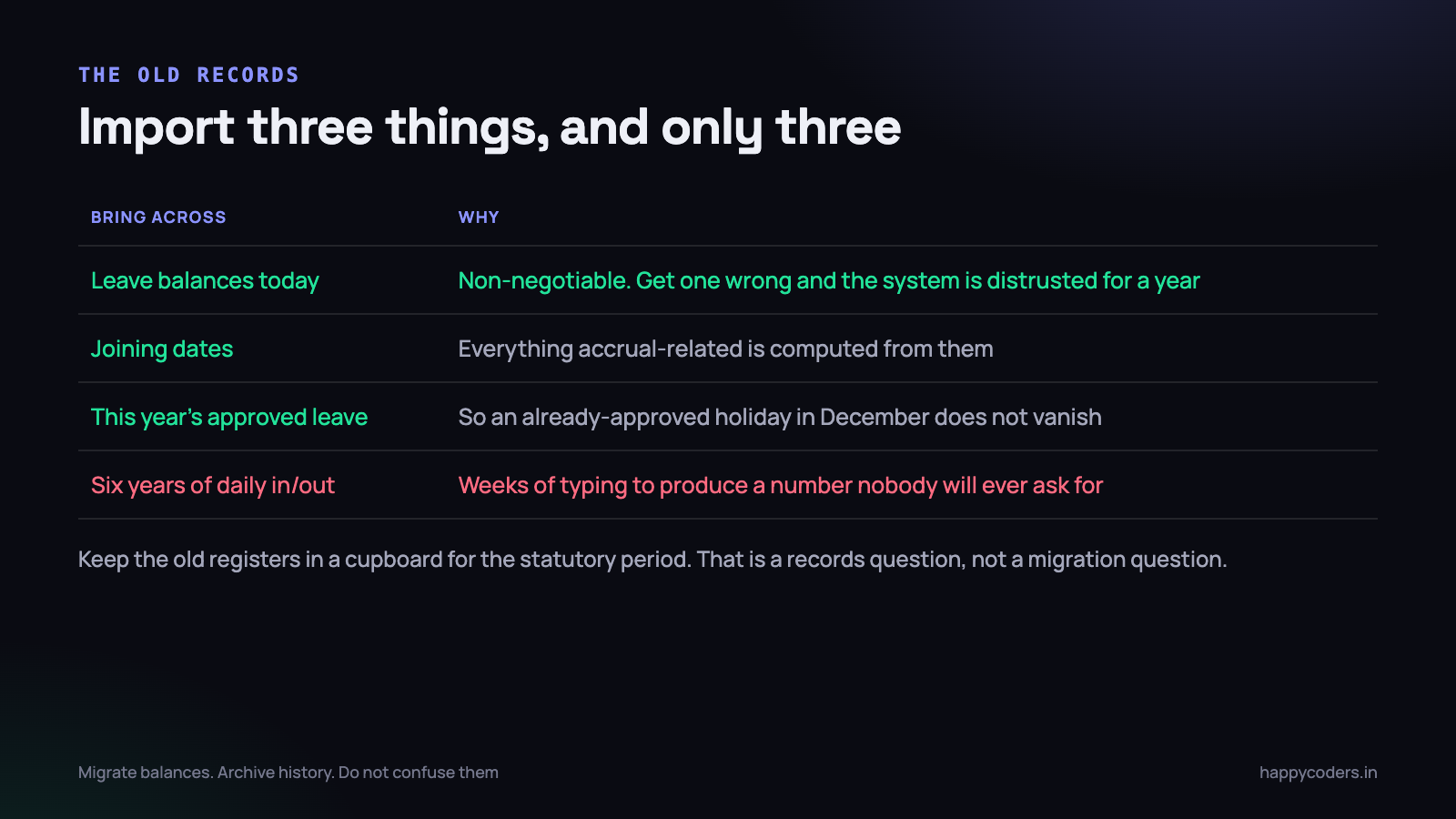
What has to come across
- Current leave balances, per person. This is non-negotiable and it has to be exactly right. Get one person’s balance wrong on day one and the entire system is distrusted for a year. Have each employee confirm their own balance in writing before you load it.
- Joining dates. Every accrual rule and every tenure-based entitlement is computed from them.
- Leave already approved for future dates. Somebody has approval for four days in December. If that disappears in the migration, they find out in December.
What does not
Daily in and out times from previous years. Old registers. Punch exports from the biometric machine going back to 2019. None of it earns its migration cost.
Keep the physical registers and the old exports for the statutory retention period — three years is a common requirement and some states ask for more. Put them in a labelled box, and keep a scanned copy of the last two years somewhere backed up. That is a records-keeping decision, entirely separate from the migration, and treating it that way removes the biggest blocker from the project.
One exception worth making: if a dispute is live or likely with a specific employee, load that person’s relevant history properly. A targeted import of one person’s year is an afternoon. A blanket import of everybody’s six years is a month.
Run both for one month
This is the step that makes the difference between a switch people barely notice and one that generates complaints for a quarter. It costs almost nothing and it removes nearly all of the risk.
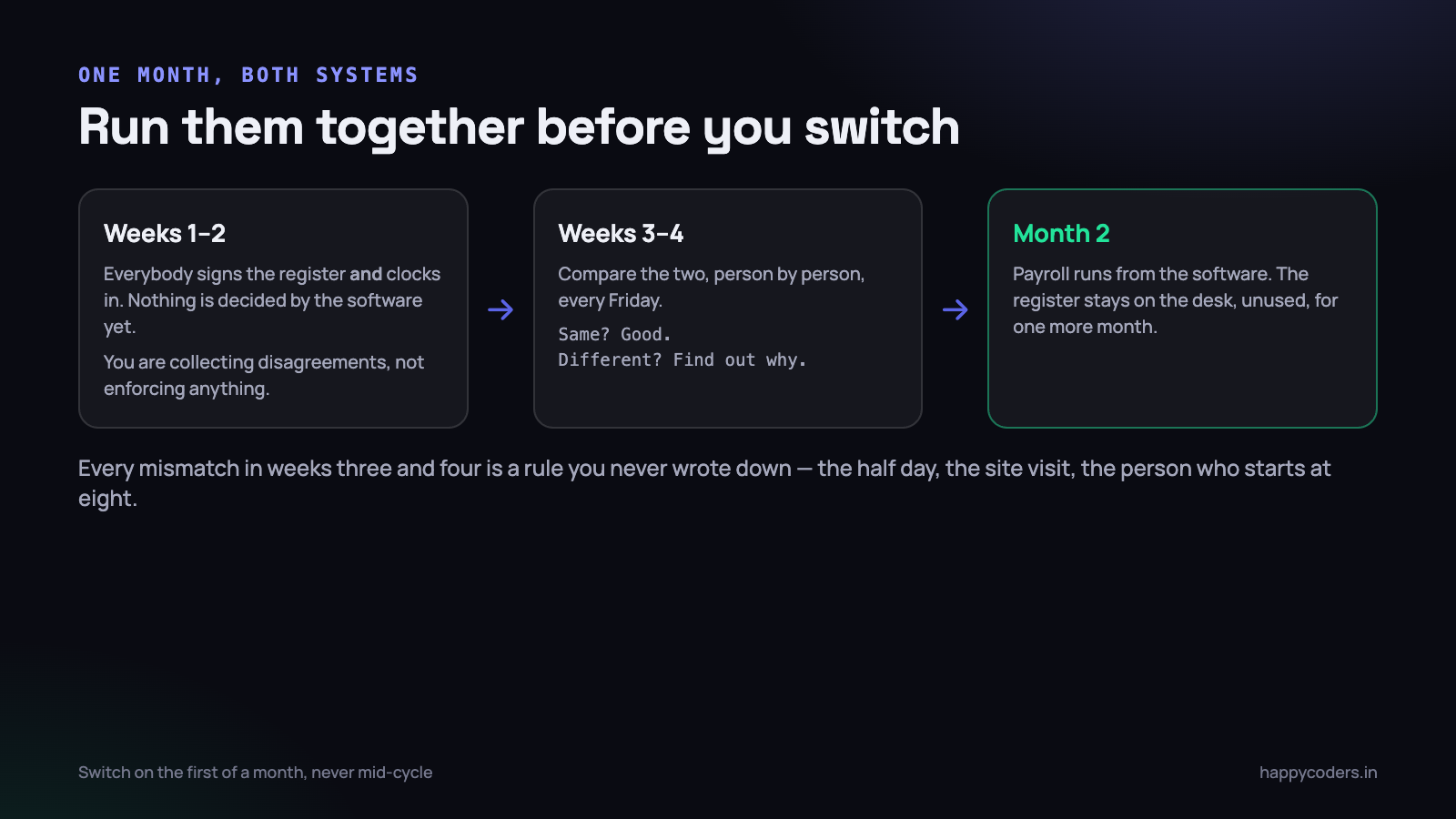
Weeks one and two: collect, do not enforce
Everybody signs the register or punches in as usual, and clocks in on the new system. Nothing is decided by the software. No report is circulated. You are gathering disagreements, not enforcing a policy.
Expect friction in the first three days and fix it the same day. Somebody’s phone will not install the app. Somebody’s name is spelt wrong. Somebody’s shift starts at eight and the system assumes nine. All of this is trivial to fix in week one and expensive to fix in month three.
Weeks three and four: compare every Friday
Put the two records side by side, person by person, and look for differences. Every mismatch is informative, and almost every one turns out to be a rule that existed in somebody’s head and was never written down.
- A person marked present on paper with no clock-in. They were at a client site. Does that count as a normal day? Write the rule down.
- A half day recorded differently by each system. Is a half day four hours or is it a designation applied by a manager? Decide once.
- Somebody who starts at 8:00. Their shift is different and nobody ever configured it.
- A clock-in at 9:50 where the register says 9:30. The register was written from memory at lunchtime. This is exactly what you switched for, and it needs to be handled gently.
- Missing days for people at a wedding or on site. Your leave and on-duty categories are incomplete.
Two Friday sessions of half an hour each will surface almost every edge case your company has. Answer each one by writing a sentence in the attendance policy. By the end of the month you have a policy that describes how your company actually works, which is something very few Indian SMEs possess.
Month two: switch, but leave the register on the desk
Payroll now runs from the software. The register stays on the desk for one more month, unused, because it costs nothing and it is a visible safety net. Almost nobody will write in it after the first week. Then it goes in the box.
Switch on the first of a month, never mid-cycle. Splitting a payroll period across two systems creates a reconciliation nobody wants to do and errors that look like the software’s fault.
The conversation, which matters more than the software
Here is the thing that decides whether this goes well. The same change, announced two different ways, produces either a shrug or a month of resentment.
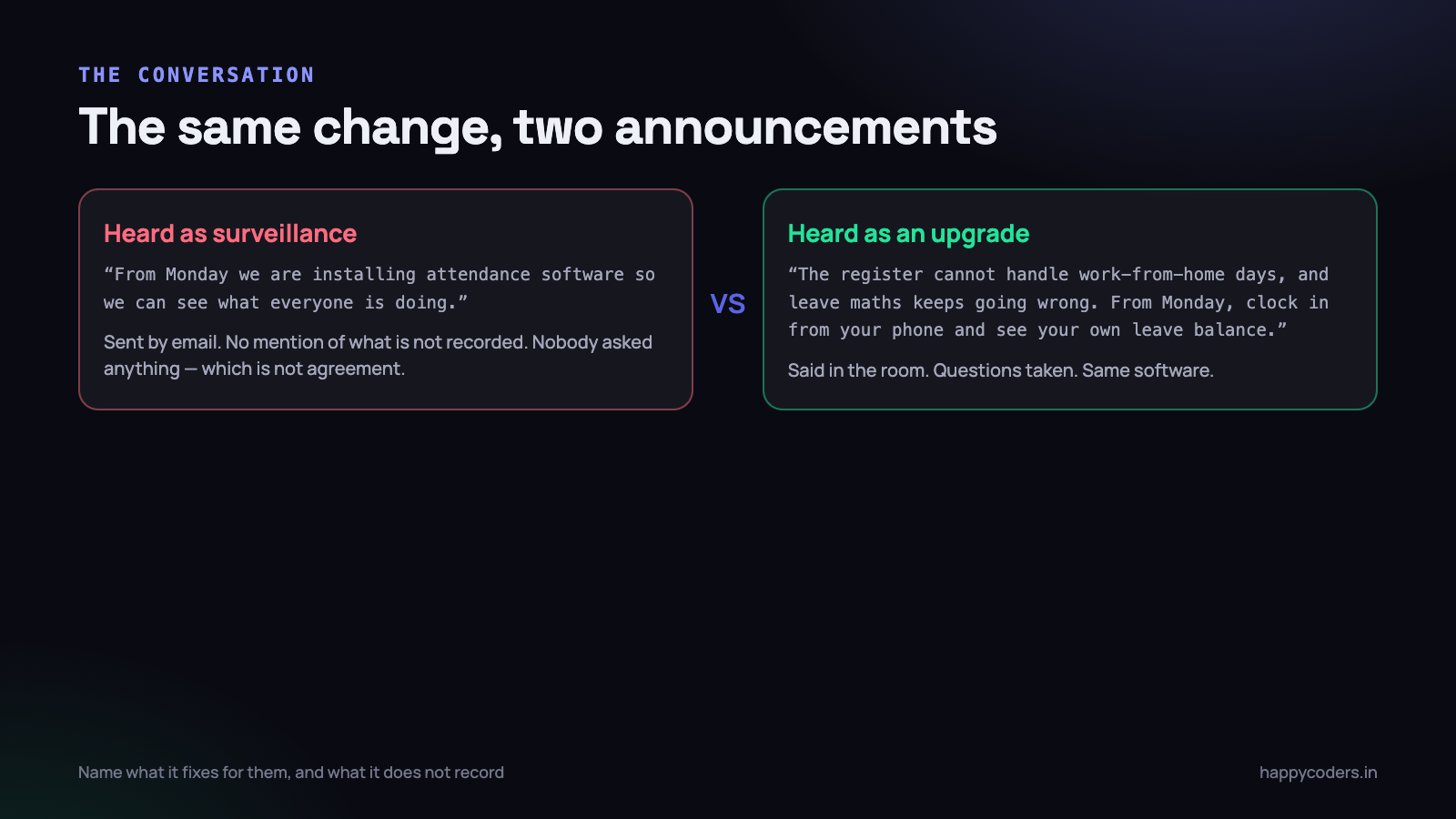
Why it lands badly by default
“From Monday we are installing attendance software” contains no information about what is recorded, so people supply their own answer, and the answer they supply is always worse than the truth. Sent by email, it also signals that questions are not expected. Nobody objects, which is not the same as agreement, and you find out what people actually thought when the first person quits.
There is a specific Indian dimension to this too. In a company where the register has been the system for fifteen years, replacing it reads as a statement about trust, whether or not you meant one. That reading has to be addressed directly, not hoped away.
How to announce it
- Do it in person, in one room, with everybody there. Ten minutes. An email after, never instead.
- Lead with the problem it solves for them. Leave balances everybody can see without asking HR. Work-from-home days that count properly. Salary that stops depending on somebody’s arithmetic. These are real benefits and they are the honest reason.
- Say what is recorded, as a list. Clock-in time, clock-out time, leave. Then say what is not: no location tracking, no screenshots, no monitoring of what is on anybody’s screen, if that is true. The second list does more work than the first.
- Answer the trust question before anyone asks it. “This is not because we think people are not working. It is because the register cannot handle work-from-home days and the leave maths keeps going wrong.” Say it plainly.
- Take questions in the room, and answer the awkward one properly. Somebody will ask what happens if they are five minutes late. The answer has to be the same as it was last month, or you have changed the policy as well as the system and should say so.
- Have the founders and managers use it too, visibly, from day one. A system that applies to staff and not to the people who introduced it is understood immediately for what it is.
The most common mistake is introducing new rules at the same time as the new system. If late marks were informal before, keep them informal for the first two months. Otherwise every enforcement decision for the rest of the year gets blamed on the software, and the software cannot defend itself.
What to check before you buy
- Leave and attendance in one place. If leave lives in a separate system, you have rebuilt the reconciliation problem you were trying to escape.
- A per-person, per-day record that does not care whether the day came from a phone, a browser or a desktop app.
- Shifts and half days configured properly, including people who do not work nine to six.
- Holiday calendars that match your state. A product that only knows national holidays will need editing every year for Pongal, and somebody will forget.
- Export that payroll can consume without a person retyping it.
- The employee can see their own record. This single feature removes most attendance disputes, because people correct errors in week one rather than discovering them at appraisal time.
What to do on Monday morning
- Write down which of the four questions you need answered — payroll, availability, compliance, delivery. Ten minutes, and it decides what you are shopping for.
- Ask each employee to confirm their current leave balance in writing. Do this now. It takes a week to come back and it is the one number that must be right.
- Pick a start date on the first of a month, at least six weeks out.
- Book the ten-minute announcement in a room, and write the three sentences you will open with.
- Run both systems from that first, and put two half-hour Friday comparison slots in the calendar.
- Label a box for the old registers with the year they can be destroyed, and scan the last two years before it goes in the cupboard.
Happy Tracker handles attendance, leave and holidays in one place alongside project hours, with clock-in from a browser or a desktop app, per-member device rules, and a leave balance every employee can see for themselves. The register still goes in a box, but the maths stops being anybody’s Friday afternoon.




