
Your Download Count Is Lying: 47 Downloads, 2 People
On a Friday afternoon an alert landed in our inbox: HappyRec Windows downloads: 47 in the last 24 hours. On a normal day that number is one, maybe two. Forty-seven looked like the start of something — a mention on a forum, a directory listing finally paying off, a video somebody had shared.
Within the hour the person who runs the company had forwarded it with one line: is it real downloads?
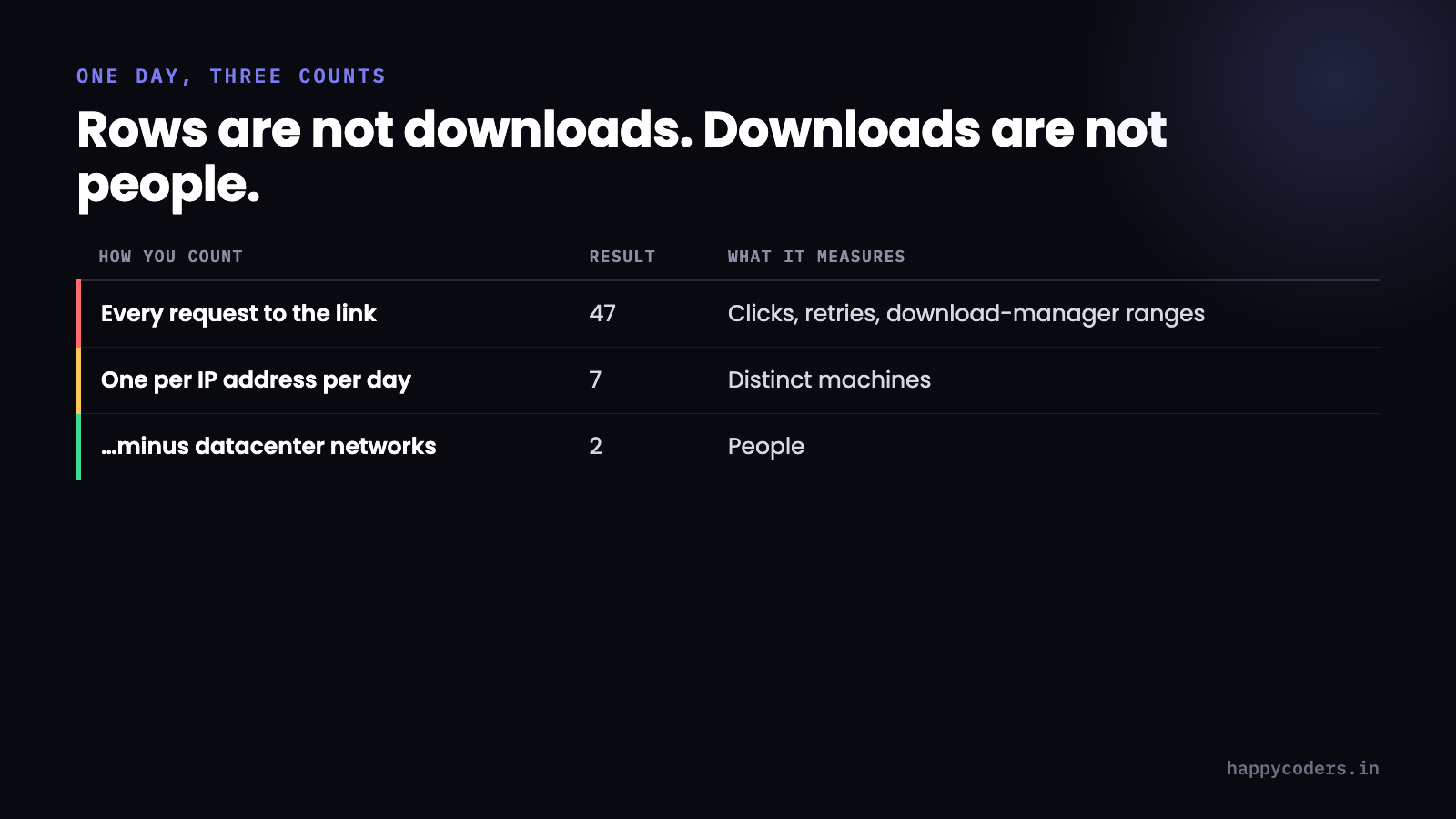
It was not. Forty-seven clicks on the download link came from seven IP addresses, and only two of those seven were people. The rest were servers. This post is about how we found that out, why every small software company’s download count is inflated the same way, and the three questions that turn a flattering number into an honest one.
Where a download number comes from
Our download buttons do not point straight at the installer. They point at a small endpoint on our own server that writes a row — time, platform, IP address, browser — and then redirects to the file. It is the simplest way to count downloads, and almost every product site does something like it.
The trouble is the word row. A row is not a person, and it is not even a download. It is one request to a URL. Everything that follows is about the gap between those three things.
Question one: how many times does one person click?
We sorted the 47 rows by IP address and the picture changed straight away. One address had hit the link 22 times in about 90 seconds. Another had done it 12 times in under 30 seconds. Nobody clicks a download button 22 times.
What actually happens is less dramatic. A browser may request the file, cancel and request it again when it decides to show a “keep or discard” warning. A download manager splits a large file into ranges and asks for each part separately. Some antivirus tools fetch a file before letting the browser have it. Each of those is a request, and each request was a row.
So the first fix is mechanical: count one download per IP address per day. It is not perfect — an office of twenty people behind one router becomes one — but for a small product it is far closer to the truth than raw rows. On that day it turned 47 into 7.
Question two: are those addresses people at all?
Seven still looked like a good day, so we went one step further and looked up who owned each of the seven addresses. Every IP address belongs to a network, and every network has a registered owner. A home broadband line belongs to an internet provider. A server belongs to a hosting company.
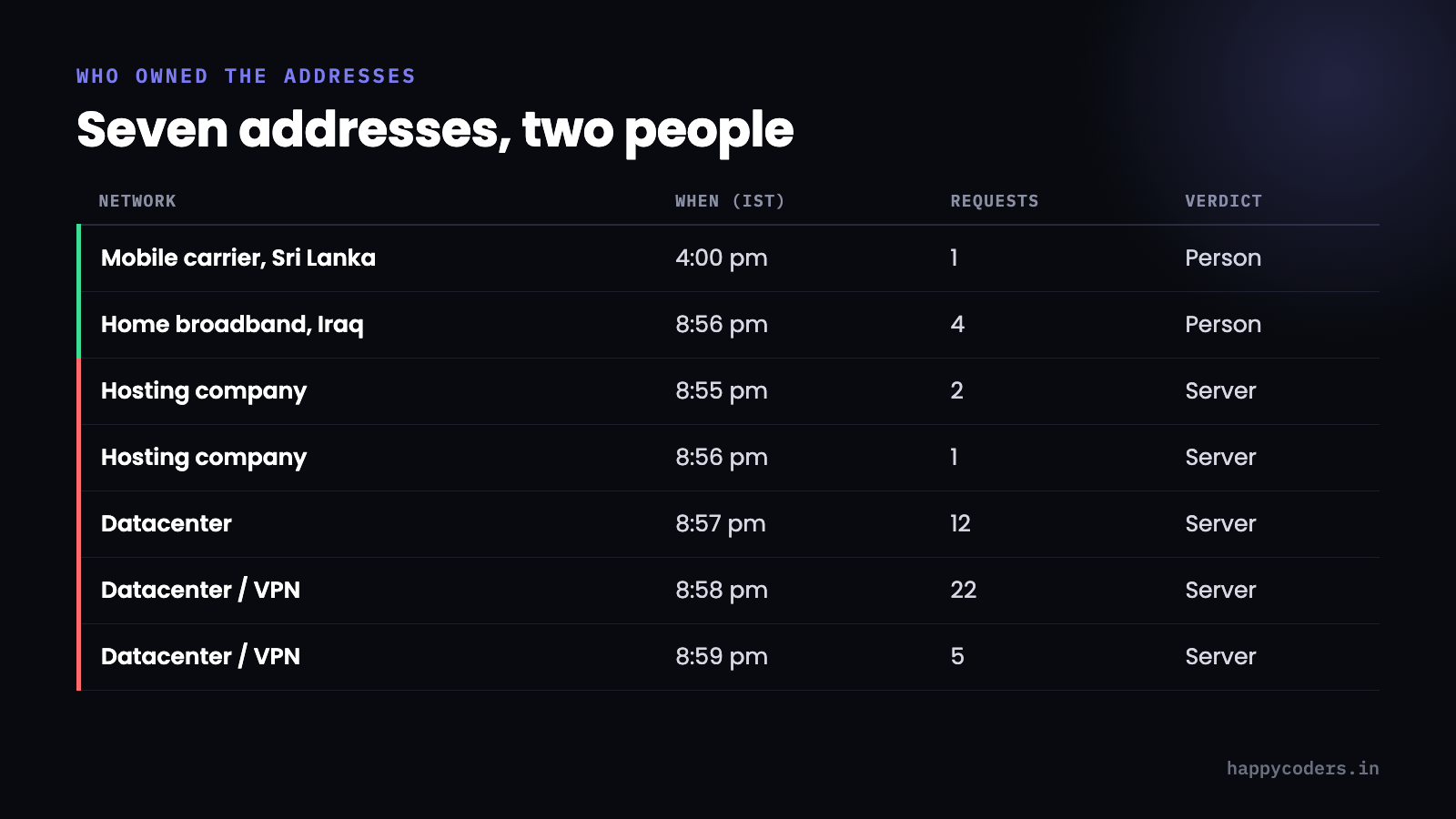
Two of the seven belonged to consumer networks: a mobile carrier in Sri Lanka at four in the afternoon, and a home broadband provider in Baghdad later that evening. Those are people.
The other five belonged to datacenters — hosting and VPN companies in the US and Europe — and all five arrived within the same four minutes, around nine at night, with exactly the same browser identity. That is not five people in five different places deciding to try a screen recorder at the same moment. That is one automated system, most likely something that checks new installers as they appear on the web, using several servers.
Real downloads that day: two.
Question three: what did the old numbers look like?
This is the uncomfortable part. Once the two rules were in place — one per IP per day, datacenter networks removed — we re-ran the whole history, not just that Friday.
- Across every download we had ever recorded there were 70 distinct addresses. 32 of them were datacenters, most of them Amazon’s cloud.
- HappyRec for Windows had looked like it was growing from 17 people in October to 26 in the first three weeks of November. With bots removed it was 3 in October and 9 in November.
- Our desktop time tracker’s Mac downloads went from “27” to “12”.
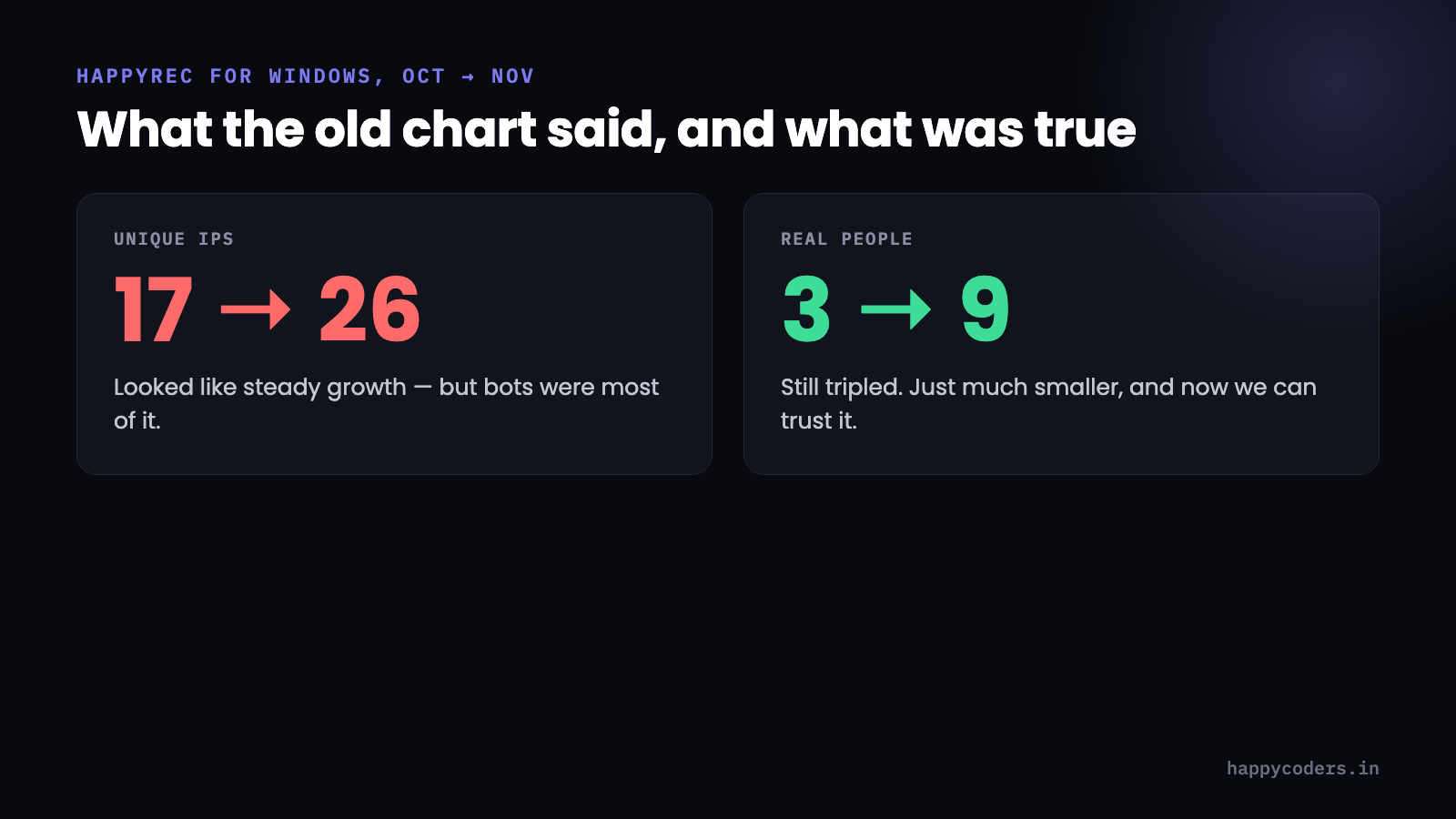
The trend was still real — nine is three times three — but the size of it was not. We had already reported the bigger numbers internally, and we went back and corrected them. If you take one thing from this post, take that: correct the old numbers when you find the problem, not just the new ones. A trend you can’t trust is worse than no trend, because people make decisions on it.
Why bots download your software
It feels personal — why would anyone bother? — but none of it is aimed at you.
- Security scanners. Antivirus vendors and reputation services fetch new executables so they can classify them before a real user meets them. An unsigned Windows installer is exactly the kind of file they want to see early.
- Download directories. Software listing sites crawl for new versions so their own pages stay current.
- Link previews. When someone pastes your link into WhatsApp, Slack or Facebook, the platform fetches it to build a preview card. That fetch comes from the platform’s servers, not the person’s phone.
- Search and SEO crawlers. Some follow every link on a page, including download buttons.
Most of these come from cloud providers, because that is where anyone running an automated job rents their computers. That is exactly why the network owner is such a good signal.
How we fixed it without sending anyone’s data away
There are paid and free web services that will tell you whether an IP address is a datacenter. We did not want to send our visitors’ addresses to a third party to find out, so the lookup runs on our own server against a freely published table that maps every IP range in the world to the network that owns it. It is about 11 MB, refreshed weekly, and the lookup takes a fraction of a second.
A network whose name contains words like hosting, cloud, datacenter or the name of a large cloud provider is treated as a server. Two exceptions mattered more than we expected:
- Cloudflare, Akamai and Fastly are not treated as bots. Apple’s iCloud Private Relay and Cloudflare’s WARP send real iPhone and laptop users out through those networks. Counting them as servers would quietly erase real people — the opposite of what we wanted.
- Facebook’s network is treated as a crawler. When it fetches your download link, it is building a link preview, not installing anything.
The technical details — the lookup, the edge cases, the exact list — are written up on our engineering blog for anyone who wants to build the same thing.
Signups have the same problem
Once we were looking, we found the same pattern one step further down the funnel. Our time-tracking product had seventeen accounts. Two were our own test accounts. One was an address on a free webmail service that signed up, never confirmed its email and never came back — a form-filling bot. Another was a real person who had typed gmail.vom, so every email we sent them bounced into nothing.
None of those should appear in a report as “new users”, and none of them should trigger a welcome email from a real person on the team. The test for an account is the same as the test for a download: did a human do something only a human would do? Clicking a link in a real inbox is a good line to draw. An email address whose domain cannot receive mail is an easy one to rule out before you even try.
What we changed in our reporting
- The daily report shows two columns: real people, and bots, for the last 24 hours, 7 days, 30 days and all time. Seeing the bot column next to the people column stops anyone mistaking one for the other.
- The spike alert counts people only. It fires when real downloads in 24 hours are at least five and at least three times the normal daily rate. A burst of scanners no longer triggers it.
- Every new-user alert waits for a verified email. Signups get the same treatment as downloads: an account that never confirmed its address is not reported as a new user.
The three questions, for your own numbers
You do not need our setup to check yours. Export your download log, or your signup log, and ask:
- How many rows per person? Group by IP address and day. If your total drops sharply, the old total was counting clicks, not people.
- Who owns the addresses? Look up a handful of your busiest IPs. Any WHOIS lookup will show the owning network. If the names are cloud and hosting companies, those are machines.
- When did they arrive? People trickle in. Machines arrive in bursts — several addresses, seconds or minutes apart, identical browser strings.
Ten minutes with a spreadsheet will tell you whether your growth chart is a growth chart.
What a smaller, true number is good for
Two real downloads is less exciting than 47. It is also something you can act on. Two people — one in Sri Lanka, one in Iraq — found a free screen recorder and installed it. We know when, and roughly where. If the number grows, we will know it is people. If we put money into an ad, the alert will tell us whether it reached anyone.
And the next time the boss asks is it real?, the answer arrives in the same message as the number.
HappyRec is our free screen recorder for Mac, Windows, Chrome and Edge — see it here. If you’d like a second pair of eyes on your own product analytics, talk to us.
Related articles
Browser DevTools Debugging: Getting Real Value Out of It
Most developers use ten percent of Chrome DevTools. The Network waterfall, conditional breakpoints, why your CSS will not apply, and throttl…
Accessibility Basics for Developers: The First Hour
Most accessibility problems on a site come from about six mistakes. Semantic HTML, labels, focus, contrast and keyboard order — fixed in an …
MySQL Backup and Restore for a Small Team, Done Properly
Most small teams have a backup that has never been restored. The mysqldump flags that matter, where the copy must not live, the restore dril…