
A Service Worker That Keeps Forgetting: How HappyRec’s Extension Keeps Its REC Badge and Recorder Window Straight
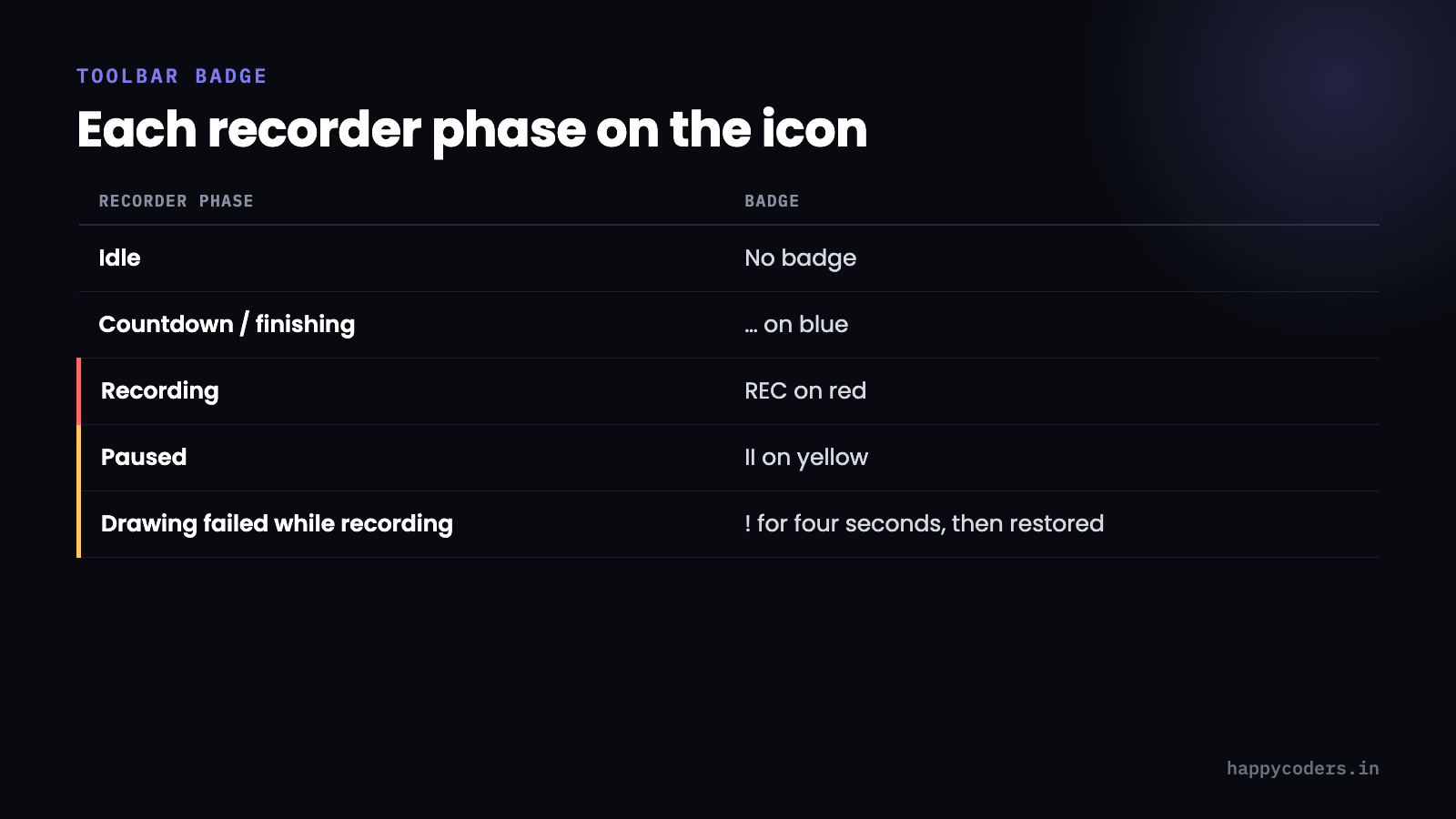
The HappyRec browser extension for Chrome and Edge has a small red REC badge on its toolbar icon while you record. It turns yellow with II when you pause, and disappears when you stop. Click the icon and the recorder window comes to the front; click it again and you get the same window, never a second one.
That sounds like the easiest part of a screen recorder to build. In a Manifest V3 extension it is not, because the code that owns the badge and the window is a service worker, and the browser stops a service worker whenever it has been idle for a short while. Every variable in it is gone when that happens. This post walks through how the extension keeps the badge and the window straight anyway, using the actual code, and the rules we took from it for any MV3 extension.
Two pieces, and why recording is not in the service worker
The extension has two parts that matter here:
- The service worker (
background.js). It owns the toolbar icon, the badge, the keyboard shortcuts, the right-click menu and the single recorder window. - The recorder page (
recorder.html), opened as its own small window. It does all the real work: screen capture, the camera bubble, the encoder and saving the file.
Recording cannot live in the service worker. A service worker has no DOM, so there is no getDisplayMedia, no MediaRecorder and no canvas. It also cannot live in a normal toolbar popup, because a popup closes the moment it loses focus, and the browser’s own “choose what to share” picker takes focus. A popup recorder would destroy itself at exactly the moment the user picks a screen. So the recorder is a separate window of type popup (a small window with no address bar), and the service worker’s job is to manage it.
The problem: a manager that keeps forgetting
In the old Manifest V2 model, the background page lived as long as the browser did. You could keep the recorder window’s ID in a variable and it would still be there an hour later.
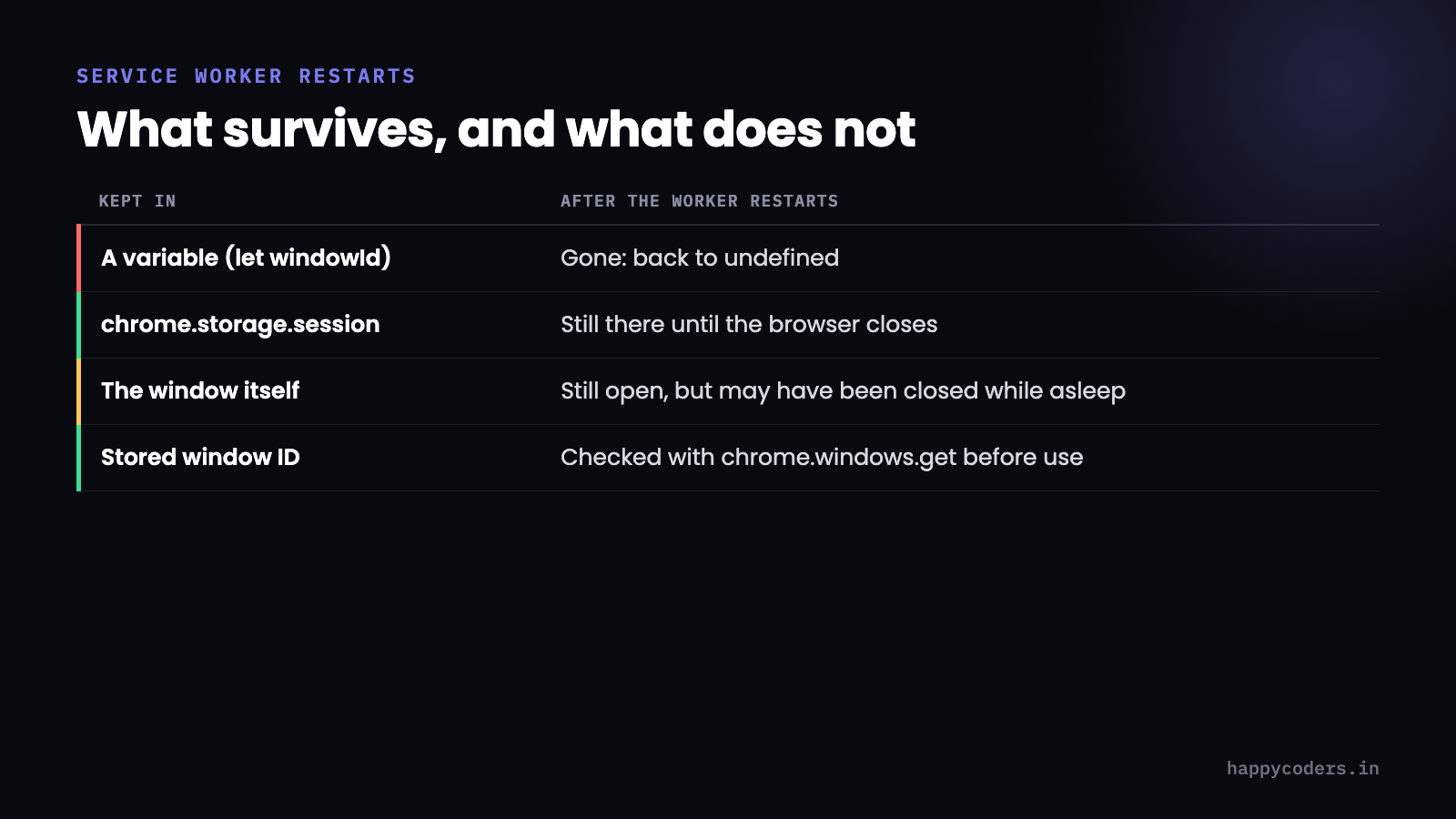
In Manifest V3 the service worker is started when an event arrives (an icon click, a message, a shortcut) and stopped again once it is idle. When it restarts, it runs the file from the top. Any let recorderWindowId is back to undefined, any “current badge state” is lost, and the worker has no memory of what it did before.
The browser does keep some things across a restart: the badge text you set on the icon stays on the icon. But the icon is a display, not a record the rest of the code should make decisions from, and the window ID is not kept anywhere at all unless you keep it. Two concrete failures follow if you ignore this:
- The user clicks the icon during a long recording, the worker has restarted, it does not know a recorder window exists, and it opens a second one.
- Something else needs to know “are we recording right now?”, for example to decide whether it may pop the recorder window to the front, and the answer has been forgotten.
Rule one: keep state in storage.session, not in variables
The extension never keeps the window ID or the badge state in a variable. Both go into chrome.storage.session, which is an in-memory store that survives the service worker being stopped and restarted, and is cleared when the browser itself closes. That lifetime is exactly right for both values: a window ID means nothing after the browser restarts, and nor does “we are recording”.
Here is the window part:
const WINDOW_KEY = 'recorderWindowId';

async function getRecorderWindowId() {
  const stored = await chrome.storage.session.get(WINDOW_KEY);
  const id = stored[WINDOW_KEY];
  if (typeof id !== 'number') return null;
  try {
    await chrome.windows.get(id);          // does that window still exist?
    return id;
  } catch {
    await chrome.storage.session.remove(WINDOW_KEY);   // stale: forget it
    return null;
  }
}

async function openOrFocusRecorder() {
  const existing = await getRecorderWindowId();
  if (existing !== null) {
    await chrome.windows.update(existing, { focused: true, state: 'normal' });
    return existing;
  }
  const win = await chrome.windows.create({
    url: RECORDER_URL, type: 'popup', width: 680, height: 860, focused: true,
  });
  await chrome.storage.session.set({ [WINDOW_KEY]: win.id });
  return win.id;
}
Two details carry the weight.
A stored ID is checked before it is trusted. The user can close the recorder window at any time, and the worker might be asleep when they do. So getRecorderWindowId asks the browser whether that window still exists. If the lookup fails, the stored ID is stale: it is removed and the function reports “no window”. Storage tells you what you saw last; only the browser can tell you what is true now.
Open-or-focus is one function. The icon click, the first-install welcome, the “focus recorder” message from other pages and the shortcut fallback all call openOrFocusRecorder. There is one place that decides between “bring the existing window forward” and “create a new one”, so there is one place where a duplicate window could be created by mistake, and it checks first.
Rule two: the page that knows the state reports it
The service worker does not know whether a recording is running. Only the recorder page knows that. So the page tells the worker every time its phase changes, and the worker’s only job is to mirror it on the icon:
// recorder.js — the page that actually records
function reportState(badge) {
  try {
    const p = chrome.runtime.sendMessage({ type: 'recorder-state', state: badge });
    if (p && typeof p.catch === 'function') p.catch(() => {});
  } catch {
    /* background asleep or page closing */
  }
}

// background.js — the service worker
chrome.runtime.onMessage.addListener((message, _sender, sendResponse) => {
  if (message.type === 'recorder-state') {
    setBadge(message.state).then(() => sendResponse({ ok: true }));
    return true;                         // keep the channel open for the reply
  }
});
The recorder has five phases that matter to the badge: idle, countdown, recording, paused and finishing (writing the file). Anything else, such as reviewing a finished clip, reports as idle. The page sends a message; Chrome wakes the worker if it was asleep; the worker updates the badge and replies.
Note the defensive shape of reportState. It never lets a failed message become an error on the recorder page. If the message cannot be delivered, for instance while the page itself is closing, the recording is far more important than the badge, so the failure is swallowed. The return true in the listener matters too: it tells Chrome the reply will be sent asynchronously, after setBadge finishes, so the message channel stays open.
Rule three: write the state down before you show it
const BADGE = {
  idle:      { text: '',    color: '#008BD2' },
  countdown: { text: '…',   color: '#008BD2' },
  recording: { text: 'REC', color: '#DB3833' },
  paused:    { text: 'II',  color: '#D0AF21' },
  finishing: { text: '…',   color: '#008BD2' },
};

async function setBadge(state) {
  await chrome.storage.session.set({ badgeState: state });   // remember it first
  const badge = BADGE[state] || BADGE.idle;
  await chrome.action.setBadgeText({ text: badge.text });
  await chrome.action.setBadgeBackgroundColor({ color: badge.color });
}
setBadge writes the state to session storage first, then changes the icon. Other code in the worker reads that stored value to make decisions, and the clearest example is error reporting for the drawing tool.
The extension can draw on a web page (circle something and explain it). That can be triggered by a keyboard shortcut or the right-click menu, which have no window of their own, so if drawing fails, the worker has to tell the user somehow. It reads the stored badge state to decide how:
- If idle, it stores the error message and brings the recorder window forward, where the message is shown.
- If anything else, meaning a recording may be running, it does not bring the recorder window forward, because that window could end up in the video. It flashes a yellow ! on the badge, puts the reason in the icon’s tooltip, and after four seconds puts the badge back to whatever the stored state says.
That last step is the reason the state is stored and not just painted. After the four seconds, the worker may well have been restarted in between. Without a stored value it would not know whether to restore REC, II or nothing.
Rule four: clean up on the events the browser does send
The worker cannot watch the recorder window continuously, but it can listen for events, and Chrome wakes it up to deliver them:
chrome.windows.onRemoved.addListener(async (windowId) => {
  const stored = await chrome.storage.session.get(WINDOW_KEY);
  if (stored[WINDOW_KEY] === windowId) {
    await chrome.storage.session.remove(WINDOW_KEY);
    await setBadge('idle');
  }
});

chrome.runtime.onStartup.addListener(() => setBadge('idle'));
When any window closes, the worker checks whether it was our recorder window. If so, it forgets the ID and resets the badge to idle. This covers the user closing the recorder mid-recording, which otherwise would leave a red REC on the toolbar with nothing recording.
On browser startup, and when the extension is installed or updated, the badge is set to idle as well. Session storage is empty at that point anyway, but the icon is not guaranteed to be clean, so the worker states it explicitly rather than assuming.
Shortcuts ask the page, and fall back to the window
The extension has keyboard shortcuts to stop and to pause a recording. There is a browser rule that shapes them: getDisplayMedia only works after a real user gesture inside the page, so a shortcut can never start a recording. It can stop or pause one, or bring the recorder forward.
chrome.commands.onCommand.addListener(async (command) => {
  const id = await getRecorderWindowId();
  if (id === null) {
    if (command === 'toggle-recording') openOrFocusRecorder();
    return;
  }
  try {
    const reply = await chrome.runtime.sendMessage({ type: 'command', command });
    if (!reply || !reply.handled) {
      await chrome.windows.update(id, { focused: true, state: 'normal' });
    }
  } catch {
    await chrome.windows.update(id, { focused: true, state: 'normal' });
  }
});
The worker does not decide what the shortcut means. It looks up the window (with the same stale check), forwards the command to the recorder page, and lets the page answer whether it handled it. The page says handled: true when it actually stopped, paused, resumed or cancelled a countdown. Otherwise, for example when you press “stop” with nothing recording, the worker brings the recorder window to the front so you can see why nothing happened. If the message fails outright, it does the same. If no recorder window exists at all, the stop shortcut opens one.
This keeps all knowledge of recording phases in one place, the page, and keeps the worker small enough that restarting it costs nothing.
Rules we would apply to any MV3 extension
- Assume every variable in the service worker is gone by the next event. Put anything that must survive into
chrome.storage.session(orlocal, if it must survive a browser restart too). - Verify stored IDs against the browser before acting on them. Windows and tabs close while the worker sleeps.
- Let the page that owns the state report it; let the worker mirror it. Do not ask a worker to know things it cannot observe.
- Write state before you display it, so any later decision, including one after a restart, reads the same truth.
- Reset on the events the browser gives you: window removed, startup, install. They are your only guaranteed moments to clean up.
- Never let a badge update break a recording. Status messages are best-effort; the recording is not.
Questions we get
Why not keep the service worker alive instead?
There are tricks for keeping a service worker running, and they work against the browser’s design: it stops idle workers to save memory and battery. The recorder window is already a real page that stays open for the whole recording, so the long-lived work belongs there. The worker only needs to wake up, act and go back to sleep.
Why session storage and not local storage?
Both values only make sense while this browser session is running. A window ID from yesterday points at nothing, and a stored “recording” after a crash would be a lie. Session storage is cleared when the browser closes, so neither can survive into a state where it is wrong.
Can the badge be out of date?
Briefly, at most. If a message from the recorder page cannot be delivered, the badge keeps its previous value until the next phase change, and closing the recorder window always resets it to idle.
HappyRec is our free screen recorder for Mac and for Chrome and Edge, with a camera bubble and on-page drawing, and no sign-up. See what it does.
Related articles
Why Our Browser Recorder Saves Voice Notes as WAV, and How It Writes Them From an AudioWorklet
Browsers cannot record WAV, and the M4A and WebM files they do write carry a wrong or missing length. How HappyRec’s browser extension captu…
Asking for an App Store Review Without Annoying Anyone: How HappyRec Decides When
HappyRec asks for a review only after a saved recording, at the 3rd, 15th and 50th, and never again once you say yes. The counter that delet…
Explaining a Website While You Record: Drawing on the Page in Chrome and Edge
A voice can’t point. Circle the button, arrow at the field, highlight the error — live on the web page while you record, with HappyRec’s Chr…