


Every queue tutorial starts the same way: run php artisan queue:work and keep it alive with Supervisor. Then you read your hosting plan and discover you cannot install Supervisor, cannot keep a process running, and that anything still executing after a few minutes gets killed.
That is most shared hosting, and it is where a lot of small applications live quite reasonably. The answer is not to give up on queues. It is to stop trying to keep a worker alive and start one on a schedule instead.
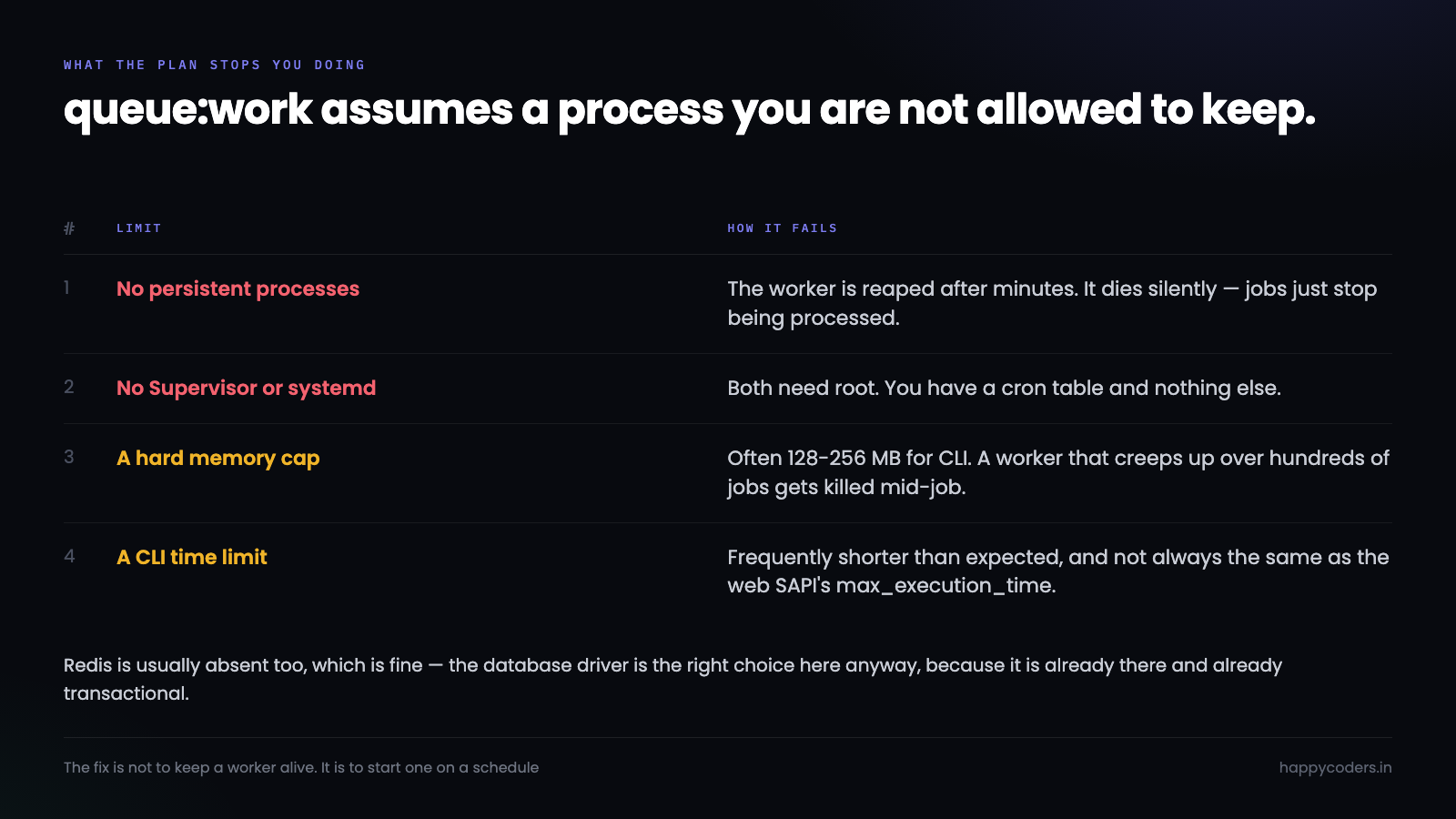
What shared hosting actually stops you doing
Four limits, and it is worth knowing which one you are hitting because they fail differently.
No persistent processes. Most providers reap anything long-running. Some kill it after a few minutes, some after thirty; either way queue:work will not stay up. It usually dies silently, which is the unhelpful part — jobs simply stop being processed and nothing says so.
No process manager. Supervisor and systemd need root. You have a cron table and that is the whole of your scheduling.
A hard memory cap. Often 128 MB or 256 MB for CLI. A worker that slowly accumulates memory across hundreds of jobs will hit it and be killed mid-job.
A CLI time limit. Frequently shorter than you expect and not always the same as max_execution_time in the web SAPI. This is the one people discover when a job that works locally is truncated in production.
Redis is usually absent too, which is fine — the database driver is the right choice here anyway, because it is already there and already transactional.
The shape that works: a worker that exits on purpose
Instead of one worker that never stops, run a worker every minute that deliberately stops before anything can kill it.
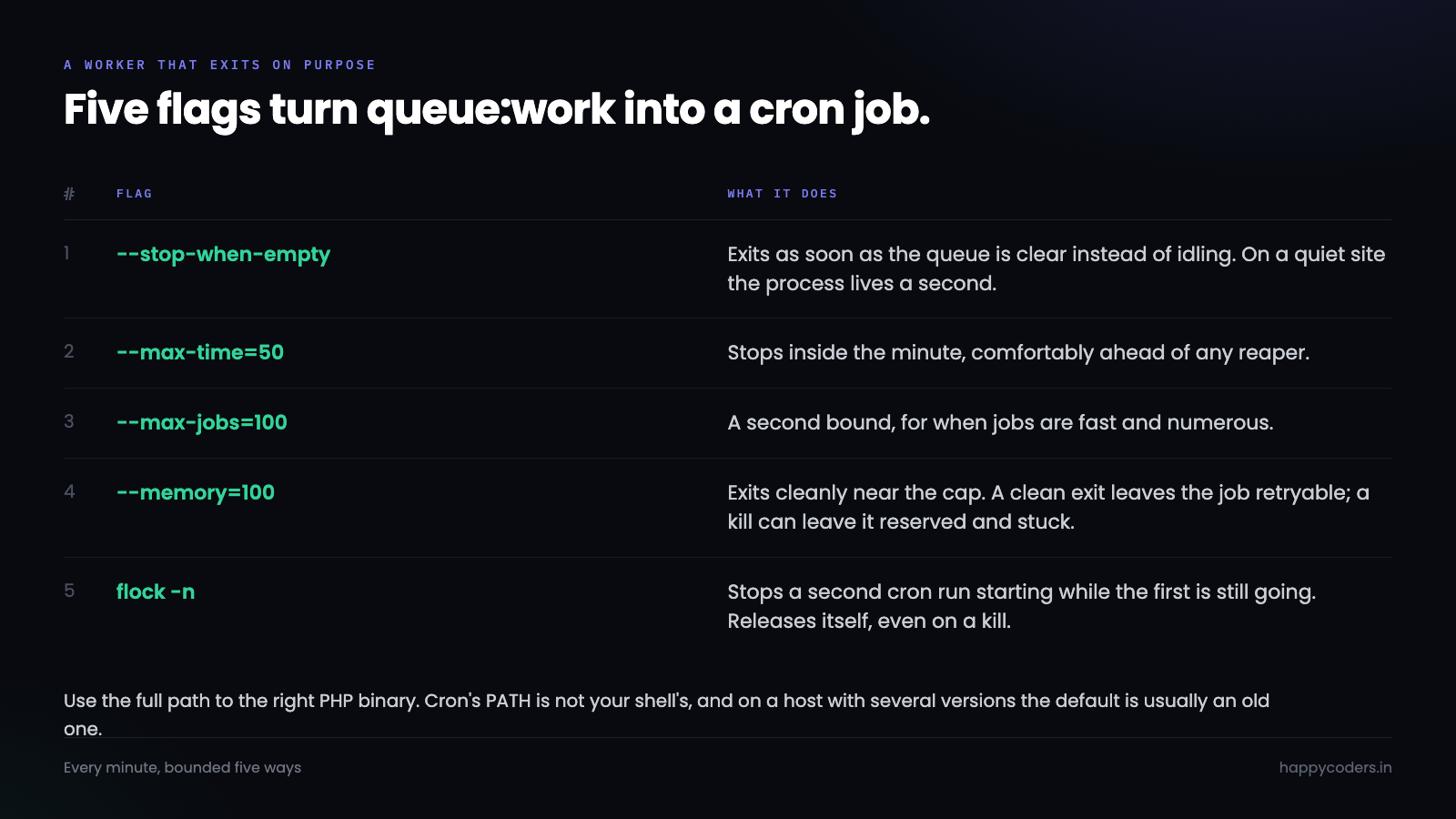
Laravel has exactly the flags for this:
* * * * * cd /home/user/app && /opt/alt/php83/usr/bin/php artisan queue:work
    --stop-when-empty
    --max-time=50
    --max-jobs=100
    --memory=100
    --tries=3
    --sleep=1
    >> storage/logs/worker.log 2>&1
Each flag is doing something specific.
--stop-when-empty exits as soon as the queue is clear rather than idling. On a quiet site the process lives for a second.
--max-time=50 stops after fifty seconds, comfortably inside the next minute’s cron and comfortably inside any reaper.
--max-jobs=100 is a second bound for when jobs are fast and numerous.
--memory=100 makes the worker exit cleanly when it approaches the cap, instead of being killed mid-job. That difference matters — a clean exit leaves the job available to retry, and a kill can leave it reserved and stuck.
Use the full path to the right PHP binary. Cron’s PATH is not your shell’s, and on a host with several PHP versions the default is frequently an old one.
Stopping two workers running at once
Cron will start a new worker every minute whether the last one finished or not. With --max-time=50 that mostly does not overlap — until one job takes ninety seconds and suddenly two workers are running against the same table.
Laravel’s database queue takes a row-level lock when it reserves a job, so this is not usually a correctness disaster. It is still wasted memory on a plan that does not have much, and “usually” is not a word to build on.
flock settles it, and it needs no PHP:
* * * * * /usr/bin/flock -n /home/user/app/storage/worker.lock
    -c 'cd /home/user/app && /opt/alt/php83/usr/bin/php artisan queue:work --stop-when-empty --max-time=50 --memory=100'
    >> /home/user/app/storage/logs/worker.log 2>&1
-n means do not wait — if the lock is held, this run exits immediately. The lock releases automatically when the process ends, including when it is killed, so there is nothing to clean up.
If flock is missing, a PHP equivalent does the same job:
$fh = fopen(__DIR__ . '/storage/worker.lock', 'c');
if (!flock($fh, LOCK_EX | LOCK_NB)) {
    exit(0);                      // another run is still going
}
// ... process jobs ...
flock($fh, LOCK_UN);
Without a framework
The same pattern in plain PHP. A jobs table, a reservation update that cannot be won twice, and a loop that watches the clock:
CREATE TABLE jobs (
    id           BIGINT UNSIGNED AUTO_INCREMENT PRIMARY KEY,
    payload      JSON NOT NULL,
    attempts     TINYINT UNSIGNED NOT NULL DEFAULT 0,
    reserved_at  DATETIME NULL,
    available_at DATETIME NOT NULL,
    created_at   DATETIME NOT NULL,
    INDEX idx_ready (reserved_at, available_at)
) ENGINE=InnoDB;
$deadline = time() + 50;
while (time() < $deadline) {
// Reserve by UPDATE, not SELECT-then-UPDATE: only one worker can win
$db->beginTransaction();
$row = $db->query(
'SELECT * FROM jobs
WHERE reserved_at IS NULL AND available_at <= NOW()
ORDER BY id LIMIT 1 FOR UPDATE SKIP LOCKED'
)->fetch(PDO::FETCH_ASSOC);
if (!$row) { $db->commit(); break; } // queue empty, go home
$db->prepare('UPDATE jobs SET reserved_at = NOW(), attempts = attempts + 1 WHERE id = ?')
->execute([$row['id']]);
$db->commit();
try {
handle(json_decode($row['payload'], true));
$db->prepare('DELETE FROM jobs WHERE id = ?')->execute([$row['id']]);
} catch (Throwable $e) {
$delay = min(3600, 60 * (2 ** $row['attempts'])); // back off
$db->prepare('UPDATE jobs SET reserved_at = NULL,
available_at = NOW() + INTERVAL ? SECOND WHERE id = ?')
->execute([$delay, $row['id']]);
error_log('job ' . $row['id'] . ' failed: ' . $e->getMessage());
}
if (memory_get_usage(true) > 100 * 1024 * 1024) { break; }
}FOR UPDATE SKIP LOCKED is what makes this safe with two workers: the second one skips the row the first has locked rather than blocking on it. MySQL 8 and MariaDB 10.6 have it. On older versions, reserve with a conditional UPDATE ... WHERE reserved_at IS NULL and check the affected row count instead.
Jobs that outlive their worker
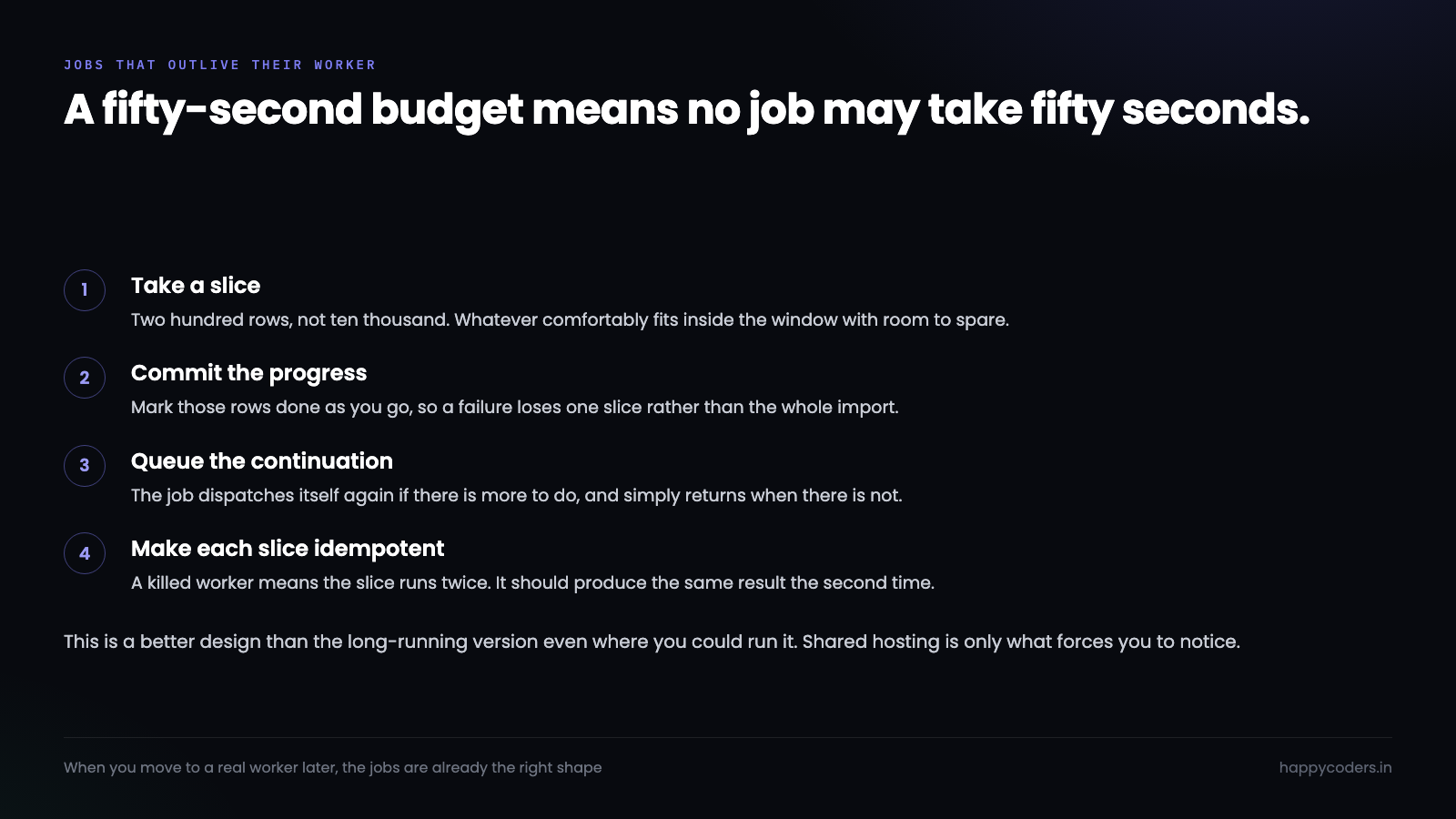
A fifty-second budget means no job may take fifty seconds. Anything that might — a large import, a batch of a thousand emails, a report over a year of data — has to be broken up.
The pattern is a job that does a slice and queues its own continuation:
public function handle(): void
{
    $rows = Import::where('processed', false)->limit(200)->get();
    if ($rows->isEmpty()) { return; }

    foreach ($rows as $row) { $this->process($row); }

    self::dispatch();          // more to do, come back for it
}
Ten thousand rows becomes fifty short jobs. Each one fits the budget, each one commits its own progress, and a failure loses one slice rather than the whole import. That is a better design than the long-running version even where you could run it — it is only shared hosting that forces you to notice.
Make every job safe to run twice
This is the part that separates a queue that works from one that quietly causes incidents, and shared hosting makes it more likely rather than less.
A worker can be killed after the job did its work and before it recorded that it had. The row is still reserved, the reservation eventually times out, and the job runs again. On a plan where processes get reaped without warning, that is not a rare edge case.
So every job has to produce the same result the second time. Concretely:
Sending an email — record that you sent it, in the same transaction as whatever it was about, and check before sending. A duplicate invoice email is a support ticket; a duplicate password reset is worse.
Charging a card — every payment gateway supports an idempotency key for exactly this. Generate one per logical charge, store it with the job, and send it. The gateway returns the original result rather than charging twice.
Writing a row — prefer a unique constraint and an upsert over a “check then insert”. The check-then-insert is a race even with one worker.
Calling somebody else’s API — if it has no idempotency support, record the call before making it and check that record on entry. Not perfect, and much better than nothing.
A quick way to find the unsafe ones: read each job and ask what happens if it runs twice in a row. If the answer is “the customer gets charged twice” or “they get two emails”, that job needs a guard before it needs anything else on this page.
Knowing it is actually running
The failure mode here is silence. Cron stops, or PHP’s path changes after a host upgrade, and jobs simply pile up. Nothing errors, nothing alerts, and you find out when a customer asks why they never got an email.
Two cheap checks catch it.
A heartbeat. Have the worker touch a file or write a timestamp on each run, and have something look at it. If the last run was over ten minutes ago, cron is not running.
A depth alert. One query, once an hour:
SELECT COUNT(*) AS waiting,
       TIMESTAMPDIFF(MINUTE, MIN(created_at), NOW()) AS oldest_minutes
FROM jobs
WHERE reserved_at IS NULL;
A queue that is never empty is not the alarm. A queue whose oldest job keeps getting older is. That single number tells you whether the worker is keeping up, and it is the one to put somewhere you will see it.
Also check failed_jobs, or whatever your equivalent is. A job failing three times and being parked is by design; nobody ever looking at the parked ones is not.
What you give up
Be clear about the trade, because it is real.
Latency is up to a minute. Cron’s finest granularity is one minute, so a job dispatched at 10:00:05 may not start until 10:01. For sending an email or generating a PDF that is fine. For anything a user is watching a spinner for, it is not — do that work in the request, or tell them it is queued.
Throughput is bounded by the window. Fifty seconds a minute, one worker. If your queue grows faster than that consistently, you have outgrown the plan rather than the pattern.
Neither of those is a reason to skip queues. An email sent a minute late by a background worker is much better than a checkout that waits for an SMTP handshake.
And the pattern travels. When you do move to a server with Supervisor, the jobs are already written, already chunked and already idempotent — you delete two flags from a cron line and start a real worker.




