


Put a login form on the internet and within a day something will start guessing at it. Not a person — a script working through a list, usually from a few hundred addresses at once, usually trying the same fifty passwords against every username it can find.
This is the most common attack a small site actually experiences. Not SQL injection, not anything clever. Somebody guessing, at speed, forever.
The standard advice is to rate limit by IP, and the standard advice quietly fails in both directions.

Why per-IP alone does not work
Consider an office. Thirty people behind one public address, everybody arriving at nine. A limit of five failed attempts per IP per fifteen minutes means the sixth person to fat-finger their password locks out the building. You will hear about it, you will raise the limit to fifty, and the limit now stops nothing.
Now consider the attack. A credential-stuffing run is not one address hammering one account. It is four hundred addresses trying two passwords each against ten thousand usernames. No single IP comes close to your threshold. The whole run passes through a per-IP limiter without touching it.
So the limiter that annoys your users is the same limiter that misses the attack. That is not a tuning problem. It is counting the wrong thing.
Count three things, not one
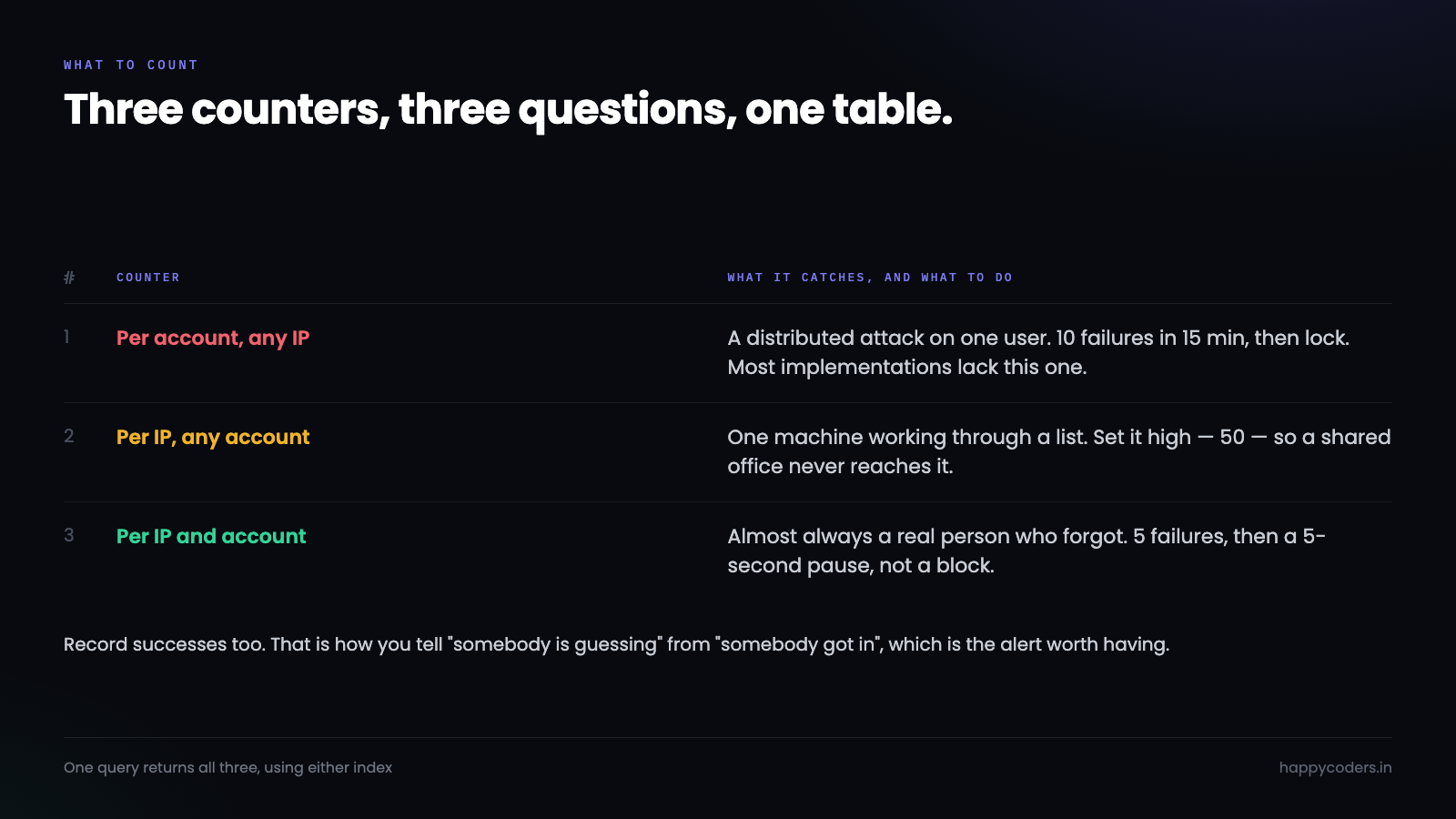
The fix is to keep three separate counters, each answering a different question.
Per account. How many times has this username failed recently, from anywhere? This is the one that catches a distributed attack on one account, and it is the counter most implementations do not have.
Per IP. How many times has this address failed recently, against any username? This catches one machine working through a list, and it needs a much higher threshold than people set — high enough that a shared office never reaches it.
Per IP and account together. The narrow one. One address, one username, repeatedly. Almost always a real person who has forgotten their password, so this should slow down rather than block.
Three counters, three thresholds, three different responses. That is the whole design, and it fits in one table.
The table
CREATE TABLE login_attempts (
    id          BIGINT UNSIGNED AUTO_INCREMENT PRIMARY KEY,
    username    VARCHAR(190) NOT NULL,
    ip          VARBINARY(16) NOT NULL,
    succeeded   TINYINT(1) NOT NULL DEFAULT 0,
    attempted_at DATETIME NOT NULL,
    INDEX idx_user_time (username, attempted_at),
    INDEX idx_ip_time   (ip, attempted_at)
) ENGINE=InnoDB;
Two details in there are deliberate.
VARBINARY(16) rather than a string, with inet_pton() on the way in. It holds IPv6, it is fixed width, and it indexes better. Storing IPv6 as text works until somebody sends the same address in two different notations and you count them separately.
Both indexes lead with the thing you filter on and end with time, because every query here is “this identifier, in this window”. An index on attempted_at alone is close to useless for these lookups.
The check
function login_blocked(PDO $db, string $username, string $ip): ?int
{
    $sql = "SELECT
              SUM(username = :u)                      AS by_user,
              SUM(ip = :ip)                           AS by_ip,
              SUM(username = :u2 AND ip = :ip2)       AS by_both
            FROM login_attempts
            WHERE succeeded = 0
              AND attempted_at > NOW() - INTERVAL 15 MINUTE
              AND (username = :u3 OR ip = :ip3)";

    $st = $db->prepare($sql);
    $packed = inet_pton($ip);
    $st->execute([
        'u' => $username, 'u2' => $username, 'u3' => $username,
        'ip' => $packed,  'ip2' => $packed,  'ip3' => $packed,
    ]);
    $c = $st->fetch(PDO::FETCH_ASSOC);

    if ($c['by_user'] >= 10) { return 900; }   // locked, 15 minutes
    if ($c['by_ip']   >= 50) { return 900; }   // one machine, a list
    if ($c['by_both'] >= 5)  { return 5; }     // probably a real person, slow down
    return null;
}
One query, three answers. The OR in the WHERE lets MySQL use either index and keeps the scanned set to rows that matter.
Note the return values. A blocked state is 900 seconds; the narrow case is five. That difference is the point — a person who mistyped twice gets a five-second pause and no drama, while a distributed run against one account hits a real lock.
Record the attempt, then decide
$wait = login_blocked($db, $username, $ip);
if ($wait !== null) {
    http_response_code(429);
    header('Retry-After: ' . $wait);
    exit('Too many attempts. Try again shortly.');
}

$user = find_user($db, $username);
$ok   = $user && password_verify($password, $user['password_hash']);

$db->prepare('INSERT INTO login_attempts (username, ip, succeeded, attempted_at)
              VALUES (?, ?, ?, NOW())')
   ->execute([$username, inet_pton($ip), $ok ? 1 : 0]);

if (!$ok) {
    sleep(1);                       // same delay whether the user exists or not
    exit('Invalid username or password.');
}
Record every attempt, successful or not. You want the successes because they are how you tell “somebody is guessing” from “somebody got in”, and that is the alert worth having.
The part people leave out: do not confirm the username
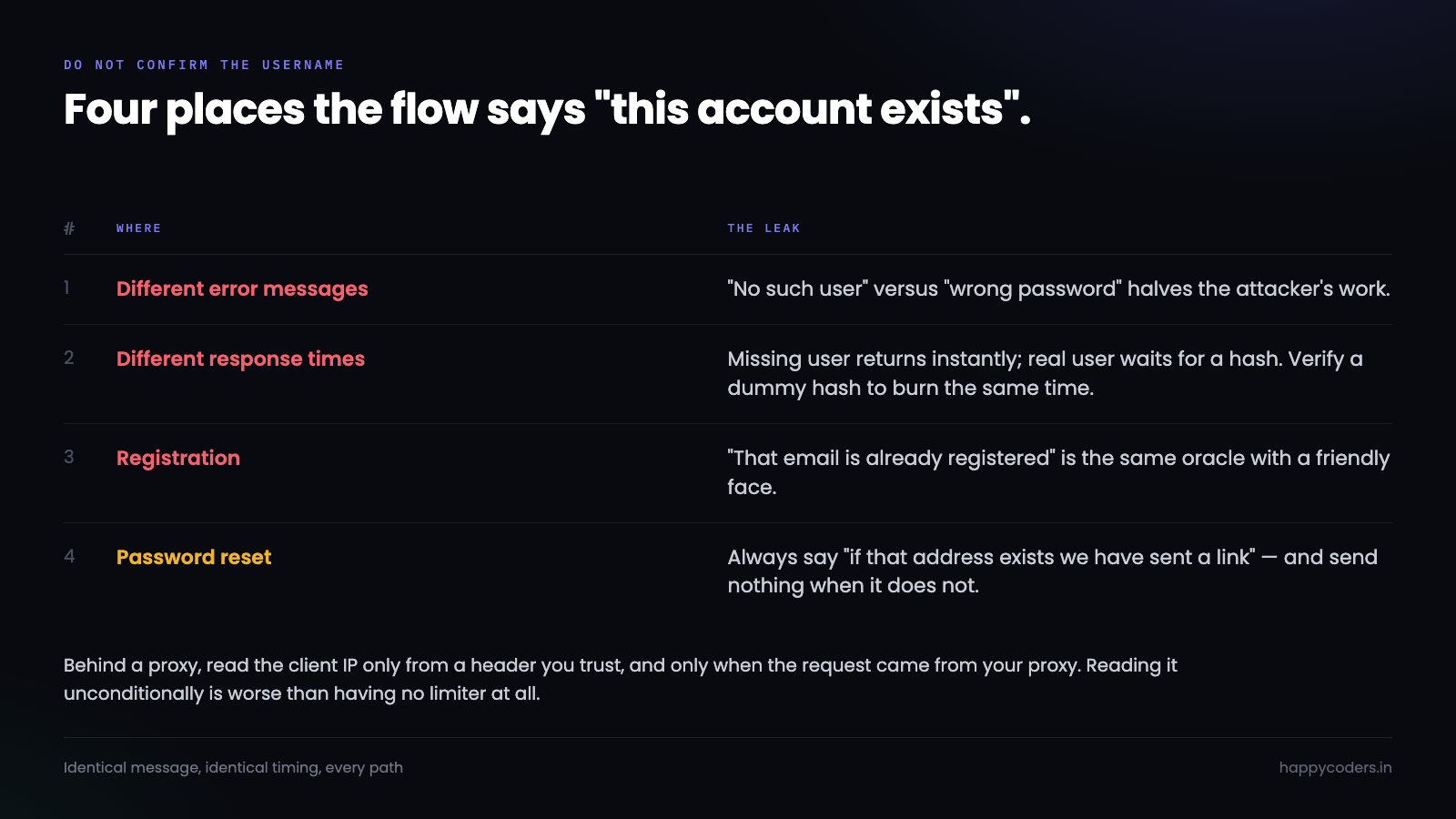
A login form that says “no such user” for one input and “wrong password” for another has handed over a way to enumerate accounts. Point the script at your user list, keep the ones that come back “wrong password”, and the attack is now half the size.
The message must be identical either way, and so must the timing. If a missing user returns instantly while a real one takes 80 milliseconds because a hash was verified, the response time says what the message would not.
The fix is to do the same work regardless — verify against a dummy hash when the user does not exist:
$dummy = '$2y$12$usesomesillystringforsalt.abcdefghijklmnopqrstuvwxyz012';
if ($user) {
    $ok = password_verify($password, $user['password_hash']);
} else {
    password_verify($password, $dummy);   // burn the same time
    $ok = false;
}
Password reset and registration leak the same way, and they are the two everybody forgets. “That email is already registered” is a account-existence oracle with a friendly face.
Clean the table up
This table grows fast during an attack — that is what an attack is. Without a cleanup it becomes the biggest table in the database and the queries slow down exactly when you need them.
DELETE FROM login_attempts
WHERE attempted_at < NOW() - INTERVAL 7 DAY
LIMIT 10000;
Run it on a schedule. The LIMIT matters: deleting a million rows in one statement on InnoDB holds locks long enough to affect the live login. Delete in batches and let it take a few passes.
Keep seven days rather than fifteen minutes even though the limiter only looks back fifteen. The extra history is what lets you answer “was this account being targeted last week”, and that question comes up.
Where the IP comes from
One mistake worth naming because it silently disables everything above.
Behind Cloudflare, a load balancer or any reverse proxy, $_SERVER['REMOTE_ADDR'] is the proxy, not the visitor. Every request looks like it came from one address and your per-IP counter becomes a global counter that either blocks everybody or nobody.
The real address arrives in a header — CF-Connecting-IP, or the last entry of X-Forwarded-For. And that header is trivially forged by anyone talking to your server directly, so only trust it when the request actually came from your proxy:
function client_ip(array $trusted_proxies): string
{
    $remote = $_SERVER['REMOTE_ADDR'];
    if (!in_array($remote, $trusted_proxies, true)) {
        return $remote;                       // not from our proxy, do not trust headers
    }
    $fwd = explode(',', $_SERVER['HTTP_X_FORWARDED_FOR'] ?? '');
    $ip  = trim(end($fwd));
    return filter_var($ip, FILTER_VALIDATE_IP) ? $ip : $remote;
}
Reading the header unconditionally is worse than not having a limiter, because an attacker sets a different fake address on every request and never hits any counter at all.
What to tell the person who got blocked
Most of the time the person hitting a limit is a real user having a bad morning, and the message decides whether they email support or give up.
Say three things: that too many attempts were made, roughly how long to wait, and where to go instead. A 429 with Retry-After and a sentence is enough. Do not say which counter was tripped and do not say how many attempts remain — both of those tell a script exactly how to pace itself.
And put the password reset link in that message. The single most common reason to be locked out is not remembering the password, and the useful thing at that moment is the route around it rather than a countdown.
One thing to get right: a successful login should not clear the lock for everybody. If an account is locked because it is being attacked, the attacker guessing correctly is exactly the case you are defending against. Clear the counter for the pair that succeeded, not for the account.
What is worth an alert
The table earns its keep the first time somebody asks whether an account was targeted, and the query is short:
SELECT username,
       COUNT(*)              AS failures,
       COUNT(DISTINCT ip)    AS addresses,
       MAX(succeeded)        AS got_in
FROM login_attempts
WHERE attempted_at > NOW() - INTERVAL 24 HOUR
GROUP BY username
HAVING addresses >= 10
ORDER BY failures DESC;
Ten or more distinct addresses failing against one username in a day is not somebody forgetting their password. The got_in column is the one to read first: a run of failures from many addresses followed by a success is the shape of a compromise, and it is worth a message to that user the same day.
Two other patterns are worth watching. A sharp rise in distinct usernames from a small set of addresses is a list being worked through — usually harmless because the usernames are guesses, occasionally not because your user list leaked. And failures against usernames that do not exist at all tell you somebody is enumerating; if that number is high, check that registration and password reset are not confirming which addresses are real.
Why not Redis
Redis is the right tool for this at scale and most small applications do not have it. Adding a service, a connection, a failure mode and a deployment step to count login failures is a poor trade when the database is already there and already transactional.
The honest limits: this adds two queries to each login attempt, which is nothing at normal volume and does become the wrong shape somewhere north of a few hundred logins a second. If you are there, you already have Redis. If you are not, the table is simpler, survives a restart, and is queryable when somebody asks what happened.
What this does not solve
Rate limiting buys time against guessing. It does nothing about a password that was correct because it leaked from somewhere else, and credential stuffing works with one attempt per account precisely to stay under every limit.
The answer to that is a second factor, and rate limiting is what holds the line until you have one. Pair it with proper password hashing, because these protect against different halves of the same problem: hashing bounds the damage after a table is stolen, and this bounds the guessing before anything is.




