


A product demo has one job: to make somebody want the thing. It is not a feature tour, it is not training, and it is not a substitute for reading the documentation. Most demos fail because the person recording forgot that, opened the app, and started clicking.
The good news is that a demo is one of the few pieces of marketing where the difference between weak and strong is almost entirely structure and preparation, not production budget. A clear five-minute recording made on a laptop will outperform an expensive video that takes three minutes to reach the point.
Decide who the demo is for before you open the app
“Everyone” is not an audience. A demo aimed at everyone shows a little of everything and convinces nobody, because the one thing that mattered to each viewer got forty seconds.
Pick one person and write them down in a sentence before you record:
- An agency owner who suspects some projects lose money but cannot prove which.
- An operations manager whose team is on four different tools and nothing reconciles.
- A developer evaluating an API, who wants to know how long integration will take.
- A finance lead who only cares whether the numbers can be exported and trusted.
Those four people need four different demos of the same product. The agency owner needs to see a project report. The developer needs to see a request and a response. Showing the developer a project report wastes their time, and they will close the tab.
If you only have the budget or time for one demo, make it for the person who signs the cheque, and put the detail the others want in a second, shorter recording. Two focused five-minute videos beat one unfocused fifteen-minute video, every time.
The structure that works
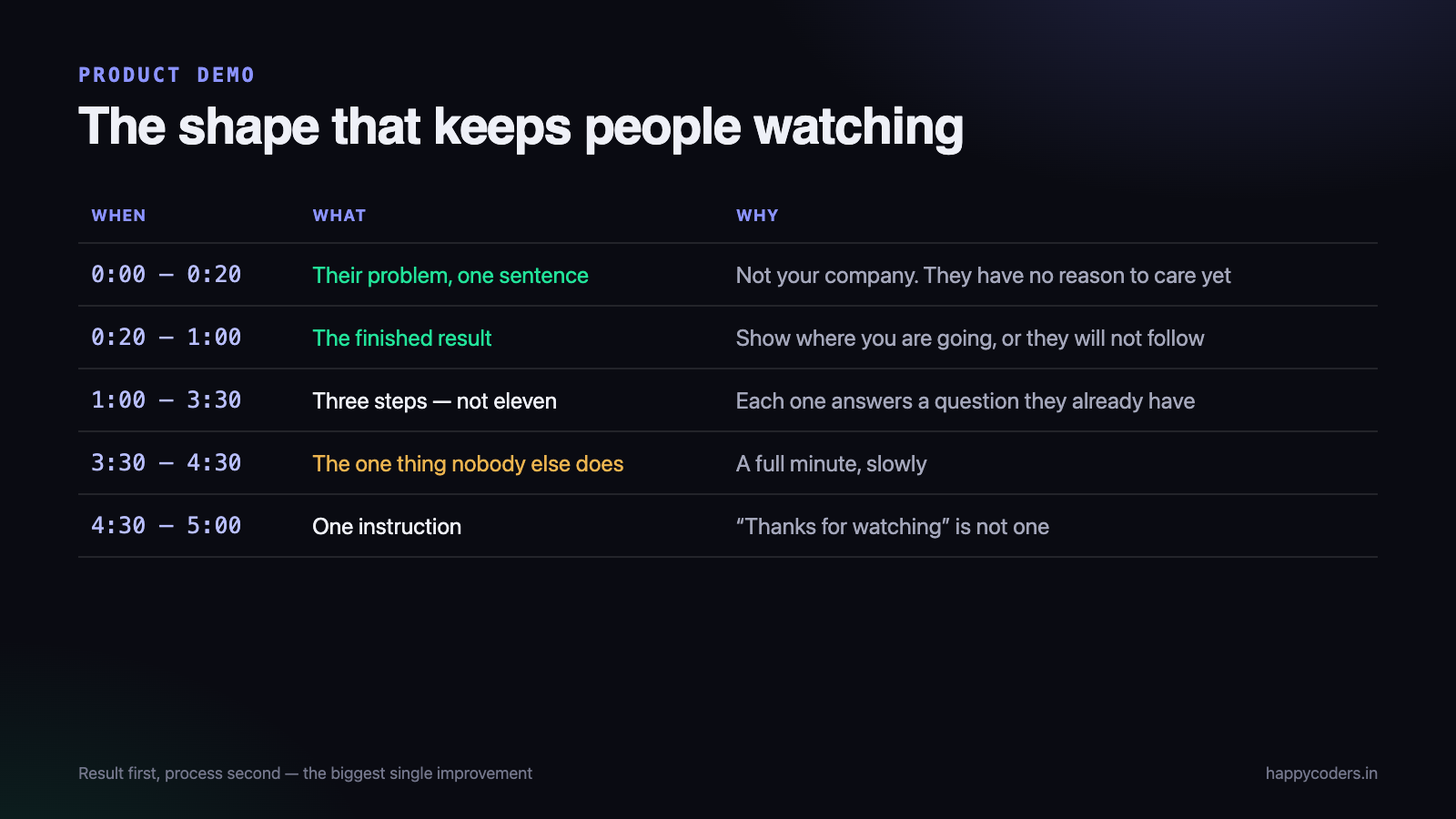
Almost every demo that holds attention follows the same arc. It is not a formula for its own sake — it is the order in which a stranger can actually absorb what you are showing.
1. The problem, in one sentence (0:00–0:20)
Open with the situation the viewer is already in, not with your company. “At the end of the month you know what the team was paid, and you still cannot say which project cost you money.” If that sentence is right, the viewer has already decided to keep watching.
What does not work: “Hi, I am Karthik from Happy Coders, and today I will be walking you through our platform.” Nobody has a reason to care yet.
2. The outcome, before the process (0:20–1:00)
Show the finished result next — the report, the invoice, the dashboard with real numbers on it. This is counter-intuitive, because the instinct is to build up to it. Do not. The viewer needs to see where you are going or they will not follow you there.
This single change — result first, steps second — is the biggest improvement most demos can make.
3. How you got there, in three steps (1:00–3:30)
Now walk the path. Three steps, not eleven. If your product genuinely needs eleven steps, pick the three that matter and say “the rest is the same idea.”
Every step should answer a question the viewer already has. If you find yourself explaining something nobody asked, cut it.
4. The one thing nobody else does (3:30–4:30)
Every product has one thing that is genuinely different. Not a feature list — one thing. Spend a full minute on it, slowly, and say plainly why it matters.
If you cannot name that one thing, the demo is not the problem. Work that out first.
5. What to do next (4:30–5:00)
End with a single instruction, spoken and shown on screen. “Reply to this email and I will set your workspace up in ten minutes” is a good ending. “Thanks for watching” is not.
What to cut, without exception
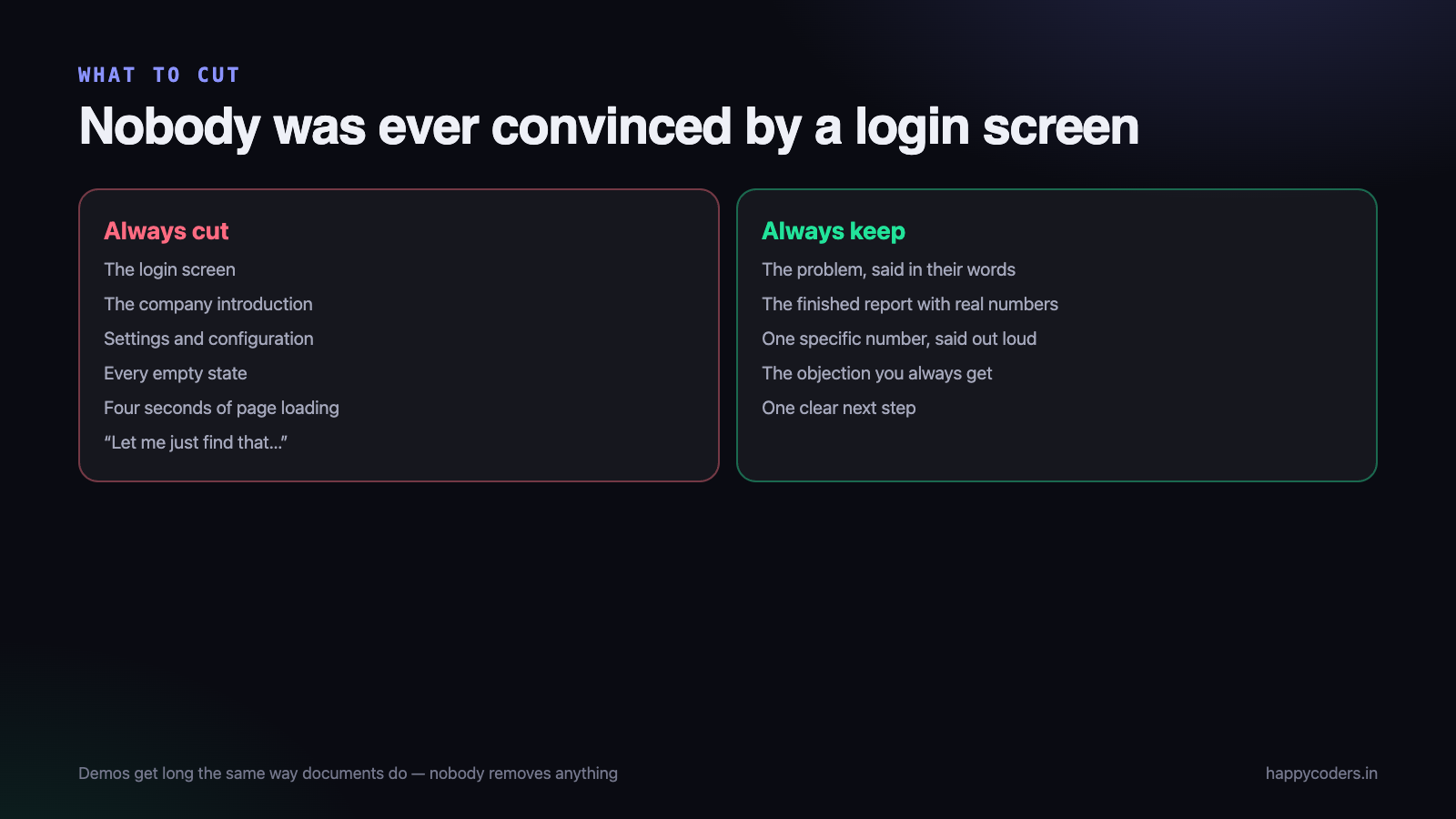
Demos get long the same way documents get long: nobody removes anything. These are the sections that can always go.
- The login screen. Start already signed in. Nobody has ever been convinced by a login form.
- The company introduction. Who you are belongs at the end, if at all.
- Settings and configuration, unless the demo is about how configurable the product is.
- Every empty state. Set up realistic data first. An empty dashboard says “nobody uses this.”
- Loading time. If a page takes four seconds, do not sit through it — stop, let it load, and continue in a second clip.
- “Let me just find that…” Anything that starts this way should have been rehearsed.
Set the screen up before you record, not during
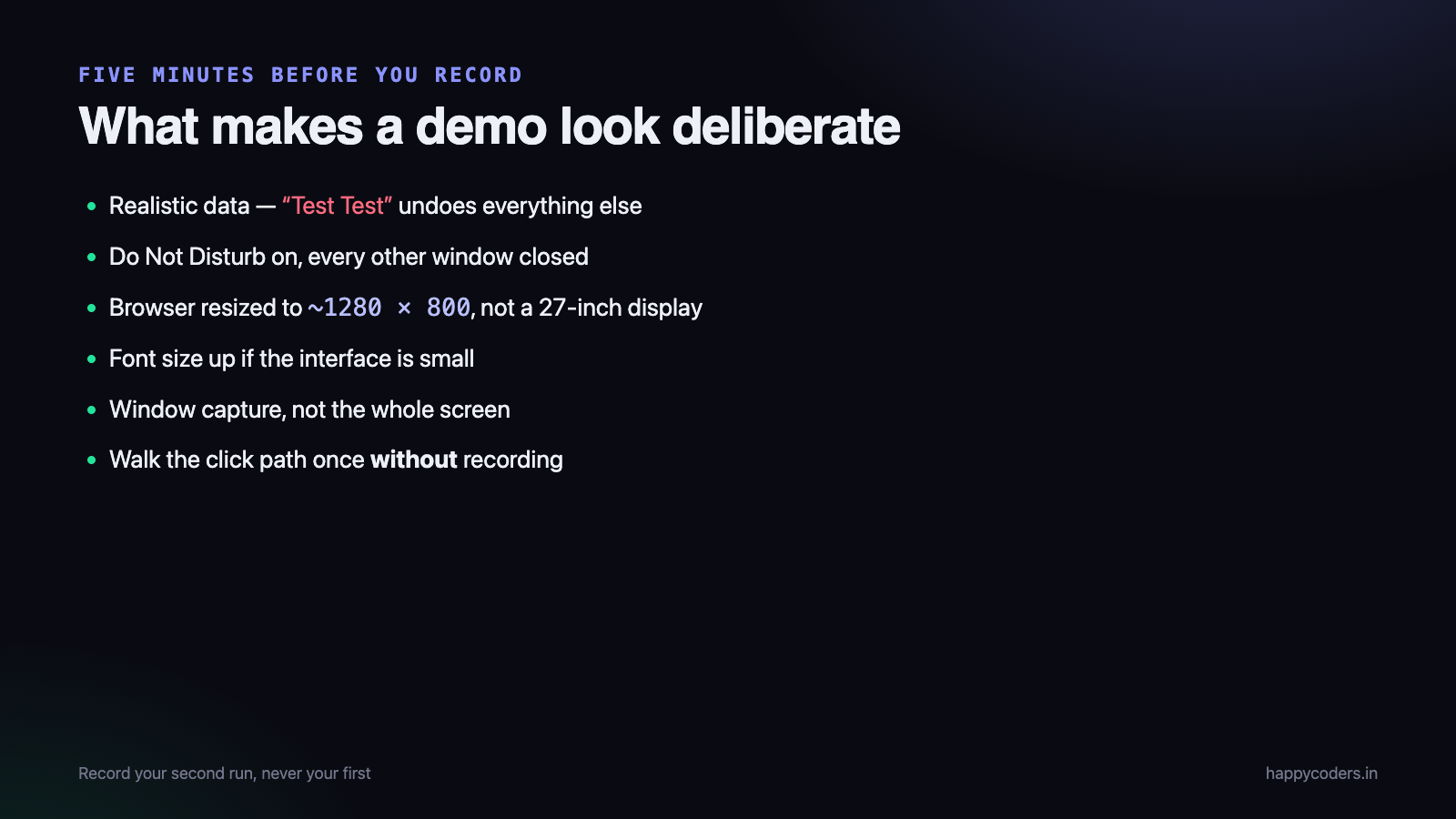
Most of what makes a demo look amateur happens before you press record, and all of it is fixable in five minutes.
- Use realistic data with believable names. “Test Test” and “asdf project” undo everything else you do well. Spend ten minutes creating a plausible customer, three plausible projects and a week of plausible activity.
- Close everything else. Other tabs, chat notifications, your inbox. Turn on Do Not Disturb. A WhatsApp preview appearing mid-demo is the fastest way to lose the room, and sometimes a privacy problem.
- Fix the window size. Resize the browser to a sensible shape before recording — roughly 1280×800 — rather than recording a 27-inch display where everything is tiny.
- Increase the font size if the interface is small. Most of your viewers will watch this on a laptop in a window, or on a phone.
- Clean the browser. Hide the bookmarks bar, close extra extensions, use a clean profile if you have one.
- Know your click path. Walk it once without recording. The recording should be your second run, not your first.
Recording it
The technical side is genuinely simple, and worrying about it is usually procrastination. A few choices matter.
Record the window, not the whole screen
Window capture keeps the file small, keeps the text large, and keeps your desktop out of the video. For a browser-based product, capture the browser window and nothing else.
Record at the size people will watch
On a Retina Mac, recording at the logical size rather than the full pixel size produces a file roughly a quarter as large that is still perfectly sharp in a browser window. That matters when the demo has to be emailed or uploaded.
Use your voice, and keep it close
Narration is what turns a screen recording into a demo. You do not need a studio microphone — you need to be close to whatever microphone you have, in a room without an echo. A quiet room with a laptop microphone beats a good microphone in a hall.
Speak slightly more slowly than feels natural, and pause before each click. On a recording, a fast cursor is genuinely hard to follow.
Show yourself, if it suits the product
A small camera bubble in the corner helps for a sales demo, because people buy from people. It does not help for a technical walkthrough, where it covers part of the screen for no benefit. If you do not want to be on camera at all, an avatar in the bubble still carries the sense of a person talking without putting your face in the file.
Record it in sections
The single most useful habit: do not try to get five perfect minutes in one take. Record each section separately — the problem, the outcome, the three steps, the differentiator, the close.
This changes everything about how it feels. A mistake costs you thirty seconds instead of the whole recording. You can redo one weak section a week later without re-recording the rest. And each section tends to be tighter, because you are thinking about one idea at a time.
It also gives you something valuable afterwards: those sections are individually useful. The “one thing nobody else does” clip is a LinkedIn post. The outcome clip is a reply to a prospect who asked what the reports look like.
Answer the objection you always get
Every product has one objection that comes up in nearly every sales conversation. For a tracking tool it is “my team will think they are being spied on.” For an accounting tool it is “we already have a system.” For anything technical it is “how long will this take to set up?”
Most demos avoid that objection and hope it does not come up. It always comes up, and by then the viewer has stopped watching. Raise it yourself, roughly two-thirds of the way through, and answer it in thirty seconds.
Doing so has two effects. The obvious one is that the objection is handled. The less obvious one matters more: naming the awkward thing out loud makes everything else you said sound more trustworthy, because you clearly were not hiding it.
The wording is simple. “The question I get here is whether the team will feel watched. Here is exactly what the app records, and here is what it does not.” Then show it, rather than describing it.
Three recordings, not one
Once the main demo exists, two more short recordings make it far more useful, and both are quick because the thinking is already done.
- A 60-second version for the website. The outcome, the one differentiator, and the call to action. No walkthrough.
- A 2-minute setup clip. What actually happens after somebody says yes. This answers the “how much work is this for me” question that stops a lot of deals quietly.
- A clip per objection. Thirty seconds each, kept in a folder, so a reply to a prospect can be a link rather than three paragraphs.
This is where recording in sections pays for itself. Most of these are re-cuts of material you already captured, not new work.
How long should it be?
Shorter than you think, and it depends entirely on where it will be watched.
- On a website — 60 to 90 seconds. Nobody watches a five-minute video they did not ask for.
- Sent to a prospect who asked — 3 to 5 minutes. They asked, so they will watch, but they will not watch fifteen.
- A deep walkthrough after a first call — up to 10 minutes, and say the length in the message so they can plan for it.
- Social media — 30 to 45 seconds, one idea, readable without sound.
When a demo needs to be longer, split it into a series rather than one long file. People finish a four-minute video and click the next one. They abandon a fifteen-minute video at minute six and never come back.
Say the number
The strongest single sentence in most demos is a specific number said out loud. “This report took about forty seconds to produce — the same report used to take our operations person most of a Friday afternoon.”
Vague claims (“saves you time”, “boosts productivity”) are ignored because everybody says them. A number invites the viewer to check it against their own situation, which is exactly the thinking you want them doing.
Only say numbers you can defend. One number that turns out to be wrong costs you the whole demo.
Watch it once, as a stranger
Before sending it anywhere, watch the whole thing in a normal-sized window, with the sound at normal volume, as though somebody sent it to you.
- Is the point clear in the first twenty seconds? If not, re-record the opening. It is the only section most people hear.
- Can you read the small text at that window size? If not, the recording resolution or the interface font is too small.
- Is there a moment where you would stop watching? Cut it.
- Does the audio level stay steady? A section that is noticeably quieter reads as careless.
- Is there anything on screen that should not be shared? Another customer’s name, a real email address, an internal note.
That last check matters more than it sounds. Demos get forwarded, and a recording made for one prospect often ends up in front of people you did not plan for.
The short version
- Write down who it is for, in one sentence.
- Open with their problem, not your company.
- Show the outcome before the process.
- Three steps, not eleven.
- One minute on the thing nobody else does.
- End with one instruction.
- Realistic data, clean screen, window capture, rehearsed once.
- Record in sections.
- Say one specific number.
- Watch it as a stranger before you send it.
None of that requires a videographer, a script writer or a budget. It requires half an hour of thinking before you press record, which is the part almost everybody skips.
HappyRec is a free screen recorder for macOS with window and area capture, system audio alongside your voice, and a camera bubble or avatar when you want a face in the corner — which covers everything above without a paid tool.




