


Date bugs are the ones that reach production. They pass review because the code reads sensibly, they pass testing because everybody testing sits in the same time zone, and they surface weeks later as a report that is short by a day or a deadline that expires five and a half hours early.
Almost all of them come from the same root: a value that means one thing is stored, moved or printed as though it meant something else. Fix that and the rest of it is formatting.
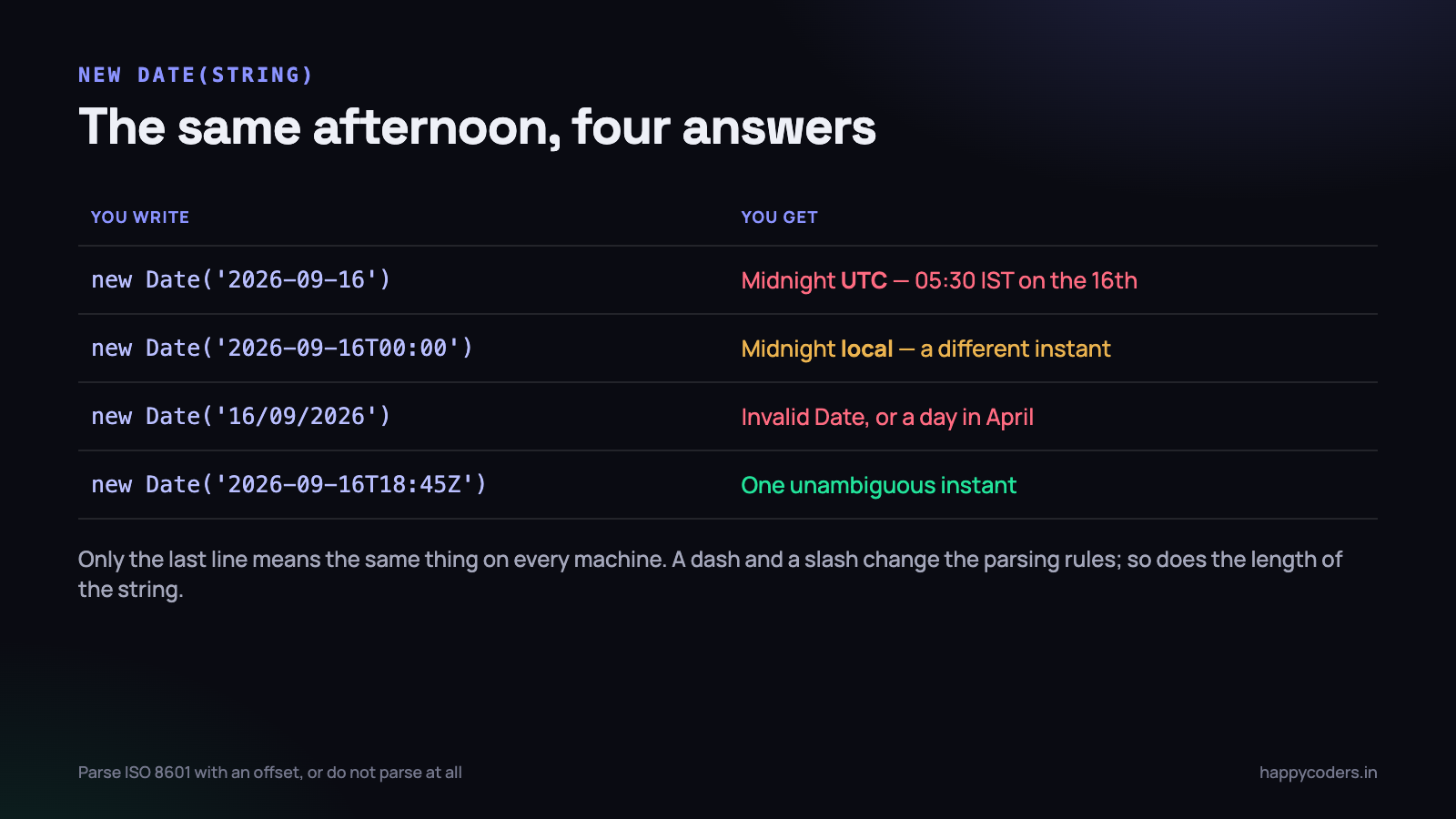
new Date(string) is a parser you cannot trust
The Date constructor accepts a string and tries to work out what you meant. Historically, browsers were free to guess differently, and although the specification has tightened, the legacy behaviour is still there.
new Date('2026-09-16')        // midnight UTC  -> 05:30 IST on the 16th
new Date('2026-09-16T00:00')  // midnight LOCAL -> a different instant
new Date('2026-09-16 00:00')  // was invalid in Safari for years
new Date('16/09/2026')        // Invalid Date, or 9 April 2026
new Date('Sep 16, 2026')      // works, and means nothing precise
The first two lines are the important pair. A bare YYYY-MM-DD string is treated as UTC. The same string with a time attached and no offset is treated as local. Two values that differ by one letter land 5 hours 30 minutes apart in India, which is exactly wide enough to move something across a day boundary.
The rule that removes the whole category: only ever parse ISO 8601 strings that carry an offset. Anything ending in Z or +05:30 is unambiguous. Anything else is a guess, and the guess differs between your laptop, your server and your user’s phone.
If you are handed a string from a user, from a spreadsheet or from somebody else’s API in a format you do not control, do not feed it to new Date() and hope. Parse it explicitly, with a library or with a regular expression, and then construct the value from known parts.
// a dd/mm/yyyy string from an Indian form, parsed deliberately
const [d, m, y] = '16/09/2026'.split('/').map(Number);

// months are 0-indexed, because of course they are
const localMidnight = new Date(y, m - 1, d);     // local, deliberate
const utcMidnight   = new Date(Date.UTC(y, m - 1, d));  // UTC, deliberate
Three different things people call a date
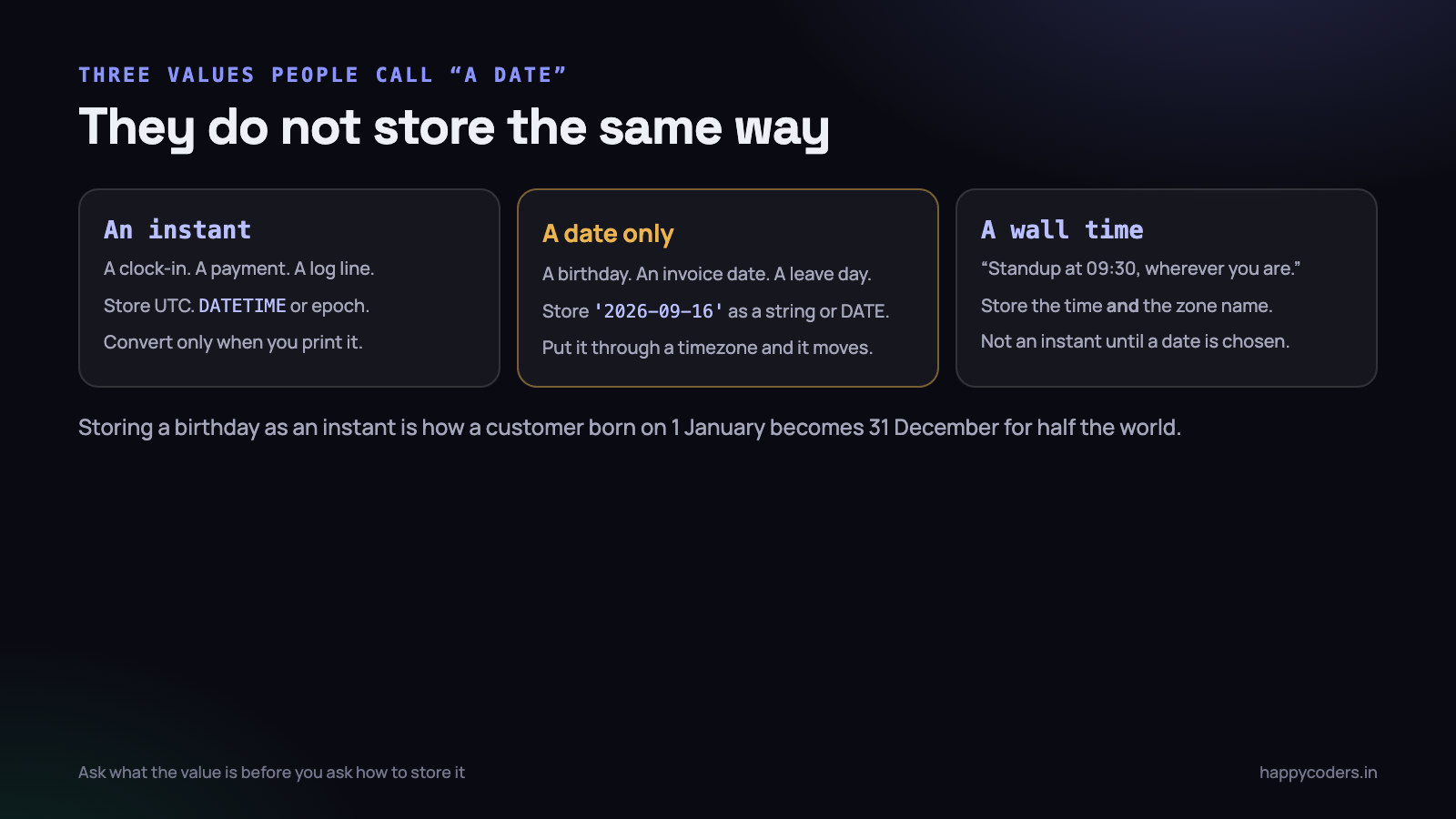
Before deciding how to store a value, decide what kind of value it is. There are three, and they behave differently.
- An instant. A moment on the world’s timeline: a clock-in, a payment, a log line, a message sent. It happened at one point in time, and everybody on earth agrees on that point even if they call it a different hour.
- A date only. A birthday, an invoice date, a leave day, a public holiday. It has no time, no zone and no instant. The 16th of September is the 16th of September in Chennai and in Chicago.
- A wall time. “Standup at 09:30, in each person’s own time”, or “the office opens at 09:00”. A time of day that becomes an instant only once you pair it with a date and a zone.
A JavaScript Date object can only represent the first kind. It is a single number of milliseconds since 1970 — an instant, nothing else. Everything that looks like a day, a month or an hour is produced on demand, in whatever zone you ask for.
Which means using a Date for the other two kinds is where most of the pain starts. Store a birthday as an instant and it will eventually render as the previous day for somebody.
The rule: UTC in the database, local on the screen
This is the only approach that survives a second country, a second office or a customer who travels. It has three parts and no exceptions.
- Capture an instant.
new Date()already is one. Do not touch it. - Store it in UTC — an ISO string with
Z, or aDATETIMEcolumn that everybody agrees is UTC, or an integer of seconds. One convention for the whole system. - Convert once, at the edge, when a human is about to read it, into the zone that human cares about.
The failure mode is never step one or step three. It is a conversion that happens somewhere in the middle — a helper that adds 5.5 hours, a MySQL column written in server-local time, a CSV export that formats before it filters. Every timezone bug I have debugged has been an extra conversion, or a missing one, halfway along the path.
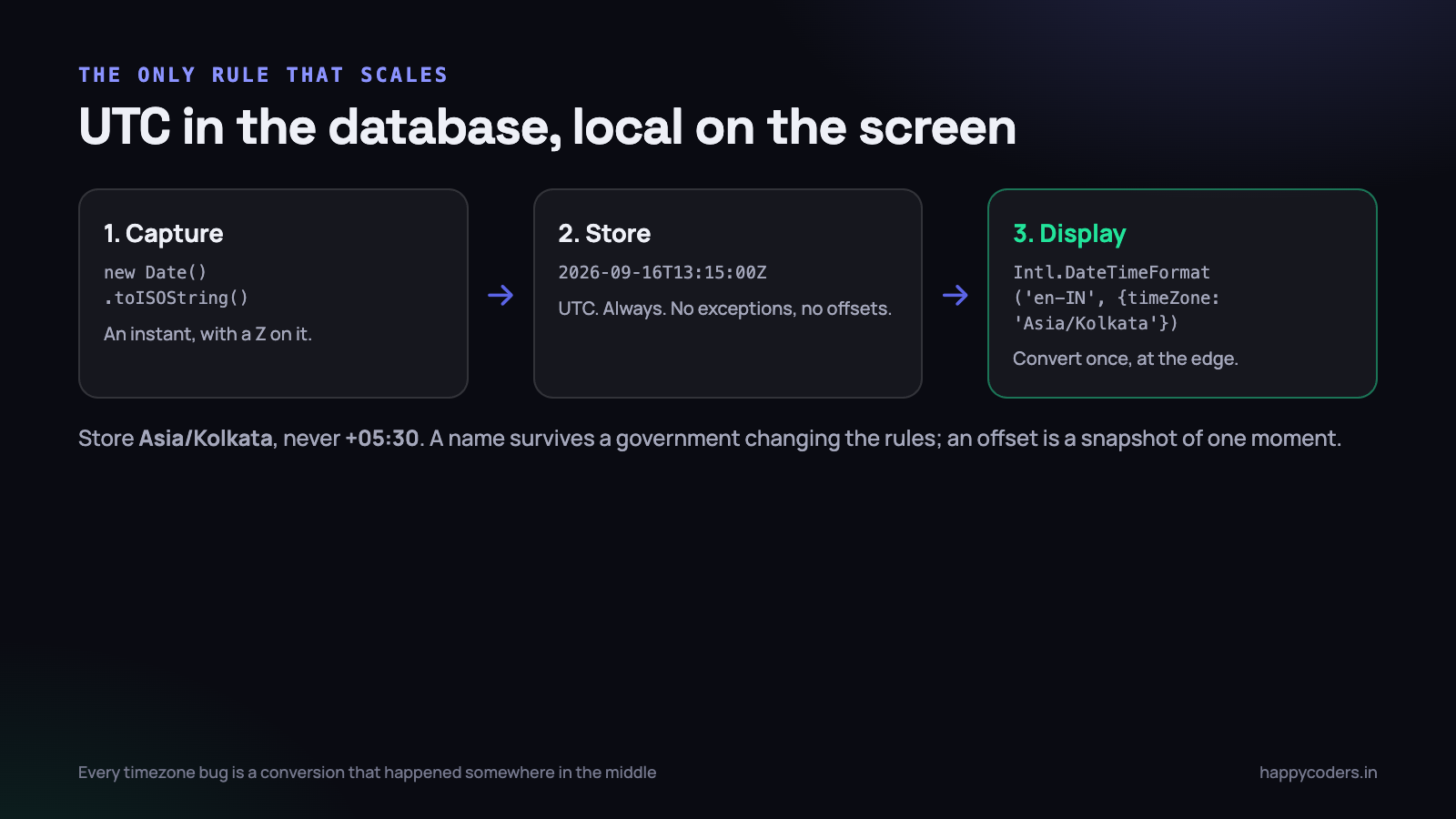
Store zone names, not offsets. An organisation’s zone is Asia/Kolkata, not +05:30. The name survives a government changing the rules — and they do; an offset is a snapshot of one moment that will eventually be wrong. India has not changed since 1947, but the customer you sign in Dubai or Santiago will.
// in the browser: what zone is the user actually in?
Intl.DateTimeFormat().resolvedOptions().timeZone   // "Asia/Kolkata"

// send that to the server on login, and store it against the user
// - but let them override it, because laptops travel
Formatting for humans: Intl.DateTimeFormat
This is the part of the platform that is genuinely good, and it is under-used because people reach for a library first.
const t = new Date('2026-09-16T18:45:00Z');

new Intl.DateTimeFormat('en-IN', {
  dateStyle: 'medium',
  timeStyle: 'short',
  timeZone: 'Asia/Kolkata',
}).format(t);
// "17 Sep 2026, 12:15 am"

new Intl.DateTimeFormat('en-IN', {
  dateStyle: 'medium',
  timeStyle: 'short',
  timeZone: 'UTC',
}).format(t);
// "16 Sep 2026, 6:45 pm"
One instant, two correct answers, on two different days. That is not a bug — it is the reason the zone has to be explicit rather than implied.
toLocaleString() is the same machinery with a shorter name, and it takes the same options object:
t.toLocaleString('en-IN', { timeZone: 'Asia/Kolkata' });
// "17/9/2026, 12:15:00 am"

t.toLocaleDateString('en-IN', {
  weekday: 'long', day: 'numeric', month: 'long', year: 'numeric',
  timeZone: 'Asia/Kolkata',
});
// "Thursday, 17 September 2026"
Two habits make this reliable. Always pass a locale, because the default comes from the machine and your server is probably en-US while your users are not. Always pass a timeZone, because the default is the machine’s zone — UTC on most servers, IST on your laptop, whatever the user picked on their phone.
Getting the calendar parts in a specific zone
getDate(), getHours() and friends always answer in the machine’s zone. There is no getDateIn(zone). When you need the parts in a particular zone — to group a report by day, for instance — use formatToParts:
function partsIn(date, timeZone) {
  const parts = new Intl.DateTimeFormat('en-CA', {
    timeZone, year: 'numeric', month: '2-digit', day: '2-digit',
    hour: '2-digit', minute: '2-digit', hour12: false,
  }).formatToParts(date);

  return Object.fromEntries(parts.map(p => [p.type, p.value]));
}

partsIn(new Date('2026-09-16T18:45:00Z'), 'Asia/Kolkata');
// { year: '2026', month: '09', day: '17', hour: '00', minute: '15' }
The en-CA locale is a small trick: it formats as YYYY-MM-DD, which sorts correctly and is easy to reassemble. Grouping a day’s entries by ${year}-${month}-${day} from this function gives you days that match what the user believes a day is.
Group and filter in the same zone. A report that filters a range in UTC and then groups the rows by IST day will be internally inconsistent, and the mismatch only shows up in the rows near midnight — which is why nobody catches it for a month.
Date arithmetic, and the day that is not 24 hours
Adding a day by adding 86,400,000 milliseconds is correct in India and wrong in about half the world, twice a year.
// wrong wherever daylight saving exists
const tomorrow = new Date(today.getTime() + 24 * 60 * 60 * 1000);

// correct: calendar arithmetic, in the local calendar
const d = new Date(today);
d.setDate(d.getDate() + 1);
setDate() handles month ends and leap years, and in a zone with daylight saving it lands on the same clock time on the next day even when that day was 23 or 25 hours long. India has no daylight saving, which is precisely why this bug ships from Indian teams and then breaks for the first customer in Europe or the United States.
The related trap is month arithmetic. Adding one month to 31 January produces 3 March, because 31 February overflows. If you are doing billing periods or subscription renewals, that behaviour needs a deliberate decision rather than a discovery in production.
Measuring elapsed time
A duration is not a date, and it should not be stored as one. If a task took 95 minutes, store 5700 seconds — an integer — not a Date of 01:35 on some arbitrary day. Durations add up, go negative, and exceed 24 hours; dates do none of those things gracefully.
And when you are timing something rather than recording when it happened, Date.now() is the wrong clock. It follows the system clock, which can jump backwards when NTP corrects it or when a user changes their machine’s time, so a timer can produce a negative duration.
// wrong for measuring: the wall clock can move
const t0 = Date.now();
doWork();
const ms = Date.now() - t0;        // can be negative after an NTP correction

// right: a monotonic clock that only ever moves forwards
const p0 = performance.now();
doWork();
const ms2 = performance.now() - p0;
This matters in a desktop tracker or anything that runs for hours. A laptop that sleeps, wakes and resynchronises its clock will produce entries that end before they started, and those rows then poison every average downstream.
Relative time, without a library
“3 days ago” is another thing people install a package for when the platform already does it, including the pluralisation and the wording for every locale.
const rtf = new Intl.RelativeTimeFormat('en-IN', { numeric: 'auto' });

rtf.format(-1, 'day');     // "yesterday"
rtf.format(-3, 'day');     // "3 days ago"
rtf.format(2, 'hour');     // "in 2 hours"
rtf.format(-1, 'week');    // "last week"
Compute the difference yourself, pick the largest sensible unit, and hand the number over. One caution: work out “yesterday” from calendar days in the user’s zone, not from dividing milliseconds by 86,400,000, or something that happened at 00:30 this morning will be reported as yesterday for anyone whose day started later than yours.
Date-only values deserve their own treatment
A birthday is not an instant. Neither is an invoice date, a leave day or a public holiday. The moment such a value passes through a Date object it acquires a time and a zone it never had, and then it can move.
// the bug
const dob = new Date('1994-03-15');        // midnight UTC
dob.toLocaleDateString('en-IN');           // "15/3/1994" in India
dob.toLocaleDateString('en-US', { timeZone: 'America/New_York' });
// "3/14/1994"  <- the customer was born the day before

// the fix: keep it a string, all the way through
const dob2 = '1994-03-15';                 // DATE column, or a string
const [y, m, d] = dob2.split('-');         // format it yourself
Treat date-only values as strings in the format YYYY-MM-DD, store them in a DATE column, compare them as strings (which sorts correctly), and never let them near a timezone conversion. If you need to display them prettily, split the string and format the parts.
The same applies in reverse. When a user picks a date in an <input type="date">, the value is already a YYYY-MM-DD string. Send that string to the server. Do not convert it to a Date first and then serialise it, because that round trip is where the day shifts.
Temporal, and where it actually stands
Temporal is the replacement for Date, and it is designed around exactly the distinction this article keeps making: separate types for separate kinds of value.
// separate types, so the compiler and the reader both know what you mean
Temporal.Now.instant();                      // an instant, UTC
Temporal.PlainDate.from('1994-03-15');       // a date, no time, no zone
Temporal.PlainTime.from('09:30');            // a wall time
Temporal.ZonedDateTime.from({
  year: 2026, month: 9, day: 17,
  hour: 0, minute: 15,
  timeZone: 'Asia/Kolkata',
});

// arithmetic that knows what a day is
Temporal.PlainDate.from('2026-01-31').add({ months: 1 });  // 2026-02-28
The API is immutable, the arithmetic is calendar-aware, and PlainDate alone removes most birthday bugs by making them impossible to express.
As of late 2026, Temporal has shipped in Firefox and is progressing in the other engines, with a well-maintained polyfill available. The practical position for production code today: keep doing UTC in, convert at the edge, and use a small library if you need more than Intl gives you. Write the conversions in one module so that adopting Temporal later is a change to one file rather than to four hundred.
If you are choosing a library in the meantime, pick one that is immutable and timezone-aware, and avoid the older mutable ones. But check first whether Intl.DateTimeFormat already does the job, because for display-only work it usually does, at zero bytes.
The classic bugs, and what they actually are
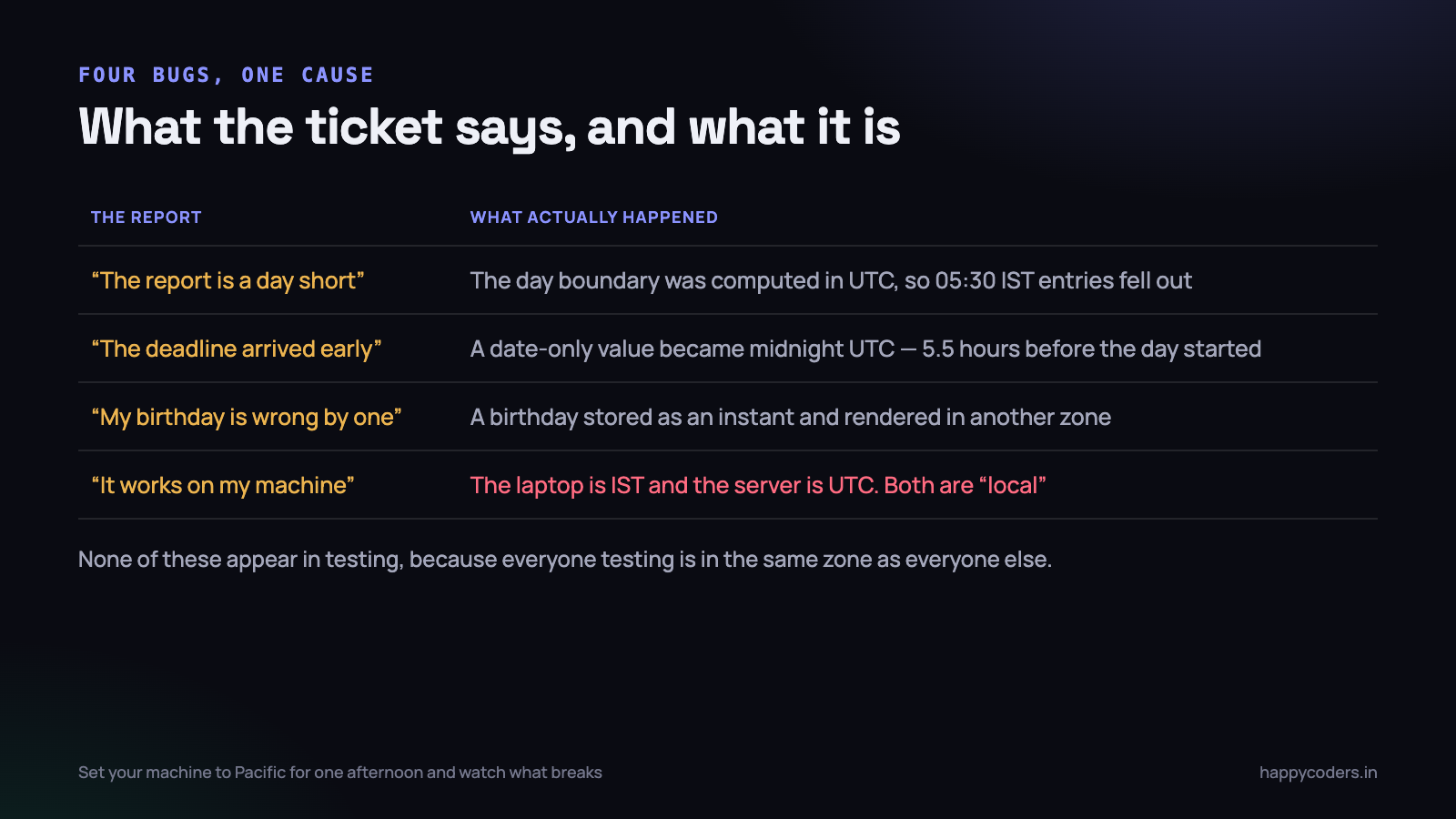
The report that is short by a day
A user asks for 1–30 September. The code takes those dates, turns them into UTC midnights, and filters. Every entry recorded between 00:00 and 05:30 IST is outside the range, because in UTC it belongs to the previous day. The month total is quietly light, nobody can see why, and the numbers are being used to invoice a client.
The fix is to build the boundaries in the organisation’s zone, convert those two instants to UTC, and only then query. We wrote about that in more depth for time tracking data in storing and displaying timesheet time zones.
The deadline that arrives early
A due date is stored as a date only, then compared against new Date(). The comparison turns it into midnight UTC, which is 05:30 IST, so the deadline expires five and a half hours before the day has ended for the user. Somebody submits at 11 pm on the due date and is told they are late.
The birthday that is a day out
Covered above, and it is worth saying the reason again: the value was never an instant, but it was stored as one.
It works on my machine
The developer’s laptop is Asia/Kolkata and the server is UTC. Both are “local”, and code that relies on local time gives different answers in the two places. This is why the bug appears the day it is deployed and not before.
The nightly job that runs at the wrong hour
A cron entry set to run “at 2am” runs at 2am in the server’s zone. If the server is UTC and the report covers the Indian working day, the job fires at 07:30 IST — after people have started work, and it includes half of the wrong day. A recurring reminder stored as an instant has the same problem in reverse: it stays fixed while the user’s wall clock moves around it at a DST change.
Recurring events are wall times, not instants. Store “09:30, Asia/Kolkata, weekdays” and compute the next instant each time you need it. Storing the computed instants ahead of time means every one of them after the next rule change is wrong, and nothing in the system will tell you.
Dates across an API boundary
Pick one format for instants and use it everywhere: ISO 8601 with an explicit offset, ideally Z.
{
  "started_at": "2026-09-16T13:15:00Z",     // an instant
  "invoice_date": "2026-09-16",             // a date, no time
  "timezone": "Asia/Kolkata"                // how to render the first one
}
Three rules keep this clean. Never send an instant without an offset. Never send a date-only value with a fake time attached. And if the client needs to render in a particular zone, send the zone name as its own field rather than pre-formatting on the server — formatted strings cannot be sorted, filtered or re-rendered.
On the database side, decide once whether your DATETIME columns are UTC and write it in the README. A column where some rows are IST and some are UTC is unfixable without guessing, and I have seen a project spend a week on exactly that archaeology.
Testing, cheaply
You do not need a timezone test framework. You need to stop testing in one zone.
- Run your test suite under a different zone.
TZ=America/Los_Angeles npm testcosts nothing and catches a surprising amount, because that zone is behind UTC where India is ahead. - Add two fixtures at 00:30 IST and 23:30 IST. Nearly every day-boundary bug is visible in those two rows and invisible in the rest.
- Test a day either side of a DST change for any zone your customers are in, even though your own is not.
- Check one report total by hand against the raw rows, in the user’s zone, once. It is dull and it finds the off-by-one immediately.
What to do on Monday morning
A short, concrete list that fixes most of this in a day.
- Grep for
new Date(with a string argument. Every one that is not a full ISO string with an offset is a latent bug. - Confirm what your database columns mean. Pick UTC, write it down, and correct anything that disagrees while you still can.
- Find every date-only value — birthdays, invoice dates, leave days, holidays — and make sure none of them passes through a timezone conversion.
- Put a
timeZoneon everytoLocaleStringandIntl.DateTimeFormatcall, and a locale too. No defaults. - Move the conversions into one module. One function to format an instant, one to build a day range in the user’s zone. Everything else calls those.
- Run the suite with
TZset to something far from IST and fix what falls over.
None of this is difficult. It only requires being explicit about two things that JavaScript lets you leave implicit — which zone a value is in, and what kind of value it is. Once both are written down, dates stop being scary and go back to being a column in a table.




