


A query that ran in 8 milliseconds on your laptop takes 4 seconds in production. The table has indexes. Somebody added one on every column that appears in a WHERE clause, which felt thorough.
That is usually the problem. Indexes are not a quantity you add until things are fast; they are a specific structure that answers specific questions, and an index that does not match the question is ignored while still costing you on every write.
What an index actually is
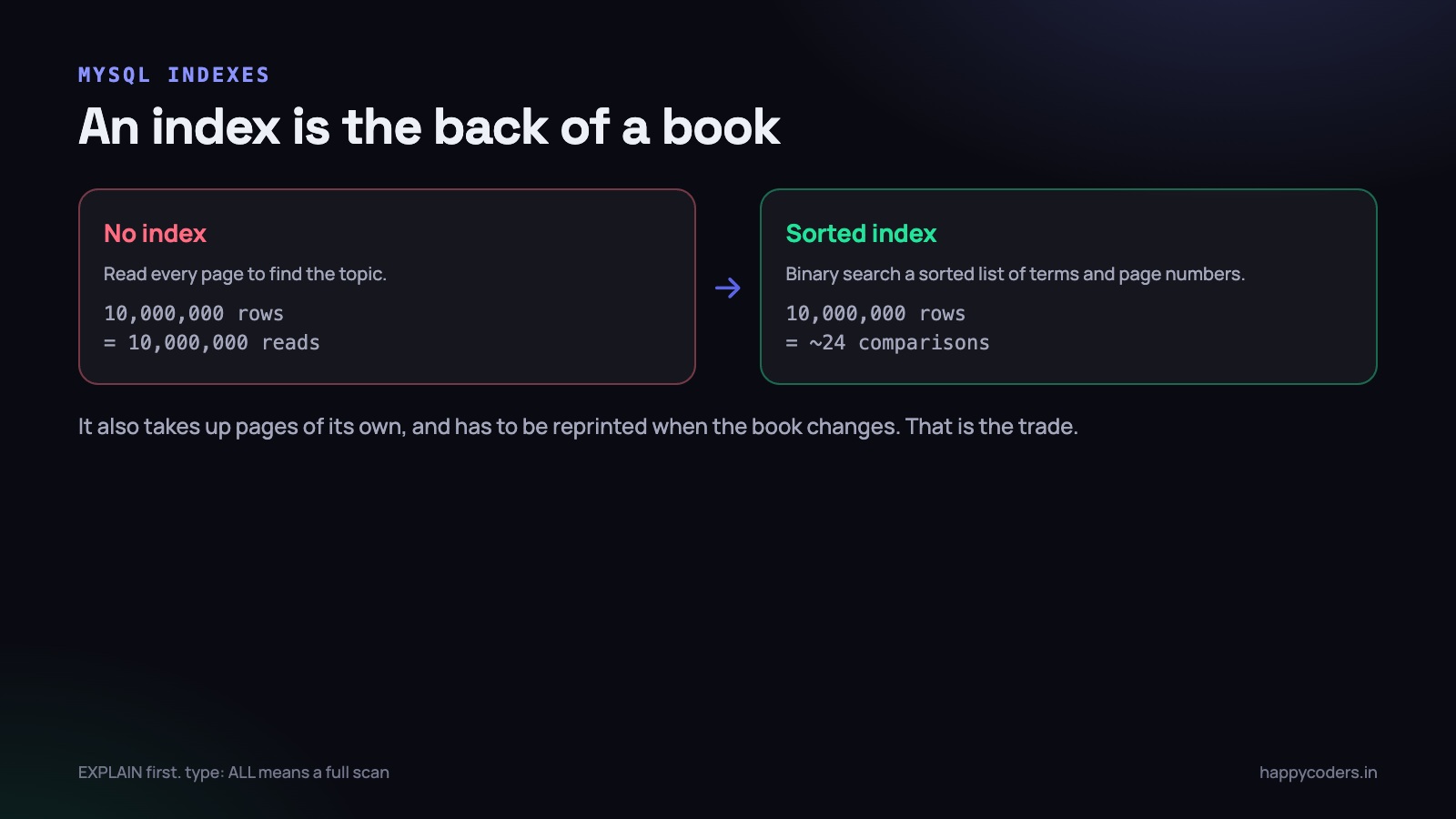
A table without an index is a stack of pages. To find every order from a particular customer, the database reads every row. Ten thousand rows is instant. Ten million is four seconds.
An index is a separate, sorted copy of one or more columns, with a pointer back to the row. Sorted means the database can do a binary search instead of a scan: ten million rows becomes about twenty-four comparisons.
The analogy that holds up is the index at the back of a book. It is sorted alphabetically, it contains only the terms and the page numbers, and it lets you find a topic without reading the book. It also takes up pages of its own, and it has to be reprinted when the book changes — which is exactly the trade-off an index makes.
The first thing to do: ask the database
Do not guess about indexes. MySQL will tell you what it did.
EXPLAIN SELECT * FROM time_entries
WHERE user_id = 42 AND started_at >= '2026-09-01';
Four columns of the output carry almost all the information:
type— how it found the rows.constandeq_refare ideal,refandrangeare good,ALLmeans a full table scan and is the thing you are looking for.key— which index was actually used.NULLhere with a largerowsvalue is the problem.rows— how many rows MySQL expects to examine. Compare it with how many you expect to get back; a large gap is wasted work.Extra—Using indexis excellent (it answered from the index alone).Using filesortandUsing temporaryusually mean an ORDER BY or GROUP BY that no index supports.
Run this before adding an index and after. If key does not change, the index you added is not the one the query needed.
Composite indexes, and why order matters
This is where most of the confusion lives. An index on multiple columns is sorted by the first column, then by the second within that, then the third. Like a phone book sorted by surname, then first name.
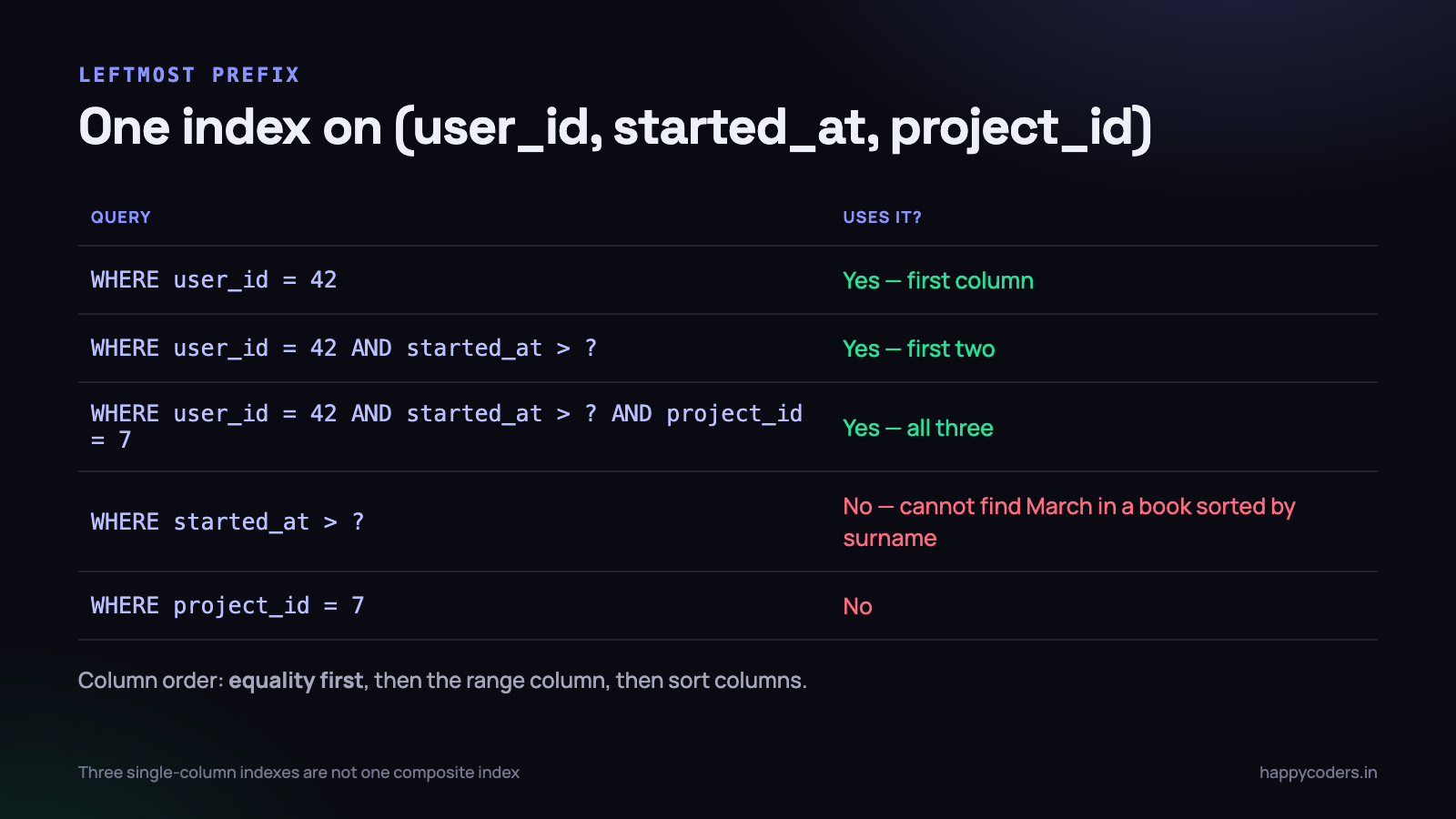
CREATE INDEX idx_entries ON time_entries (user_id, started_at, project_id);That index can answer:
WHERE user_id = 42— yes, the first columnWHERE user_id = 42 AND started_at > ?— yes, first twoWHERE user_id = 42 AND started_at > ? AND project_id = 7— yes, all three
And it cannot help with:
WHERE started_at > ?alone — you cannot find everyone born in March in a phone book sorted by surnameWHERE project_id = 7alone — same reason, further in
This is the leftmost prefix rule, and it is the single most useful thing to know about MySQL indexes. An index on (a, b, c) serves queries on a, on (a, b) and on (a, b, c) — and does nothing for a query on b alone.
It also means three separate single-column indexes are not equivalent to one composite index, and are usually worse: MySQL will generally pick one of them and filter the rest by hand.
The order to put the columns in
- Equality first. Columns compared with
=go before columns compared with>,<orBETWEEN. - Then the range column. Once a range is used, the columns after it in the index can no longer narrow the search — only filter what was already found.
- Then anything used for sorting, if it can avoid a filesort.
So for “this user, in this date range, ordered by date”, the index is (user_id, started_at) and never (started_at, user_id).
Six reasons a perfectly good index is ignored
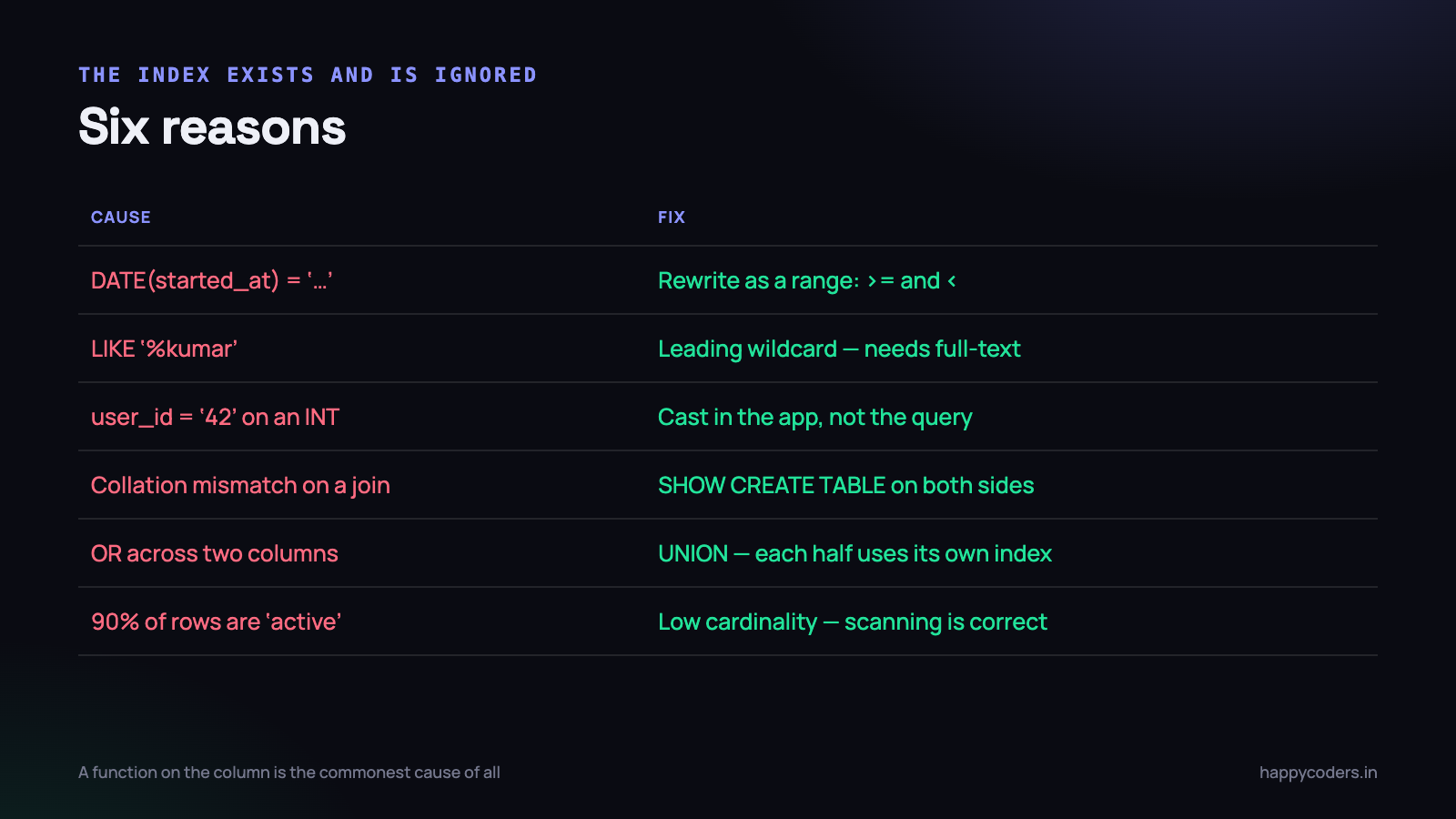
1. A function is applied to the column
-- index on started_at is useless here
WHERE DATE(started_at) = '2026-09-12'

-- rewrite as a range, and the index works
WHERE started_at >= '2026-09-12 00:00:00'
  AND started_at <  '2026-09-13 00:00:00'
The index stores the column’s value, not the function’s result. The same applies to YEAR(), MONTH(), UPPER() and arithmetic on the column. This is the most common cause of a slow query on a well-indexed table.
2. A leading wildcard
WHERE name LIKE '%kumar'     -- cannot use an index
WHERE name LIKE 'kumar%'      -- can
A sorted structure cannot help you find entries that end with something. For genuine substring search you need a full-text index or a search engine, not a B-tree.
3. Mismatched types
-- user_id is an INT, the value is a string
WHERE user_id = '42'
MySQL converts, and conversion on the column side can prevent index use. This happens constantly with values arriving from PHP, where everything from a request is a string. Cast in your application, not in the query.
4. Mismatched collations on a join
Joining a utf8mb4_general_ci column to a utf8mb4_unicode_ci one forces a conversion and kills the index. It usually comes from tables created years apart. Check with SHOW CREATE TABLE on both sides of any join that is mysteriously slow.
5. OR across different columns
-- often uses neither index well
SELECT * FROM entries WHERE user_id = 42 OR project_id = 7;

-- each half can use its own index
SELECT * FROM entries WHERE user_id = 42
UNION
SELECT * FROM entries WHERE project_id = 7;
A condition like WHERE user_id = 42 OR project_id = 7 often cannot use either index efficiently. Two queries joined with UNION are frequently much faster, because each half can use its own index.
6. The index is not selective enough
An index on a status column with three possible values, where 90% of rows are active, is close to useless for finding active rows. MySQL knows this from its statistics and will scan instead — correctly, because reading the index and then fetching most of the table is more work than reading the table.
Low-cardinality columns are useful in a composite index after a selective column, and rarely useful alone.
Indexes you probably already have, and one you may not
Two are created for you and it is worth knowing what they are, because they change how everything else behaves in InnoDB.
The primary key is the table
In InnoDB the rows are physically stored in primary key order — this is a clustered index, not a separate structure. Two consequences follow, and both are practical.
First, a random primary key is expensive. Inserting rows with a random UUID means every insert lands in the middle of the table and pages are constantly split. An auto-incrementing key always appends, which is why it stays fast on a large table. If you need UUIDs, store them in binary form and consider an ordered variant, or keep an auto-increment key and treat the UUID as a separate unique column.
Second, keep the primary key narrow. Every secondary index stores the primary key as its pointer back to the row, so a wide composite primary key makes every other index on that table larger.
Foreign keys get an index; the other side may not
MySQL creates an index on the child column of a foreign key. It does not create one for the reverse direction of joins you write by hand. If a query joins two tables on a column that is not a declared foreign key, check that it is indexed — an unindexed join column is one of the slowest things a query can do, because it scans the second table once per row of the first.
The one people forget: an index for ORDER BY
A query that filters on nothing much but sorts a large table — a paginated list ordered by date, say — is often slow for the sorting rather than the filtering. Using filesort in EXPLAIN means MySQL is sorting the result set by hand.
An index whose columns match the ORDER BY, in the same direction, lets the database read rows in order and stop as soon as it has a page of them. On a big table this turns a two-second list into a fast one, and the query text does not change at all.
A word about pagination
It deserves a mention because it is where indexes stop being enough. LIMIT 20 OFFSET 100000 asks MySQL to find one hundred thousand and twenty rows and throw away the first hundred thousand. There is no index that makes that cheap, and page 5,000 of a list is genuinely slow however well the table is indexed.
-- slow on deep pages
SELECT * FROM entries ORDER BY id LIMIT 20 OFFSET 100000;

-- fast on any page: remember the last id you showed
SELECT * FROM entries WHERE id > ? ORDER BY id LIMIT 20;
This is keyset pagination, and it is the fix when deep pages matter. It costs you the ability to jump to an arbitrary page number, which most interfaces do not actually need — almost nobody clicks page 400, and the ones who do are usually a script.
Covering indexes: the free speed-up
If an index contains every column a query needs, MySQL never touches the table at all. EXPLAIN shows Using index, and the query can be several times faster.
-- the query
SELECT user_id, started_at, duration FROM time_entries
WHERE user_id = 42 AND started_at >= ?;

-- an index that answers it completely
CREATE INDEX idx_cover ON time_entries (user_id, started_at, duration);
Adding duration is not there to narrow the search. It is there so the value is already in the index and the row never has to be read. For a hot query on a large table this is often the difference between 300ms and 8ms.
Do not do it everywhere — each extra column makes the index larger and writes slower. Do it for the two or three queries that actually matter.
What indexes cost
They are not free, which is why “add an index to every column” is bad advice.
- Every write updates every index. An INSERT into a table with eight indexes is nine write operations.
- They take disk and memory. Indexes work best when they fit in the buffer pool. Too many, and useful ones get evicted by ones nobody uses.
- They slow bulk operations. Importing a million rows into a heavily indexed table is dramatically slower than into a bare one. For large imports, drop the indexes, load, and rebuild.
- The optimiser has more to consider, and occasionally picks wrongly when given too many similar options.
Unused indexes are pure cost. On MySQL 8 you can find them:
SELECT object_schema, object_name, index_name
FROM sys.schema_unused_indexes
WHERE object_schema = 'your_database';
Let the server run for a few weeks of normal traffic first, so the statistics are meaningful, and be careful with anything that might only be used by a monthly report.
Finding the queries worth fixing
Turn on the slow query log and let it collect for a day. Then look at what comes out — and look at total time, not the slowest single query.
-- log anything over half a second
SET GLOBAL slow_query_log = 'ON';
SET GLOBAL long_query_time = 0.5;
A query taking 4 seconds once a day matters far less than one taking 80ms that runs forty times per page load. pt-query-digest or the sys.statement_analysis view will rank by total time, which is the number that decides what your users actually feel.
And check for the N+1 pattern while you are there: a hundred identical queries differing only by an id is an application problem, and no index will fix it.
A working method
- Find the query from the slow log, ranked by total time.
- Run EXPLAIN. Look at
type,key,rowsandExtra. - Check for the six blockers above — functions, leading wildcards, type and collation mismatches, OR, low selectivity.
- Design one composite index: equality columns, then the range column, then sort columns.
- Add it on a copy of production data, not on production, and run EXPLAIN again.
- Measure the real query, not just the plan.
- Check what it cost writes before shipping it.
Six of those seven steps are measurement. That ratio is the point: almost every slow query is fixed by understanding it rather than by adding indexes until something works.
The short version
- EXPLAIN first, always.
type: ALLmeans a full scan. - Composite index order: equality, then range, then sort.
- Leftmost prefix — an index on (a, b) does nothing for a query on b alone.
- A function on the column disables the index. Rewrite as a range.
- Leading wildcards, type mismatches and collation mismatches all disable it too.
- Covering indexes avoid reading the table and are often the biggest win.
- Every index slows every write. Drop the unused ones.
- Rank by total time, not by the slowest single query.
Indexes are a small, learnable topic, and the payoff is large: most “we need a bigger database server” conversations turn out to be one missing composite index and one query with DATE() wrapped around a column.
Related reading on getting more out of the database layer: Laravel queues vs cron jobs, and writing queries safely in PHP.




