


Half the requirements you were given in a client call are not in anybody’s notes. The person who took them was also talking. Two weeks later there is a disagreement about what was agreed, and both sides are honestly remembering different things.
Recording the call solves that, and it introduces a different set of problems — consent, audio that only captures half the conversation, a folder of 4 GB files nobody ever opens, and a quiet unease about holding other people’s voices on a laptop. All four are manageable. None of them are solved by simply pressing record.
Ask first, and ask properly
Start here, because everything else is a technical detail and this one is not. A recording made openly is a working tool. The same recording made quietly is a thing you carry around for years and hope nobody finds out about.
The position in India, in practice
India has no single statute that says “you may or may not record a meeting”. In practice, recording a conversation you are yourself a participant in is treated very differently from intercepting one you are not part of — the second is what the Information Technology Act and the telegraph rules are concerned with, and it is a serious matter.
But legality is the floor, not the standard. The Supreme Court’s recognition of privacy as a fundamental right, and the data protection rules that have followed, both point the same way: a recording of identifiable people is personal data, and how you obtained it and what you do with it afterwards both matter. A recording made with everyone’s knowledge, kept for a stated purpose and deleted when that purpose ends, sits comfortably. One made secretly and forwarded to somebody does not, whatever the criminal law says.
None of this is legal advice, and if the meeting concerns a dispute, a disciplinary matter or anything you can imagine being read out in a hearing, talk to someone qualified before recording rather than afterwards.
Three places to get agreement
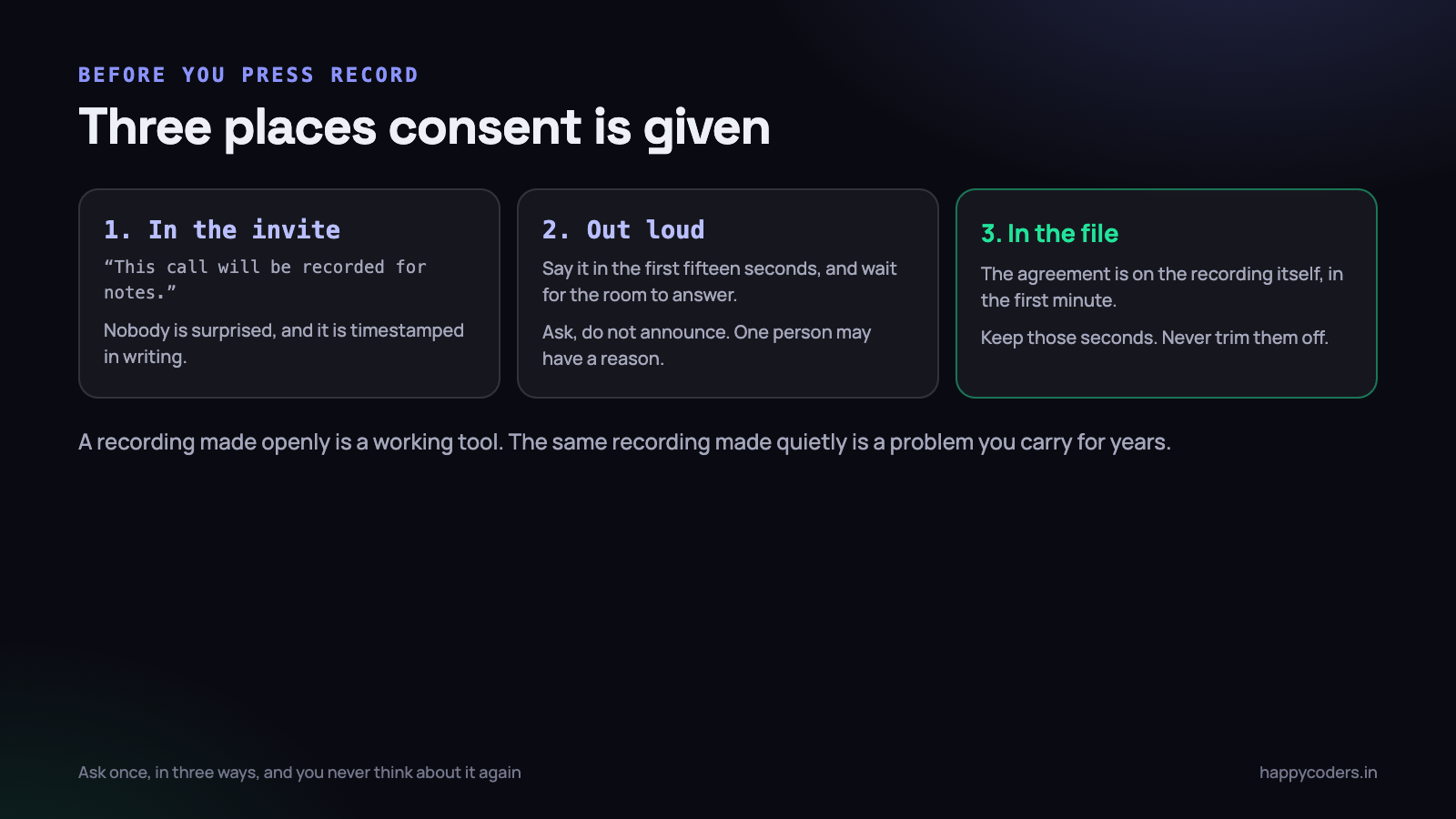
- In the calendar invite. One line: “This call will be recorded so we can write accurate notes — tell me if you would rather we did not.” Now it is in writing, timestamped, before anybody joins.
- Out loud, in the first fifteen seconds. Ask rather than announce. “I am going to record this for notes — is everyone comfortable with that?” Then wait for the answer. Somebody may have a reason, and hearing it is the point of asking.
- On the recording itself. Start recording, then ask. The agreement is now inside the file, in the first minute, permanently attached to the thing it applies to. Never trim that section off when you tidy the clip.
If one person objects, you do not record. That is the whole rule. Take written notes that call instead, and nobody remembers it as an incident. Recording over an objection is remembered for years.
Say what happens to it
Add one sentence about the afterlife of the file: who will have access, what it is for, and when it will be deleted. “It stays on my machine, I will circulate written notes today, and the recording goes in thirty days.” Objections almost always disappear at that sentence, because what people are actually uneasy about is not the recording but the unknown.
Capture both audio sources, or capture nothing useful
This is the failure that ruins more meeting recordings than anything else. The file plays back and you can hear yourself perfectly, answering questions from people who are inaudible. You recorded your microphone and not the call.
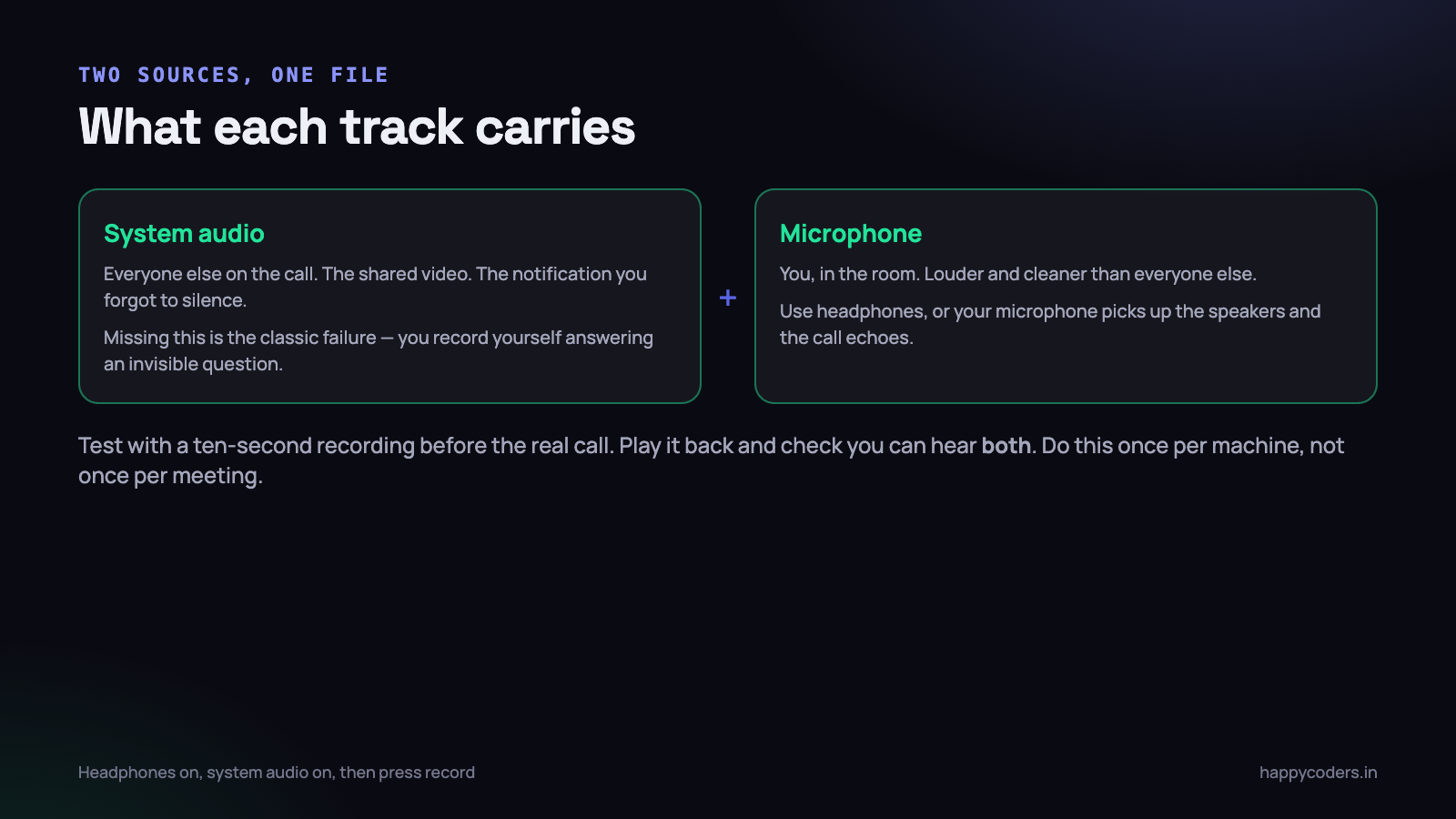
A Mac does not route what comes out of the speakers back into a recording by itself. A recorder that captures system audio does that for you, and you want it switched on alongside the microphone for any meeting recording. We went through the mechanics of this in recording system audio and microphone on a Mac.
Wear headphones
Not optional. If the call is playing through the laptop speakers, your microphone picks it up as well as the system audio track, and the result is a doubled, echoing recording of everyone else, half a beat apart. Any headphones fix it, including wired earphones from a drawer.
Test it once per machine
Before your first real recording, record ten seconds of a YouTube video playing while you say your own name. Play it back. Can you hear both? Good — that is the setup, and it will stay correct until you change your audio devices. Doing this once saves you the meeting you record without the far side.
Watch the level difference
You are close to your microphone and everyone else is compressed call audio. Your voice will be noticeably louder in the file. That is normal and mostly harmless, but it is worth speaking slightly away from the microphone if you know the recording will be listened to closely, so the far side is not drowned every time you agree with somebody.
When the platform wants a paid plan
Recording is one of the first features most meeting platforms move behind a subscription, or restrict to the host. You are in the call, you have permission from everyone in it, and the button is greyed out or asks you to upgrade.
Recording your own screen is the answer, and it is not a workaround in any dubious sense — you are capturing what is happening on your own machine, with the knowledge of the people on the call. It differs from the platform’s own recording in five ways, and only one of them matters.
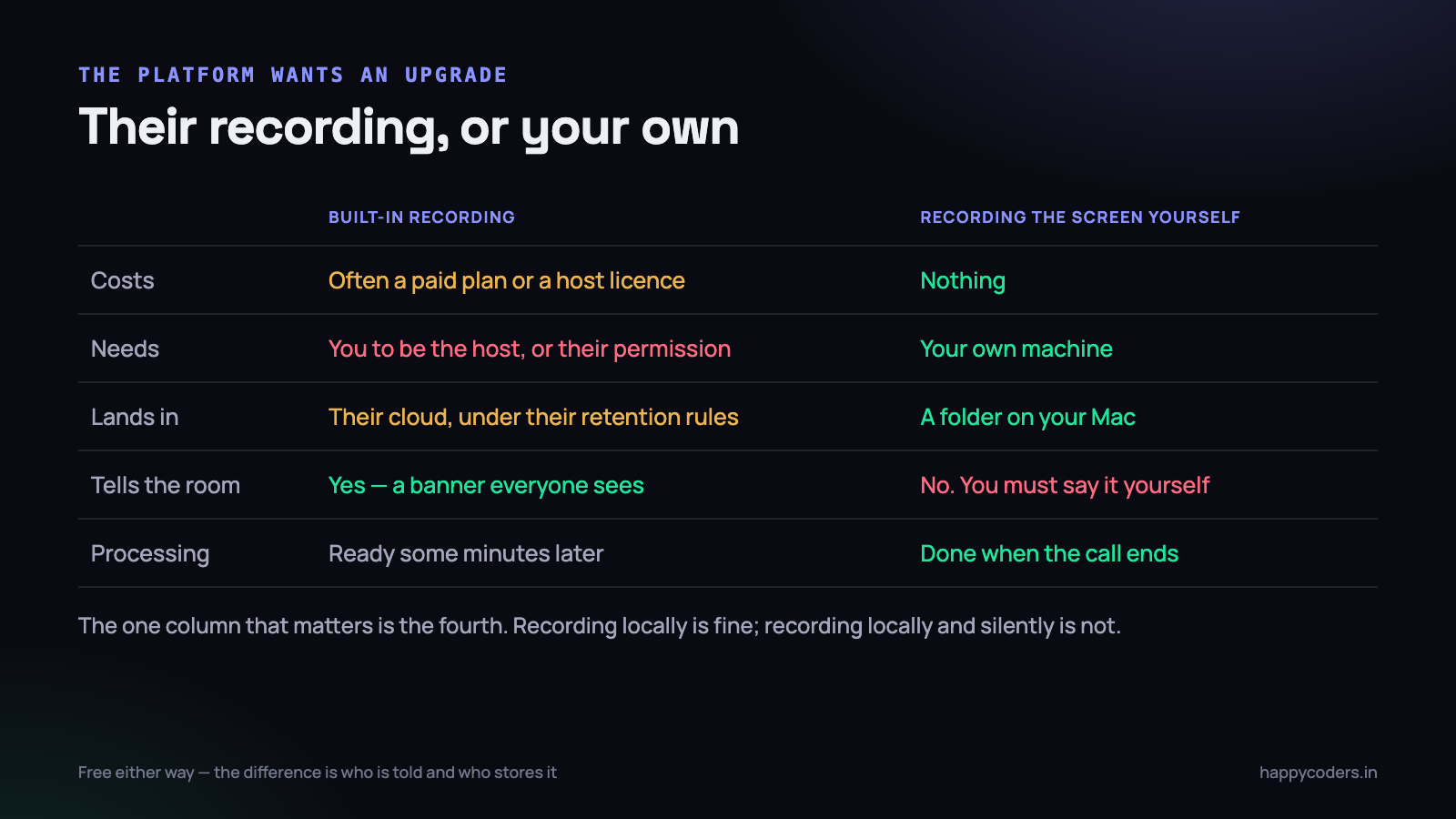
The platform’s recording puts a banner on everyone’s screen. Your own recording does not, which is exactly why the spoken request at the start of the call is not a formality — it is the only notice anyone gets. Say it, and you are in the same position as the paid feature. Skip it, and you are not.
The practical advantages run your way. The file is finished when the call ends rather than appearing in somebody’s cloud twenty minutes later, it lives on your own machine under your own retention rules, and it works when you are an ordinary participant rather than the host.
Recording a webinar you are attending
Treat this as different. In a meeting, the other participants are peers and you can ask them. In a webinar, the material is usually somebody’s product — a paid course, a conference session, a training they sell. Recording it for your own notes is one thing; circulating it, posting it or using it in your own training is straightforwardly taking something that was not given to you. Ask the host, and most will simply send you the official recording, because they would rather you had the good copy.
What to capture, and at what size
Meetings are long, and long recordings are big. A few choices keep the folder manageable.
- Capture the meeting window, not the whole desktop. Smaller file, no stray notifications, and none of your other work visible when you share a clip later.
- 720p is enough for faces. 1080p if a screen is being shared with text or code on it. There is no reason to record a meeting at Retina resolution.
- 30fps. Nothing in a meeting needs more.
- If nobody shares a screen, record audio only. A ninety-minute call as audio is a few tens of megabytes instead of a couple of gigabytes, and you will never look at the video of five faces in boxes anyway.
That last point deserves more use than it gets. For requirement calls, interviews and briefings, an audio file is the right format — it is small, it transcribes just as well, and it is far less intrusive to everybody than video. Voice-only recording covers the format choice.
Long meetings
Do not record three hours in one file. Stop and restart at the natural breaks — after the introductions, after the requirements section, after the demo. Three forty-minute files are easier to store, easier to send, easier to skip through, and if something goes wrong with the recording you lose one section rather than the morning.
Where the files go, and when they leave
A recording of a meeting contains other people’s voices, their opinions, sometimes their salary or their frustration with a colleague. It deserves slightly more thought than a folder called Desktop.
Name them so they can be found and judged
Date first, then the subject, then the participant or client. 2026-09-16-requirements-kumaran-textiles.m4a tells you what it is, how old it is and whether it still matters, without opening it. A folder of Recording 12.mov is a folder nobody can safely prune, so nobody ever does.
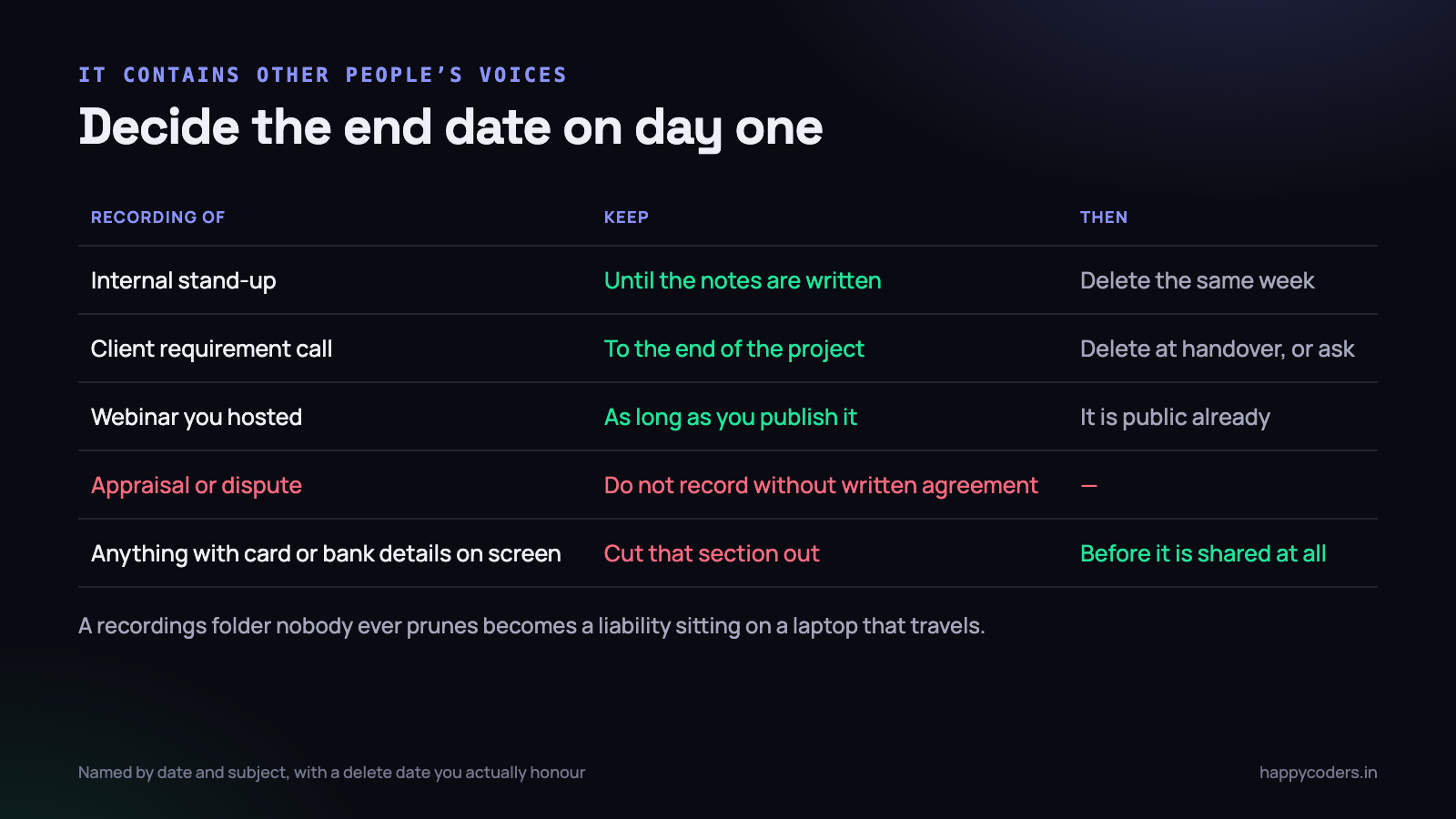
Set an end date at the start
Write the retention rule down once and apply it to everything:
- Internal calls — until the notes are written and circulated. Usually the same week.
- Client requirement calls — until the project ships, because that is when the “we never agreed to that” conversation happens. Then delete, or ask the client whether they want a copy.
- Interviews and appraisals — do not record these without explicit written agreement and a clear policy. If your organisation does not have one, this is not the recording to start with.
- Anything with card numbers, bank details or personal documents on screen — cut that section out before the file is stored anywhere, not before it is shared.
A fifteen-minute calendar reminder on the last Friday of each month, to open the recordings folder and delete what is past its date, is the entire process. Without it you will have three years of other people’s conversations on a laptop that travels in a bag through airports.
Be careful where you upload
A recording uploaded to a free transcription service is a recording you have given to a company whose terms you did not read, which may use it to train something. For an internal stand-up, fine. For a client’s commercial requirements or anything covered by an NDA, check what you are agreeing to first — and if you cannot check, transcribe it yourself.
Turning a recording into notes people actually read
Here is the uncomfortable truth about meeting recordings: almost nobody ever watches one. The recording is not the deliverable. It is insurance, and a source. The deliverable is a short set of notes, circulated the same day.
If a recording exists and no notes are written, the meeting is effectively undocumented, because nobody is going to sit through ninety minutes to find out what was decided.
Mark the moments while you are still in the call
Keep a text file open and type the clock time whenever something important happens. 00:14 pricing, 00:31 they want Tamil on the site, 00:52 deadline moved. Four or five lines, a second each to type, and afterwards you can jump straight to the two minutes that matter instead of scrubbing.
This is the single highest-value habit in this entire article. It takes no effort during the call and converts an unusable ninety-minute file into a set of bookmarks.
Write the notes in the same hour
Do it while your memory still fills the gaps, using the timestamps to check the parts you are unsure about. Keep the format short and always the same:
- Decisions. What was actually agreed, in complete sentences. Not the discussion — the conclusion.
- Actions. Each with a named person and a date. An action with no name is not an action.
- Open questions. What was raised and not settled, and who is going to settle it.
- Anything that changes scope, price or the deadline, on its own line, with the timestamp from the recording next to it.
Then send it to everyone who was in the call with one line: “Notes from today — tell me if I have got anything wrong.” That sentence is what turns your notes into the shared record. Silence for a day is agreement, and now the recording rarely needs to be opened at all.
Transcripts help, and they are not notes
Automatic transcription is genuinely useful for searching — finding the two minutes where a figure was mentioned. It is a poor substitute for notes, because a transcript is as long as the meeting and contains every false start. Use it to find things. Do not circulate it and call it minutes.
Indian English, Tamil or Hindi mixed into an English call, and names of local companies all reduce accuracy noticeably. Treat any number in an automatic transcript as needing a check against the audio before you act on it.
If you are the one running the webinar
Two extra habits, both learned the hard way.
- Record locally as well as in the platform. Cloud recordings fail, get cut short, or turn out to have captured the wrong layout. A local copy of your own screen costs nothing and has rescued more than one session.
- Capture the questions. Read each question out loud before answering it. Chat text is often not in the recording at all, and an answer to an unheard question is useless to everyone who watches later.
On Monday morning
Do three things, all of them small.
First, add a standard line to your meeting invite template: this call will be recorded so we can circulate accurate notes — tell me if you would rather we did not. It takes two minutes and it removes the awkwardness from every future call.
Second, do the ten-second audio test on your own Mac — a video playing while you say your name, both audible on playback. Once it is right, it stays right.
Third, open your recordings folder, rename anything worth keeping to the date-and-subject format, and delete the rest. Then put a monthly reminder in the calendar to do that again. The habit is the part that matters; the recording software is the easy half.
HappyRec is a free screen recorder for macOS that captures system audio and your microphone together, records a window rather than the whole desktop, and can record voice only when the meeting has nothing on screen worth keeping.




