


A sprint board is easy to draw and hard to run. Most teams end up with a board that describes what happened rather than one that helps decide what to do next — largely because the board and the hours live in different tools and nothing joins them.
The question that exposes it is simple: how long did that feature actually take? With separate tools, answering it means exporting hours, exporting tickets, matching them by name and date, and accepting that the result is roughly right. Nobody does that more than once.
Here is one full cycle on the Happy Tracker board, from the empty sprint to the report at the end that tells you how the estimate actually held up — and what to do with what it tells you.
Before the sprint: what should be true
Three things make a sprint worth running. None of them are about the software.
- The work is broken down small enough. A task estimated at three weeks is not a task, it is a project wearing a task costume.
- Somebody owns each item. An unassigned card in progress is a card nobody is thinking about.
- There is an estimate on everything. Not because the estimate will be right, but because the gap between estimate and actual is the thing you are going to learn from.
Create the sprint
Sprint Management and Backlog, then New sprint. Give it a name, a start date and an end date.
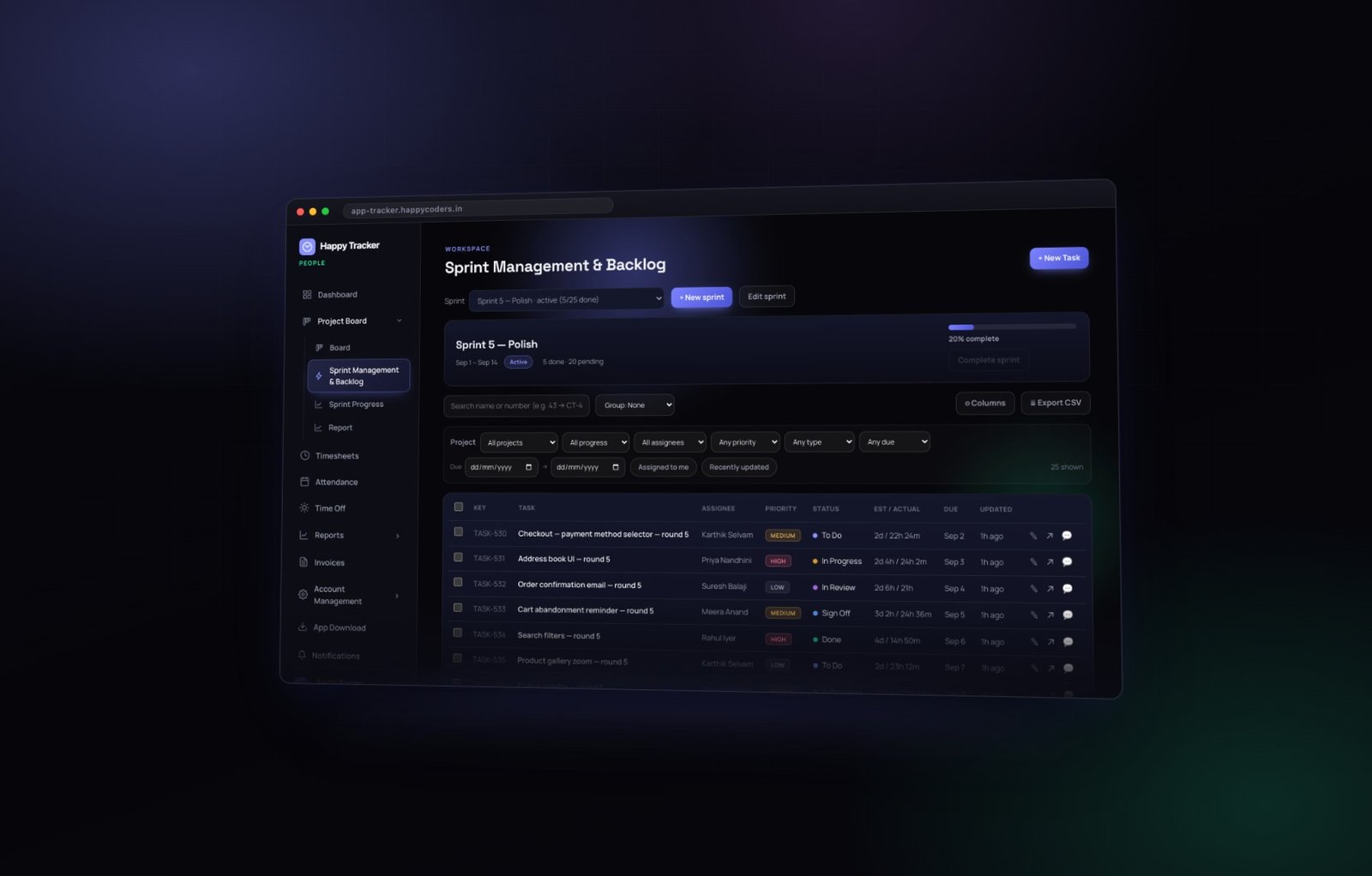
One sprint is active at a time. That is deliberate, and worth defending when somebody asks to run two in parallel: a board showing three sprints at once is a backlog with extra columns, and the entire value of a sprint is that it is a commitment small enough to be real.
The sprint header on the board then shows the dates, whether it is active, how many tasks are done against pending, and a completion bar. It is the first thing anybody sees when they open the board, which is the right place for it.
Fill it from the backlog
The table underneath Sprint Management is every task in the workspace, with its key, assignee, priority, status, estimate against actual, due date and last update. Sort it, filter it, and move what you are committing to into the new sprint from here rather than card by card.
How much to commit to
If you have run three or four sprints, Sprint Progress will tell you what your team actually completed in each. Use that, not optimism. The single most common planning error is committing to the amount of work the team could do if nothing went wrong, in a world where something always goes wrong.
Leave room
Every team has unplanned work — a production problem, an urgent client request, a colleague who needs three hours. If you commit to a full sprint, that work displaces committed work and the sprint fails for reasons nobody controls. Committing to about eighty percent of capacity is not pessimism; it is arithmetic.
Work the board
Now the board itself. Five stages, and work moves left to right by dragging.
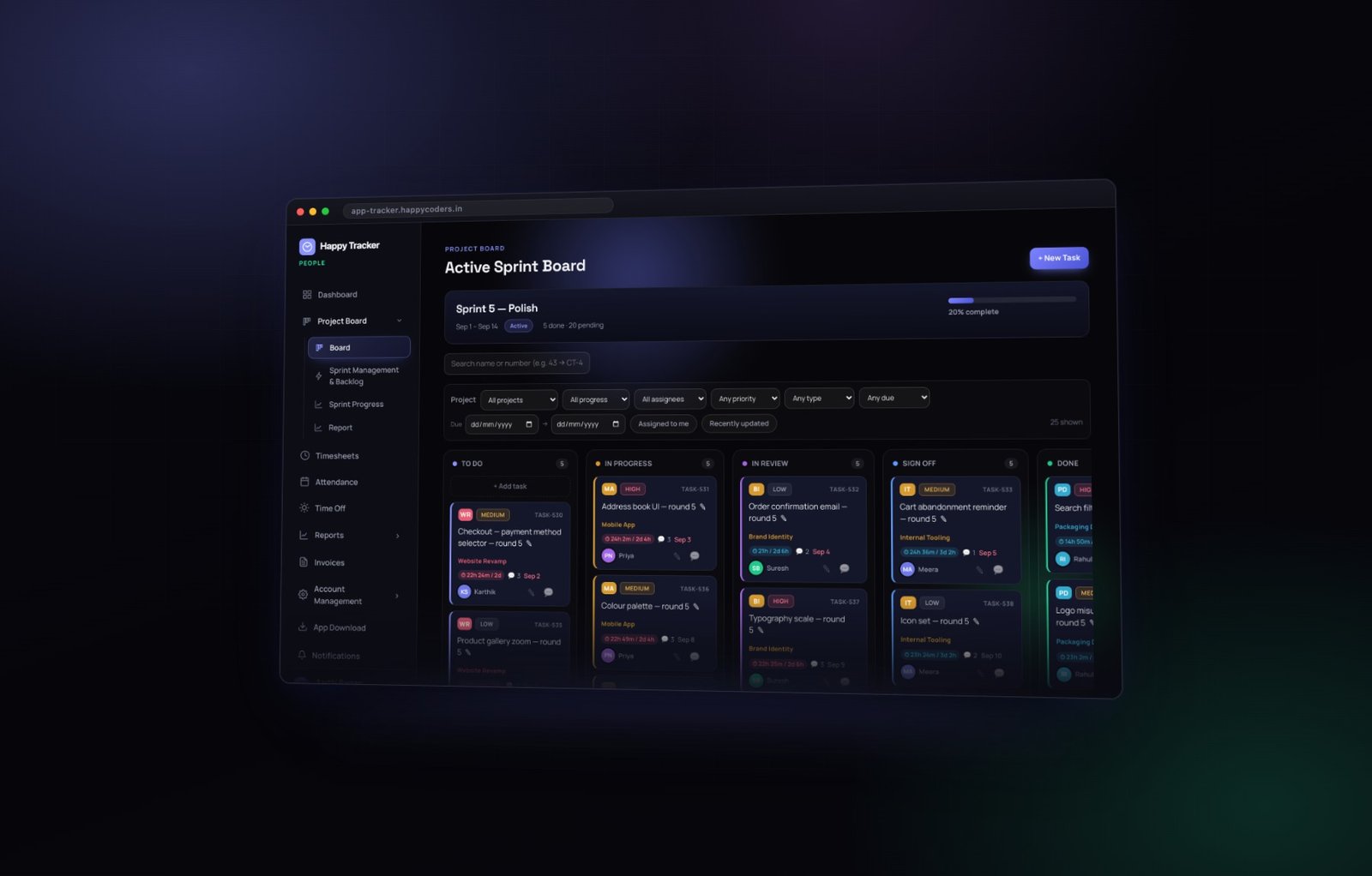
- To Do — committed to this sprint, not started.
- In Progress — somebody is actively on it. This column should be short. A team with twelve things in progress has twelve things half done.
- In Review — the work is finished and waiting on somebody else.
- Sign Off — reviewed, waiting on final acceptance.
- Done — finished and accepted.
Reading a card at a glance
Each card carries who owns it, its priority, its type, the project it belongs to, its due date, the time tracked against it so far, and its comment count. That is enough to run a stand-up from the board without anybody opening anything.
The filters that matter
The filter row narrows by project, progress, assignee, priority, type or due date. Two quick filters — assigned to me, and recently updated — cover the two views most people actually want. Recently updated is the one to open before a stand-up; assigned to me is the one everybody else lives in.
Why the hours land by themselves
Because the timer runs against the same task, the tracked time appears on the card without anybody logging anything separately at the end of the day. That is not a convenience feature — it is the reason the numbers at the end of the sprint are worth reading rather than politely ignoring. Time logged from memory on a Friday is time nobody should plan with.
Inside a card
Click a card and it opens the full task.
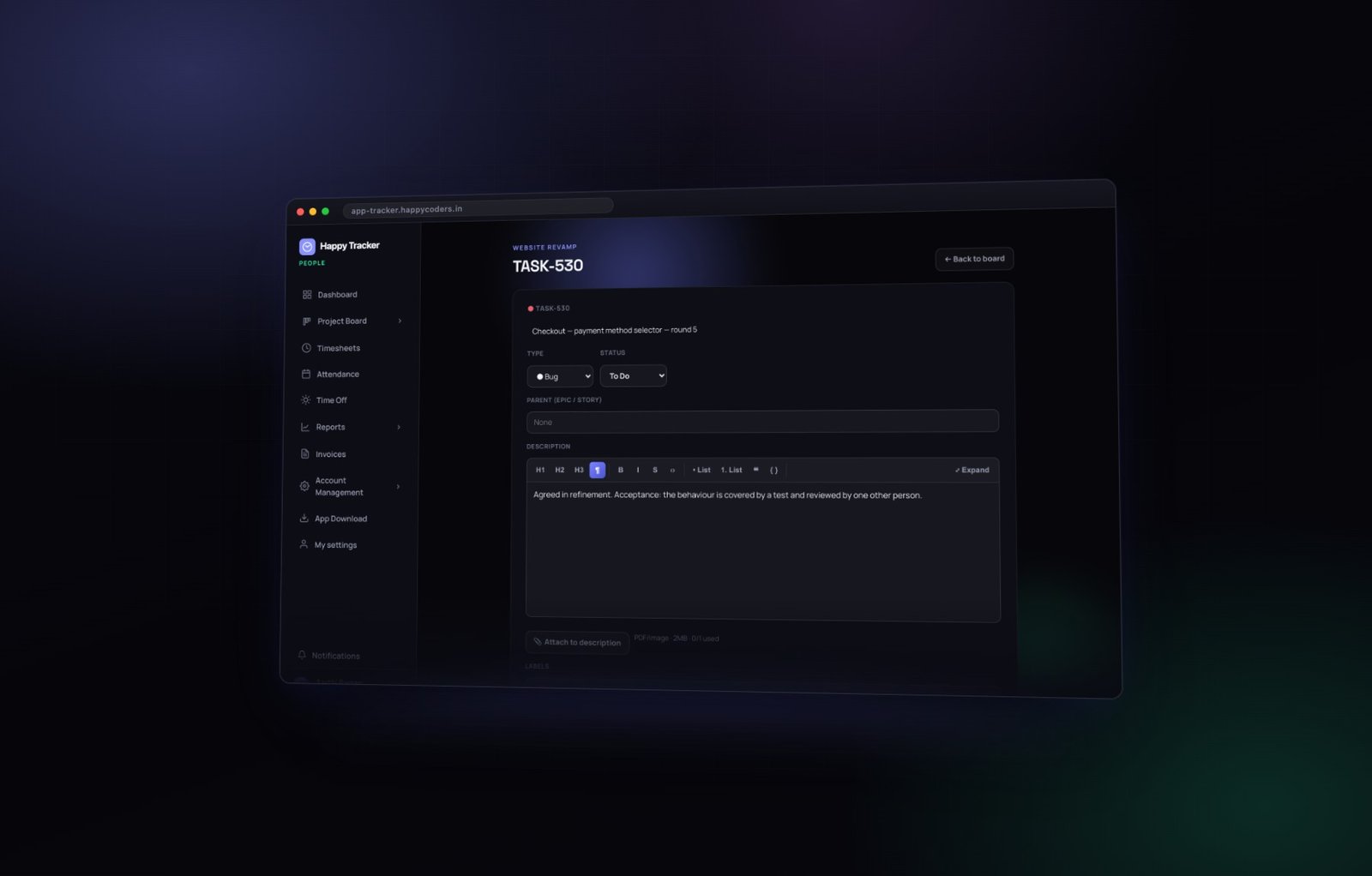
The top holds the type, the status and the parent epic or story. Underneath is a proper rich text description with attachments, so the specification lives with the work rather than in a chat message somebody has to go and find three weeks later.
The fields on the right
Assignee, priority, due date, story points, reporter, start date, and the sprint the task belongs to. Below them, sub-tasks for anything that needs breaking down without becoming a separate card.
Estimate against actual
The line worth watching, with the variance called out when it goes over. Nobody enters that twice — the estimate came from planning and the actual came from the timer running on this card.
Use the variance to improve estimating, never to grade people. The moment a team believes estimates are a performance measure, every estimate doubles and the data becomes useless to everybody, including them.
Comments and history
Two tabs at the bottom. Comments is the discussion about this specific piece of work, kept with the work rather than scattered across chat. History is every change anybody ever made — who created it, who assigned it, who moved the priority, who edited the description, and when.
History is the one people underrate until the first time somebody asks why a task took three weeks. The answer is usually right there: reassigned twice, priority changed mid-sprint, description rewritten on day nine. That is not a people problem, it is a process problem, and you cannot fix it if you cannot see it.
Running the sprint day to day
The stand-up
Open the board filtered to recently updated. Anything that has not moved in three days is worth a sentence. Anything sitting in review is worth chasing — review queues are where sprints quietly die.
Mid-sprint changes
They happen. When something urgent arrives, add it and take something else out rather than adding it on top. A sprint that grows during the sprint teaches you nothing at the end, because the commitment you are measuring against changed while you were measuring.
Watch In Progress
If it grows past roughly one item per person, work is being started rather than finished. That is the single most useful thing a manager can notice from the board, and it is visible without asking anybody anything.
Close the sprint
When the cycle ends, complete the sprint. Anything unfinished goes back to the backlog for the next planning session rather than quietly rolling forward — rolling forward is how a two-week sprint becomes a permanent list.
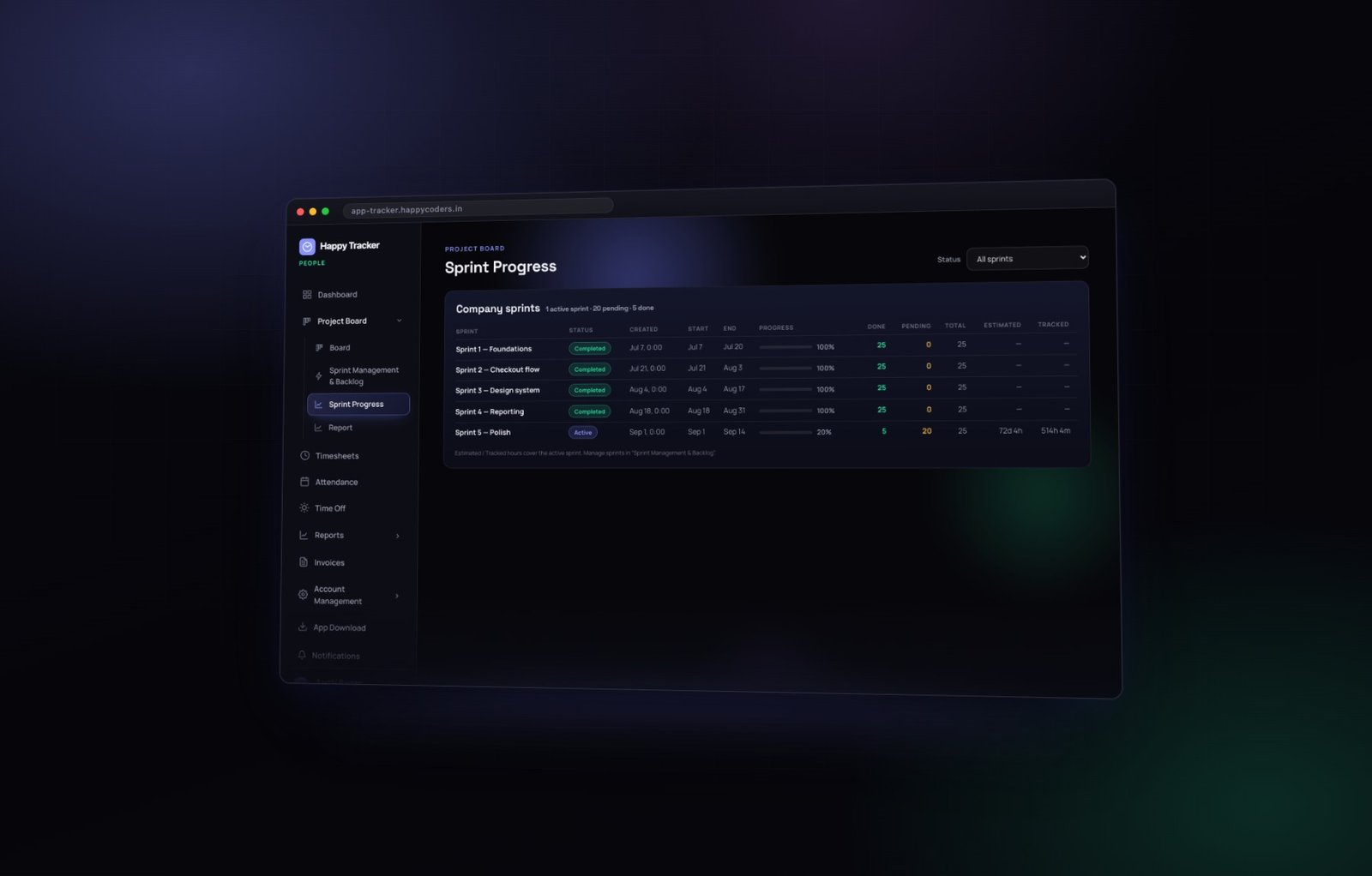
Sprint Progress then shows every sprint you have run with its status, dates, progress bar, done and pending counts, and — the useful part — estimated hours against tracked. Three or four sprints in, the shape of your team’s estimating starts to be visible, and it is usually a consistent multiplier rather than random noise.
Read the report
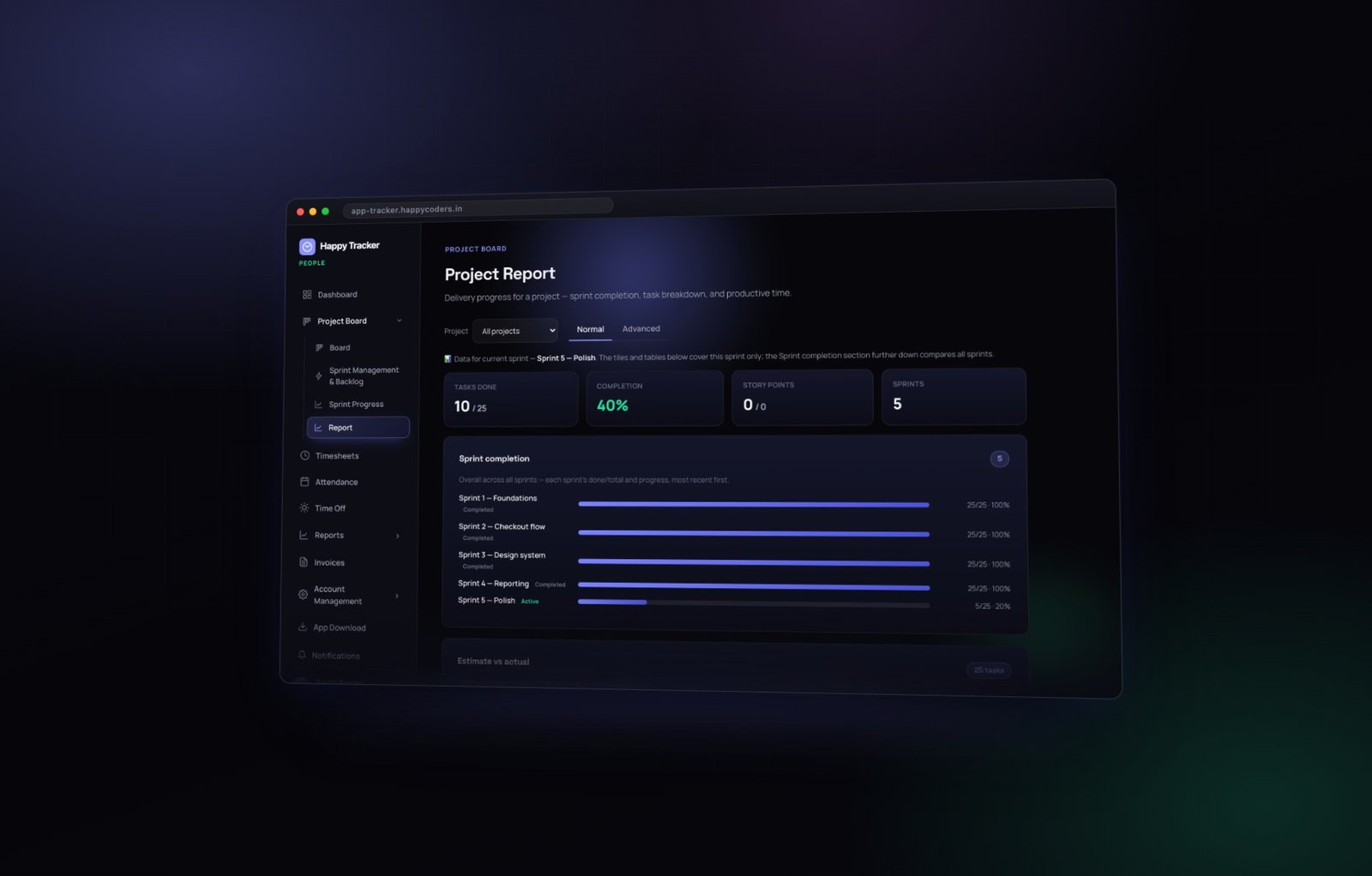
The Project Report goes one level deeper, task by task. The Normal tab gives you sprint completion, estimate against actual, and breakdowns by status and by assignee. The Advanced tab is sprint-scoped and adds who actually worked on each task, which is often different from who it was assigned to — and that difference is frequently the most interesting thing on the page.
What to do with the variance
Look for the pattern rather than the outlier. One task that took three times its estimate is a story. Ten tasks that each took forty percent longer is a system.
And it is almost always the same system: review cycles, environment problems, and the third round of small changes that nobody estimates for. The fix is not to tell people to estimate better. It is to estimate the review and the rework as part of the task — which teams only start doing once they can see how much of their sprint those two things quietly consume.
One lesson per retrospective
Take exactly one thing into the next sprint. Teams that list eight improvements implement none of them. Teams that pick one — “we will size review into every estimate” — actually change, and the next report tells you whether it worked.
Common mistakes
- Estimating in hours that are really ideal hours. Nobody gets six uninterrupted hours from an eight-hour day.
- Letting In Progress grow. Work in progress is inventory, and inventory is not delivery.
- Adding work mid-sprint without removing any. It destroys the measurement you were about to take.
- Treating the variance as a performance report. It is a planning report.
- Not closing sprints. An open sprint from six weeks ago makes every subsequent number harder to read.
The numbers worth tracking across sprints
Three, and only three. More than that and nobody looks at any of them.
Completion rate
Done against committed, sprint after sprint. If it is consistently below about eighty percent you are over-committing, and the fix is planning less rather than working more.
Estimate accuracy
Tracked hours against estimated hours across the sprint. Most teams land at a stable multiplier — one and a half, or twice — and once you know yours, planning gets easier immediately. You do not need better estimates; you need to know your own multiplier.
Where the hours actually went
The project report by task, at the end of each sprint. It regularly shows that a third of the sprint went into something that was never on the board at all, which is the most actionable finding available to most teams.
Anti-patterns worth naming
The permanent sprint
A sprint that never closes because a few items are always unfinished. It stops being a commitment and becomes a list, and every measurement built on it becomes meaningless.
The estimate ritual
Estimating everything carefully and then never looking at the variance. All of the cost of estimating and none of the benefit. If you are not going to read the report, do not estimate.
The review queue nobody owns
Work piles up in review because reviewing is nobody’s explicit job. It is the most common reason a sprint that looked fine on Wednesday fails on Friday, and it is visible on the board days before it becomes a problem.
Silent scope growth
Adding work mid-sprint without removing any. The sprint may still finish, but you have destroyed the measurement you were about to take, and you will not know what your team can actually deliver.
A cycle, end to end
- Create the sprint with real dates.
- Fill it from the backlog, with an estimate and an owner on every task.
- Commit to about eighty percent of capacity.
- Work the board; keep In Progress short; chase the review queue.
- Let the timer run on the task, so the hours land by themselves.
- Complete the sprint; push what is unfinished back to the backlog.
- Read Sprint Progress for the shape, and the Project Report for the detail.
- Take exactly one lesson into the next planning session.
The board, the timer and the reports are all included on the free plan for up to five users. Try it on your next sprint.




