


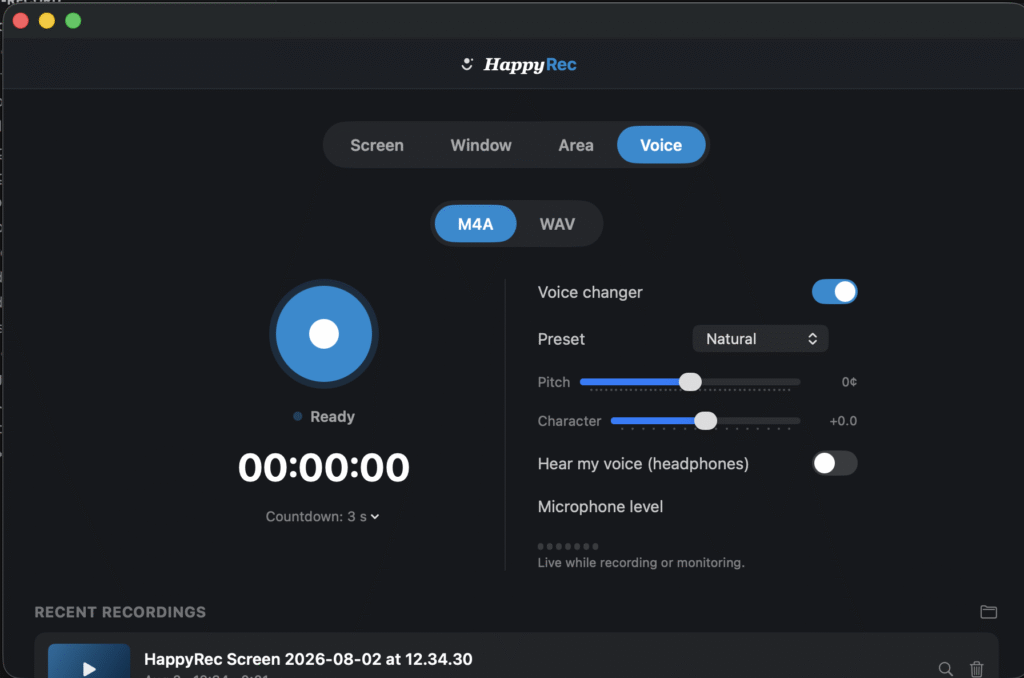
Open almost any voice changer and you’ll find exactly one control: a pitch slider. Push it up, you get a chipmunk. Push it down, you get a demon impression. That’s not a flaw specific to any one app — it’s simply what plain pitch-shifting does. It speeds the entire signal up or down, formants included, and formants are what your ear actually uses to recognize a voice, not just a pitch.
What a formant actually is, in plain terms
Formants are the resonant frequencies your vocal tract naturally emphasizes — shaped by the size and structure of your own throat and mouth. They’re a huge part of what makes a voice sound like a specific person rather than a pitched-up or pitched-down version of the same recording. Shift only the pitch, and you get exactly that: the same voice, just squeakier or deeper. Shift the formants too, and you get something that actually sounds like someone else talking.
How HappyRec’s voice changer works
HappyRec moves pitch and formants independently, live, with no perceptible delay while you’re talking. Male and Female presets aren’t pitch tricks — they’re a genuine timbre conversion. Beyond those two: Chipmunk (playful, exaggerated), Robot (decimated, mechanical), Anonymous (pitched down and filtered specifically for voice privacy), Cave (deep reverb), and Radio (band-limited, old-broadcast character).
Works the same in every language, on purpose
Because the whole thing is pure signal processing — no AI voice cloning, no text-to-speech, no phoneme modeling — it doesn’t care what language you’re speaking. English, Tamil, Hindi, Telugu, Malayalam, Spanish, German: identical quality, because there’s no language-specific model involved at any point. There’s no language setting in the app, because none is needed.
Tuning it to your own voice
Every preset has two extra sliders on top of it: Pitch and Character (formant). That’s what lets you nudge a preset to sit right for your specific voice instead of a generic average one — and you can hear the result live through headphones before you ever commit to recording it.
What actually gets recorded
Whatever you hear in the live preview is exactly what’s written to the mic track — always as the first audio track in the file, so any player defaults to your voice over background sound.




