


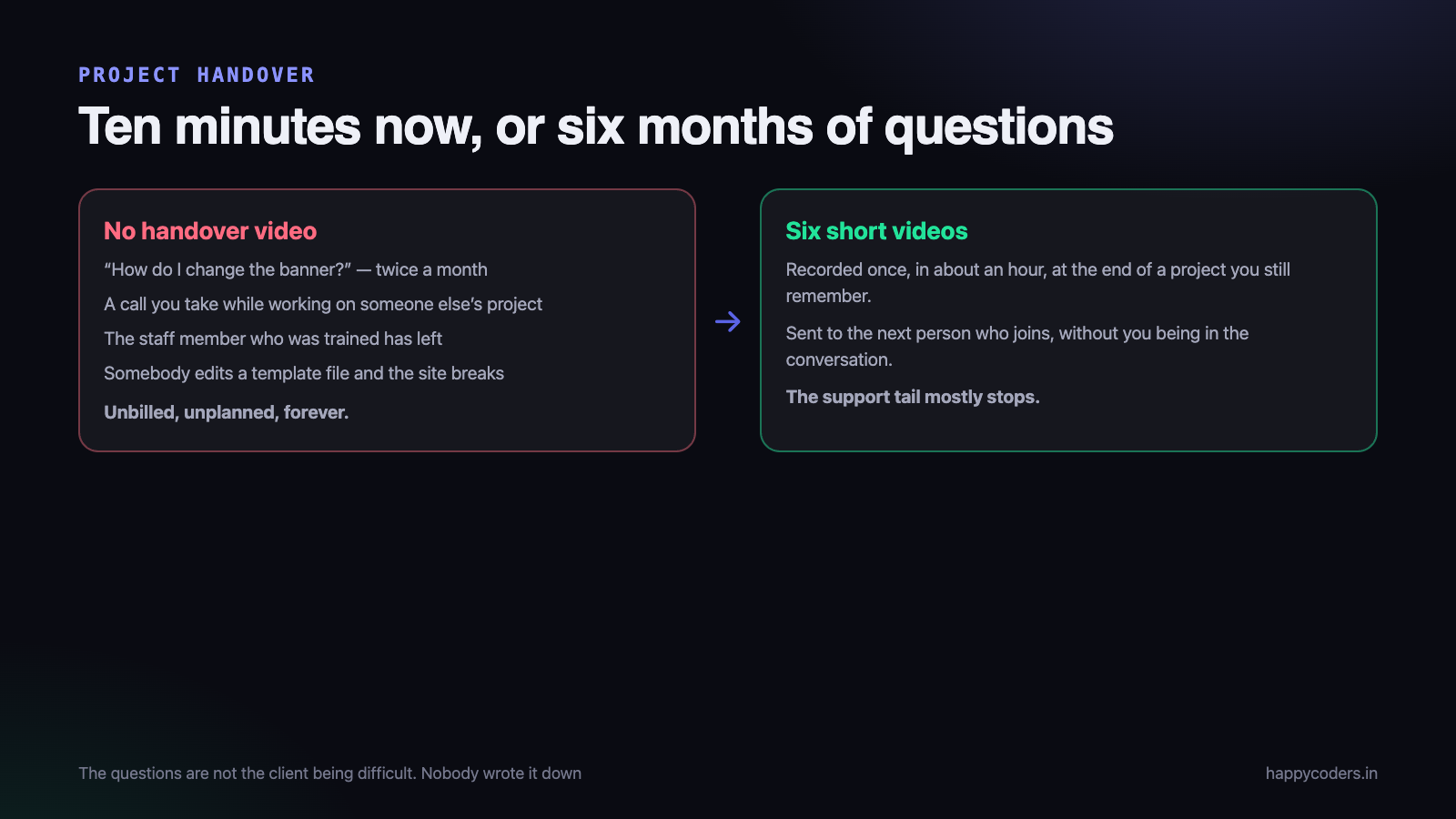
The website goes live on a Thursday. The invoice is settled by the following week. And then, for the next eight months, a message arrives every fortnight: how do I change the banner, the contact form has stopped emailing, we need to add a new product, who renews the domain.
None of those messages are unreasonable. The client is not being difficult. They are asking because nobody ever showed them, and the one person who was shown — in a rushed twenty-minute call on go-live day, while you were also fixing a caching problem — has forgotten, or has left the company.
An hour of recorded walkthroughs at the end of the project removes most of that permanently. It is the highest-return hour in a small agency’s week, and almost nobody spends it.
What the support tail actually costs
Put a number on it, because the number is what makes this worth doing. Take a typical small project — a business website with a CMS, delivered for ₹80,000.
In the six months after go-live, you can reasonably expect eight to twelve messages, two or three calls, and one incident where somebody edits the wrong thing and you spend an evening restoring it. Call it six hours. At a modest ₹1,200 an hour, that is ₹7,200 of unbilled work — nine per cent of the project value, arriving in fifteen-minute pieces at the worst possible moments.
The fifteen-minute pieces are the real damage. A single billable six-hour block would be fine. What you actually get is an interruption in the middle of somebody else’s sprint, which costs the rest of that afternoon too.
Handover questions are the cheapest form of scope creep to prevent, because unlike feature requests they do not need a negotiation. They need a recording. If you have not read it, how to handle scope creep covers the other kind.
Why a video rather than a document
Most agencies that try to solve this write a PDF. Then nobody reads it, and the questions keep coming, and the conclusion drawn is that documentation does not work.
The PDF fails for a specific reason. A written instruction says “navigate to Pages, select the page, and edit the content block.” The client reads it, opens the admin, and does not see anything called Pages, because on their installation it is called Site Content and it is inside a menu that only appears after you scroll. The document was right in spirit and useless in practice.
A recording removes that entire class of failure. The viewer sees the actual screen, in the actual theme, with the actual menu labels, being clicked in the actual order. There is nothing to interpret. Somebody who is not confident with computers can pause it, do the step, and carry on — which is exactly how a non-technical client uses it.
The second reason is that a video takes you ten minutes to make and a good document takes two hours. You will actually do the one that takes ten minutes.
What a handover video must contain
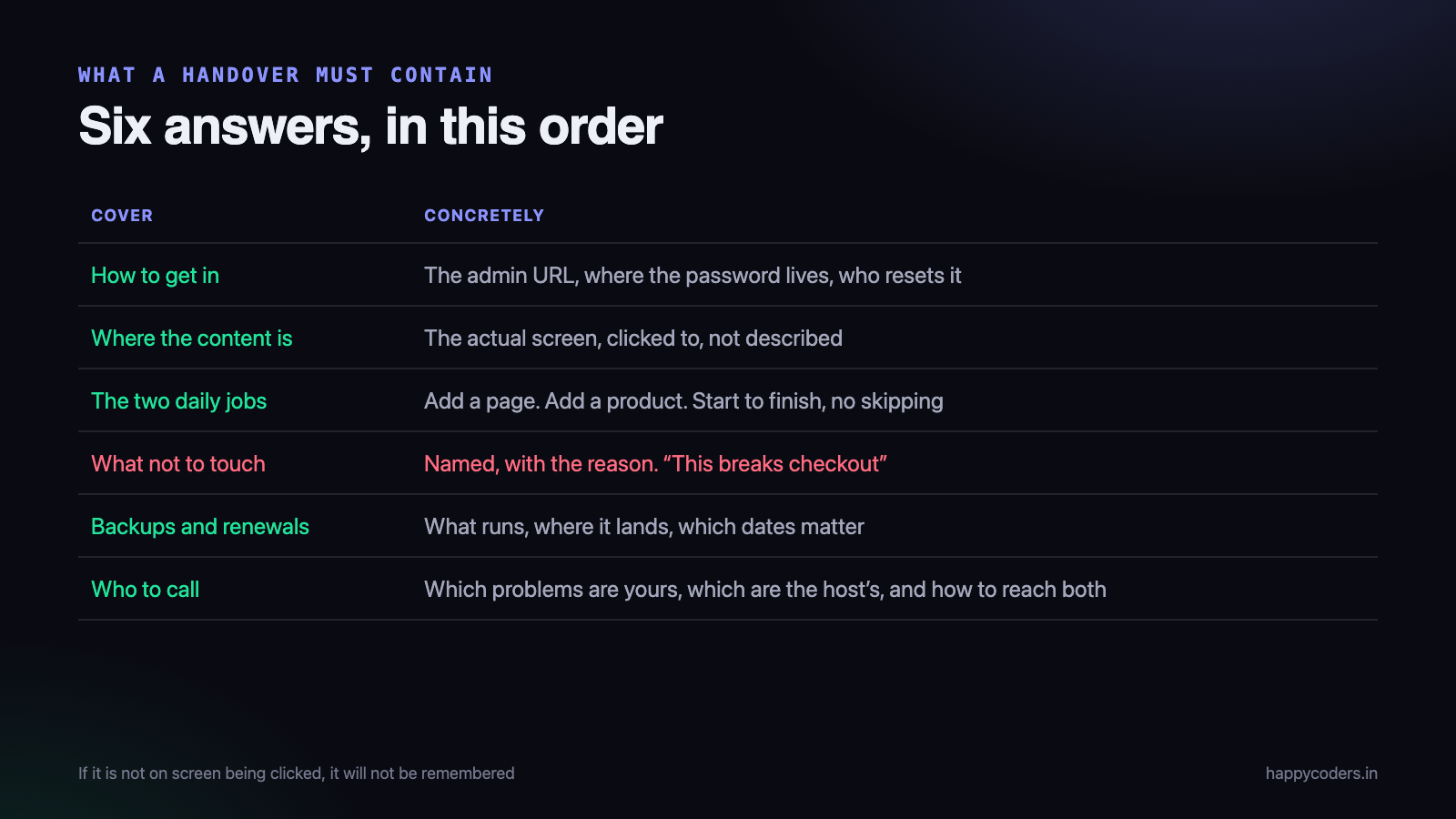
A handover is not a tour of the admin panel. It answers six questions, and it should answer them in this order, because that is the order in which they will come up.
1. How to get in
The admin URL, spoken and shown. Where the username and password live — a password manager, an email, a sealed document with the accounts person. Who can reset it if it is lost, and how long that takes.
Never read a live password out loud on a recording. Show the login screen, show the fields, and say “the credentials are in the email titled Handover Credentials, sent on 12 September.” The video will be forwarded to people you never met.
2. Where the content lives
Click to it. Do not describe it. Open the admin, go to the screen where text is edited, and show the relationship between what is on that screen and what appears on the public site — ideally with both windows visible, so the viewer sees the change happen.
This is the moment where most handovers are won or lost. Once somebody has seen the connection between the field and the page, they can find the rest themselves.
3. The two or three jobs they will actually do
Every project has two or three recurring tasks, and the rest is noise. For a business site it is usually: add a page, update an existing page, post a news item. For an online shop: add a product, change a price, mark something out of stock, check an order.
Record each one start to finish with no skipping. Including the save button. Including where the confirmation appears. Including what it looks like when it worked, and what the mistake looks like when somebody forgets to publish.
4. What not to touch, and why
This is the section that saves you a weekend. Name the specific things, and give the reason in plain words. “Do not change this setting — it is what connects the shop to the payment gateway, and if it changes, cards stop working and you will not notice until somebody phones you.”
A rule with a reason is followed. A rule without one is treated as your preference and ignored in month four.
5. Backups, renewals and the dates that matter
Which backup runs, how often, where it lands, and how somebody would restore from it. When the domain expires, when the hosting expires, when the SSL certificate renews, and who is paying for each. Whether renewal is automatic or whether someone must act.
Expired domains are the single most expensive avoidable failure in this business. Sixty seconds of video that says “this domain is due for renewal on 14 March every year and it is registered in your name, under this account” has saved more emergencies than any monitoring tool.
6. Who to call
Be specific about the split. Which problems are yours, which belong to the hosting company, which belong to the payment gateway, and which are the client’s own internal responsibility. Give the support channel for each, and say what your response time actually is.
This is also where you say what is included after handover and what is chargeable. Said on a recording, in a calm voice, at a point where everyone is happy, it lands as information. Said in a WhatsApp reply four months later, it lands as an argument.
Record several short videos, not one long one
A single forty-minute handover video is only marginally better than no video. Nobody scrubs through forty minutes looking for the bit about products — they message you instead, which is the outcome you were trying to prevent.
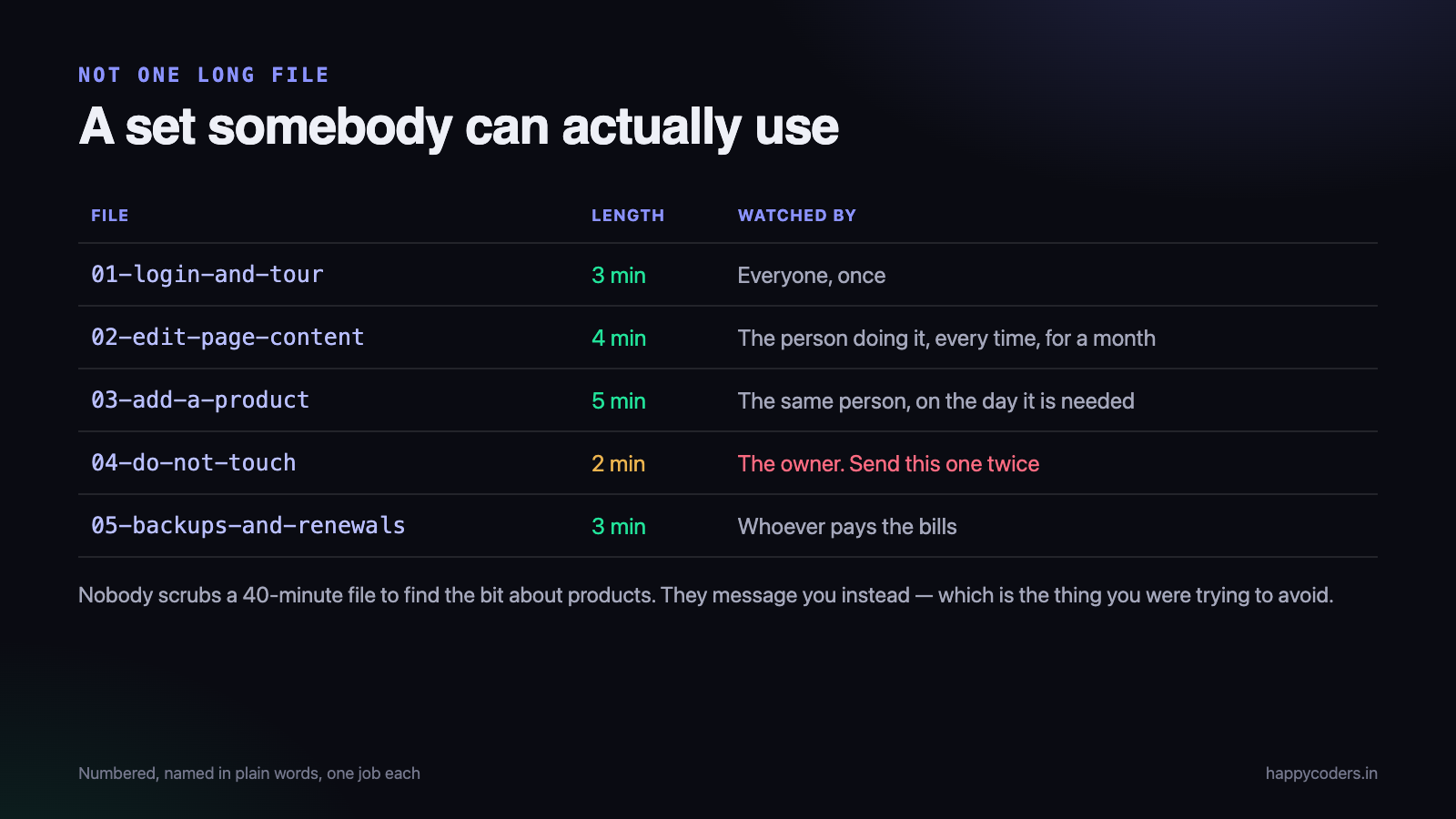
Split it by job. Each file is two to five minutes and does one thing.
- 01 — Logging in and a tour of the admin. Three minutes. Watched once by everybody.
- 02 — Editing page content. Four minutes. Watched repeatedly for the first month by the person who actually does it.
- 03 — Adding a product or a news item. Five minutes. Watched on the day it is needed, possibly a year later.
- 04 — What not to touch. Two minutes. Send this one to the owner separately, and send it twice.
- 05 — Backups, renewals and support. Three minutes. This one is for whoever pays the bills, who is often not the person using the admin.
The split matters for a reason beyond convenience: different people watch different files. The owner never opens the product video. The intern who joins next year opens only the content one. A single long file forces everybody through everybody else’s material and so nobody watches any of it.
Short files are also far easier for you to make. If you fumble minute four of a forty-minute take you will not start again. If you fumble minute one of a three-minute take, you will.
Recording it well enough, quickly
This does not need to be polished. It needs to be clear, and it needs to exist. Half an hour of preparation is plenty.
- Use a realistic account, not the master admin. Log in as the role the client will actually have. Otherwise you demonstrate menu items they will never see, which causes its own support messages.
- Check what is on screen. Other customers’ names in a shared admin, real email addresses, order details, your own bookmarks bar. Handover videos get forwarded widely.
- Capture the browser window, not the whole desktop. Smaller file, larger text, no notifications.
- Turn the browser zoom up to 110 or 125 per cent. The person watching may be sixty years old and on a laptop screen.
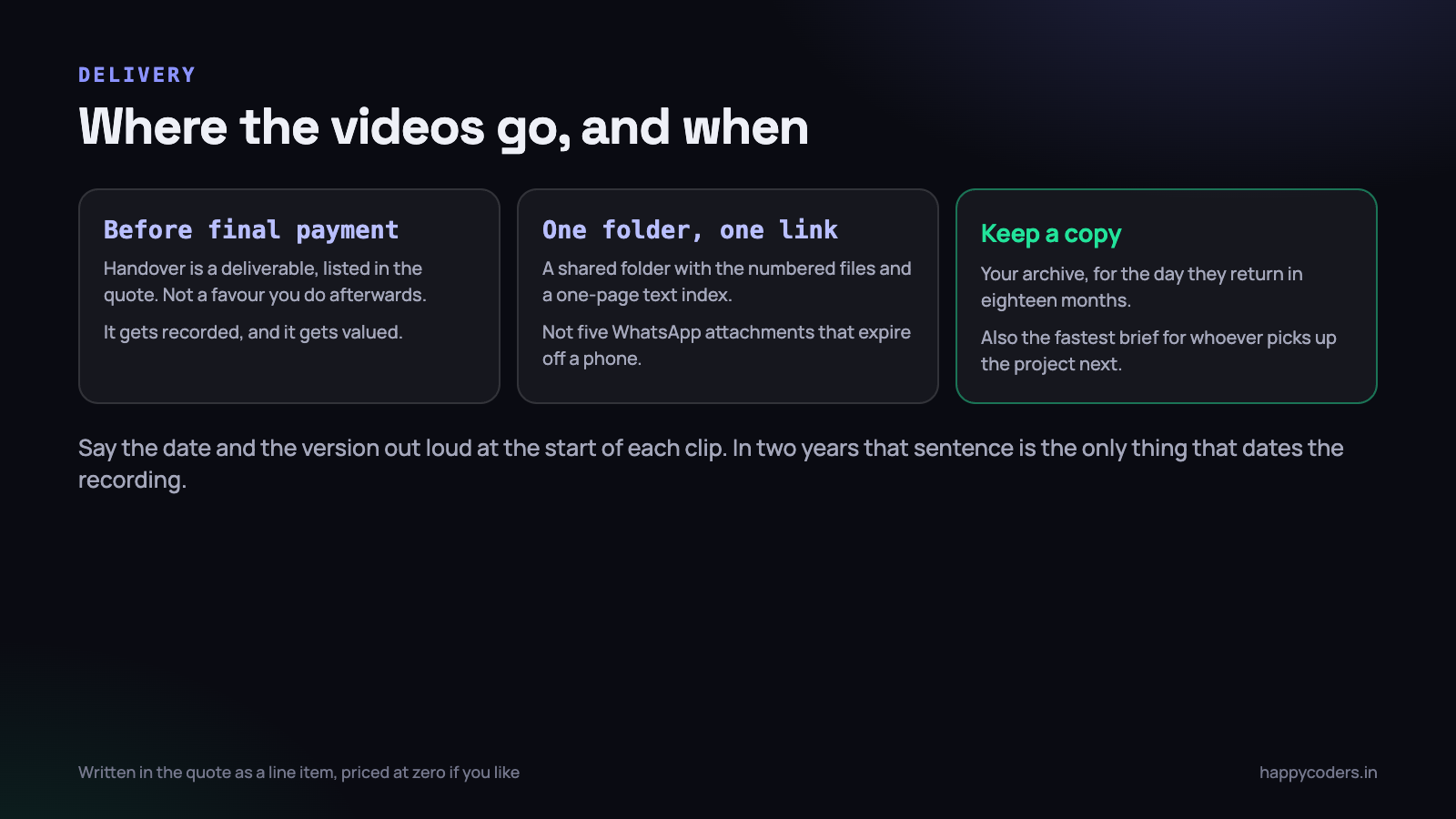
- Say the date and the version at the start of each clip. “This is the content walkthrough for the Kumaran Textiles site, recorded on 16 September 2026.” In two years, that sentence is the only thing that tells anybody whether the video still matches the site.
- Walk the path once before recording. The take you deliver should be your second run.
Speak as if the person watching is intelligent and has never seen the software. No jargon, no apologising, no “obviously”. Pause for a beat before each click so the viewer’s eye can follow the cursor. The same discipline that makes a product demo watchable makes a handover usable.
Naming and delivering the files
A good recording delivered badly is a recording nobody finds. This part takes five minutes and it is where most of the value is either kept or lost.
Name the files so a stranger can choose one
Numbered, lowercase, hyphenated, describing the job in the client’s language rather than yours:
01-login-and-admin-tour.mp4
02-edit-page-content.mp4
03-add-a-product.mp4
04-what-not-to-touch.mp4
05-backups-renewals-support.mp4
Not handover_final_v3.mp4. Not WhatsApp Video 2026-09-16 at 4.12.33 PM.mp4, which is what happens if you send these as attachments.
One folder, one link, one index
Put them in a shared folder — Drive, Dropbox, or a folder on your own hosting — and send one link. Alongside the videos, put a single page of text listing each file, one line on what it covers, and the credentials location, renewal dates and support contacts in writing. The text page is for searching; the videos are for learning.
Do not deliver handover videos as WhatsApp attachments. They are compressed into unreadability, they expire off phones, and in eighteen months the person who needs them will not be in that chat.
Keep a copy yourself
Two reasons. First, the client will lose the link, and re-sending it takes ten seconds instead of re-recording an hour. Second, when the same client returns in a year with a change request, that folder is the fastest possible briefing for whichever of your developers picks it up — including future you, who will remember nothing.
Record it before the final payment
This is the part that decides whether handover videos become a habit or a good intention.
Put handover as a line item in the quote from the start: Handover walkthrough videos and written index. Price it at zero if you like — the point is that it appears on the document, so it is a deliverable rather than a courtesy. Then make the final milestone depend on it being delivered and acknowledged.
Three things follow from that, and all three are good.
- It actually gets recorded. Work that sits between “finished” and “paid” gets done. Work that sits after “paid” does not.
- The client values it. Something listed in the quote is part of what they bought. Something sent afterwards is a nice gesture that nobody files.
- It is recorded while you still remember. Two weeks later you will have to re-learn your own admin panel to record the video, and you will quietly not bother.
There is a commercial benefit too. When a competitor quotes the same price, “we hand over with recorded walkthroughs so your team is not dependent on us for routine changes” is a genuinely different offer, and it is one of the few differentiators a small agency can make credible in a sentence.
The objection — that teaching clients to do their own updates loses you support revenue — does not survive contact with reality. The updates you lose are the ones you were doing free. The work you keep is the work that needed you. And clients who feel in control of their own site come back with the bigger projects.
When the site changes later
A handover video ages. The admin gets a redesign, you add a module, the hosting moves. That does not mean re-recording the set.
Because the videos are split by job, an interface change usually affects one file. Re-record that one, keep the number, add the new date to the start, and replace it in the folder. Two minutes of work.
For a client on a maintenance retainer, it is worth re-checking the set once a year — typically when you renew the hosting anyway. For everybody else, update a clip when the thing it shows actually changes, and let the rest sit.
A handover checklist
- Add the handover line item to the quote before the project starts, tied to the final milestone.
- List the two or three jobs the client will actually do. Ask them — do not assume.
- Create or use the real client-role login, not your master admin.
- Clear the screen of other customers’ data, personal bookmarks and notifications.
- Record five short clips, each opening with the project name and the date.
- Write the one-page index: file list, credential location, renewal dates, support contacts and response times.
- Upload to one folder and send one link, with a two-line message saying which video answers which question.
- Get an acknowledgement in writing, then raise the final invoice.
- Save a copy in your own archive, under the project name.
On Monday morning
Pick the client who has sent you the most small questions this year. Do not wait for a new project to try this on.
Open their admin, spend forty minutes recording four short clips of the things they keep asking about, name the files properly, put them in a folder and send the link with one sentence: we have recorded these so your team does not have to wait for us for routine changes.
Then watch what happens to the message traffic from that client over the next two months. That result is what will convince you to put the line item in every quote you write afterwards — which is the actual goal.
HappyRec is a free screen recorder for macOS with window capture, system audio alongside your voice, and an optional camera bubble — enough to record a full handover set in an afternoon without buying anything.




