


Somebody asks how to record their screen on a Mac and gets three answers, all confident and all different. Use QuickTime, it is already there. Use Loom, everyone uses Loom. Use one of the free recorders.
They are all right, because they are answering different questions. These three tools barely overlap once you are clear about what happens to the file after you stop recording.
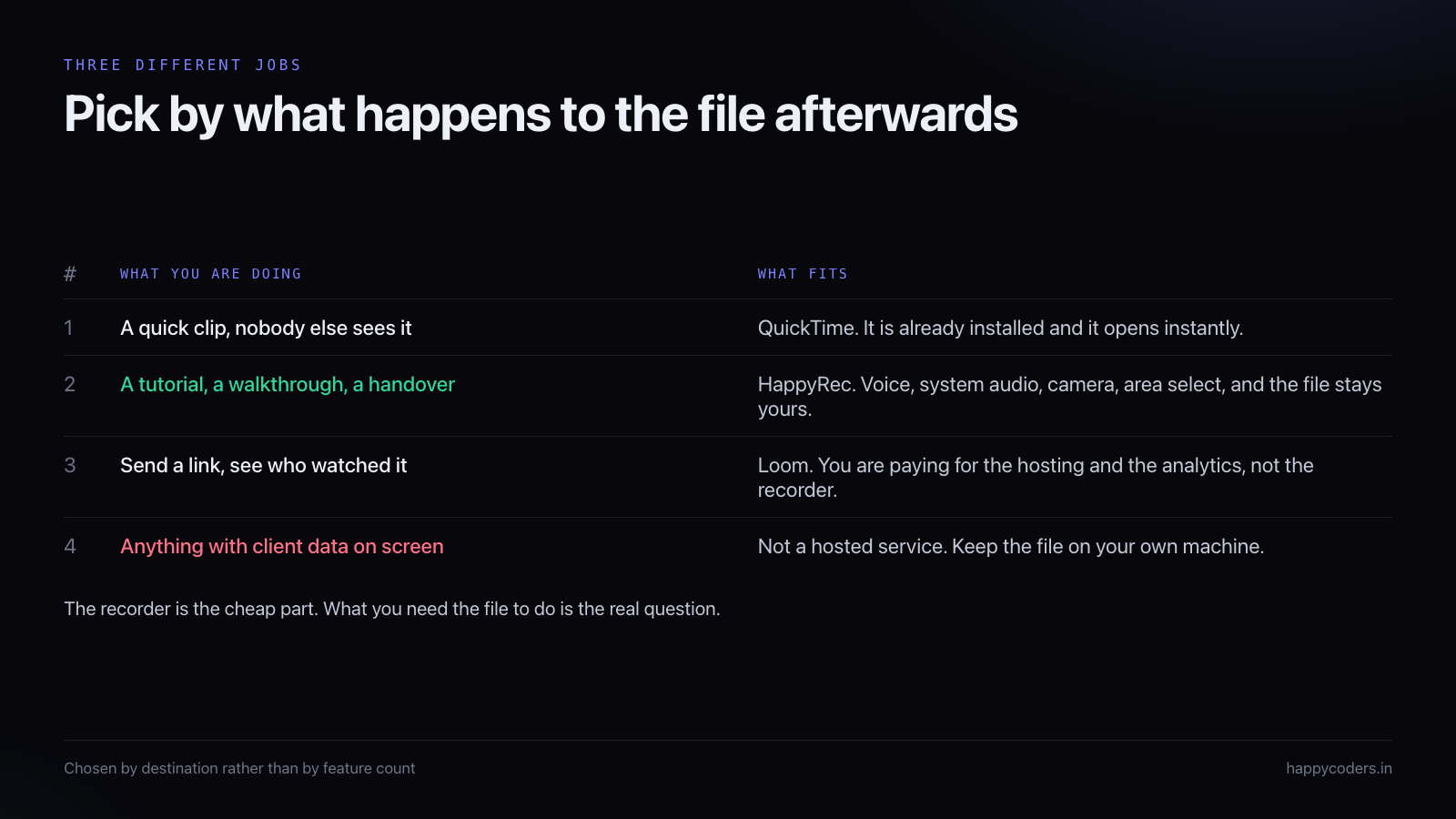
QuickTime: already installed, and better than its reputation
QuickTime Player records the screen. File, New Screen Recording, pick the whole screen or drag an area, press record. It captures the microphone, it lets you trim the start and end afterwards, and it saves a normal .mov file to your disk.
For a large share of what people actually record, that is the complete requirement. A clip of a bug to attach to a ticket. A thirty-second demonstration of where a button is. Anything silent, or anything where your own voice is the only sound that matters.
It has no account, nothing to install, and it opens instantly. When somebody reaches for a third-party recorder for a job QuickTime does, they are usually adding steps for no gain.
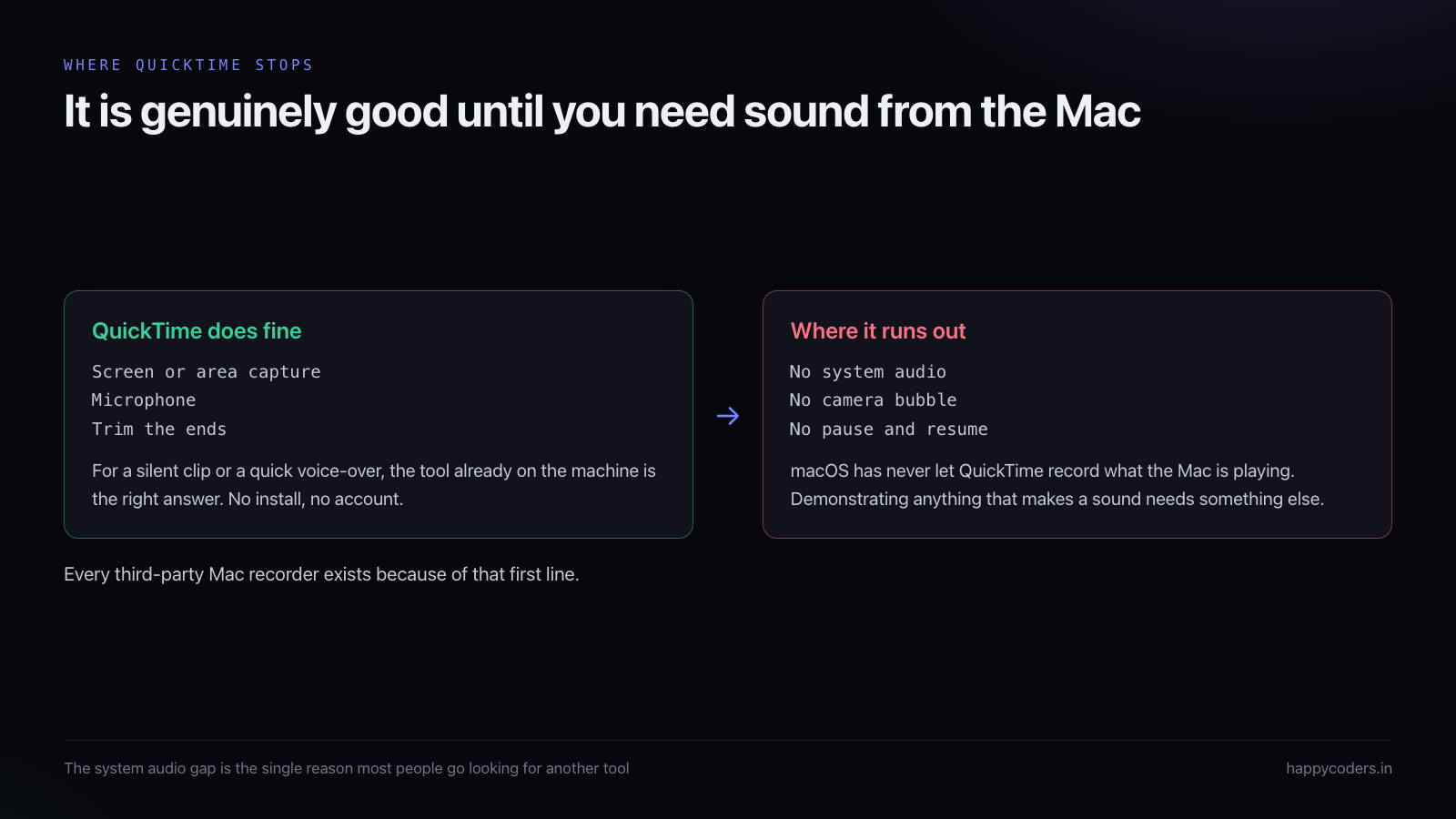
Where QuickTime stops, and why
The wall everybody hits is system audio. QuickTime cannot record what the Mac itself is playing — a video, a notification sound, the audio in the app you are demonstrating. It captures your microphone and nothing else.
This is a macOS design decision rather than a QuickTime limitation, and it is the single reason most people end up looking for another tool. The moment you need to demonstrate something that makes a sound, QuickTime is out.
Three other gaps show up on longer recordings. There is no camera overlay, so you cannot put your face in the corner. There is no pause and resume, so an interruption means either a long dead patch or starting again. And there is no voice processing, so whatever your room sounds like is what the recording sounds like.
The file sizes are wildly different, and it matters
Nobody thinks about this until they try to email a recording. QuickTime writes .mov, and it
is not shy about size — a ten-minute screen recording at full Retina resolution can be over a
gigabyte. That is unusable for sharing without a second step to compress it.
Most third-party recorders write H.264 in an .mp4 container at a sensible bitrate, which
puts the same ten minutes somewhere around 50 to 150 MB depending on how much of the screen is
moving. Small enough to attach, small enough to drop in a shared folder without anybody
complaining about the quota.
Loom sidesteps the question entirely by never giving you a file unless you ask for one. That
is convenient right up until you need the original, at which point you are downloading it back
out of a service you may or may not still be paying for.
What happens when you need the recording in two years
A handover recording, a training video, a walkthrough of a system that is still running —
these get watched long after they are made, and where they live decides whether they survive.
A file on a shared drive survives a subscription lapsing, a person leaving, and a company
changing tools. A link into a hosted service survives none of those reliably. Plenty of teams
have discovered that their onboarding videos stopped working because the account they were
recorded under was closed when somebody left.
This is not an argument against hosted recording. It is an argument for being deliberate:
anything you would be annoyed to lose should exist as a file somewhere you control, whatever
else you also do with it.
Loom: you are buying hosting, not a recorder
Loom records your screen perfectly well, but that is not what you are paying for. What Loom sells is everything after the recording: it uploads as you go, gives you a link before you have finished, and tells you who opened it and how far they watched.
For sales, support and anything asynchronous across a company, that is genuinely valuable. Sending a link beats sending a 200 MB file, and knowing whether the client actually watched the walkthrough is real information.
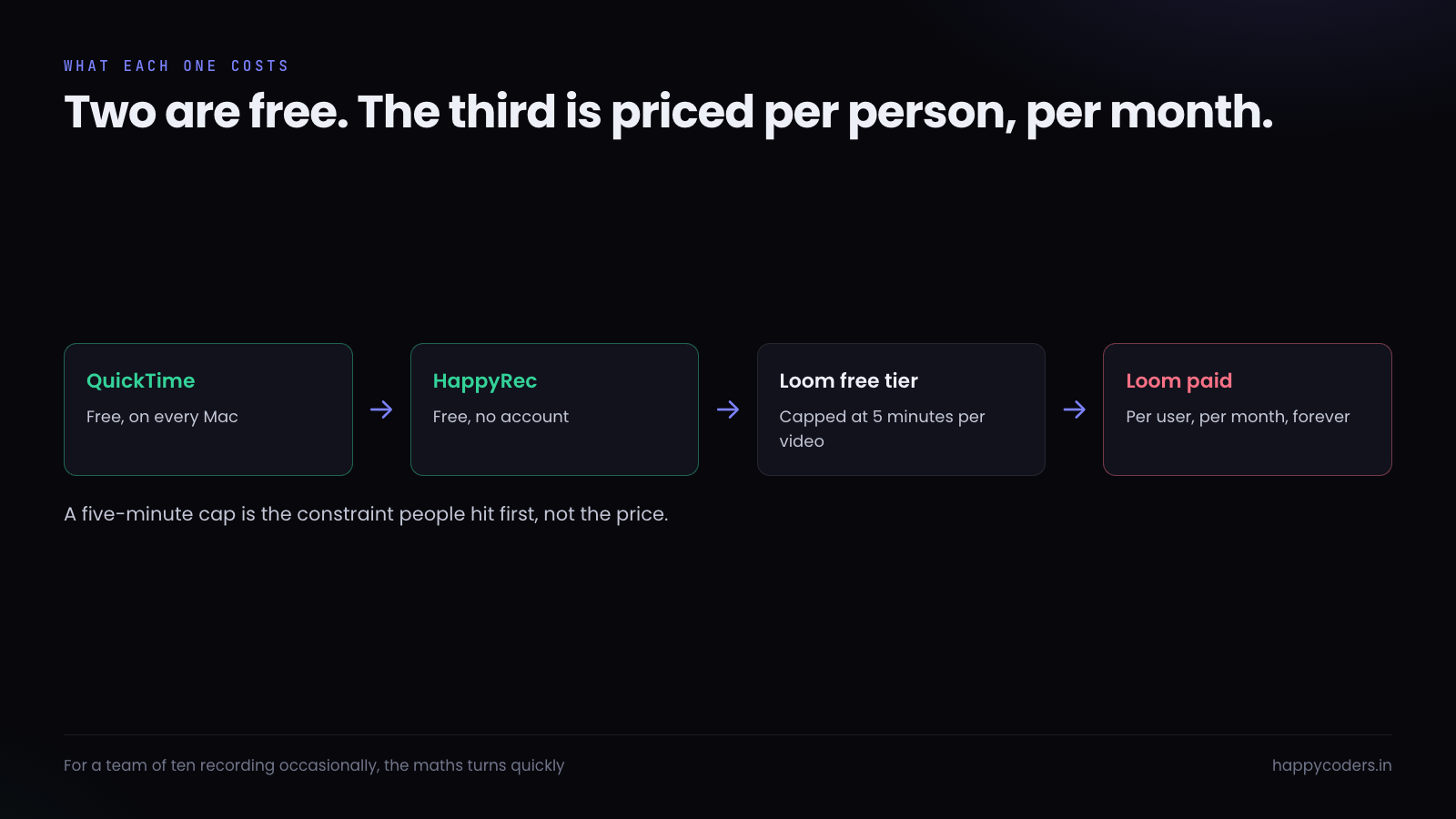
The costs are equally real. The free tier caps videos at five minutes, which is short for anything instructional — most walkthroughs run eight to fifteen. Past that it is a per-user monthly subscription, which for a team of ten adds up to a meaningful annual number for a tool used a few times a month.
And the recording leaves your machine
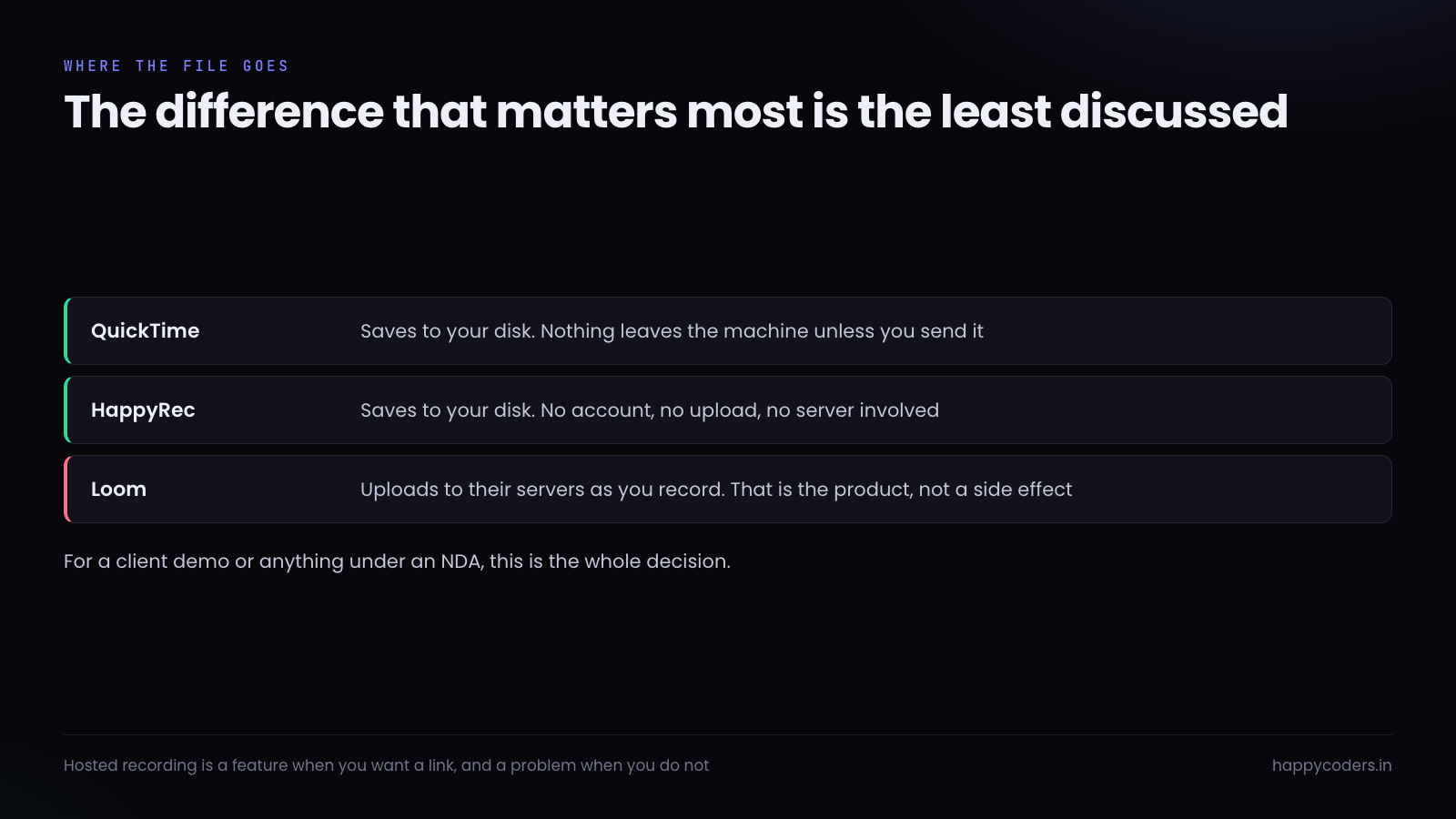
This deserves to be said directly, because it is the difference that matters most and it gets the least attention. With QuickTime and with HappyRec, the file is on your disk. Nothing has been uploaded, no account exists, no server has a copy. If you never send it, nobody else ever sees it.
Loom uploads while you record. That is not a flaw — it is the entire product, and it is what makes the instant link possible. But it means that a recording of a client’s admin panel, a database with real customer records, or anything covered by an agreement about where data may be stored, is now on somebody else’s infrastructure.
For a marketing demo, irrelevant. For a walkthrough of a client’s live system, it is the whole decision, and it is worth thinking about before rather than after.
HappyRec: the middle case
The gap between the two is real and it is where most instructional recording actually sits. You need system audio, or your camera in the corner, or to pause when somebody interrupts you. You do not need hosting, analytics, or a subscription, and you would rather the file stayed on your machine.
HappyRec is built for exactly that. Screen, window, area or voice-only. Microphone and system audio together. A camera bubble you can move and resize. Pause and resume mid-recording. Hardware encoding, so a long session does not turn the fan into part of the audio track. It saves to your disk, it is free, and there is no account.
What it does not do is host anything or tell you who watched. If those are what you need, Loom is the honest answer and no amount of feature listing changes that.
How to choose in one question
Ask what happens to the file after you stop recording.
If the answer is “nothing, I am attaching it to a ticket” — QuickTime. It is on the machine and it takes four seconds to start.
If the answer is “I am sending a link and I want to know if they watched” — Loom, and the subscription is what you are buying.
If the answer is “I am saving it, or putting it in a shared drive, or handing it over” — a local recorder, and then the question is only whether you need system audio, a camera, or pause. If you need any of them, you have outgrown QuickTime.
Three things people assume are differences and are not
Quality. All three capture the same pixels from the same screen. Where a
recording looks bad it is almost always the settings — resolution, frame rate, bitrate — and
not the tool. A hosted service will sometimes look slightly worse on playback because it
re-encodes for streaming, which is the opposite of what people assume.
Ease. QuickTime is the fastest to start because it is already installed. After
that, every one of these is a record button. Nobody should pick a recorder on the basis of
being easier to press.
Editing. None of these is an editor. QuickTime trims the ends and that is
genuinely useful. Loom lets you cut a section out. If you need captions, transitions, zooms or
multiple clips joined together, that is a separate tool regardless of which recorder you used,
and it is worth knowing that before you start recording something ambitious.
The combination that covers most people
In practice a lot of teams end up using two. QuickTime stays for the ten-second clip, because nothing beats a tool that is already open. A proper local recorder handles tutorials, handovers and anything with sound. Loom appears where a specific team — usually sales or support — actually needs the link and the analytics, and it is paid for by that team rather than rolled out to everybody.
That is a cheaper and more honest arrangement than picking one tool and forcing every job through it, which is how a five-minute cap ends up dictating how long your tutorials are.




